Third-party access is any access to your systems or data that you give to people or software outside your organisation, such as contractors, suppliers, IT support firms and the apps they connect to your accounts.
Almost every organisation relies on outsiders: an IT support company, a payroll provider, a web developer, a cloud app that syncs with your email. Each of them needs some way in. This guide is for newcomers, students, career changers and managers who are not security specialists. It explains the two kinds of third-party access (people and software), why it is risky, how to control it from start to finish, a worked example and simple first steps.
By the end of this guide you will be able to:
- Explain what third-party access is and the forms it takes.
- Understand why outsiders' access is harder to control than staff access.
- Describe the stages of granting, watching and removing third-party access.
- Identify three practical steps to take control of it this week.
Key takeaways
- Third parties come in two forms. People, such as contractors and support staff, and software, such as connected apps, API keys and service accounts a supplier uses.
- Outsiders are harder to see. You do not manage their laptops, hire or fire their staff, or always know when their own systems are breached.
- Every external account needs an internal owner and an end date. Someone inside your organisation should answer for it, and access should expire unless it is renewed.
- Give only what is needed, for only as long as needed. Narrow permissions, strong sign-in and time limits reduce the damage if a third party is compromised.
- Plan the exit at the start. When a contract ends, remove people, keys and connected apps together.
What it is, in plain English
Third-party access is access granted to vendors, contractors or support partners who are not your own employees. It usually comes in two forms.
- People: a contractor with a login to your systems, a support engineer who connects remotely to fix a server, or a partner who is invited into your shared files as a guest account.
- Software: a supplier's app connected to your email or customer database, an API key you gave to a payment or marketing service, or a service account a managed service provider uses to run backups. These are non-human identities (NHIs): identities with their own account and credentials that belong to software or machines rather than people. AI agents supplied by a vendor are NHIs too. See Non-Human Identities for Beginners.
A helpful comparison is letting builders into your home. You might give the builder a key, tell them which rooms they may use, and ask for the key back when the job is done. You would be worried if they made copies, handed the key to subcontractors you never met, or kept it for years afterwards. Where the analogy breaks down: a digital key can be copied silently and used from anywhere in the world, and a connected app can keep working long after anyone remembers setting it up.
Why it matters to you
- If you run a small business: your IT support provider may hold admin access to everything you own. If their systems are compromised, yours may be next.
- If you are new to a security job: reviewing vendor accounts and connected apps is a routine task, and incidents involving third parties are common in breach investigations.
- If you are a manager: you often approve the contracts that create this access. Asking "who will have access, to what, and until when?" is one of the most useful questions you can put to a supplier.
Third-party access is risky because the controls you rely on for staff are weaker or missing. You may not manage the outsider's device, know when their employee leaves, or hear quickly when their company is breached. Access is also easy to forget: a contractor's account or a trial integration can stay active long after the work ends.
Two incidents show both forms of risk. In the 2024 campaign against Snowflake customers, Mandiant reported that stolen usernames and passwords came mainly from infostealer malware on systems not owned by Snowflake, in several cases on contractor laptops also used for personal activities, and that the affected accounts did not have multi-factor authentication enabled.[1] Mandiant warned that one infected contractor laptop can give an attacker access across several organisations.[1] See the Snowflake Breach 2024 page.
In August 2025, attackers used credentials belonging to the Salesloft Drift chat integration to log in to companies' Salesforce accounts and export support case data.[2] Cloudflare, one of the affected companies, found 104 of its own API tokens that customers had pasted into support cases and rotated them, and advised removing integrations you no longer need and enforcing least-privilege access for third-party apps.[2] See the Salesloft Drift Breach 2025 page. OWASP lists this kind of risk as "Vulnerable Third-Party NHI" (NHI3:2025) in its top 10 risks for non-human identities.[3]
How it works, step by step
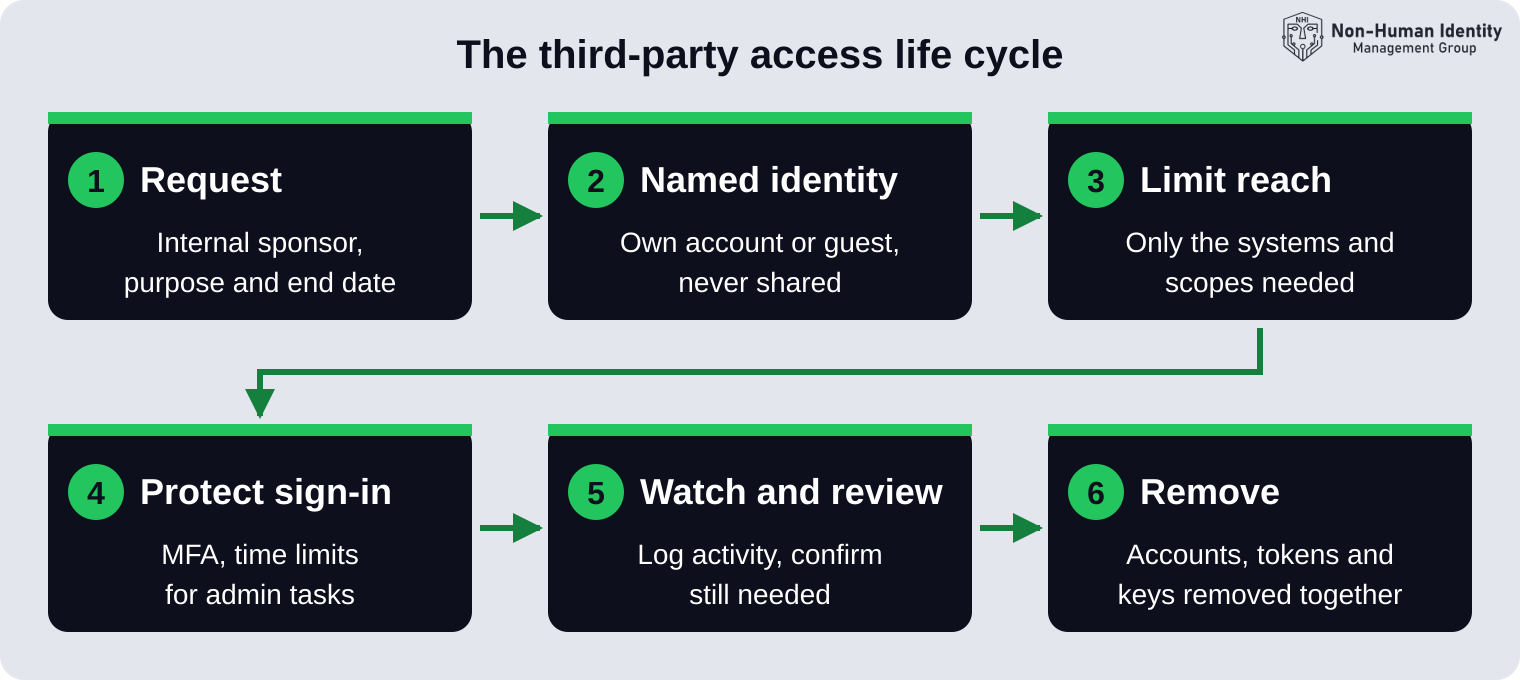
Good third-party access follows a simple life cycle. The same stages apply to a person and to a connected app.
- Request and approve. Someone inside your organisation asks for the access and becomes its sponsor: the named person who answers for it. They state what the third party needs, why, and until when.
- Set up a named identity. Each outside person gets their own account, never a shared "vendor" login. Where possible they sign in with their own organisation's account through federation or a guest invitation, so they do not need a separate password you have to manage.[4] Each connected app or key is recorded with its owner.
- Limit what it can reach. Give only the systems, data and permissions the job needs, which is least privilege. For apps, approve only the narrowest permissions (often called scopes). OWASP advises scoping integration tokens narrowly and revoking unused access.[3]
- Protect the sign-in. Require multi-factor authentication (MFA) for outside people, and consider limiting where they can sign in from. Mandiant noted that the affected Snowflake accounts had no MFA and no network allow lists.[1] For powerful tasks, give time-limited access that switches off on its own; see Just-in-Time Access for Beginners.
- Watch and review. Keep logs of what third parties do, and check regularly that each account and app is still needed. OWASP recommends monitoring third-party activity, such as logs and API calls, for unusual behaviour.[3]
- Remove at the end. When the work or contract ends, remove the person's accounts, revoke the app's tokens and keys, and change any shared credentials, all at the same time. In US government guidance, NIST control PS-7 (External Personnel Security) covers requiring providers to tell you when their staff with access leave or move.[5]
The table below shows how the two forms of third-party access differ in practice.
| Question | Outside people (contractors, support staff) | Outside software (connected apps, keys, service accounts) |
|---|---|---|
| How do they get in? | Their own named account, a guest invitation, or a remote support session. | An OAuth app approval, an API key, a token or a service account. |
| How is sign-in protected? | MFA, managed or checked devices, location limits. | Narrow scopes, short-lived tokens where offered, and limits on where tokens can be used. |
| What goes wrong most often? | Shared logins, accounts left active after people leave. | Forgotten integrations, broad permissions, long-lived keys. |
| How is it removed? | Disable the account and end active sessions. | Revoke the app's tokens, delete or rotate keys, remove the app. |
Useful distinctions
- Third-party access is not the same as third-party risk management. Third-party risk management checks whether a supplier is trustworthy before and during a contract. Third-party access control decides what that supplier can actually reach. You need both. See the Third-Party Risk Management Guide.
- A contract is not a control. A promise to use MFA helps, but you should also set it up on your side where you can.
- Connected apps can outlive the person who approved them. An app approved by an employee may keep working after that employee leaves. See OAuth Apps and Integrations for Beginners.
- Emergency access for suppliers is a controlled exception. If a provider needs urgent admin access, grant it for a short time, with approval, recorded, and remove it afterwards.
A worked example
Northgate Dental is a fictional group of four dental practices with 60 staff. It uses an outside IT support firm, a cloud booking system and a marketing agency.
Amira, the practice manager, asks the IT firm for a list of everyone who can reach Northgate's systems. The answers surprise her:
- The IT firm logs in with one shared "support" account that has full admin rights. Six engineers know the password, including two who have left the firm.
- The marketing agency's app is connected to the shared email inbox with permission to read and send all email, although it only needs to send newsletters.
- A booking system trial from three years ago still has an active API key to the patient database.
Amira and the IT firm agree changes:
- Named accounts: each engineer gets their own account with MFA. Admin rights are switched on only when a support ticket needs them, and switch off after four hours.
- Narrower app permissions: the marketing app is reconnected with send-only permission to a single mailbox.
- Removal: the old trial key is revoked, and the shared support password is changed and then retired.
- Owner and review: Amira becomes the sponsor for all supplier access and reviews the list every three months.
Six months later, one of the IT firm's engineers falls for a phishing email. Because his account needs MFA and holds no standing admin rights, the attacker's attempt to sign in to Northgate is blocked at the MFA step and flagged. This did not make Northgate immune: if the attacker had also captured the MFA approval, they would have had the engineer's normal access, so Northgate and the IT firm still reset his account and checked the logs together.
Myths and misunderstandings
| What people think | What is true |
|---|---|
| Our suppliers are trusted, so their access is safe. | Trust in a company does not protect you if one of its laptops or systems is compromised. Limit and monitor the access anyway. |
| A shared vendor login is simpler and just as safe. | Shared logins hide who did what and stay usable by people who have left. Give each person their own account. |
| Third-party access only means people logging in. | Connected apps, API keys and service accounts held by suppliers are third-party access too, and are often forgotten. |
| When the contract ends, access ends. | Only if someone removes it. Accounts, tokens and keys need to be revoked deliberately. |
| A supplier's security certificate means we do not need our own controls. | Certificates show a supplier's process, not what their staff can reach in your systems. Your own access limits still matter. |
Key terms
- Third-party access
- Access granted to vendors, contractors or support partners who are not direct employees of the organisation.
- Third-party identity
- An identity issued to a partner, vendor, contractor or external service so it can reach internal systems.
- External identity
- An account or access path owned outside the organisation but trusted inside it, such as a partner, vendor or temporary worker.
- Guest account
- A directory identity issued to an outside user so they can collaborate inside an organisation's environment.
- Third-party NHI
- A non-human identity, such as an API key, token, service account or agent, owned or operated by an outside organisation.
- OAuth connected app
- A third-party integration that uses approved permissions (scopes) and tokens to act inside another system.
- Least privilege
- Giving each user, process and system only the access it needs, for only as long as needed.
- Multi-factor authentication (MFA)
- Requiring two or more independent proofs of identity before access is granted.
- Access review
- A formal, recorded check of whether access is still needed and justified.
- Offboarding
- The controlled removal of an identity's credentials and permissions when it is no longer needed, checking that no access path remains.
Common questions
Who counts as a third party?
Anyone who is not your own employee but can reach your systems or data: contractors, suppliers, IT and cloud providers, partners, and the software they connect to your accounts.
Should contractors get normal staff accounts?
They should get their own named accounts, clearly marked as external, with an end date and a sponsor. Many organisations keep them in a separate group so they are easy to review.
How often should we review supplier access?
We suggest at least every three months for powerful access and at every contract change, plus straight away if a supplier reports a breach.
What should we do if a supplier is breached?
Find every account, app and key that supplier holds in your systems, revoke or change what may be affected, and check your logs for unusual activity. See the Your vendor was breached playbook.
Are AI tools from vendors third-party access?
Yes. An AI assistant or agent connected to your email, files or systems is a third-party NHI and needs an owner, narrow permissions and a way to switch it off.
Is remote support software risky?
It can be. The US Cybersecurity and Infrastructure Security Agency (CISA) notes that attackers increasingly co-opt remote access tools to get into victims' systems.[6] Use only approved tools, with named accounts and MFA.
First steps
Three things you can do this week:
- List your third parties' access. Ask each key supplier who can reach your systems, and check your directory and admin consoles for guest accounts, external users and connected apps.
- Remove what is no longer needed. Disable accounts for finished projects and people who have left, and remove connected apps nobody uses. Agree a controlled way to restore access, approved and time-limited, in case something turns out to be needed.
- Replace shared supplier logins. Ask your IT or support provider for named accounts with MFA for each engineer.
Checklist
- We have a list of every outside person and app with access to our systems.
- Each external account and connected app has an internal sponsor.
- External accounts have end dates and expire unless renewed.
- No supplier uses a shared login; each person has a named account.
- Outside people must use MFA to sign in.
- Connected apps have only the permissions they need.
- Third-party activity is logged, and powerful access is reviewed regularly.
- When a contract ends, people, tokens and keys are removed together.
Simple measures that show progress: the number of external accounts with no sponsor or end date, accounts still active after their end date, connected apps unused for 90 days, and how long it takes to remove a supplier's access when asked.
Check your understanding
1. What are the two main forms of third-party access?
Answer: outside people, such as contractors and support staff, and outside software, such as connected apps, API keys and service accounts.
2. Why is a shared vendor login a problem?
Answer: you cannot tell who did what, and people who have left the supplier may still know the password.
3. What is a sponsor?
Answer: the named person inside your organisation who answers for an outsider's access and decides whether it is still needed.
4. What should happen when a supplier contract ends?
Answer: their accounts are disabled, their apps' tokens and keys are revoked, and any shared credentials are changed, all at the same time.
Suggested learning pathway
- Start with Identity and Access Management for Beginners.
- For the software side, read Non-Human Identities for Beginners.
- For connected apps, see OAuth Apps and Integrations for Beginners.
- For giving the right amount of access, see Least Privilege for Beginners.
- For regular checks, see Access Reviews for Beginners.
- For the full practitioner approach, see the Third-Party Access Guide.
- For suppliers with admin access, see the Vendor Privileged Access Management (VPAM) Guide.
Standards and references
- UNC5537 Targets Snowflake Customer Instances for Data Theft and Extortion. Mandiant, Google Cloud Threat Intelligence, June 2024. https://cloud.google.com/blog/topics/threat-intelligence/unc5537-snowflake-data-theft-extortion, accessed 27 Nov 2026.
- The impact of the Salesloft Drift breach on Cloudflare and our customers. Cloudflare blog, 2 September 2025. https://blog.cloudflare.com/response-to-salesloft-drift-incident/, accessed 27 Nov 2026.
- NHI3:2025 Vulnerable Third-Party NHI. OWASP Non-Human Identities Top 10, OWASP Foundation. https://owasp.org/www-project-non-human-identities-top-10/2025/3-vulnerable-third-party-nhi/, accessed 27 Nov 2026.
- B2B collaboration overview. Microsoft Entra External ID documentation, Microsoft Learn, last updated 25 Apr 2026. https://learn.microsoft.com/en-us/entra/external-id/what-is-b2b, accessed 27 Nov 2026.
- SP 800-53 Rev. 5, Security and Privacy Controls for Information Systems and Organizations (PS-7 External Personnel Security). National Institute of Standards and Technology (NIST). https://csrc.nist.gov/pubs/sp/800/53/r5/upd1/final.
- Guide to Securing Remote Access Software. Cybersecurity and Infrastructure Security Agency (CISA) and partners. https://www.cisa.gov/resources-tools/resources/guide-securing-remote-access-software, accessed 27 Nov 2026.
Related NHI Mgmt Group resources: Third Party Access Review Guide · Third-Party Access Policy Template · Third Party Risk for Small Organisations