A shared account is one login, with one password, that several people use.
This guide is for anyone whose team passes round a login for email, social media, a supplier website or a till. You do not need to work in IT to be affected: if your business shares even one password, you should know what it costs you.
In short
- With a shared login, the records show the account name, not the person, so nobody can tell who did what.
- Everyone who ever knew the password can still use it until someone changes it.
- Many apps let you give each person their own login and still share the work, such as a shared inbox.
- If a shared login has to stay, keep it in a password manager, limit who can see it and change it when someone leaves.
What you will learn
- Explain what a shared account is and why it causes trouble.
- Spot the shared logins your team uses today.
- Check whether an app offers team access instead.
- Ask the right questions when someone leaves.
- Team login (shared account)
- one username and password used by more than one person.
- Activity record (audit trail)
- a list of who did what, and when, inside a system.
- Password safe (password manager)
- an app that stores passwords in a locked vault and can share them with chosen people.
What is a shared account?
Think of a visitor book where everyone on the team signs the same name. The book fills up, but you cannot tell who came in at 3am. A shared account works the same way for a computer system.
Lots of small teams share logins. The office email, the company social media page, a supplier's ordering site and the website's admin page are common examples. One person sets it up, then the password goes round by email, chat or a note on the fridge.
A close cousin is a generic account, a login with a job name like "admin" or "reception" instead of a person's name. It often ends up shared too.
The UK's national cyber security agency says sharing work accounts brings risks, and that it stops you linking actions to a person.[1]
Where the comparison stops working: a visitor book stays at the front desk. A shared password can be copied into phones, notes and old chats, so it can turn up in places you did not expect.
Why does it matter?
Shared logins feel easy until something goes wrong. Then you find that nobody can say who did it, and nobody is sure who still knows the password.
If you run a small business
What could happen: someone changes your bank details on a supplier site, and the record only says "office".
Check this: list every login more than one person uses.
If you manage a team
What could happen: a person leaves on bad terms and still knows the password to your social media page.
Check this: make "change shared passwords when someone leaves" part of your leaver steps.
If you are new to IT work
What could happen: you are asked to fix a problem, but the records cannot show which person caused it.
Check this: ask whether the system offers team access, so each person can have their own login.
What does it look like?
Here is a made-up team chat message. Messages like this are a common way shared passwords spread.
Example only. All values are made up.
Team chat, Monday 09:12
Jo: Login for the supplier site, for anyone   (1)
    who needs it this week:
    user: [email protected]                  (2)
    pass: FAKE-Spring0000                     (3)
Sam: thanks! saved it in my notes app         (4)
Jo: same one as the social media page btw     (5)
- "For anyone" means nobody knows who has it.
- A job-style address, not a person's name, so the records will not show who signed in.
- In a real message, this line would contain the actual password, now copied into the chat history.
- A second copy, now on a personal phone.
- One password for two systems, so one leak opens both.
Why this is risky: the password now lives in the chat, in a notes app and in people's heads. It stays there until someone changes it.
The safer way: give each person their own login where the site allows it. If it does not, share the login through a password manager, so only named people can use it.
How does it work?
Here is how a shared login usually grows, and where trouble starts.
- One login is set up. Someone makes an account for a task, often in their own name or a job name like "office".
- The password is passed round. It goes out by chat, email or a note, and each copy is a new place it can leak from.
- Records show only the account. The system logs "office", not the person, so you cannot tell who made a change.[1]
- People come and go. A leaver may still know the password, and it often stays the same for years.
- A stranger gets it. If the password leaks, their actions look like normal use of a known account. A US government advisory notes that this kind of misuse is hard to trace back.[4]
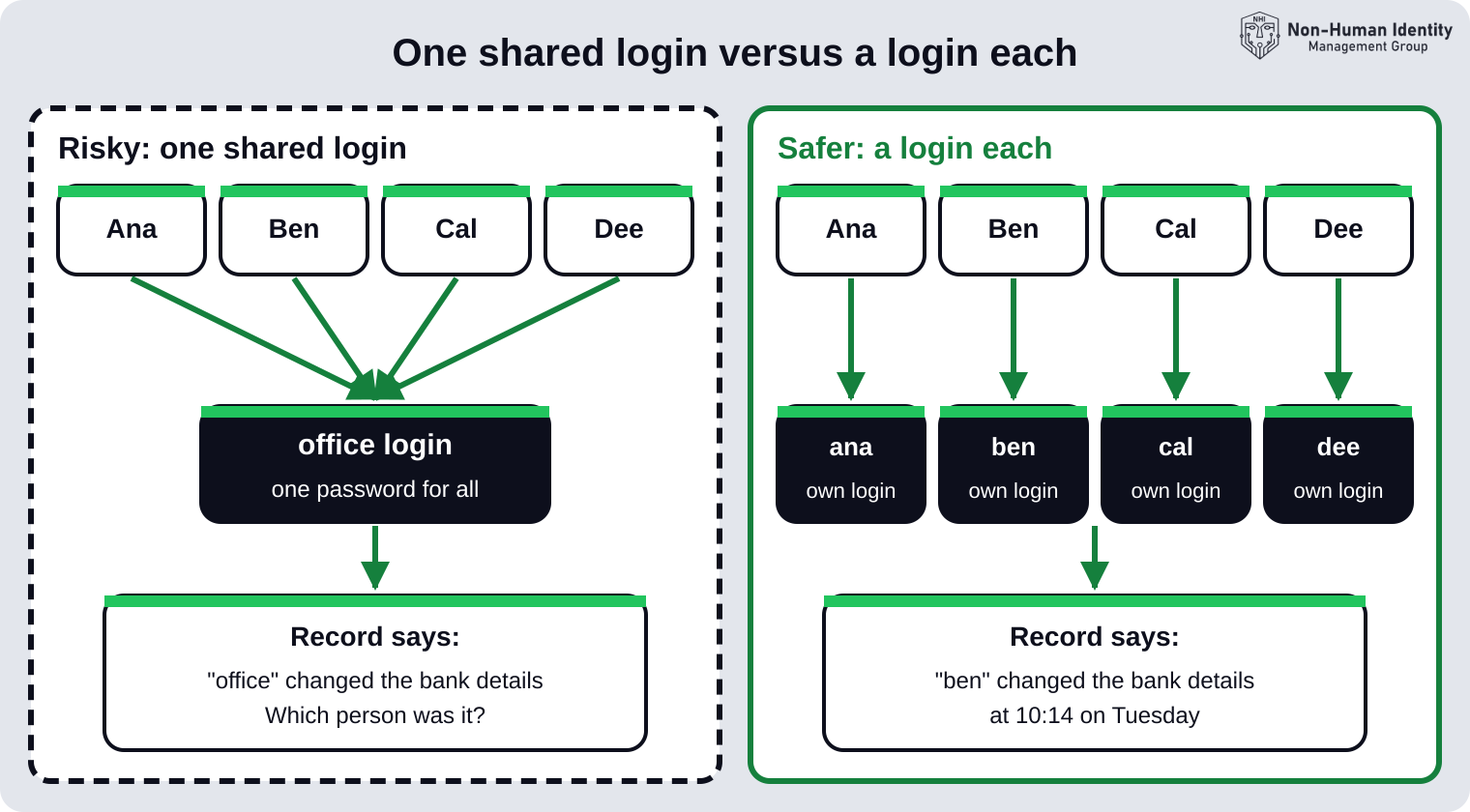
The fix is usually simple. Many apps let a team share the work without sharing a password. For example, Microsoft 365 has shared mailboxes: several people read one inbox, each using their own login. Microsoft says nobody should sign in to the shared mailbox directly, and that sign-in for it should be blocked.[3]
A US government security checklist lists shared accounts among the types an organisation may want to ban, because of the risk. It asks organisations to weigh the lack of accountability before allowing them.[2]
A worked example
This story is made up to show how it can happen.
Ewan Campbell runs Cobblestone Bakery with six staff. The team shares one login for the flour supplier's website, one for the bakery's social media page and one for the shop email. The passwords sit in a group chat.
One Friday the supplier phones. A big order was cancelled on Wednesday, and the delivery address on the account was changed. Ewan asks the team, and everyone says it was not them.
The supplier's records show the change came from the bakery's login. That is all they show. Ewan cannot tell if a staff member made a mistake, if a former worker did it, or if a stranger found the password.
He changes the supplier password first. Then he does the same for the social media page, because it used the same password.
Next he sits down with Callum Reid, a friend who does IT for small firms. Callum checks each app. The email system offers a shared inbox, so each person gets their own login. The social media site lets him add staff as page helpers, each with their own account. The supplier site allows only one login.
For that one, Ewan puts the login in a password manager and shares it with the two people who order flour. He deletes the passwords from the group chat. He also adds a line to his leaver list: change any shared password the person knew.
A month later, a wrong order goes in. This time the password manager shows who opened the login that morning, and it is sorted in five minutes.
What made the difference: once each person had their own login, or a named place to get one, Ewan could see who did what.
Myths and mistakes
| What people think | What is true |
|---|---|
| We trust each other, so sharing is fine. | Trust is not the issue. Without a login each, nobody can show they did not make a change. |
| Separate logins cost more. | Sometimes they do. But many apps have free ways to share work, such as a shared inbox or page helpers. Check first. |
| A strong password makes sharing safe. | A strong password still spreads with each copy. The UK cyber agency suggests giving access to a shared inbox or document instead.[1] |
| Once a person leaves, their access ends. | Removing their own account does not change a shared password they knew. Change it too. |
| A group chat is a handy place to keep passwords. | Chats keep old messages and sync to phones. A password manager is built for this. |
What can I do this week?
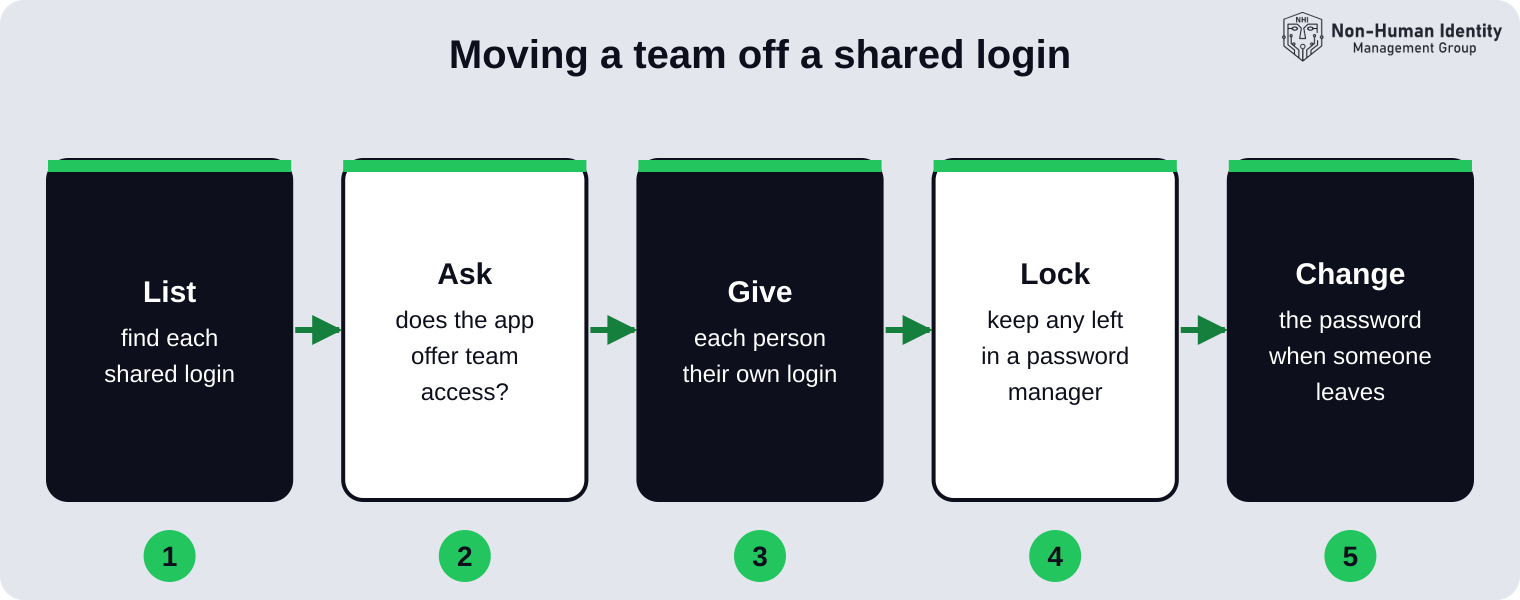
- Write a list of every login more than one person uses.
- For each one, check if the app offers team access or extra users.
- Move any login that must stay shared into a password manager, and share it only with named people.
- Delete passwords from chats, emails and notes once they are safe in the password manager.
- Add "change shared passwords" to the steps you follow when someone leaves.
Checklist
- I have a list of our shared logins.
- Each person has their own login wherever the app allows it.
- Any shared login that is left is kept in a password manager.
- Only named people can see each shared login.
- No two shared logins use the same password.
- Shared passwords are not in chats, emails or notes.
- We change shared passwords when someone leaves.
- A second sign-in check is on for shared logins, where the app allows it.
Common questions
Is it ever safe for a team to share one login?
Sometimes it is the only option, for example when an app allows just one user. Then keep the risk small. Share it only with named people through a password manager, use a strong unique password, and change it when anyone with access leaves.
What is the difference between a shared account and a shared inbox?
A shared account means everyone uses the same password. A shared inbox lets several people read and send from one address, while each signs in with their own login. The inbox is shared, but the password is not, so the records still show who did what.
Can a password manager fix shared logins?
It helps a lot, but it is not a full fix. A password manager keeps the login in one locked place and controls who can see it. Some show who opened it. The system itself may still record only the shared name, so separate logins are better.
What should I do when someone with a shared password leaves?
Change the password the same day, or as soon as you can. Then update the copy in your password manager. Some logins send a code to a phone as a second check. Make sure that phone belongs to someone who is staying.
Where next?
Ready for the detail? Read the practitioner guide: Shared and Generic Accounts Governance Guide. It goes further into replacing shared accounts with individual access, controls for the shared accounts you must keep, and how to detect and measure them.
Also useful:
- Password Managers for Beginners
- Password Security for Beginners
- Joiner, Mover, Leaver for Beginners
- Multi-Factor Authentication for Beginners
Related NHI Mgmt Group resources: Least Privilege for Beginners · Privileged Access Management for Beginners · Account Takeover for Beginners
Key terms
- An account used by more than one person, which makes it hard to prove who did what.
- Generic account
- A login with a job name, like "admin", that is not tied to one named person or system.
- One inbox a team uses together, with each person signing in with their own login.
- Audit trail
- A record in time order of who did what in a system, and when.
- Password manager
- An app that creates, stores and fills in passwords, and can share them safely with chosen people.
- Multi-factor authentication
- Asking for two or more kinds of proof, such as a password and a code, before letting someone in.
Sources and further reading
- Password policy: updating your approach (Password administration for system owners). National Cyber Security Centre (NCSC), reviewed 19 November 2018. https://www.ncsc.gov.uk/collection/passwords/updating-your-approach, accessed 28 Nov 2026.
- SP 800-53 Rev. 5, Security and Privacy Controls for Information Systems and Organizations (control AC-2 Account Management and enhancement AC-2(9) Restrictions on Use of Shared and Group Accounts). National Institute of Standards and Technology (NIST). https://csrc.nist.gov/pubs/sp/800/53/r5/upd1/final, accessed 28 Nov 2026.
- About shared mailboxes in Microsoft 365. Microsoft Learn, updated 2026. https://learn.microsoft.com/en-us/microsoft-365/admin/email/about-shared-mailboxes, accessed 28 Nov 2026.
- NSA and CISA Red and Blue Teams Share Top Ten Cybersecurity Misconfigurations (AA23-278A). Cybersecurity and Infrastructure Security Agency (CISA) and National Security Agency (NSA). https://www.cisa.gov/news-events/cybersecurity-advisories/aa23-278a, accessed 28 Nov 2026.