Pass-the-hash is an attack where someone signs in with a stolen scrambled password instead of the password itself.
This guide is for anyone who has heard the name and wants to know what it means. You do not need to be a Windows expert. If your organisation runs Windows computers joined to a company network, this attack is one reason your IT team cares about how admin accounts are used.
In short
- Windows keeps a scrambled form of each password, called a hash, and some sign-in methods accept the hash as proof.
- An attacker who copies a hash from one computer may be able to use it to sign in to other computers.
- The attacker usually needs admin control of a computer first, so this is a "spreading" attack, not a way in.
- Unique local admin passwords, Windows credential protection and keeping admin accounts off everyday computers all reduce the risk.
What you will learn
- Explain pass-the-hash in one sentence.
- Explain why a password hash can be as useful to an attacker as the password.
- Spot the shared password habits that make the attack easier.
- Ask your IT team three questions about admin accounts.
- Scrambled password (hash)
- a one-way scrambled form of a password that a computer keeps instead of the password itself.
- Moving around a network (lateral movement)
- an attacker using one computer they control to reach others.
What is pass-the-hash?
Think of a festival wristband. The gate staff check the band, not your ticket. If someone makes a perfect copy of your band, the gate lets them in too, and they never needed your ticket.
Windows computers often store a password hash rather than the password. A hash is made by running the password through a one-way formula. You cannot easily turn it back into the password.
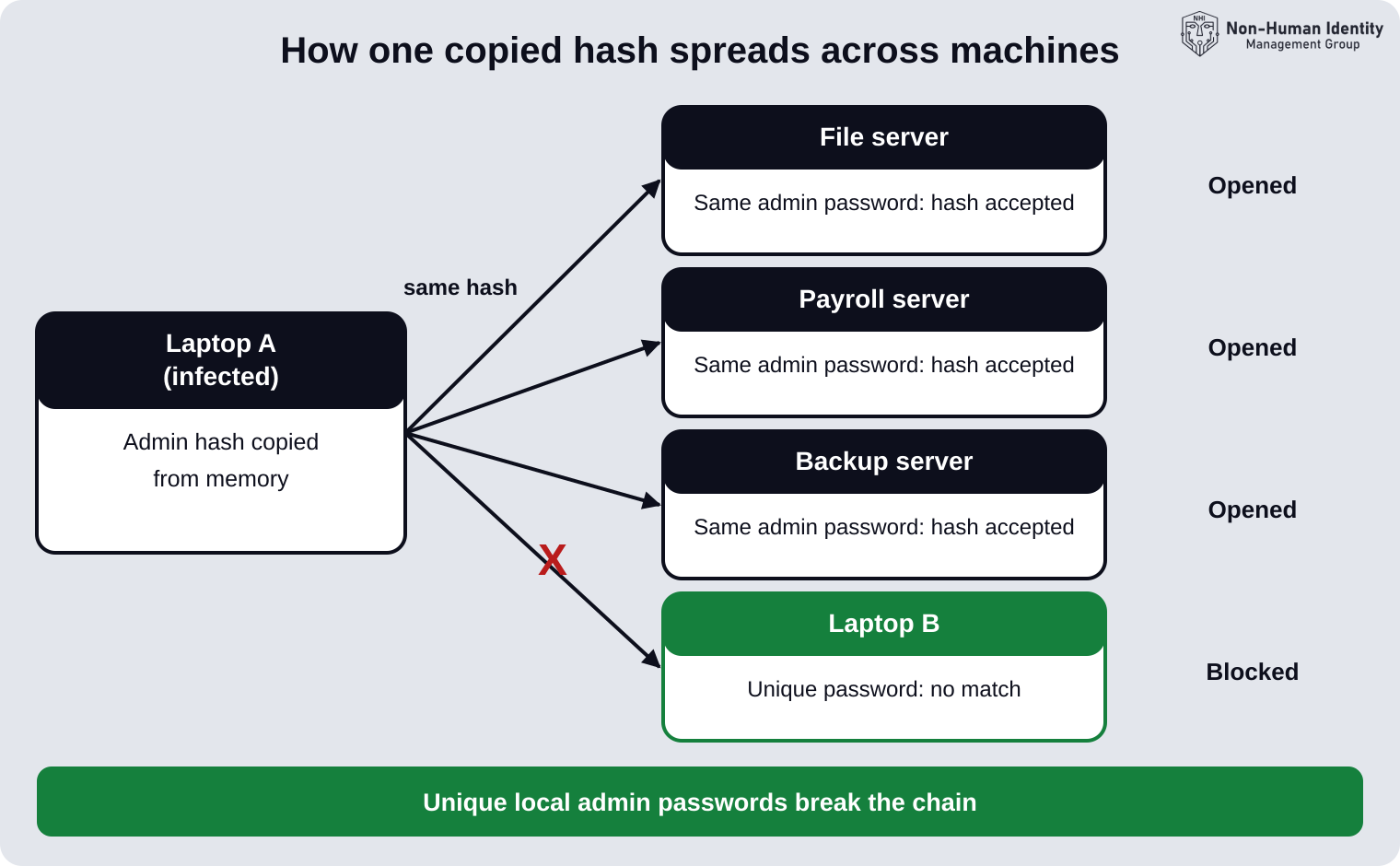
The problem is that an older Windows sign-in method, called NTLM, can accept the hash itself as proof. So an attacker who copies the hash can skip the password step and sign in as that person.[1] This is pass-the-hash.
Where the comparison stops working: a copied wristband only works at one festival. A copied hash can work on every computer where that account has the same password, which is why shared passwords make it worse.
Why does it matter?
Pass-the-hash turns one infected computer into many. The attacker hops from machine to machine. On each one they collect more hashes. They stop when they reach an account that controls a lot.[1]
If you manage a team
What could happen: one staff laptop is infected. The attacker then spreads to file servers with copied admin hashes.
Check this: ask IT if each computer's own admin account has its own password.
If you are new to IT work
What could happen: you sign in to a user's laptop as a powerful admin. Your hash is left behind for an attacker to copy.
Check this: use a separate, less powerful account for day to day support.
If you look after service accounts
What could happen: a service account shares one password across many servers. One copied hash can then open them all. A service account is a non-human identity (NHI) that a program uses to sign in.
Check this: give each service account its own password and only the access it needs.
What does it look like?
Defenders spot pass-the-hash in sign-in records, not on screen. Here is a made-up summary of the kind of pattern a security team might look at.
Example only. All values are made up.
Sign-in summary, Tuesday (simplified, made up)
02:14  account: FAKE-admin   from: LAPTOP-0000   to: FILESRV-0000   method: NTLM   (1)
02:16  account: FAKE-admin   from: LAPTOP-0000   to: PAYROLL-0000   method: NTLM   (2)
02:19  account: FAKE-admin   from: LAPTOP-0000   to: BACKUP-0000    method: NTLM
Note: FAKE-admin did not sign in to LAPTOP-0000 at the keyboard today      (3)
- In a real file, this line would contain an admin account reaching a server over the network from an ordinary laptop.
- The same account reaches more servers a few minutes later, in the middle of the night.
- No matching normal sign-in by the person. This mismatch is one of the signs defenders look for.[1]
Why this is risky: each server accepted the account because the proof looked valid. Nothing in a single line looks broken. The pattern is what gives it away.
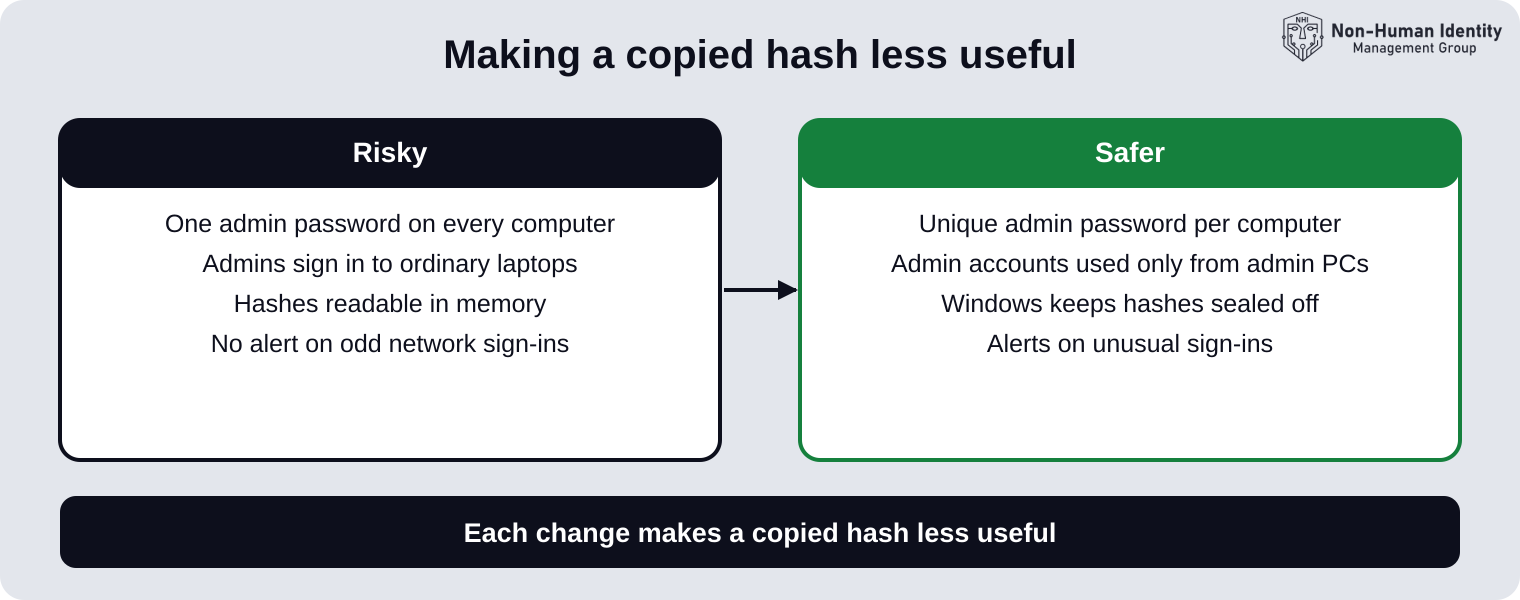
The safer way: admins use special admin computers. Each machine has its own admin password. Odd sign-ins between computers raise an alert.
How does it work?
Here is the attack in plain steps. It is described so you can defend against it, not to show how to run it.
- A first foothold. The attacker gets onto one computer, for example through a harmful email attachment.
- Admin control. They gain admin rights on that computer, which lets them read protected memory.
- Copying hashes. They copy the password hashes stored on it. This step is called credential dumping.
- Reusing a hash. They present a copied hash to another computer that accepts NTLM sign-ins, and it lets them in.[1]
- Spreading. They repeat this on each new computer, looking for more powerful accounts.
Some Windows features make the copying step much harder. Credential Guard keeps hashes in a sealed-off area of the computer that normal software, even with admin rights, is not meant to read. Microsoft says this helps protect against pass-the-hash. It is on by default on many newer company computers that meet the rules. But it does not guard every place a hash is kept.[2]
Windows LAPS gives each computer's built-in admin account its own password and changes it regularly. Microsoft lists protection against pass-the-hash and lateral movement among its benefits.[3]
A worked example
Noor Lindahl manages a fictional accountancy firm with forty staff. One Monday, her IT supplier, Jonah Pajari, calls her.
"A laptop in reception opened a harmful attachment on Friday," he says. "Over the weekend, the same admin account signed in to the file server and the backup server from that laptop. Nobody was in the office."
Noor thinks of the festival wristband. The servers let the account in because the proof looked right. They did not check who was really holding it.
Jonah takes the reception laptop off the network first. Next, he resets the password on that admin account, so the old hash should no longer match. He also checks the other servers' records for the same pattern.
Then he finds the root problem. Every computer in the office used the same built-in admin password, set years ago. So a hash copied from one machine could work on all of them.
Over the next week, Jonah turns on Windows LAPS, so each computer gets its own admin password. He checks that Credential Guard is running on the newer laptops. He also creates separate admin accounts that are only used from his own secured computer.
In the records available to him, Jonah finds no sign that client files were copied. Noor adds "unique admin passwords" to the firm's supplier checklist.
Myths and mistakes
| What people think | What is true |
|---|---|
| A hash is safe because it cannot be turned back into the password. | With older sign-in methods, the hash itself can be used as proof. It needs the same care as a password.[1] |
| A long, strong password stops pass-the-hash. | The attacker does not guess the password, they reuse its hash. Strength does not help here, but uniqueness does. |
| Pass-the-hash is how attackers first break in. | It usually comes later. The attacker first needs control of one computer, then uses hashes to spread. |
| Using the same admin password everywhere is easier and fine. | It lets one copied hash open every machine. Give each computer its own password.[3] |
| Credential Guard fixes the problem on its own. | It protects hashes on each computer, but not every store of them. Microsoft advises combining it with other defences.[2] |
What can I do this week?
- Ask IT if each computer's own admin account has its own password. Windows LAPS can do this.
- Ask if admins use a separate account for admin work, on a special admin computer.
- Check that Credential Guard is on where your Windows version supports it.
- List service accounts that share one password across servers. Plan to split them.
- Ask if your security tools warn you about odd sign-ins between computers.
Checklist
- Every computer has a unique built-in admin password that changes regularly.
- Everyday user accounts are not admins on their own computers, or on many computers.
- Admin accounts are separate from everyday accounts and used only from admin computers.
- Credential Guard is on for supported Windows devices.
- Service accounts do not share one password across many servers.
- Unusual network sign-ins between computers raise an alert that someone reviews.
- Your IT team has a plan to reduce reliance on the older NTLM sign-in method.
Common questions
Is pass-the-hash still a problem today?
Yes. A well-known list of attacker methods still includes it, and was updated in 2026. Newer Windows features make it harder. But networks with old settings, shared admin passwords or NTLM still in use can be at risk.[1]
Does pass-the-hash affect home computers?
Rarely. It mostly matters in company networks, where many Windows computers trust the same accounts. At home, the usual advice still applies. Keep your computer up to date, and do not use an admin account for everyday tasks.
Would multi-factor authentication stop pass-the-hash?
Not on its own. The attack uses sign-ins between computers inside the network, where a second step is often not asked for. A second step helps a lot elsewhere. Here, unique passwords, separate admin accounts and hash protection matter more.
What is the difference between pass-the-hash and credential dumping?
Credential dumping means copying stored passwords, hashes or tickets off a computer. Pass-the-hash means using a copied hash to sign in somewhere else. Dumping usually comes first. Pass-the-hash is one way the stolen hash is then used.
What is pass-the-ticket?
It is a close cousin. Instead of a hash, the attacker reuses a stolen Kerberos ticket. That is a short-lived pass that Windows networks hand out after sign-in. The defences overlap a lot, and the practitioner guide covers both.[1]
Where next?
Ready for the detail? Read the practitioner guide: Pass-the-Hash and Pass-the-Ticket Guide. It goes further into detection events, admin tiering and the Windows settings that limit hash and ticket reuse.
Also useful:
- Credential Dumping for Beginners
- Lateral Movement for Beginners
- NTLM for Beginners
- Active Directory Attacks for Beginners
Related NHI Mgmt Group resources: Lateral Movement Guide · Credential Guard and VBS · NTLM Deprecation and Elimination Guide
Key terms
- Pass-the-hash
- Signing in with a stolen password hash instead of the password itself.
- Password hash
- A one-way scrambled form of a password, used to check it without storing the password itself.
- NTLM
- An older Microsoft sign-in method that uses a question and answer check, and can accept a hash as proof.
- Lateral movement
- An attacker moving from one computer they control to others in the same network.
- Credential dumping
- Copying stored passwords, hashes or tickets off a computer after gaining control of it.
- LAPS
- A Windows feature that gives each computer's built-in admin account its own password and changes it regularly.
- Credential Guard
- A Windows protection that keeps password hashes in a sealed-off area, so they are harder for harmful software to copy.
Sources and further reading
- Use Alternate Authentication Material: Pass the Hash, T1550.002. MITRE ATT&CK, MITRE Corporation, version 2.0, modified 12 May 2026. https://attack.mitre.org/techniques/T1550/002/, accessed 28 Nov 2026.
- Credential Guard overview. Microsoft Learn, Microsoft. https://learn.microsoft.com/en-us/windows/security/identity-protection/credential-guard/, accessed 28 Nov 2026.
- What is Windows LAPS? Microsoft Learn, Microsoft. https://learn.microsoft.com/en-us/windows-server/identity/laps/laps-overview, accessed 28 Nov 2026.