Smart meter security is how your energy meter's readings and commands are kept private and protected from tampering.
This guide is for householders and anyone curious about the meter on their wall. It uses Great Britain's system as the main example, because its security design is well documented. Systems in other countries work differently.
In short
- A smart meter sends your energy readings to your supplier automatically, so nobody needs to read it by hand.
- In Great Britain, meters use their own private network, not the internet, and messages are encrypted and checked.
- The meter records how much energy your home uses in total, not which appliances you use. It does not hold your name or bank details.
- You can choose how often readings are sent, and other companies need your permission to see them.
What you will learn
- Explain how your smart meter sends readings and who can see them.
- Describe the main ways the system is protected.
- Check and change your data-sharing choices.
- Spot a call or message about your meter that deserves suspicion.
- Scrambling (encryption)
- turning data into a code that only the right person or system can read.
- Usage screen (in-home display)
- a small screen that shows how much energy you are using and what it costs.
What is smart meter security?
Think of a meter reader who never needs to knock on your door. Instead, your meter reads itself and phones the numbers through on a private line that only your supplier answers.
A smart meter is a digital meter for electricity or gas that does this. It measures the total energy your home uses, not what each appliance uses.[2] A small box called a communications hub sends the readings out, and an in-home display shows you how much you are using.
Smart meter security covers two things. First, your readings should stay private. Second, nobody without permission should be able to send commands to your meter, such as changing your tariff or switching off your supply.
Where the comparison stops working: a phone call can be overheard. In Great Britain, smart meter messages are encrypted. Each command is also checked to make sure it came from the right company before the meter acts.[1]
Why does it matter?
Energy readings can say a lot about a home, such as when people are in or away. Meters can also do important things, like switch a supply on or off. That is why the system was designed with security in mind from the start.
If you have a smart meter at home
What could happen: you share more detailed readings than you meant to, or forget which companies you said yes to.
Check this: look at your data-sharing settings in your supplier's app or account.
If you are thinking about getting one
What could happen: you worry about hacking and miss out on cheaper tariffs that need a smart meter.
Check this: ask your supplier how readings are shared and what choices you have.
If you are a student or new to security
What could happen: you assume all connected devices are equally weak and miss what good design looks like.
Check this: compare the meter design with a typical smart plug or camera.
What does it look like?
Most suppliers let you see your sharing choices in an app or online account. Here is a made-up settings screen.
Example only. All values are made up.
Smart meter settings - Account EXAMPLE-0000
Electricity readings sent: every half hour     (1)
Gas readings sent: once a month                (2)
Price comparison site access: allowed          (3)
  Given to: FakeCompare Ltd (example.com)
In-home display: paired                        (4)
- The most detailed choice for electricity. You may be able to change it to daily.
- The least detailed choice for gas.
- Another company you once allowed to see your readings.
- Your usage screen, which shows readings but does not store them.
Why this is risky: if you never check this screen, a company you no longer use may still have permission to see your readings.
The safer way: check the settings once a year. Keep only the permissions you still want, and pick the reading frequency that suits you.
How does it work?
Here is how readings and commands travel in Great Britain's system.
- The meter measures. It records your home's total energy use and shows it on the in-home display. That screen updates electricity every 10 seconds and cannot record information.[2]
- The hub sends. The communications hub sends readings over a closed network run by a company called the DCC. Smart meters do not use the internet.[3]
- Data is scrambled. Readings are protected by two layers of encryption, so even the DCC cannot read sensitive data as it passes through.[3]
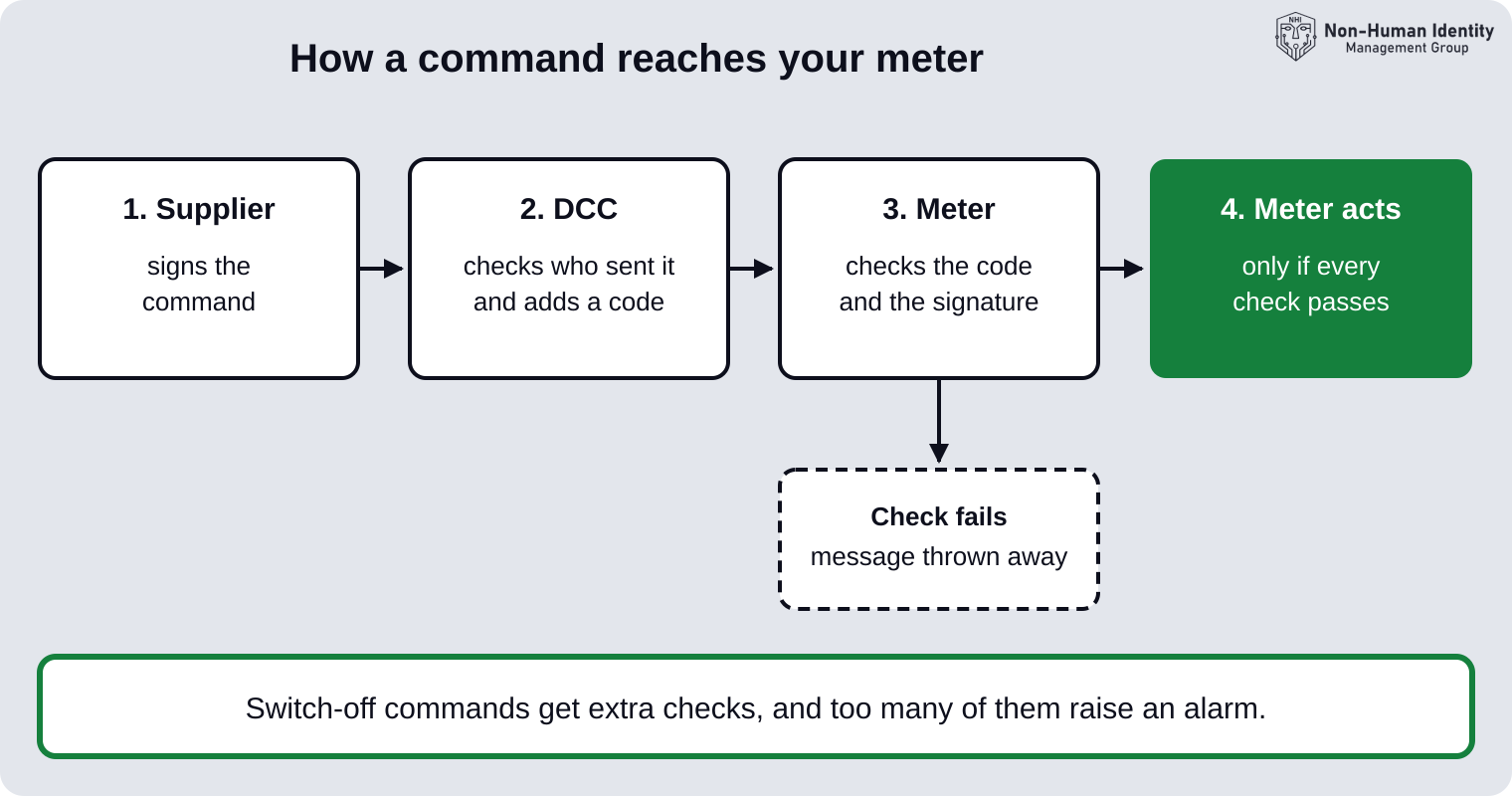
- Commands are checked. A meter only acts on messages that came through the DCC and carry a code that only the DCC or that meter can make. Messages that fail the check are thrown away.[1]
- Risky commands get extra checks. Commands that could affect your supply, such as switching it off, need a digital signature from your supplier. The DCC also raises an alarm if too many switch-off commands are sent.[1]
- The network is watched. The DCC monitors the network around the clock for possible threats.[3]
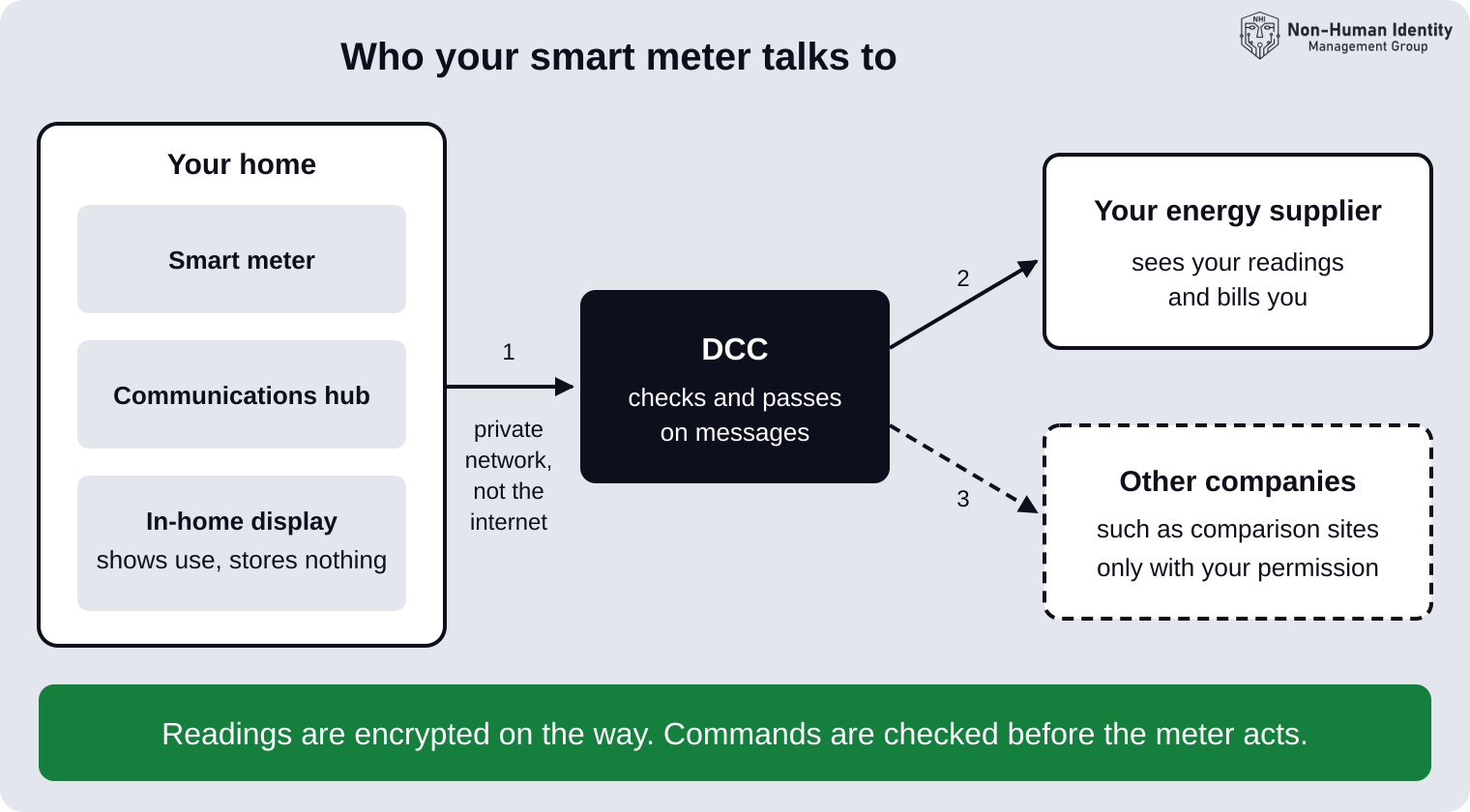
The system was designed by the government department then in charge of energy, working with GCHQ, the UK's intelligence and security agency. A key idea was that no single break-in should have a big effect, and that weak spots would be found and need fixing over time.[1]
A worked example
Milo Jovanovic has just had a smart meter fitted in his flat. That evening he reads a headline about hacked smart devices and starts to worry.
He remembers the idea of a meter reader on a private phone line. So he looks up how his meter sends its readings. He learns that it does not use his home internet at all, and that the meter is not connected to his Wi-Fi.
Next he opens his supplier's app. His electricity readings are set to every half hour. He decides he is happy to share daily readings instead, and he changes the setting. He also sees that a price comparison site he tried two years ago still has access. He removes it.
A week later his phone rings. The caller says they are from his energy company and need his bank details to "activate" his new meter. Milo has not been told about any such step, and the request feels wrong.
He hangs up without giving anything. Then he calls his supplier on the number printed on his bill. They confirm the meter is working and that they did not call him. They thank him for checking.
Milo realises the meter itself was never the weak spot. The risks he could control were his own sharing settings and calls from strangers.
Myths and mistakes
| What people think | What is true |
|---|---|
| My smart meter is on the internet. | In Great Britain, smart meters use their own closed network, not the internet.[3] |
| The meter knows which appliances I use. | It measures your home's total energy use, not each appliance.[2] |
| My meter stores my name and bank details. | Smart meters do not hold personal details such as your name, address or bank details.[2] |
| I have to share half-hourly readings. | You can change electricity readings to daily, and gas defaults to monthly.[4] |
| I have no choice about having one. | You do not have to accept a smart meter, though some cheaper tariffs may need one.[4] |
What can I do this week?
- Check how often your readings are sent, and change it if you want.
- Review which other companies can see your readings and remove any you no longer use.
- Keep your supplier's phone number from your bill somewhere handy.
- Never give bank details to someone who calls you about your meter. Call your supplier back instead.
Checklist
- I know which company supplies my energy and how to contact them.
- I have checked how often my electricity and gas readings are sent.
- I have reviewed which other companies can see my readings.
- I know my meter does not use my home Wi-Fi.
- I check calls or messages about my meter by calling my supplier back.
- I keep my supplier app or account protected with a strong password.
Common questions
Can a smart meter be hacked?
Any connected device can have flaws, and the British design assumes some will be found. It is built so that no single break-in should have a big effect. Messages are encrypted, commands are checked, and the network is watched around the clock. For most people, scam calls are the bigger day-to-day risk.
Who can see my smart meter data?
You and your energy supplier can. Other companies, such as price comparison sites, need your permission. Network companies can see anonymised data that cannot be traced back to you. You can check and change your choices with your supplier.
Does my smart meter use my Wi-Fi?
No, not in Great Britain. Smart meters there use their own closed communications network, run separately from the internet. Your meter and in-home display talk to each other inside your home, but readings do not travel over your broadband.
Can someone switch off my power remotely?
Only your supplier should be able to, and only with strong checks. Switch-off commands need a digital signature from your supplier and pass through the DCC, which raises an alarm if too many are sent. Messages that fail the checks are thrown away.
Can I have a smart meter that does not send readings?
Yes, you can ask. Citizens Advice says you can ask your supplier to fit one with the smart functions switched off, so it works like an ordinary meter. You may then need to send readings yourself and may miss some tariffs.
Where next?
Ready for the detail? Read the practitioner guide: Smart Meter Security Guide. It goes further into how meters and networks are built, how keys and certificates are managed for millions of meters, and how Britain and Germany compare.
Also useful:
- IoT Security for Beginners
- Smart Home Security for Beginners
- Phone Scams for Beginners
- Operational Technology Security for Beginners
Related NHI Mgmt Group resources: EV Charging Security Guide · Distributed Energy Resources and Solar Inverter Security Guide · IoT Security Guide
Key terms
- Smart meter
- A digital energy meter that measures use at short intervals and sends readings automatically.
- Encryption
- Turning data into a code that only someone with the right key can read.
- Digital signature
- A code made with a private key that proves who sent a message and that it was not changed.
- Consent
- Your informed permission for a company to collect or use your data.
- Personal data
- Information that can identify you, directly or indirectly.
Sources and further reading
- The smart security behind the GB Smart Metering System. National Cyber Security Centre, 20 April 2016, reviewed 30 October 2025. https://www.ncsc.gov.uk/articles/smart-security-behind-gb-smart-metering-system, accessed 28 Nov 2026.
- Data access and privacy. Smart Energy GB. https://www.smartenergygb.org/about-smart-meters/smart-facts/data-access-and-privacy, accessed 28 Nov 2026.
- Protecting data on the smart meter network. Smart DCC. https://www.smartdcc.co.uk/our-smart-network/protecting-data-on-the-smart-meter-network/, accessed 28 Nov 2026.
- Getting a smart meter installed. Citizens Advice. https://www.citizensadvice.org.uk/consumer/energy/energy-supply/your-energy-meter/getting-a-smart-meter-installed/, accessed 28 Nov 2026.