Operational technology (OT) security is the protection of the computers and devices that monitor and control physical things, such as factory machines, water pumps, power grids and building systems, so that they keep running safely and as intended.
Most people meet cyber security through office IT: laptops, email and websites. OT is different, because a problem can stop a production line, affect drinking water or put people in danger. This guide is for newcomers, students, career changers and managers who want a plain English introduction. It explains what OT is, why it is protected differently from office IT, a worked example and simple first steps.
By the end of this guide you will be able to:
- Explain what operational technology is, with everyday examples.
- Understand why safety and availability come first in OT.
- Describe the main layers of protection used in OT environments.
- Identify practical first steps for a site that uses OT.
Key takeaways
- OT controls the physical world. It includes the controllers, screens and networks that run machines and processes.
- Safety and uptime come first. In OT, a security change that stops a process can be as harmful as an attack, so changes are planned with engineers.
- Simple gaps cause real incidents. Devices left reachable from the internet with default passwords have been taken over.
- Separation is a core defence. Keeping OT networks apart from office IT and the internet, with tightly controlled links, reduces the routes an attacker can use.
- Plan to run by hand. Being able to operate safely without the automated controls is part of OT resilience.
What it is, in plain English
Operational technology (OT) is the hardware and software that watches or changes physical processes. NIST, the US standards body, describes OT as a broad range of programmable systems and devices that interact with the physical environment, including examples such as industrial control, building management, transport systems and environmental monitoring.[1]
Common OT parts include:
- Programmable logic controller (PLC): a small, rugged computer that runs the logic for a machine or process, such as "open this valve when the tank is full".
- Human-machine interface (HMI): the screen operators use to see and control the process.
- SCADA (supervisory control and data acquisition): systems that collect data from many sites and let operators supervise and control them, for example across a water network.
- Industrial control system (ICS): the general name for these control systems together.
The UK National Cyber Security Centre (NCSC) explains that OT priorities centre on safety, reliability and availability, because failure can cause physical harm, while IT focuses on the confidentiality, integrity and availability of information.[2]
A helpful comparison is a railway. Office IT is like the ticket office: if it goes down, people are annoyed. OT is like the signals and points: if they go wrong, trains can stop or collide. Where the analogy breaks down: on a real railway, signals and ticket systems are clearly separate, but in many modern sites OT and IT are connected, which is exactly what makes OT security necessary.
Why it matters to you
- If you run a small business: refrigeration, building heating, packaging machines and alarm systems are often OT. A supplier's remote access link to one of them is a route into your site.
- If you are new to a security job: OT security is a growing field, and the first lesson is that IT habits such as rebooting or scanning a device can disrupt a live process.
- If you are a manager: OT incidents can mean lost production, safety risks and regulatory attention, so ownership needs to be shared between engineering and security.
Real incidents show that simple gaps matter. CISA and partner agencies reported that, from November 2023, cyber actors linked to Iran's Islamic Revolutionary Guard Corps, using the persona "CyberAv3ngers", compromised at least 75 programmable logic controllers in the United States, including at least 34 in the water and wastewater sector. The devices were reachable from the internet and used default passwords or none.[3] The agencies said the actors replaced control logic and defaced HMI screens, and recommended changing default passwords, disconnecting PLCs from the public internet and keeping backups of controller logic.[3]
How it works, step by step
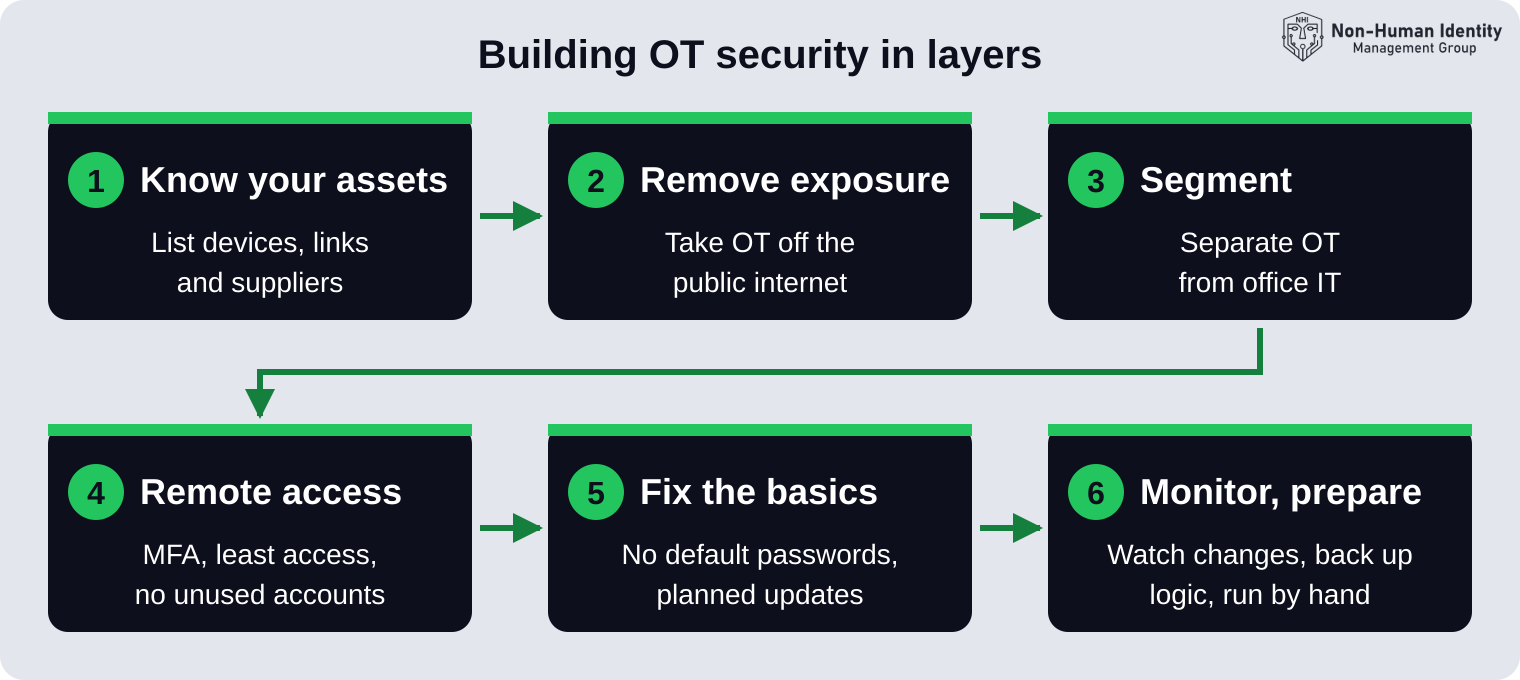
OT security is built in layers. Here is a sensible order for a site starting out, based on widely used government guidance.
- Know what you have. Build a list of OT devices, what they control, who supports them and how they connect. The NCSC calls this keeping a definitive view of your OT system, including assets, connectivity and third-party links.[2]
- Remove internet exposure. Find any OT device reachable from the public internet and remove the unintended exposure. This is the first of CISA's primary mitigations for OT.[4]
- Separate OT from IT. Use network segmentation to divide the network into zones, with controlled traffic between them. CISA recommends segmenting IT and OT and using a buffer zone, often called a demilitarised zone (DMZ), to pass data.[4]
- Control remote access. Limit who can connect from outside, use a private network or VPN with strong passwords and phishing-resistant multi-factor authentication (MFA), give the least access needed and disable unused accounts.[4]
- Fix the basics on devices. Replace default passwords with strong, unique ones and plan updates with engineers and suppliers.[4]
- Watch and prepare. Monitor for unusual logins, unexpected connections and changes to controller programs, keep tested backups of controller logic, and make sure the site can operate safely by hand if automated controls fail.[3][4]
IT and OT side by side
| Question | Office IT | Operational technology |
|---|---|---|
| What matters most? | Protecting information | Safety, reliability and availability of the process |
| Typical lifespan | A few years | Often many years, sometimes decades |
| Can you reboot to patch? | Usually, out of hours | Only in planned maintenance windows |
| Who owns it? | IT team | Engineering and operations, often with suppliers |
| Effect of a failure | Lost data or downtime | Stopped production, damage or harm to people |
Useful distinctions
- OT and IoT overlap but differ. Internet of Things (IoT) devices, such as smart cameras, are usually general connected devices. OT devices control industrial processes. Many sites have both.
- An "air gap" is often not complete. An air gap means no network connection at all. In practice, USB drives, supplier laptops and remote support links often cross it, so check rather than assume.
- The Purdue model is a map, not a rule. The Purdue model is a widely used way of drawing OT networks in layers, from field devices up to business systems. It helps decide where boundaries go. Standards such as the ISA/IEC 62443 series build on the idea of zones and conduits.[5]
- Security is shared. ISA/IEC 62443 describes roles for asset owners, product suppliers, integrators and service suppliers, each with their own responsibilities.[5]
A worked example
Valley Fresh Juices is a fictional bottling plant with 60 staff. Its bottling line is run by PLCs and an HMI in the control room. The machine supplier connects remotely to help with faults, and the plant manager, Gareth, can view production figures from his office PC.
After reading the CISA advisory on internet-exposed controllers, Gareth asks the plant engineer, Leila, and the company's IT supplier to check three things. They find that the supplier's remote access tool is always on and uses one shared password. They also find that the office network and the control network are connected with no firewall between them.
Over the next three months they make changes in planned maintenance windows. Remote access is switched on only when a support call is booked, uses individual accounts with MFA, and is logged. A firewall now separates the office from the control network, and production figures reach the office through one controlled connection. Leila saves copies of the PLC programs and writes a short procedure for running the line by hand.
These steps reduce the routes an attacker could use and make recovery quicker. They do not make the plant immune, so Valley Fresh adds a yearly review of the device list and the remote access log.
Myths and misunderstandings
| What people think | What is true |
|---|---|
| Our OT is air-gapped, so it is safe. | True air gaps are rare. Supplier laptops, USB drives and remote support links often connect OT to the outside world. |
| Nobody would target a small site. | Many attacks are opportunistic: attackers search the internet for exposed devices with default passwords, whatever the size of the owner.[3] |
| We can secure OT with the same tools and habits as IT. | Some IT actions, such as active scanning or automatic reboots, can disrupt older OT devices. Changes must be planned with engineers. |
| OT security is only for big utilities. | Factories, food producers, hospitals, building managers and farms all use OT. |
| If the supplier set it up, it must be secure. | Default settings and shared support passwords are common. Security is shared between the owner, suppliers and integrators. |
Key terms
- Operational technology (OT)
- Hardware and software that monitors or controls physical processes, such as manufacturing lines, utilities and transport systems.
- Programmable logic controller (PLC)
- An industrial device that runs the control logic for machinery and processes.
- Human-machine interface (HMI)
- The operator-facing screen or system used to monitor and control an industrial process.
- SCADA
- Supervisory control and data acquisition: systems that collect operational data and let operators control industrial processes.
- Network segmentation
- Dividing a network into zones with controlled traffic between them, so a problem in one zone does not reach all the others.
- Purdue model
- A layered way of describing industrial networks that separates enterprise IT from operational control levels.
- Air gap
- Physical isolation of a system from other networks; true air gaps are rare in practice.
- Historian
- A database that collects and stores time-series data from industrial systems for monitoring and reporting.
- Remote access
- The ability for a person or system to reach devices or data from outside the local network.
- Zones and conduits
- Grouping systems into zones with similar security needs and controlling the connections (conduits) between them.
Common questions
What is the difference between OT and IT security?
IT security mainly protects information. OT security protects physical processes, so safety and keeping the process running come first, and changes are planned around operations.
Is OT the same as ICS or SCADA?
Not quite. OT is the broadest term. Industrial control systems are a major part of OT, and SCADA is one type of control system used to supervise processes across sites.
Can we just patch OT devices like laptops?
Usually not straight away. Updates are tested and applied in planned maintenance windows, often with the supplier, because a failed update can stop a process.
Why are default passwords such a problem in OT?
Default passwords are often published in manuals, so anyone who can reach the device may be able to log in. CISA lists replacing them among its primary OT mitigations.[4]
Which standards cover OT security?
Two widely used references are NIST SP 800-82 Rev. 3, the Guide to Operational Technology (OT) Security, published in September 2023,[6] and the ISA/IEC 62443 series for industrial automation and control systems.[5]
Who should own OT security?
It works best as a shared job between engineering or operations, who understand the process, and security, who understand the threats, with suppliers involved.
First steps
Three things you can do this week:
- Start a device list. With the site engineer, list your OT devices, what each controls, who supports it and how it connects.
- Ask about remote access. Find every way a supplier or staff member can connect to OT from outside, and who holds the passwords.
- Check for internet exposure. Ask your IT supplier or internet provider to confirm that no OT device is directly reachable from the internet.
- Write down the manual fallback. Confirm how the process would be run safely by hand if controls failed, and who is trained to do it.
Checklist
- We have an up-to-date list of OT devices, their connections and their suppliers.
- No OT device is directly reachable from the public internet.
- Office IT and OT networks are separated, with controlled connections between them.
- Remote access uses individual accounts with MFA, is switched on only when needed and is logged.
- Default passwords on OT devices have been changed.
- Copies of controller programs and configurations are backed up and tested.
- We can run critical processes safely by hand, and staff know how.
- Security changes on live systems are planned and tested with engineers first.
- Any temporary exception, such as extra supplier access, is approved, recorded and time-limited.
Check your understanding
1. What makes OT different from office IT?
Answer: OT controls physical processes, so safety and keeping the process running come first, and failures can cause physical harm.
2. What did attackers exploit in the 2023 attacks on PLCs described by CISA?
Answer: devices reachable from the internet that used default passwords or no password.
3. Why separate OT from office IT?
Answer: so that a problem on the office network, such as malware from a phishing email, has fewer routes to reach the systems that control the process.
4. Why should you be careful running IT security tools on OT?
Answer: some actions, such as active scanning or automatic reboots, can disrupt older OT devices, so they must be planned with engineers.
Suggested learning pathway
- Industrial Control Systems and SCADA for Beginners: a related beginner guide to read next.
- IoT Security for Beginners: a related beginner guide to read next.
- For security basics for a smaller organisation, start with the Small Business Cybersecurity Basics Guide.
- For how the two worlds differ in more depth, see IT Security vs OT Security.
- For the government's first-priority actions, see the CISA Primary Mitigations for OT Guide.
- For the full practitioner overview, see the OT Security Guide.
- For separating networks, see the OT Network Segmentation, Purdue Model and IEC 62443 Zones and Conduits Guide.
- For the main standard, see the IEC 62443 Guide.
Standards and references
- Operational technology (glossary entry, citing NIST SP 800-82r3 and SP 800-37 Rev. 2). NIST Computer Security Resource Center. https://csrc.nist.gov/glossary/term/operational_technology, accessed 27 Nov 2026.
- Operational Technology (OT) collection. National Cyber Security Centre (NCSC). https://www.ncsc.gov.uk/collection/operational-technology, accessed 27 Nov 2026.
- IRGC-Affiliated Cyber Actors Exploit PLCs in Multiple Sectors, Including US Water and Wastewater Systems Facilities (AA23-335A). CISA and partner agencies, published 1 December 2023, updated 18 December 2024. https://www.cisa.gov/news-events/cybersecurity-advisories/aa23-335a, accessed 27 Nov 2026.
- Primary Mitigations to Reduce Cyber Threats to Operational Technology. Cybersecurity and Infrastructure Security Agency (CISA). https://www.cisa.gov/resources-tools/resources/primary-mitigations-reduce-cyber-threats-operational-technology, accessed 27 Nov 2026.
- ISA/IEC 62443 Series of Standards. International Society of Automation (ISA). https://www.isa.org/standards-and-publications/isa-standards/isa-iec-62443-series-of-standards, accessed 27 Nov 2026.
- SP 800-82 Rev. 3, Guide to Operational Technology (OT) Security. National Institute of Standards and Technology (NIST), September 2023. https://csrc.nist.gov/pubs/sp/800/82/r3/final.
Related NHI Mgmt Group resources: Principles of OT Cyber Security Guide · Reducing Internet-Exposed OT Guide · OT Remote Access vs IT VPN