System hardening is the work of setting up a computer, server or device so that it has fewer ways in for an attacker: removing what it does not need, changing risky default settings and keeping it updated.
New computers and software usually arrive set up to be easy to use, not to be as safe as possible. Hardening closes the gaps. This guide is for newcomers, students, career changers and managers who are not security specialists. It explains what hardening means, why it matters, how a hardening project works step by step, where trusted checklists come from, a worked example and first steps for a small team. It covers the idea for any system; platform-specific settings are in the practitioner guides linked at the end.
By the end of this guide you will be able to:
- Explain what system hardening is and what an attack surface is.
- Understand why default settings and unneeded software create risk.
- Describe the six stages of a hardening project, including testing and rollback.
- Identify trusted baselines and three first steps for this week.
Key takeaways
- Less is safer. Every program, service, open port and account is a possible way in. Remove what the system does not need.
- Defaults are for convenience. Default passwords, open sharing and everyday admin rights make set-up easy and attacks easier. Change them.
- Use a trusted baseline, not guesswork. Free, expert-written checklists such as CIS Benchmarks and vendor security baselines tell you which settings to use.
- Test before you roll out. Hardening can break things. Try changes on a few systems first and keep a controlled way back.
- Hardening is never finished. Settings drift and new updates arrive, so keep checking and keep patching.
What it is, in plain English
NIST, the US standards body, defines hardening as a process intended to remove a means of attack by patching vulnerabilities and turning off nonessential services.[1] In practice, people use the term a little more widely to include all the ways you tighten a system's set-up: removing unused software and accounts, changing default passwords, limiting who has admin rights and switching on security features that are off by default.
The idea behind it is the attack surface: the total set of points where an attacker could try to get in. A laptop with ten programs it never uses, a remote access service nobody needs and an admin account with a factory password has a large attack surface. Hardening shrinks it.
The UK National Cyber Security Centre (NCSC) makes secure configuration one of the five technical controls in its Cyber Essentials scheme, alongside firewalls, security update management, user access control and malware protection. Its advice is to set up computers securely to reduce the ways a cyber criminal can find a way in.[2]
A helpful comparison is moving into a new house. The builder hands over spare keys, leaves a side gate unlocked and fits a burglar alarm with the code "1234". Before you settle in, you change the locks, lock the gate you never use, set a new alarm code and decide who gets a key. Where the analogy breaks down: a house stays roughly the same once secured, while computers change constantly as updates, new software and new settings arrive, so hardening has to be repeated.
Why it matters to you
- If you run a small business: many attacks look for easy targets, such as devices still using default passwords or services left open to the internet. Basic hardening makes you a harder target for very little cost.
- If you are new to a security job: hardening is one of the most common tasks you will be given, and audits often check systems against a named baseline.
- If you are a manager: hardening reduces the number of ways an attack can start and how far it can spread. It also supports schemes and frameworks such as Cyber Essentials and NIST SP 800-53.[2][6]
Default passwords are a good example of why this matters. The US Cybersecurity and Infrastructure Security Agency (CISA) has published a Secure by Design alert asking manufacturers to remove the risk of static default passwords being exploited in their customers' systems.[7] Until every product ships that way, changing default passwords stays the customer's job.
How it works, step by step
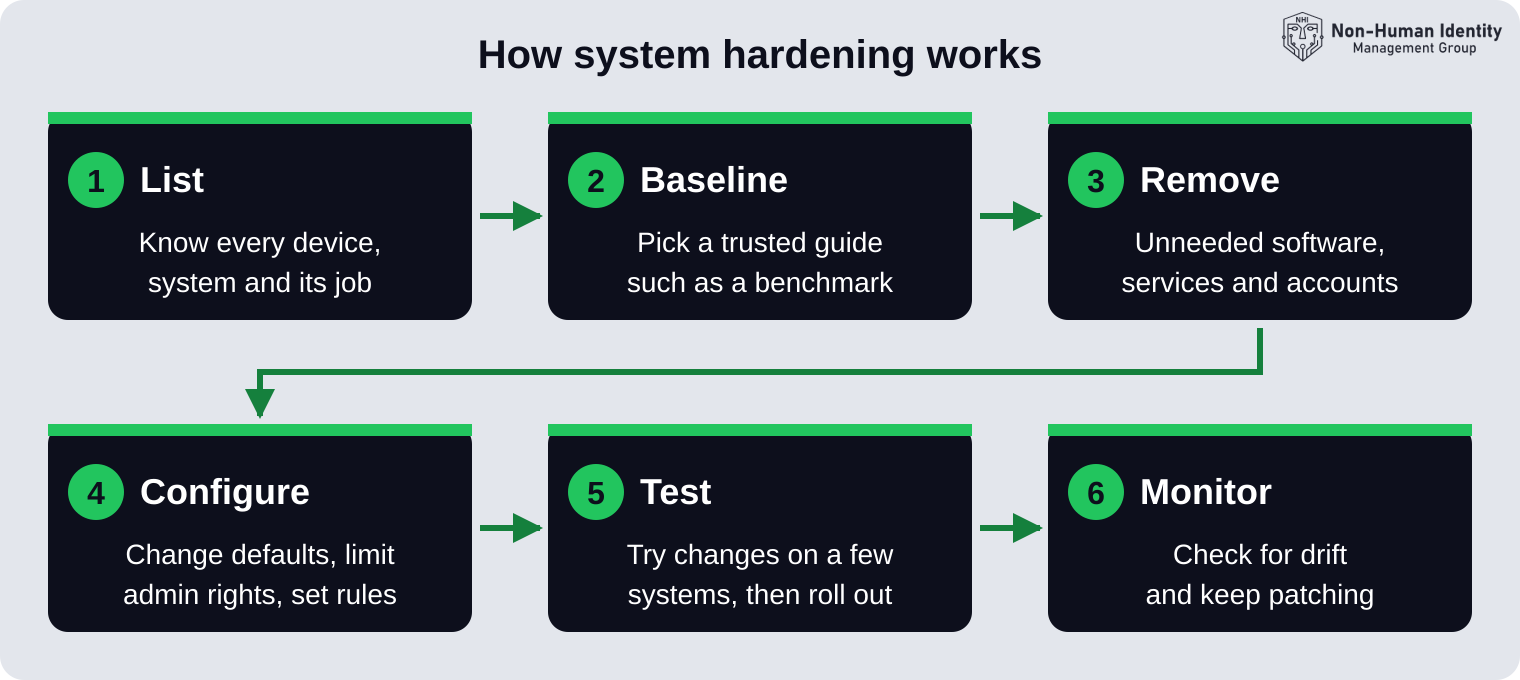
Whether you are hardening one laptop or a thousand servers, the stages are the same.
- List your systems and what each one is for. You cannot decide what a system does not need until you know what it does. A file server, a reception desk PC and a developer laptop need different things.
- Choose a baseline. A security baseline is a written set of recommended settings. Rather than inventing your own, start from a trusted one (see the table below). Microsoft notes that Windows alone has thousands of Group Policy settings and recommends using an industry-standard configuration rather than creating a baseline yourself.[4]
- Remove what is not needed. Uninstall unused programs, turn off services and features the system does not use, and delete or disable unused accounts. This applies the principle of least functionality: a system should provide only the functions it needs, which NIST lists as control CM-7 in SP 800-53.[6]
- Configure what remains. Change every default password, give everyday users accounts without admin rights, turn on the firewall and screen lock, and switch on security features that are off by default. NIST lists setting and documenting secure configuration settings as control CM-6.[6]
- Test, then roll out in stages. Apply the changes to a small test group first, check that people can still do their jobs, then widen the rollout. If a setting breaks something important, roll that one setting back as a controlled, approved and recorded exception with a date to revisit it, rather than abandoning the baseline.
- Monitor and maintain. Check regularly that systems still match the baseline, because settings drift. Keep applying security updates. NIST calls the documented, approved set-up a baseline configuration, control CM-2.[6]
Where trusted baselines come from
You do not have to decide every setting yourself. These sources publish ready-made guidance. They are listed alphabetically; the order is not a ranking.
| Source | What it offers |
|---|---|
| CIS Benchmarks (Center for Internet Security) | Prescriptive configuration recommendations for many vendor product families, including operating systems, cloud platforms, network devices and server software, developed by consensus among security experts.[3] |
| Microsoft security baselines | Groups of Microsoft-recommended configuration settings that explain their security impact, delivered through the Security Compliance Toolkit, Group Policy, Configuration Manager or Intune.[4] |
| NIST National Checklist Program | A US government repository of security configuration checklists; NIST SP 800-70 Rev. 5 (May 2026) explains how to find and use them.[5] |
NIST describes a security configuration checklist as instructions or machine-readable content that set an IT product to a target risk level, verify that set-up, detect unauthorised changes and record the product's security posture.[5]
Useful distinctions
- Hardening is not the same as patching. Patching fixes flaws in software; hardening changes how the software is set up. NIST's definition includes patching, and you need both.[1] See Patch Management for Beginners.
- A baseline is a starting point, not a law. Benchmarks often offer more than one level of strictness. Choose what fits the system's job and record any setting you deliberately leave out, with the reason.
- Hardening reduces risk; it does not remove it. A hardened system can still be attacked through a new flaw or a stolen password, so you still need monitoring, backups and an incident plan.
A worked example
Greenway Accountants is a fictional firm with 25 staff, 25 Windows laptops, one small office server and a network printer. Omar, the office manager, looks after IT with an outside support company.
Omar and the support company work through the stages:
- List: they record each device and its job. The server holds shared files and nothing else.
- Baseline: they choose the vendor's published security baseline for Windows laptops and the matching CIS Benchmark for the server, and note it in a short document.
- Remove: they find trial software, an old remote access tool installed years ago and two accounts belonging to former staff. All are removed.
- Configure: the printer still has its factory admin password, so they change it. Everyday staff lose local admin rights; two named people keep separate admin accounts. Screen locks and disk encryption are switched on.
- Test: they apply the laptop settings to three volunteers for a week. One setting blocks an old tax software add-in. They roll that one setting back for the tax team only, record it as an approved exception and set a date to revisit it when the add-in is updated.
- Monitor: the support company runs a monthly check against the baseline and reports any differences.
Greenway is not immune to attack, but there are fewer ways in: no forgotten remote access tool, no factory password on the printer and no everyday admin rights for malware to borrow.
Myths and misunderstandings
| What people think | What is true |
|---|---|
| New devices are secure out of the box. | Many are set up for convenience. Defaults such as factory passwords and unused services need changing. |
| Antivirus is enough. | Malware protection is one control. Secure configuration is a separate control in schemes such as Cyber Essentials.[2] |
| Hardening means switching on every security setting. | Applying every strict setting blindly can break systems. Use a baseline that fits the system's job and test first. |
| Once hardened, always hardened. | Settings drift and updates add features. NIST checklists are also meant to detect unauthorised changes over time.[5] |
| We need to write our own settings list. | Free, expert baselines exist. Microsoft recommends starting from an industry-standard configuration rather than building one yourself.[4] |
Key terms
- System hardening
- Reducing unnecessary exposure in a system by tightening its configuration, patching weaknesses and applying security good practice.
- Attack surface
- The total set of points where an attacker can try to enter, exploit or disrupt a system.
- Security baseline
- The set of expected settings and controls used to judge whether a system is set up safely.
- CIS Benchmark
- A hardened configuration standard for a specific operating system, application or platform, giving a repeatable baseline.
- Least functionality
- Setting up systems to provide only the functions and services they need, and disabling the rest.
- Default credential
- A factory-set username, password or secret left unchanged after a product is installed.
- Patch management
- Evaluating, testing and deploying software updates that fix vulnerabilities.
- Configuration drift
- The gradual change of a system's settings away from its intended secure state.
- Least privilege
- Giving each user, process or system only the access it needs, and no more.
- Application allowlisting
- An endpoint control that lets only approved applications, scripts and libraries run.
Common questions
What is system hardening in simple terms?
It is setting up a system so it has fewer ways in: removing what it does not need, changing risky defaults and keeping it updated.[1]
Which baseline should we use?
We suggest starting with the operating system or product vendor's own security baseline, or the matching CIS Benchmark, whichever fits how you manage your systems.[3][4] Using one consistently matters more than which you pick.
Does hardening apply to cloud systems and network devices?
Yes. CIS publishes benchmarks for cloud providers, network devices and server software as well as operating systems.[3]
Will hardening slow people down?
Usually very little, if you test first. Removing admin rights is the change people notice most, so give a quick, recorded way to request help with installs.
How often should we check?
We suggest checking important systems against the baseline at least monthly, and after any big change or update. Automated tools make this easier as you grow.
Is hardening a legal requirement?
Not in general. It appears in many frameworks and certification schemes, such as Cyber Essentials and NIST SP 800-53, which customers or contracts may ask for.[2][6]
First steps
Three things you can do this week:
- Hunt for default passwords. Check routers, printers, cameras and any admin web pages. Change any factory password to a strong, unique one and store it securely.
- Remove everyday admin rights. Make sure staff use standard accounts day to day, with separate admin accounts for the few people who need them.
- Pick a baseline and test it on one machine. Download the vendor security baseline or CIS Benchmark for your main operating system, apply it to one test computer and note what breaks before rolling it out further.
Checklist
- We have a list of our systems and what each one is for.
- We have chosen and written down a baseline for each main type of system.
- No device is still using a factory default password.
- Unused programs, services and accounts have been removed or disabled.
- Everyday users do not have admin rights; admin accounts are separate and few.
- The firewall, screen lock and disk encryption are on where supported.
- Changes are tested on a small group before being rolled out.
- Any setting we leave out of the baseline is approved, recorded and reviewed by a set date.
- We check systems against the baseline regularly and keep applying updates.
Check your understanding
1. What is an attack surface?
Answer: the total set of points where an attacker could try to get into a system. Hardening makes it smaller.
2. Why should you start from a published baseline rather than your own list?
Answer: experts have already worked out which settings matter and why, which saves time and reduces mistakes.
3. What should you do if a hardening setting breaks an important application?
Answer: roll back that one setting for the affected systems as an approved, recorded and time-limited exception, and keep the rest of the baseline.
4. Is hardening the same as patching?
Answer: no. Patching fixes software flaws; hardening changes how the system is set up. You need both.
Suggested learning pathway
- For the wider picture of protecting devices, start with Endpoint Security for Beginners.
- For keeping software updated, read Patch Management for Beginners.
- For limiting admin rights, read Least Privilege for Beginners.
- For Linux systems, read Linux Security for Beginners.
- For how benchmarks work and how to use them, see the CIS Benchmarks Guide.
- For Windows laptops and desktops in detail, see the Windows Endpoint Hardening Guide.
- For a ready-made list of settings to check, see the Endpoint Hardening Checklist.
- For keeping systems on their baseline over time, see the Configuration Drift and Baseline Enforcement Guide.
Standards and references
- Glossary: hardening (from NIST SP 800-152). NIST Computer Security Resource Center, National Institute of Standards and Technology. https://csrc.nist.gov/glossary/term/hardening, accessed 27 Nov 2026.
- Cyber Essentials overview. National Cyber Security Centre (NCSC). https://www.ncsc.gov.uk/cyberessentials/overview, accessed 27 Nov 2026.
- CIS Benchmarks. Center for Internet Security (CIS). https://www.cisecurity.org/cis-benchmarks, accessed 27 Nov 2026.
- Windows security baselines. Microsoft Learn, Microsoft, last updated 18 Aug 2025. https://learn.microsoft.com/en-us/windows/security/operating-system-security/device-management/windows-security-configuration-framework/windows-security-baselines, accessed 27 Nov 2026.
- SP 800-70 Rev. 5, National Checklist Program for IT Products: Guidelines for Checklist Users and Developers. National Institute of Standards and Technology (NIST), May 2026. https://csrc.nist.gov/pubs/sp/800/70/r5/final, accessed 27 Nov 2026.
- SP 800-53 Rev. 5, Security and Privacy Controls for Information Systems and Organizations (controls CM-2, CM-6, CM-7). National Institute of Standards and Technology (NIST). https://csrc.nist.gov/pubs/sp/800/53/r5/upd1/final.
- Secure by Design Alert: How Manufacturers Can Protect Customers by Eliminating Default Passwords. Cybersecurity and Infrastructure Security Agency (CISA). https://www.cisa.gov/resources-tools/resources/secure-design-alert-how-manufacturers-can-protect-customers-eliminating-default-passwords, accessed 27 Nov 2026.
Related NHI Mgmt Group resources: CIS Control 4 Secure Configuration of Enterprise Assets and Software Guide · Microsoft Security Baselines and Security Compliance Toolkit Guide · Secure Configuration and Hardening Policy Template