Travel cyber safety means keeping your phone, laptop and accounts safe while you are away from home.
This guide is for anyone going on holiday or a work trip with a phone or laptop. If you travel for work, the same habits protect your employer's data as well as your own.
In short
- Update your devices, set a screen lock and back up your photos before you go.
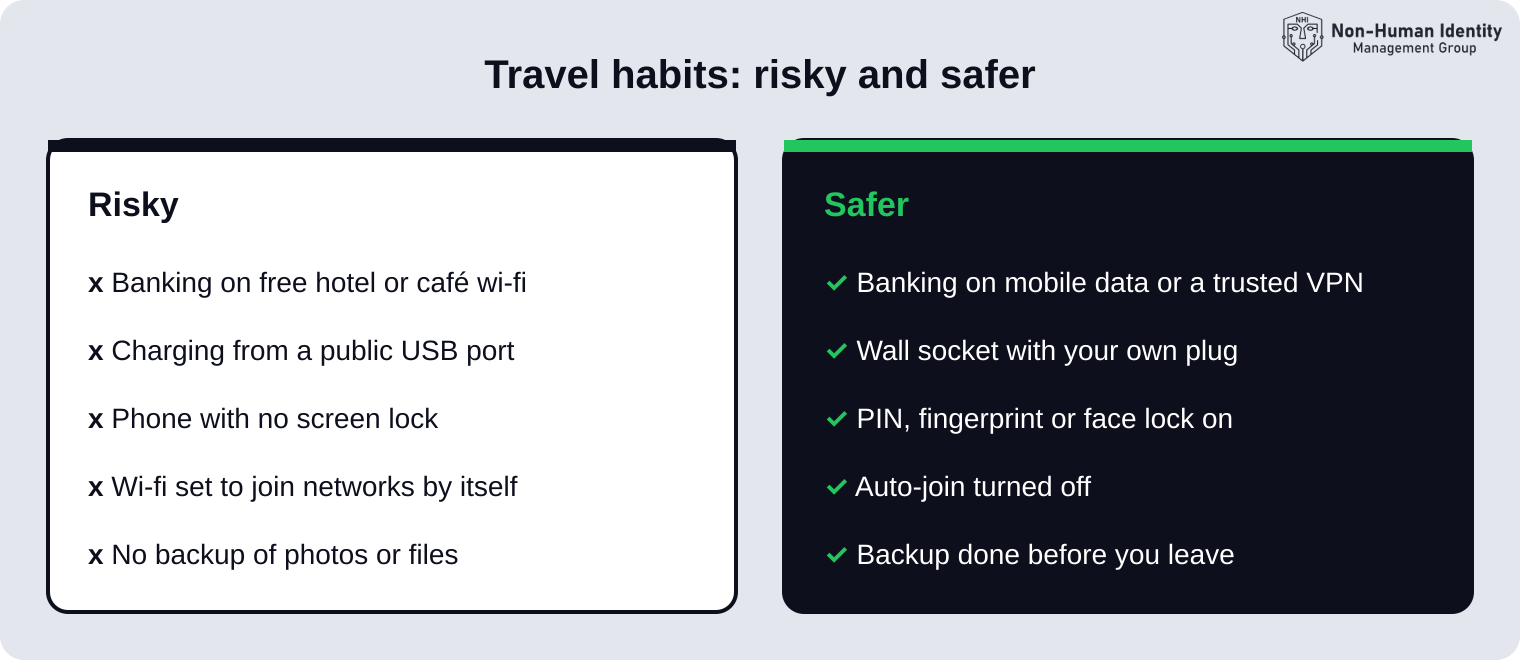
- Free wi-fi in hotels and cafés is shared with strangers, so use mobile data for banking.
- Charge from a wall socket with your own plug, not a public USB port.
- Know how to find, lock and erase a lost phone before you need to.
What you will learn
- Explain why travel brings extra risks for your devices.
- Spot the riskier choices in airports, hotels and cafés.
- Check your phone is ready before a trip.
- Act quickly if a device is lost or stolen.
- Free shared internet (public wi-fi)
- a wireless connection in a shared place that anyone nearby can join.
- Lock and wipe from afar (remote wipe)
- a phone feature that lets you lock or erase a lost device from another device.
What is travel cyber safety?
Think of how you treat your wallet on holiday. You carry less, keep it close and know which pocket it is in. Travel cyber safety is the same care for your phone and laptop.
At home, your devices sit on your own wi-fi, behind your own front door. On a trip they move through airports, taxis, hotels and cafés. They join networks you do not know and charge from sockets you did not set up.
Your phone also holds a lot: banking apps, email, photos, boarding passes and sign-in codes. Losing it abroad can be stressful, so a little care before you leave helps a lot.
Where the comparison stops working: a lost wallet is simply gone. A lost phone can often be found, locked or erased from another device, if you set that up first.
Why does it matter?
Busy places make it easier to lose a device or to have it taken. Shared networks and chargers add a few smaller risks. A few habits cover most of them.
If you are going on holiday
What could happen: your phone is lost on day one, along with your boarding pass, photos and bank app.
Check this: turn on your phone's find-my-device feature and back up your photos before you go.
If you travel for work
What could happen: a work laptop left unlocked in a hotel lobby lets a stranger see client files.
Check this: ask your IT team what to do before a trip and who to call if a device goes missing.
Next: VPNs for Beginners
If you book trips online
What could happen: a fake message about your booking asks you to "confirm" your card details.
Check this: open the booking app or site yourself rather than tapping links in messages.
What does it look like?
Here is a made-up list of wi-fi networks, as you might see it in a hotel lobby.
Example only. All values are made up.
Wi-fi networks near you
  EXAMPLE-Hotel-Guest      (password on key card)  (1)
  EXAMPLE-Hotel-Free       (open, no password)     (2)
  EXAMPLE_Hotel_Guest      (open, no password)     (3)
  Free-Airport-WiFi-0000   (open, no password)     (4)
[ Auto-join: ON ]                                  (5)
- In a real screen, this line would show the network the staff told you to use.
- An open network with no password. Anyone nearby can join it.
- A name very close to the hotel's own. A network with a copied name is called an evil twin.
- A network from somewhere else entirely. Your phone may still try it.
- Auto-join lets your phone connect to networks without asking you.
Why this is risky: it is hard to tell which network is the hotel's. On a shared or fake network, others may be able to watch what you send.
The safer way: ask staff for the exact network name, turn auto-join off, and use mobile data for banking and shopping.[1]
How does it work?
Most travel problems fall into a few simple patterns.
- Devices get lost or taken. Busy airports, taxis and cafés make it easy to leave a phone behind, or for someone to pick it up.
- Shared wi-fi is shared. On public wi-fi, you share the network with strangers. A US communications regulator advises against banking or shopping on it.[1]
- Public chargers can carry data. A USB cable carries data as well as power. The same regulator warns that public USB charging points could be tampered with, called juice jacking.[2]
- Scams follow the trip. Fake booking messages and fake wi-fi pages try to get your card or login details.
- Old software has known gaps. Updates fix weak spots, so a device that is not up to date is easier to get into.
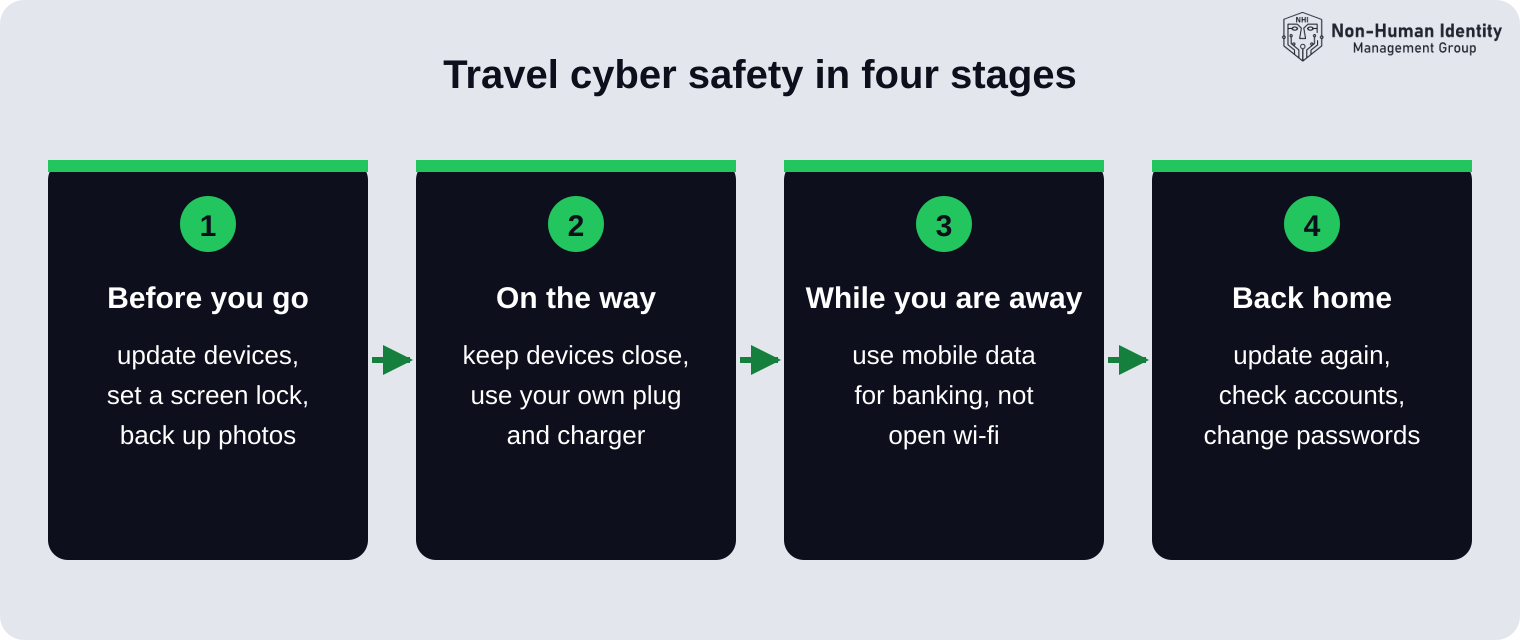
For charging, the regulator suggests a wall socket with your own plug, a charging-only cable that carries no data, or your own portable battery.[2]
A VPN, short for virtual private network, wraps your internet traffic in a protected tunnel. It can help on hotel wi-fi, but choose a trusted one, as some free VPNs come with their own risks.
A worked example
This story is made up to show how it can happen.
Emil Bello is a teacher from Cork. He is flying to Lisbon for a long weekend with friends.
The night before, he spends ten minutes getting ready. He installs the waiting update on his phone and checks it locks with his face and a six-digit PIN. He turns on his phone's find-my-device feature and backs up his photos.
At the airport, a free charging point by the gate has spare USB ports. Emil uses his own plug in a wall socket instead.
At the hotel, he sees two networks with nearly the same name. He asks reception which one is theirs. He still uses mobile data for his banking app.
On the last night, Emil leaves his phone in a taxi. Back at the hotel, he signs in to his phone maker's find-my-device service on his friend's laptop.[3][4] He marks the phone as lost, which locks it and shows a message with his friend's number on the screen.
He calls his mobile provider to tell them, and checks his bank app on the laptop. There are no payments he does not recognise.
The next morning the taxi firm calls his friend. A driver has handed the phone in. Emil gets it back, still locked.
What made the difference: the ten minutes Emil spent before the trip meant he could act straight away.
Myths and mistakes
| What people think | What is true |
|---|---|
| Hotel wi-fi is safe because it has the hotel's name. | Anyone can name a network after a hotel. Ask staff for the exact name, and use mobile data for banking.[1] |
| A USB port only gives power. | USB can carry data too. Use a wall socket with your own plug, a charging-only cable or your own battery.[2] |
| I can set up find-my-device after I lose my phone. | It needs to be switched on before the phone goes missing.[4] |
| Updates can wait until I get home. | Install them before you leave, so you travel with the latest fixes. |
| A screen lock is a hassle on holiday. | It is the main thing between a stranger and your apps if your phone goes missing. |
What can I do this week?
- Install any waiting updates on your phone, tablet and laptop before the day you travel.
- Check your phone locks with a PIN, fingerprint or face.
- Turn on find-my-device, and practise finding your phone from another device.
- Back up your photos and important files, so a lost phone does not mean lost memories.
- Pack your own plug and cable, and a portable battery if you have one.
Checklist
- My devices are up to date.
- Each device has a screen lock.
- Find-my-device is turned on, and I know how to use it.
- My photos and files are backed up.
- Wi-fi auto-join is turned off.
- I use mobile data or a trusted VPN for banking and shopping.
- I charge from a wall socket with my own plug, not a public USB port.
- I know how to contact my bank and mobile provider from abroad without my phone.
Common questions
Is hotel wi-fi safe to use?
It is fine for browsing and maps, with care. You share it with strangers, and it is hard to be sure it is the real network. A US regulator advises against banking or shopping on public wi-fi, so use mobile data or a trusted VPN for those.[1]
Should I use public USB charging points?
It is better not to. USB carries data as well as power, and a tampered port could try to reach your device. Use a wall socket with your own plug, a charging-only cable, or your own portable battery instead.[2]
What should I do first if my phone is lost abroad?
Use your phone maker's find-my-device service from another device. Mark the phone as lost, which locks it. Then tell your mobile provider and your bank. Erase the phone only once you are fairly sure you will not get it back.[3][4]
Do I need a VPN when I travel?
It helps, but it is not essential. A trusted VPN protects your traffic on shared wi-fi. Mobile data is a simple alternative for banking. If you use a VPN, pick a well-known paid service, as some free ones carry their own risks.
Should I take my work laptop on holiday?
Only if you need it. Fewer devices means less to lose. If you do take it, follow your employer's travel rules, keep it locked, and know who to call in IT if it goes missing.
Where next?
Ready for the detail? Read the practitioner guide: Travel Cybersecurity Guide. It goes further into theft protection settings on each phone type, booking scams on the road, and where to get help when a device is lost.
Also useful:
- Lost or Stolen Devices for Beginners
- Smartphone Security for Beginners
- VPNs for Beginners
- Public Wi-Fi Safety Guide
Related NHI Mgmt Group resources: Choosing a VPN Safely Guide · Lost or Stolen Device Response Checklist · Passkeys for Everyone Guide
Key terms
- Public wi-fi
- A wireless internet connection in a shared place that anyone nearby can join.
- Evil twin
- A fake wi-fi network that copies the name of a real one so devices join it.
- Juice jacking
- When a tampered public USB charging point or cable tries to take data or put harmful software on a device.
- VPN
- A protected tunnel for your internet traffic, which helps on networks you do not trust.
- Remote wipe
- Erasing a device from another device, used when a lost phone or laptop is unlikely to come back.
- Software update
- A new version of an app or system that often fixes security weak spots.
Sources and further reading
- Cybersecurity Tips for International Travelers. Federal Communications Commission (FCC). https://www.fcc.gov/consumers/guides/cybersecurity-tips-international-travelers, accessed 28 Nov 2026.
- 'Juice Jacking': Tips to Avoid It. Federal Communications Commission (FCC). https://www.fcc.gov/juice-jacking-tips-to-avoid-it, accessed 28 Nov 2026.
- How to find your lost iPhone or iPad. Apple Support. https://support.apple.com/en-us/101593, accessed 28 Nov 2026.
- Find, secure, or erase a lost Android device. Google Android Help. https://support.google.com/android/answer/6160491, accessed 28 Nov 2026.