When a phone or laptop is lost or stolen, quick steps can protect your accounts, money and data.
This guide is for anyone with a phone, tablet or laptop. If you use a device for work, it matters for your employer too, because work email and files may be on it.
In short
- Use your device maker's find tool from another device to locate it and lock it.
- Tell your mobile provider, your bank and, for a work device, your IT team.
- Change the password for your main email and phone account, and check for sign-ins you do not recognise.
- Erase the device from afar only once you have given up hope of getting it back, and report a theft to the police.
What you will learn
- Follow the first-hour steps when a device goes missing.
- Explain the difference between locking and erasing a device from afar.
- Check that the find feature is turned on before you need it.
- Spot the fake "we found your phone" messages that often follow a theft.
- Find tool (Find My or Find Hub)
- a feature from your device maker that shows where a device is and lets you lock or erase it from another device.
- Wipe from afar (remote wipe)
- erasing a missing device over the internet, so the person holding it cannot see your data.
What is a lost device response?
Think of losing your wallet. You call your bank to cancel the cards, even while you still hope it turns up in a coat pocket. A lost phone or laptop needs the same quick thinking.
A lost device response is the short list of steps you take when a device goes missing. You try to find it, lock it, and protect the accounts it can reach. Your phone is often the key to your email, bank apps and sign-in codes. So it is worth acting fast.
Most phones and many laptops have a built-in find tool. On Apple devices it is called Find My. On Android it is Find Hub. On Windows it is Find My Device. These tools can show where the device is and lock it. Some can also do a remote wipe, which erases it over the internet.[1][2][3]
Where the comparison stops working: a wallet holds a few cards you can cancel. A phone can be signed in to dozens of accounts. Unlike a wallet, you may be able to lock or wipe it from afar. That only works if you set it up beforehand.
Why does it matter?
A missing device is not only the cost of a new one. If someone can get past the lock screen, they may reach your messages, email, photos and payment apps.
If you lose your personal phone
What could happen: someone uses your number to get sign-in codes, or tricks you into giving them your passcode.
Check this: your find tool is turned on and you know how to use it from someone else's device.
If a work laptop or phone goes missing
What could happen: company email, customer files or saved passwords end up in a stranger's hands.
Check this: you know who to tell at work, and how fast. Tell them before you go looking.
If you look after a relative's devices
What could happen: they lose a tablet and do not know the password to lock it from afar.
Check this: help them turn on the find tool and store their account password somewhere safe.
What does it look like?
Here is a made-up first-hour note, like one you might jot down on a borrowed phone.
Example only. All values are made up.
PHONE MISSING  14:10   Device: EXAMPLE-PHONE-0000
14:15 Find tool: last seen near example.invalid    (1)
14:16 Marked as lost, message added                (2)
14:25 Called mobile provider: SIM blocked          (3)
14:35 Called bank: cards and app paused            (4)
14:45 Email password changed, other devices out    (5)
Later: police report ref EXAMPLE-0000              (6)
- The find tool shows where the phone was last seen.
- Marking it as lost locks it and can show a message on the screen.
- The provider can block the SIM so nobody can use your number.
- The bank can pause cards and payment apps.
- Changing the email password helps shut out anyone using the phone.
- The crime reference the police give you goes here.
Why this is risky: every minute the phone stays unlocked and signed in gives someone more time to use it.
The safer way: work down the list in order, and keep notes. Your provider, bank and insurer may ask for them.
How does it work?
Here are the first-hour steps. Do them from another phone or computer.
- Locate. Open your maker's find tool on another device or in a web browser. It can show the device on a map and play a sound.[1][2]
- Lock. Mark it as lost. On an iPhone, Lost Mode locks the phone with your passcode and pauses Apple Pay. You can add a message for whoever finds it.[1] Android and Windows can also lock a device from afar.[2][3]
- Call. Ask your mobile provider to block your SIM or account. Call your bank. For a work device, tell your IT team straight away.[1]
- Secure accounts. Change the password for your main email and your phone account. Check for sign-ins or changes you did not make.[1][3]
- Report and decide. Report a theft to the police. They may ask for the serial number. Erase the device from afar only when you have given up on getting it back.[1]
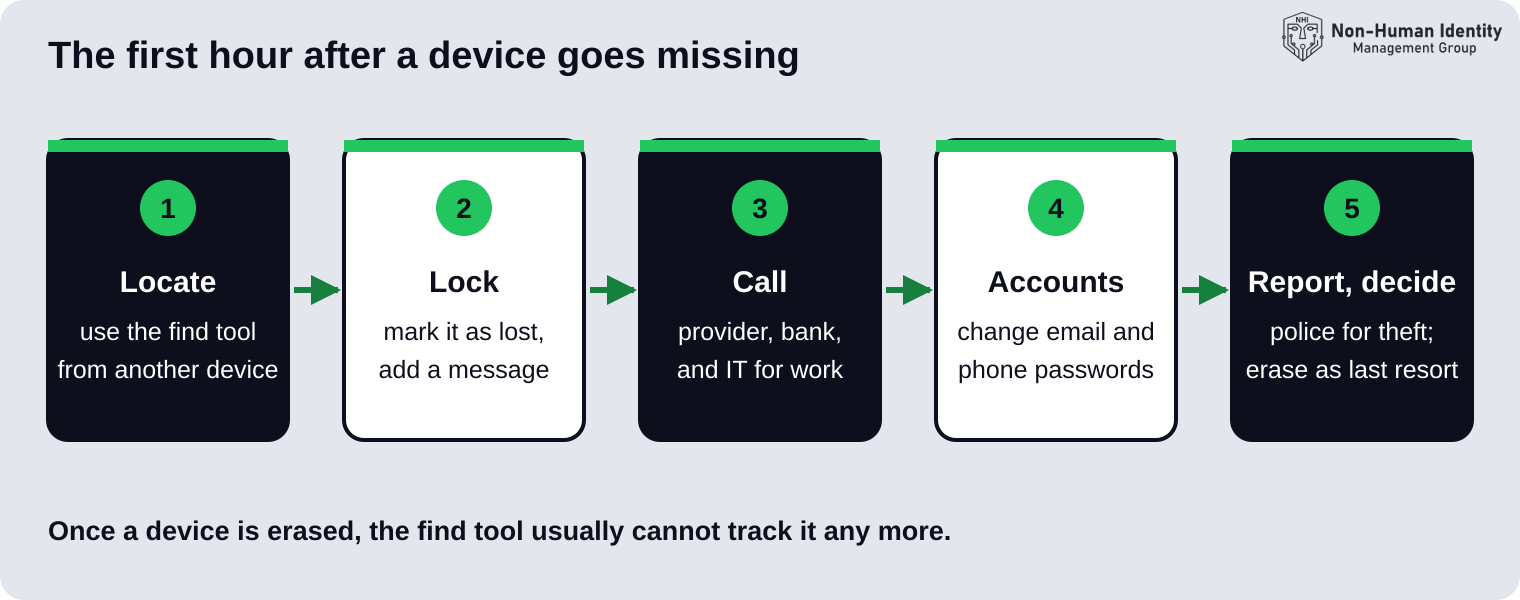
Why erase last? Erasing cannot be undone. Once an Android phone is reset, it no longer shows in Find Hub, so you cannot track it.[2] Apple also advises not to remove the phone from Find My, even after erasing. That keeps Activation Lock on, the setting that ties the phone to you, which makes it harder to sell on.[1]
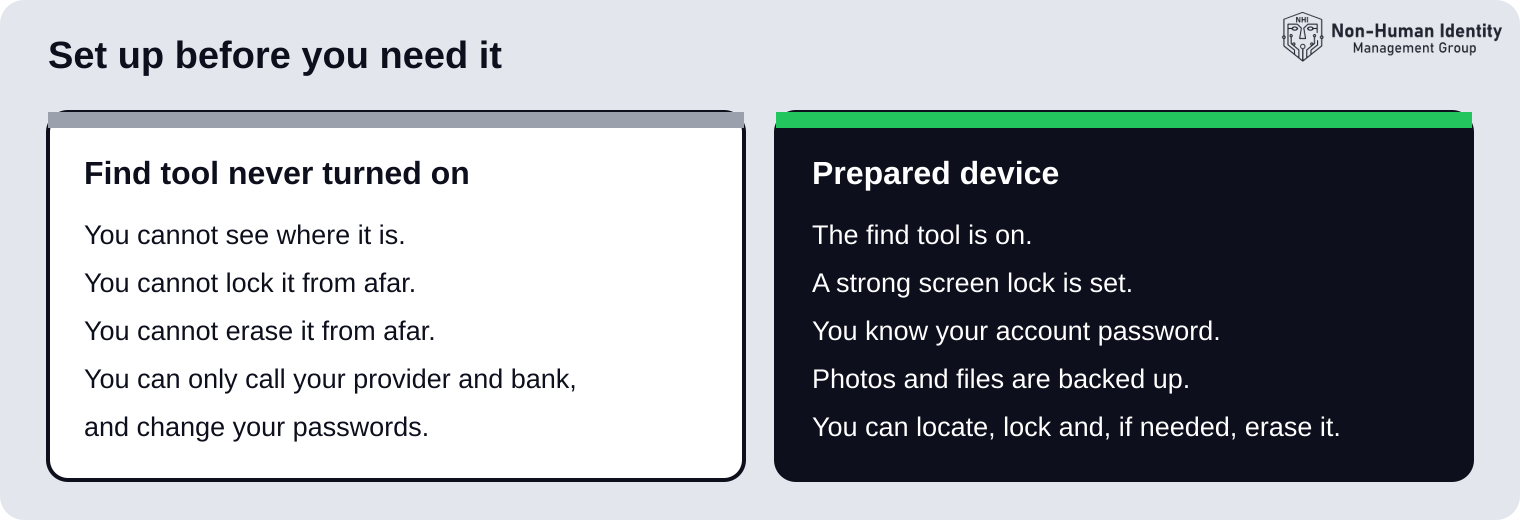
The find tools only help if they were turned on before the device went missing.[4] Some also need the device to have power and an internet connection.[1][2][3]
A worked example
This story is made up to show how it can happen.
Gareth Llewellyn is a bus driver in Cardiff. On Saturday he leaves a café and realises his phone is gone. It was on the table a minute ago.
He goes back, but it is not there. He borrows his friend's phone and signs in to the find tool in a web browser. The map shows his phone a few streets away, moving.
Gareth does not chase it. He marks the phone as lost, which locks it, and adds a message asking for it to be handed in. Then he calls his mobile provider, using the number from its website, and asks them to block his SIM.
Next he calls his bank on the number on the back of his card. They pause his card in the banking app. He changes his email password from his friend's phone and signs out every other device.
That evening he reports the theft to the police and writes down the reference. He finds his phone's serial number on the box at home.
The next day a text arrives on his partner's phone. It says his phone has been found and asks him to sign in at a link. Gareth remembers Apple's advice that it will not contact you to say a device was found.[1] He deletes the text.
After a week with no sign of the phone, he erases it from afar and claims on his insurance.
What made the difference: Gareth had turned on the find tool months earlier, so he could lock the phone soon after losing it.
Myths and mistakes
| What people think | What is true |
|---|---|
| I should erase it straight away. | Lock it first. Once erased, you may no longer be able to track it.[2] |
| I can turn on the find tool after I lose the phone. | It has to be on beforehand. Check it today.[1] |
| Once I have erased it, I should remove it from my account. | Apple advises against this. Removing it switches off Activation Lock and makes the phone easier to sell on.[1] |
| A message saying my phone was found must be good news. | It can be a scam to get your passcode or password. Do not share codes or passwords with anyone who asks.[1] |
| It is a work laptop, so it is not my problem. | Tell your IT team at once. They may be able to lock it and protect company data. |
What can I do this week?
- Turn on your device maker's find tool on each phone, tablet and laptop.
- Practise signing in to it from a web browser, so you know how it works.
- Set a strong screen lock on every device.
- Write down your device serial numbers and your bank and provider help numbers, and keep them away from your phone.
- Turn on automatic backups for photos and files.
Checklist
- The find tool is turned on for each of my devices.
- I can sign in to it from someone else's device.
- Every device has a screen lock.
- My photos and files are backed up.
- I have my provider's and bank's help numbers written down.
- I know who to tell at work if a work device goes missing.
- I know not to share passcodes or codes with anyone who says they found my phone.
Common questions
What is the first thing to do if my phone is lost?
Use your maker's find tool from another device to see where it is, then mark it as lost to lock it. Next, call your mobile provider and your bank, and change your main email password. Report a theft to the police.
Should I erase my phone from afar?
Only as a last resort. Erasing cannot be undone, and on Android a reset phone no longer shows in Find Hub. Lock it first and try to get it back. If you give up on it, erasing helps protect your data.
Can the thief use my phone number?
They may be able to, if the SIM card is still active. That could let them receive your text codes. Ask your mobile provider to block the SIM or account. They can usually give you a new SIM with the same number.
I got a message saying my phone was found. Is it real?
Be very careful. Thieves sometimes send fake "found" messages to trick you into giving your passcode or account password. Apple says it will not contact you to say a device was found.[1] Do not click links or share codes.
Does locking a laptop protect my files?
Locking helps stop casual access. Your files are better protected if the laptop's storage is encrypted, which scrambles data so it cannot be read without your key. Many laptops can switch this on in their settings.
Where next?
Ready for the detail? Read the practitioner guide: Lost or Stolen Device Response Checklist. It goes further into how organisations take reports, cut off access to work accounts, and decide whether a lost device is a data breach.
Also useful:
- Smartphone Security for Beginners
- SIM Swap Fraud for Beginners
- Disposing of Old Devices for Beginners
- Encryption for Beginners
Related NHI Mgmt Group resources: Securing Your Smartphone Guide · Disk Encryption Guide: BitLocker and FileVault · Travel Cyber Safety for Beginners
Key terms
- Remote wipe
- Erasing a missing device over the internet, so whoever holds it cannot reach your data.
- Factory reset
- A built-in option that erases a device's data and settings and returns it to its original state.
- Full disk encryption
- Scrambling everything stored on a device, so it cannot be read without the right password or key.
- Mobile device management (MDM)
- Tools an employer uses to set up, lock and wipe work phones and laptops.
- Multi-factor authentication (MFA)
- Asking for two or more kinds of proof, such as a password and a code, before letting you in.
- Account takeover
- When someone else gets into one of your accounts and uses it as if they were you.
Sources and further reading
- If your iPhone or iPad is lost or stolen (How to find your lost iPhone or iPad). Apple Support. https://support.apple.com/en-us/101593, accessed 28 Nov 2026.
- Find, secure, or erase a lost Android device. Android Help, Google. https://support.google.com/android/answer/6160491, accessed 28 Nov 2026.
- Find or lock a lost Windows device. Microsoft Support. https://support.microsoft.com/en-us/account-billing/find-and-lock-a-lost-windows-device-890bf25e-b8ba-d3fe-8253-e98a12f26316, accessed 28 Nov 2026.
- How To Protect Your Phone From Hackers. Federal Trade Commission (FTC), Consumer Advice. https://consumer.ftc.gov/articles/how-protect-your-phone-and-data-it, accessed 28 Nov 2026.