A VLAN is a setting that splits one physical network into separate groups of devices.
This guide is for people new to IT work and for anyone who looks after a small office network. If your office has staff computers, guest Wi-Fi and devices like printers or card machines on the same equipment, VLANs are one way to keep them apart.
In short
- A VLAN (virtual local area network) groups devices on shared network equipment, so each group behaves like its own network.
- Devices in different VLANs need a router or firewall to talk, which gives you a place to set rules.
- A VLAN on its own is a grouping, not a wall. You still need rules between VLANs and careful switch settings.
- Common steps are: one VLAN per type of device, no use of the default VLAN, and unused ports switched off.
What you will learn
- Explain what a VLAN is in one sentence.
- Spot which devices in an office should sit in their own VLAN.
- Explain why a VLAN needs rules between groups to add security.
- Ask your IT supplier the right questions about your network.
- Network box with many sockets (switch)
- a device that connects computers, printers and other kit in one place.
- Separate group on shared kit (VLAN)
- a setting that makes some switch sockets act as their own network.
- Traffic director (router)
- a device that passes traffic between networks and can apply rules.
What is a VLAN?
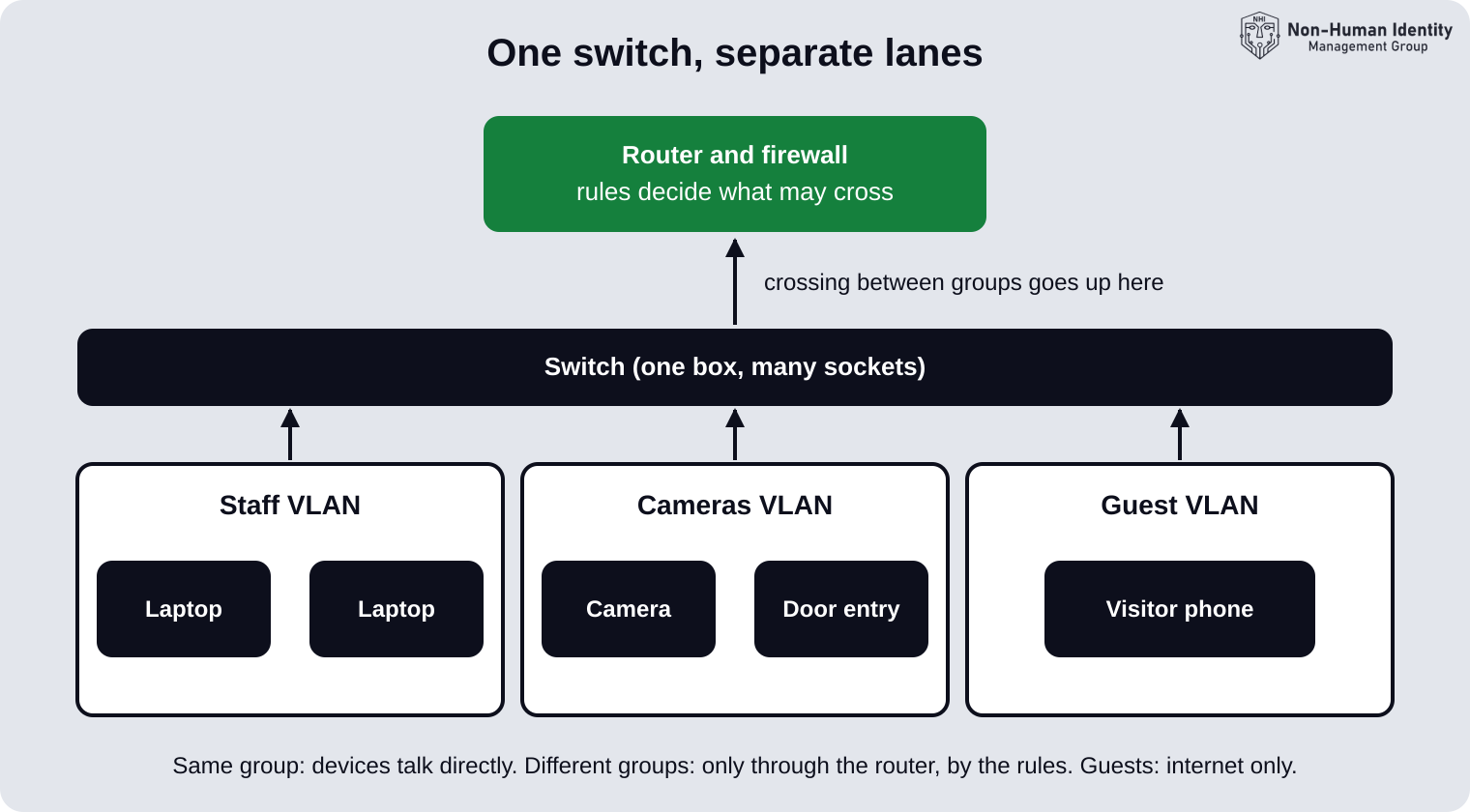
Think of a wide road with painted lanes. Buses use one lane, cars another and bikes a third. They share the same road, but each stays in its own lane. To cross over, you have to go through a junction.
A VLAN works the same way on a network. A switch is the box with many sockets that your computers plug into. A VLAN setting tells the switch which sockets belong to which group. Devices in one group can talk to each other, but not to another group, unless traffic goes through a router.[2]
VLAN stands for virtual local area network. "Virtual" means the split is made by settings, not by buying separate equipment for each group.
Where the comparison stops working: paint on a road is not a barrier, and nor is a VLAN on its own. A badly set-up switch can let traffic jump into the wrong group, so a VLAN needs care to stay separate.[1]
Why does it matter?
If every device sits in one big group, an attacker who gets into one weak device can try to reach all the others. US security guidance advises putting similar systems into their own VLANs. That makes it harder to move from an easy target to an important one.[1]
If you run a small office
What could happen: a visitor on your guest Wi-Fi can see your staff computers and the shared drive.
Check this: ask your IT supplier whether guests, staff and devices are on separate VLANs.
If you are new to IT work
What could happen: you plug a new printer into any free socket, and it lands in the wrong group.
Check this: find out which sockets belong to which VLAN before you plug anything in.
If you look after smart devices
What could happen: a weak smart camera becomes a way into the computers that hold customer records.
Check this: put cameras, door entry and other smart devices in their own VLAN.
What does it look like?
Here is a made-up VLAN plan for a small dental surgery. You might keep a table like this with your network notes.
Example only. All values are made up.
# EXAMPLE VLAN plan, Example Surgery
VLAN 10  Staff computers     sockets 1-12      (1)
VLAN 20  Patient records     socket 13         (2)
VLAN 30  Printers            sockets 14-15
VLAN 40  Cameras and door    sockets 16-18     (3)
VLAN 50  Guest Wi-Fi         internet only     (4)
VLAN 999 Unused, switched off sockets 19-24    (5)
Rule: VLAN 50 may not reach VLANs 10 to 40     (6)
- Each group gets a number. Staff computers share one group.
- The most sensitive system sits in its own group.
- Smart devices are kept away from staff computers.
- Guests can reach the internet, but nothing inside.
- Spare sockets are switched off and parked in an unused group.
- In a real file, this line would point to a rule on the router or firewall.
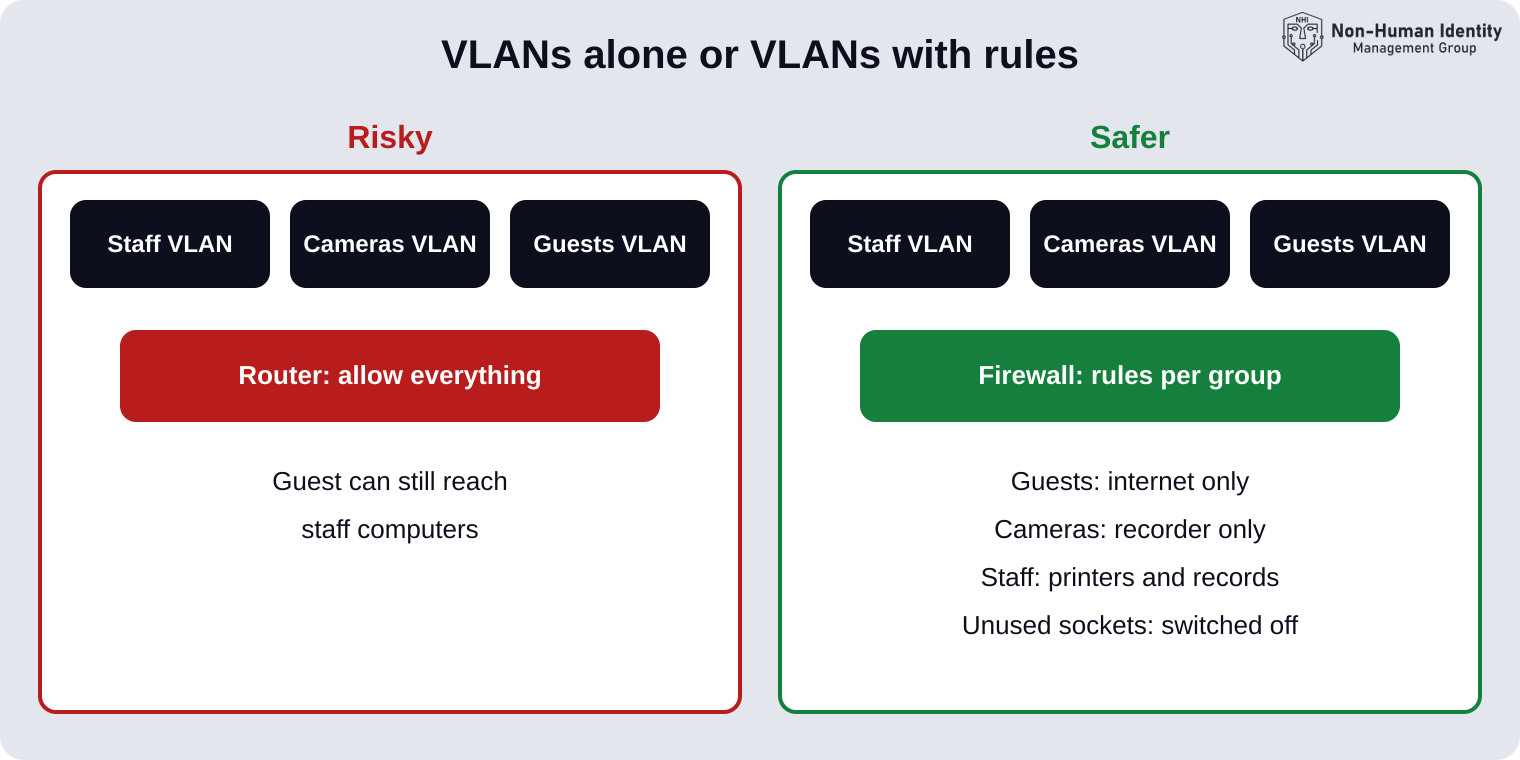
Why this is risky: without the last line, the plan only groups devices. If the router lets everything through, guests could still reach patient records.
The safer way: write down which groups may talk to which. Then set those rules on the router or firewall between them.[1]
How does it work?
Here is what happens when a device sends traffic on a network with VLANs.
- Sockets are given a group. On the switch, each socket (called a port) is set to one VLAN. This kind of socket is an access port, and the device plugged in does not need to know about VLANs.[2]
- Traffic stays in its group. A computer in VLAN 10 can reach other VLAN 10 devices directly, but not devices in VLAN 20.[2]
- Switches share a link. When two switches connect, one cable can carry several VLANs. This is called a trunk. Each piece of traffic gets a small label saying which VLAN it belongs to.[2]
- Crossing needs a junction. To go from one VLAN to another, traffic must pass through a router or firewall.[2]
- Rules decide what crosses. At that junction, rules allow only what is needed, such as staff computers reaching the printers.[1]
The labels on shared links follow a common standard from the IEEE, a body that writes networking standards.[3] You will often see VLANs described by that standard's name in switch settings.
A worked example
Lars Fairweather is practice manager at Quarry Dental, a small surgery with eight staff. Everything plugs into one switch in a cupboard: staff computers, the patient records server, two printers, a door camera and the waiting room Wi-Fi.
A patient mentions that, on the free Wi-Fi, their phone showed the surgery's printers. Lars is worried. If a guest can see the printers, what else can they see?
He calls the surgery's IT supplier, Orla Nakamura. She explains the road with lanes. Right now, everything is in one lane, so guests drive alongside the patient records.
Orla draws up a plan like the sample above. Staff, records, printers, cameras and guests each get their own VLAN. She uses new VLAN numbers and leaves the switch's default group unused.
Next, she sets rules on the firewall. Guests can reach the internet only. Staff computers can reach the records server and printers. The camera can reach only its recorder.
Last, she switches off the spare sockets in the waiting room and parks them in an unused group. A free socket on the wall no longer leads anywhere.
Lars tests it from his own phone on the guest Wi-Fi. The printers no longer appear. He keeps a copy of Orla's plan in the office file, so the next new device goes into the right lane.
Myths and mistakes
| What people think | What is true |
|---|---|
| A VLAN is a security wall. | A VLAN groups devices. Security comes from the rules between groups and careful switch settings.[1] |
| The switch's default group is fine to use. | Guidance advises moving traffic off the default VLAN, because it may reach across the whole network.[1] |
| Spare sockets do no harm. | A live spare socket lets someone plug in a device. Switch them off and park them in an unused group.[1] |
| VLANs need separate switches for each group. | No. One switch can hold many VLANs. That is the point of the "virtual" part.[2] |
| Once set up, VLANs look after themselves. | New devices and moved cables can end up in the wrong group. Keep the plan up to date and check it. |
What can I do this week?
- List the types of device on your network: staff, guests, printers, cameras and payment kit.
- Ask your IT supplier which of those groups share a VLAN today.
- Check from the guest Wi-Fi whether you can see any office printers or shared drives.
- Ask whether unused wall sockets are switched off.
Checklist
- Guests, staff and smart devices are on separate VLANs.
- Sensitive systems, such as patient or customer records, sit in their own group.
- Rules on the router or firewall allow only the traffic each group needs.
- The switch's default VLAN is not used for everyday traffic.
- Unused sockets are switched off and parked in an unused group.
- Each switch socket is set to a fixed role, not left to decide for itself.
- A written VLAN plan exists and is updated when devices change.
Common questions
Is a VLAN the same as a subnet?
Not quite, but they usually go together. A VLAN groups devices on the switch. A subnet is a range of network addresses. Most designs give each VLAN its own subnet, so the router can tell the groups apart and apply rules between them.
Do I need VLANs for a small office?
Often it helps. If guests, staff and smart devices share one network, a VLAN for each is a common way to keep them apart. Many business routers and switches support VLANs. Ask your supplier to set them up and to add rules between the groups.
Can attackers jump between VLANs?
Yes, if switches are badly set up. This is called VLAN hopping. Fixing each socket's role, not using the default VLAN and switching off unused sockets all make it harder.[1][2] The practitioner guide covers the details.
Does guest Wi-Fi use VLANs?
Usually, yes, on business equipment. The guest network is often placed in its own VLAN with rules that allow internet access only. Check with your supplier, because some setups put guests on the same group as staff by default.
What is a trunk port?
A trunk port is a switch connection that carries several VLANs over one cable, usually between two switches. Each piece of traffic carries a small label saying which VLAN it belongs to, so the other end can keep the groups apart.
Where next?
Ready for the detail? Read the practitioner guide: Layer 2 Attacks Guide. It goes further into how VLAN hopping and other switch attacks work, how to spot them and the switch settings that harden a network.
Also useful:
- Network Segmentation for Beginners
- How Routers and Switches Work for Beginners
- Small Office Networks for Beginners
- Firewall Rules for Beginners
- IP Addresses and Subnets for Beginners
Related NHI Mgmt Group resources: Network Segmentation Guide · Network Access Control for Beginners
Key terms
- VLAN
- A setting that groups devices on shared network equipment so they act as a separate network.
- Switch
- A device that connects many devices on a local network.
- Access port
- A switch socket set to carry one VLAN, usually for a single device.
- Trunk port
- A switch connection that carries traffic for several VLANs at once, each labelled.
- Native VLAN
- The VLAN that unlabelled traffic on a trunk is placed in.
- VLAN hopping
- A trick that sends traffic into a VLAN it should not reach, often through badly set-up switches.
- Network segmentation
- Splitting a network into parts so trouble in one part is harder to spread.
Sources and further reading
- Network Infrastructure Security Guidance (PP-22-0266, version 1.0). US National Security Agency, March 2022. https://www.aha.org/system/files/media/file/2022/03/nsa-network-infrastructure-security-guidance-for-network-administrators-march-2022.pdf, accessed 28 Nov 2026.
- Fundamentals of 802.1Q VLAN Tagging. Cisco Meraki Documentation, Cisco. https://documentation.meraki.com/General_Administration/Tools_and_Troubleshooting/Fundamentals_of_802.1Q_VLAN_Tagging, accessed 28 Nov 2026.
- IEEE 802.1Q, Bridges and Bridged Networks. IEEE 802.1 Working Group. https://1.ieee802.org/dcb/802-1q/, accessed 28 Nov 2026.