Network access control checks each device before it joins a network, then decides what it may reach.
This guide is for anyone who wonders how an office network knows which laptops, phones and printers to trust. You do not need to be a network expert. If your business shares one Wi-Fi password with everyone, this topic is about you.
In short
- Network access control, or NAC, asks every device to prove who it is before it gets normal access.
- It then places each device in the right area: staff, guests, equipment, or a holding area for devices that fail the check.
- A device certificate, a digital ID card for a machine, is much harder to fake than a hardware address that can be copied.
- Most rollouts start in a watch-only mode, so they can fix problems before anything is blocked.
What you will learn
- Explain what network access control does and why one shared password is not enough.
- Spot devices on your network that nobody can name.
- Check whether guests and staff use separate networks.
- Ask your IT provider the right questions about stronger device checks.
- Device check at the door (802.1X)
- the common standard that makes a device prove itself before a network lets its traffic through.
- Digital ID for a machine (device certificate)
- a hard-to-copy credential a laptop or phone shows to prove which device it is.
- Holding area (quarantine network)
- a walled-off part of the network for devices that fail the check.
What is network access control?
Think of a staff car park with a barrier. A camera reads each car's permit before the barrier lifts. Staff park in one area, visitors in another, and cars with no permit wait by the gate.
Network access control, or NAC, does the same for devices. A network is built from boxes called switches, for cables, and access points, for Wi-Fi. Every device connects through one of them.
With NAC, each socket and each Wi-Fi connection becomes a checkpoint. Before the device gets normal access, the network asks three things. Who are you? Can you prove it? Where should you be allowed to go?
The main standard behind this is called 802.1X. It lets a network manager limit the network to devices that have proved who they are.[1]
Where the comparison stops working: a car park barrier checks a car once, at the gate. A network can check a device again later, and move it to another area without anyone touching it.
Why does it matter?
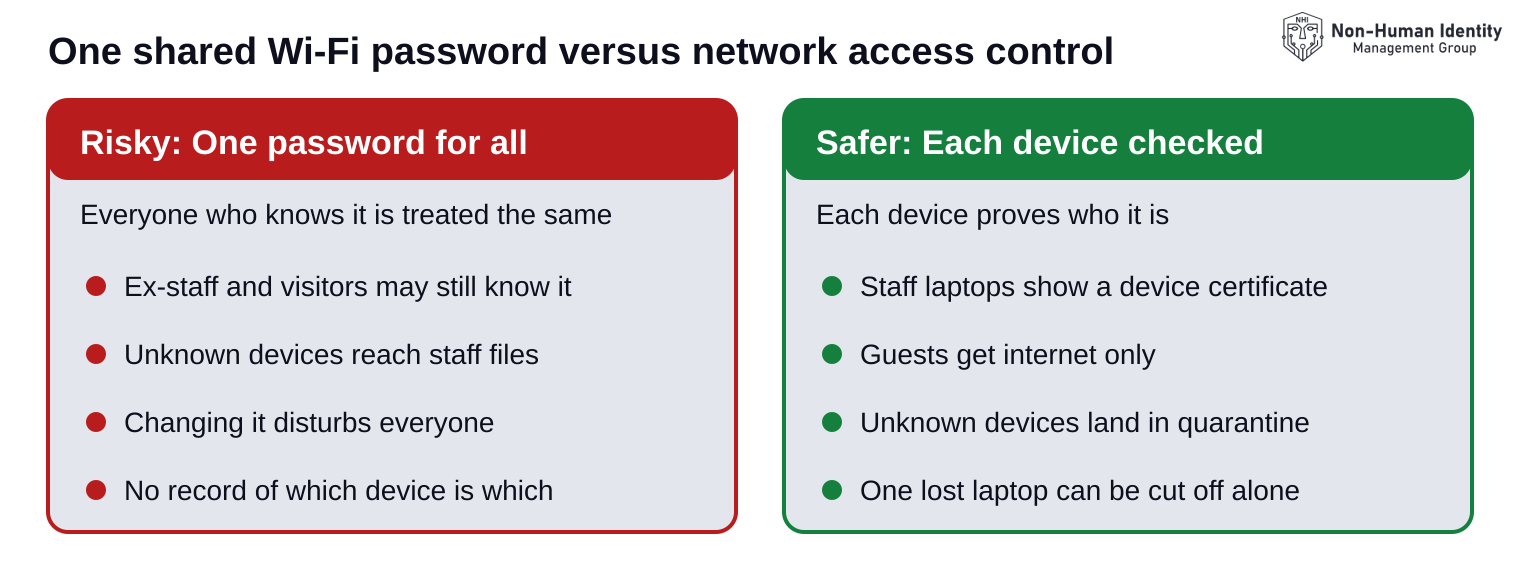
Without NAC, anyone who plugs into a spare wall socket, or knows the Wi-Fi password, is often treated like staff. Once inside, they may be able to reach files, printers and tills.
If you run a small business
What could happen: a past visitor still knows the Wi-Fi password. Their phone can join the same network as your files.
Check this: set up a separate guest Wi-Fi that reaches the internet only.
If you are new to IT work
What could happen: you are asked about "NAC" or "802.1X" in an audit and the terms mean nothing to you.
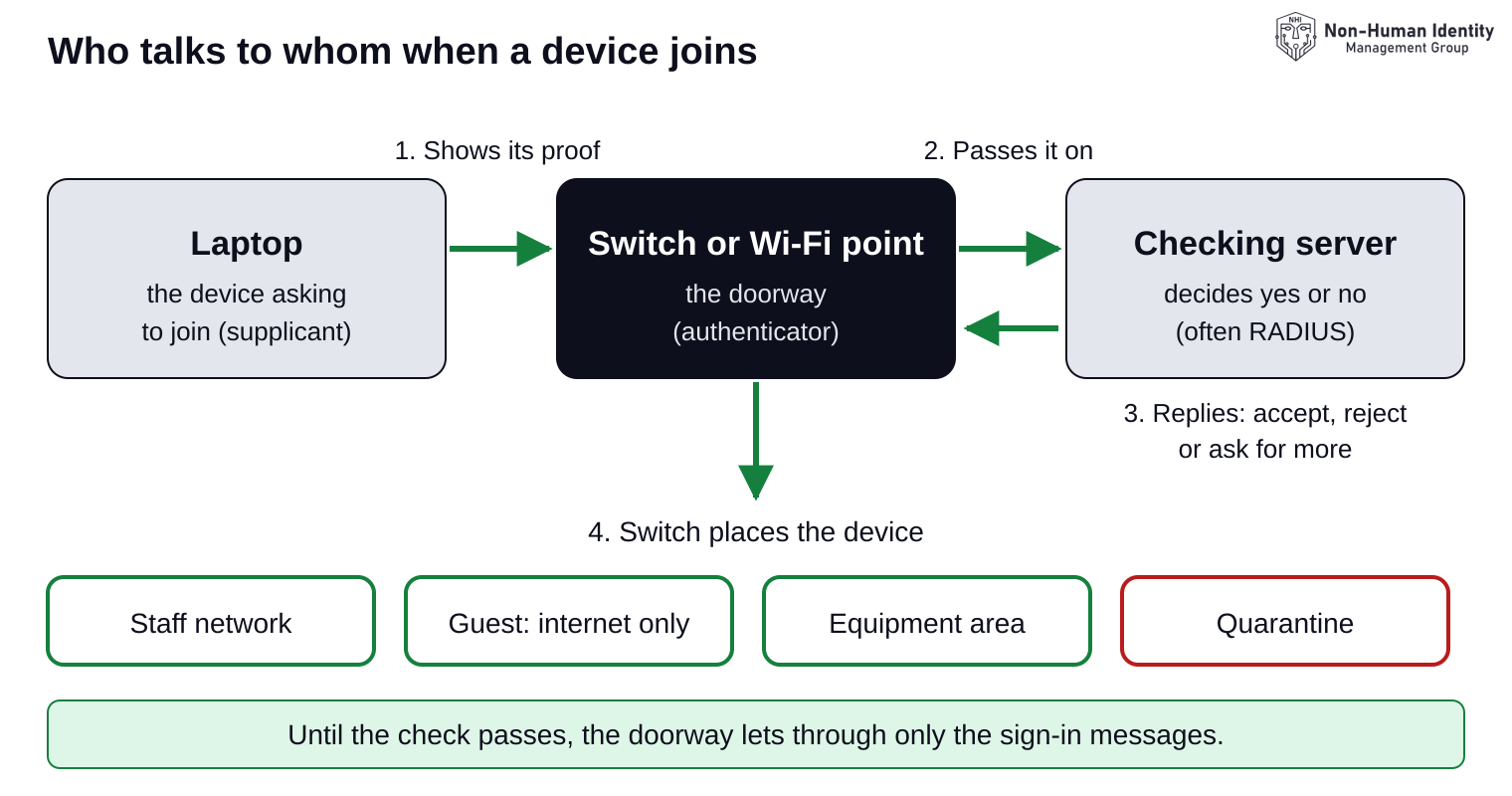
Check this: learn the three parts in Figure 1: the device, the doorway and the checking server.
If you manage a team
What could happen: nobody can say what is connected to the network, so a strange device goes unnoticed for months.
Check this: ask for a list of connected devices, with an owner for each one.
If you look after shared equipment
What could happen: a printer or camera that cannot prove itself properly is let in by its hardware address, which someone else could copy.
Check this: keep such devices in their own small area that reaches only what they need.
What does it look like?
Here is a made-up page from a network's connection log. It shows what NAC decides as devices try to join.
Example only. All values are made up.
Connection log: office.example.invalid
09:01  LAPTOP-EXAMPLE-01  certificate OK   -> staff network   (1)
09:04  PHONE-GUEST-0000   guest sign-in    -> guest network   (2)
09:10  PRINTER-FAKE-02    hardware address -> equipment area  (3)
09:15  UNKNOWN-0000       no proof         -> quarantine      (4)
09:15  Mode: watch only (would have blocked UNKNOWN-0000)     (5)
- A staff laptop shows its device certificate and joins the staff network.
- A visitor's phone gets internet only, with no route to staff files.
- A printer that cannot do the full check is let in by its hardware address, into a small, limited area.
- A device with no proof goes to the holding area. Someone should find out what it is.
- In watch-only mode, the network records what it would block but does not block it yet.
Why this is risky: without these checks, all five devices would get the same access as the staff laptop.
The safer way: give staff devices certificates, give guests their own network and keep weaker devices in limited areas.
How does it work?
The device check has three parts. The device asking to join is called the supplicant. The switch or Wi-Fi point is the doorway, called the authenticator. A checking server makes the decision. In plain words:
- Connect. A device plugs into a socket or joins the Wi-Fi. Until it is checked, the doorway lets through only sign-in messages.
- Prove. The device shows its proof. Strong setups use a method called EAP-TLS, in which the device and the server each prove who they are with certificates.[4]
- Decide. The doorway passes the request to the checking server, which often uses a system called RADIUS. The server replies accept, reject, or ask for more information.[3]
- Place. The reply tells the doorway where to put the device: the staff network, the guest network, an equipment area, or the holding area.
- Watch. Connections are logged. If a device later fails a check, or is reported lost, it can be moved or cut off.
Some devices, such as older printers, cameras and building sensors, cannot do the full check. Networks often let these in by their hardware address, called a MAC address. Cisco's guide says this method is not strong, because someone can copy the address of a valid device.[2] That is why such devices belong in small, limited areas.
A worked example
Mariam Arslan runs a small, made-up architecture studio with twelve staff. Everyone uses the same Wi-Fi password, including visitors and the plotter repair engineer. The password has not changed in five years.
One afternoon, a stranger is seen plugging a laptop into a socket in the meeting room. Mariam asks her IT provider, Ugo Ochieng, to tighten things up.
Ugo starts by listing every connected device for two weeks. He finds 48 devices, including three phones nobody can name.
He proposes three networks: staff, guests and equipment. Studio laptops get device certificates and join the staff network with the full check. Visitors get a guest Wi-Fi that reaches the internet only. The large-format plotter cannot do the full check, so it goes into a small equipment area that reaches only the computers that print to it.
Ugo runs everything in watch-only mode for a month. Nothing is blocked while he fixes the devices that would fail. He agrees a fallback with Mariam. If the checks ever stop work, he can put a socket back in watch-only mode. Each such change is written down and reviewed the next day.
The meeting room sockets are switched off unless someone books them. When the checks go live, an unknown laptop plugged into a socket lands in the holding area, with no route to client drawings.
The studio is not immune to attack. A stolen staff laptop would still carry a valid certificate until Ugo cancels it. But Mariam now knows what is connected, and strangers no longer get the same access as staff.
Myths and mistakes
| What people think | What is true |
|---|---|
| A strong Wi-Fi password is the same as NAC. | A shared password proves only that someone knows it. NAC checks each device and can remove one without changing everyone's password. |
| Filtering by hardware address keeps intruders out. | Hardware addresses can be copied. Cisco describes this method as not strong for that reason.[2] |
| NAC is only for Wi-Fi. | The same standard covers wired sockets as well as wireless networks.[1] |
| Once a device is let in, it is safe. | A trusted device can still be infected or stolen. Limited areas, logs and cancelling lost devices' certificates still matter. |
| NAC replaces a firewall. | NAC controls who joins the local network. Firewalls and other controls decide what each device can reach after that. |
| Switching on the checks is a one-day job. | Most rollouts start in watch-only mode first, because blocking unknown devices too early can stop real work. |
What can I do this week?
- List every device on your network. Include printers, cameras and anything nobody can name.
- Set up a guest Wi-Fi that reaches the internet only. Change the staff password if many people know it.
- Switch off wall sockets in public rooms, such as reception, unless they are needed.
- Ask your IT provider if your network kit can run the full device check, and what it would take.
Checklist
- I can explain in one sentence what network access control does.
- There is an up-to-date list of devices allowed on the network, with an owner for each.
- Guests use a separate network that cannot reach internal systems.
- Unused sockets in public areas are switched off.
- Staff devices join with the full check, ideally using device certificates.
- Devices let in by hardware address sit in small, limited areas.
- Devices that fail the check go to a holding area, not the main network.
- Any switch back to watch-only or open access is approved, written down and time-limited.
Common questions
Does a small business need NAC?
Not always in full. A very small office may get most of the benefit from separate staff and guest Wi-Fi, switched-off public sockets and a device list. Many business Wi-Fi systems can also run the full device check for the staff network when you are ready.
Why are certificates better than passwords for joining a network?
A certificate is tied to one device and is hard to guess or trick someone out of. With the strong method, both the device and the server prove who they are.[4] Passwords can be shared, reused or stolen, and one leak affects everyone.
What happens to printers and cameras that cannot do the check?
They are usually let in by their hardware address and kept in a small area that reaches only what they need. Because that address can be copied, the limited area is the real protection, so keep it as small as you can.
What is watch-only mode?
It is a setting where the network checks and logs devices but does not block them yet. It shows which devices would fail, so you can fix them first. Once the log is clean, you switch the checks on for real, one area at a time.
How is NAC different from zero trust access?
NAC controls who joins the local network. Zero trust network access controls access to each app, wherever the person is working. Many organisations use both, because each covers a gap the other leaves open.
Where next?
Ready for the detail? Read the practitioner guide: Network Access Control (NAC) Guide. It goes further into network design, device health checks and planning a rollout from watch-only to full enforcement.
Also useful:
- 802.1X, EAP and RADIUS Explained
- 802.1X EAP TLS vs MAB
- Network Security for Beginners
- Zero Trust Network Access (ZTNA) for Beginners
Related NHI Mgmt Group resources: Network access control (NAC) rollout playbook · Network Access Control Buyer's Guide · 802.1X and EAP-TLS Enterprise Wi-Fi Guide · NAC for OT Networks Guide
Key terms
- Network access control
- Rules and checks that decide which devices may join a network and what they may reach.
- IEEE 802.1X
- The standard that makes a device prove itself before a socket or Wi-Fi connection passes its traffic.
- Supplicant
- The device, or the software on it, that asks to join and answers the checks.
- RADIUS
- A common system the checking server uses to decide whether a device or user may connect.
- EAP-TLS
- A strong sign-in method in which the device and the server each prove who they are with certificates.
- Device Certificate
- A digital ID that proves which device is connecting; it needs an owner and an expiry date like any other credential.
- MAC Authentication Bypass
- A fallback that lets a device in by its hardware address; handy, but the address can be copied.
- Guest Network
- A separate network for visitors that keeps them away from internal systems.
Sources and further reading
- IEEE 802.1X, IEEE Standard for Local and Metropolitan Area Networks: Port-Based Network Access Control (Active Standard). IEEE Standards Association. https://standards.ieee.org/ieee/802.1X/7345/, accessed 28 Nov 2026.
- MAC Authentication Bypass Deployment Guide. Cisco Systems, September 2011. https://www.cisco.com/c/en/us/td/docs/solutions/Enterprise/Security/TrustSec_1-99/MAB/MAB_Dep_Guide.html, accessed 28 Nov 2026.
- RFC 2865, Remote Authentication Dial In User Service (RADIUS). Internet Engineering Task Force (IETF), June 2000. https://www.rfc-editor.org/rfc/rfc2865, accessed 28 Nov 2026.
- RFC 5216, The EAP-TLS Authentication Protocol. Internet Engineering Task Force (IETF), March 2008. https://www.rfc-editor.org/rfc/rfc5216, accessed 28 Nov 2026.