A hacker is someone who uses computer skills to get into systems, with or without permission.
This guide is for anyone who has heard "white hat" or "black hat" and wants to know what they mean. If you run a website, an online shop or a small office network, you may one day get a message from a hacker, so it helps to know which kind you are dealing with.
In short
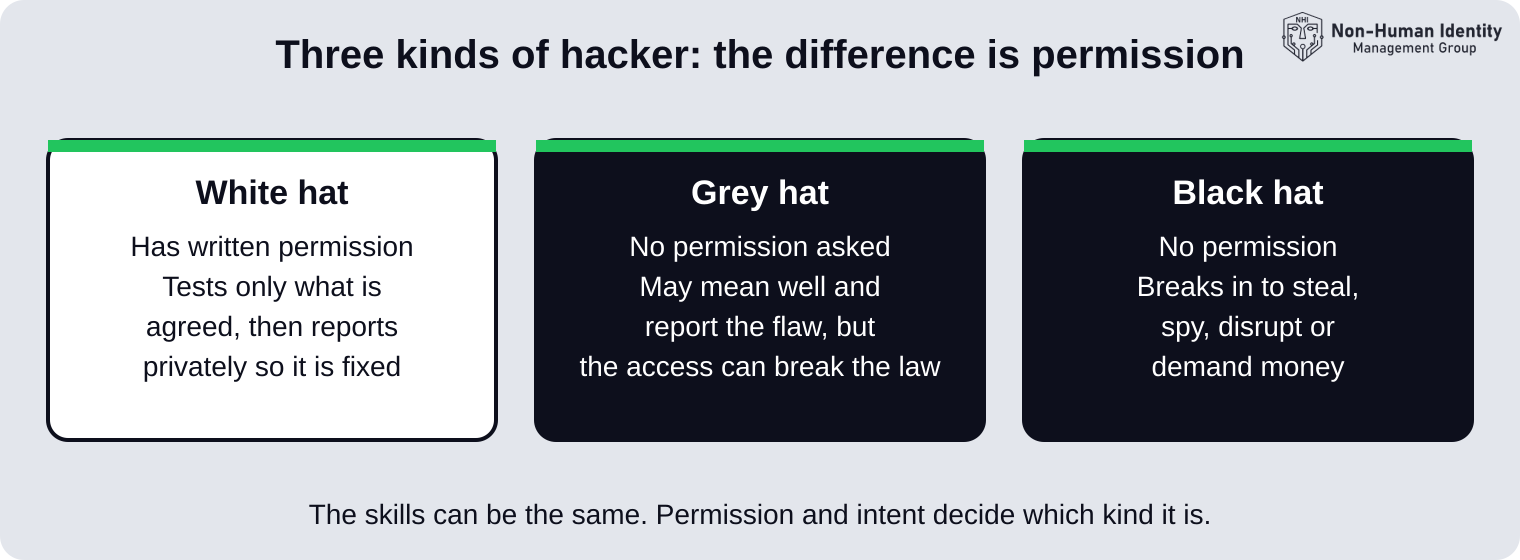
- White hat hackers test systems with the owner's written permission and report what they find.
- Black hat hackers break in without permission to steal, spy, disrupt or demand money.
- Grey hat hackers act without permission but may say they mean well. In many countries that access can still break the law.
- The skills can be the same. Permission and intent are what set them apart.
What you will learn
- Explain the difference between white, grey and black hat hackers.
- Spot the signs of a report that is really a demand for money.
- Check that your organisation has a clear way to receive security reports.
- Ask the right questions before you hire someone to test your systems.
- Weak spot (vulnerability)
- a mistake or gap in software or settings that someone could misuse.
- Allowed test attack (penetration test)
- a test where a hired expert tries to break in, with written permission, to find weak spots.
What are the types of hackers?
Think of three people who try the door of a shop at night. One is a security guard the owner hired to check the locks. One is a passer-by who tries the handle out of curiosity, then leaves a note saying it was open. The third is a burglar.
Hackers fall into the same three groups. A white hat hacker, often called an ethical hacker, works with the owner's permission. A black hat hacker breaks in to cause harm or make money. A grey hat hacker sits in between: no permission, but no clear plan to cause harm either.
The names come from old cowboy films, where the hero often wore a white hat and the villain a black one. The word "hacker" itself first meant someone who loves taking technology apart to see how it works.
You will also hear about other groups by their motive. Hacktivists attack to make a political point. Some hacking groups work for, or with the help of, a government. Most of these act without permission, so they sit on the black hat side.
Where the comparison stops working: the passer-by at a shop door is easy to spot. Online, a grey hat and a black hat can look the same at first. You often learn which one you are dealing with only from what they do next.
Why does it matter?
Knowing the types helps you respond the right way. A helpful report deserves thanks and a fix. A threat needs a calm, careful response and often outside help.
If you run a small business website
What could happen: a stranger emails to say they found a flaw and asks to be paid before they explain it.
Check this: do not pay or click links. Pass the message to whoever looks after your website and ask them to check.
If you are thinking about a career in security
What could happen: you practise on a real website "just to see", and that can be a crime even if you mean no harm.[1]
Check this: only test systems you own or have written permission to test, such as practice labs built for learning.
If you manage a team or budget
What could happen: you only learn about a weak spot when a black hat uses it, because nobody was asked to look.
Check this: ask when your systems were last tested by a hired, permitted tester.
What does it look like?
Here are two made-up messages a small business might receive. One looks like a helpful report. The other is a demand for money.
Example only. All values are made up.
Message A
From: [email protected]
Subject: Security issue on shop.example.com     (1)
I found a page that shows order details to
anyone. I have not kept any data. Details are
in the attached report. Happy to help you test. (2)

Message B
From: [email protected]
Subject: URGENT flaw on your site               (3)
Pay 0.00 FAKE coins in 48 hours or I publish it. (4)
- A specific, calm subject line that names your site.
- In a real message, this part would explain the flaw and say no data was kept. That points to a white or grey hat.
- Pressure words and no detail about what was found.
- A payment demand with a deadline. That is black hat behaviour, whatever the sender calls themselves.
Why this is risky: both messages may be about a real weak spot. Ignoring either one could leave the flaw open.
The safer way: thank the sender of Message A and have the flaw checked and fixed. Do not pay or reply to Message B. Keep a copy and get help from your web supplier or the police.
How does it work?
This is a simple view of what separates the three types. It is not a guide to hacking.
- Permission comes first. A white hat agrees in writing what they may test, and when. Without that, the access is unauthorised.
- The law cares about permission. In the UK, the Computer Misuse Act makes it an offence to get into a computer when you know you are not allowed to.[1] Good intentions do not change that on their own.
- Some rules make room for honest research. In the US, federal prosecutors were told in 2022 not to charge good-faith security research under the main anti-hacking law.[2] That policy has limits and does not cover everything.
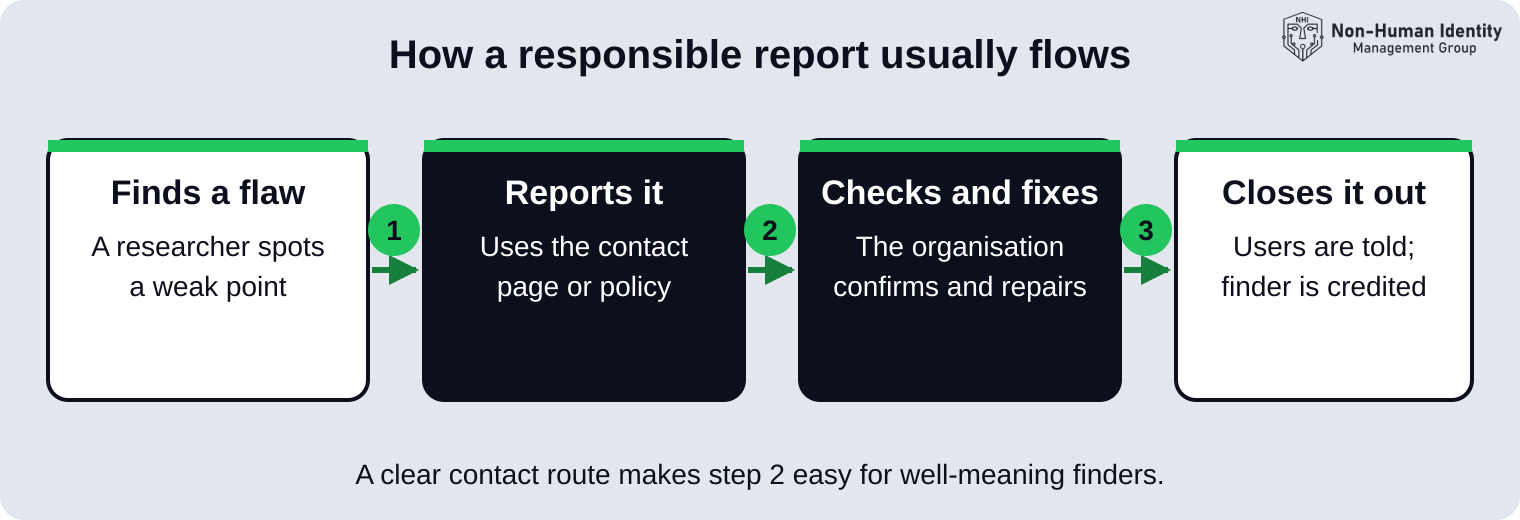
- What they do with the flaw matters. A white hat reports it privately so it can be fixed. A black hat uses it, sells it or demands money.
- Organisations can invite reports. A vulnerability disclosure policy is a public page that says how to report a weak spot safely.[3] Some firms also pay rewards, called a bug bounty.
A small text file can help well-meaning finders reach you. It is called security.txt, and it sits in a standard place on your website with your security contact details.[4] The UK National Cyber Security Centre suggests it as part of a simple reporting setup.[3]
A worked example
This story is made up to show how it can happen.
Ola Lund runs a small online shop in Cork that sells handmade candles. A local developer built the website for him two years ago.
One Monday he gets two emails. The first is from someone who says they found a page on his site that shows other customers' orders. They name the page, say they kept no data, and offer to answer questions.
The second email says his site has an "urgent flaw". It gives no detail. It asks for payment within two days, or the sender will "go public".
Ola feels a jolt of panic. Then he remembers a short talk from his business network: permission and behaviour tell you which kind of hacker you are dealing with.
He does not reply to the second email or open its links. He forwards both messages to his developer and keeps copies.
The developer checks the first report. The order page is real and open to anyone who has the link. She fixes it that afternoon. Ola replies to the first sender to say thank you.
The developer also looks at the shop's records. In the records available to her, she sees no sign that anyone downloaded customer orders. Because customer details were exposed, Ola also asks for advice on whether he needs to tell anyone.
The second sender never follows up. Ola reports the email to the police fraud reporting service as an attempted demand.
Then he makes two changes. He adds a security.txt file and a short "report a problem" page to his site. Next year, he will pay a firm with written permission to test the shop before the busy season.
What made the difference: Ola judged each sender by what they did, not by the word "hacker".
Myths and mistakes
| What people think | What is true |
|---|---|
| All hackers are criminals. | Many hackers are hired, with permission, to find weak spots before criminals do. |
| If I mean well, it is fine to test any website. | Getting in without permission can be a crime, even if you report what you found.[1] |
| Someone who reports a flaw and asks for money is a white hat. | A real reward comes from a published bug bounty with set rules. A demand with a deadline is extortion. |
| Small firms are too small for hackers to bother with. | Many attacks are automated and scan large numbers of sites, so size alone does not keep you out of view. |
| Ignoring a security email is the safest thing to do. | Ignore the demand, not the flaw. Have the claim checked, because the weak spot may be real. |
What can I do this week?
- Check whether your website has a "report a security problem" page or a security.txt file.
- Agree who in your organisation reads security reports and how fast they reply.
- Write a short rule for staff: never pay, reply to or click links in a demand. Forward it instead.
- Ask your IT or web supplier when your systems were last tested by a permitted tester.
- If you are learning to hack, sign up only for legal practice labs and courses.
Checklist
- I can explain the difference between white, grey and black hat hackers.
- Our website tells people how to report a security problem.
- Someone owns security reports and knows how to reply.
- Staff know not to pay or answer demands from strangers.
- Any test of our systems has written permission and a clear scope.
- I know where to report extortion or fraud attempts.
Common questions
Is ethical hacking legal?
Yes, when the owner of the system has given permission, ideally in writing, and the tester stays inside what was agreed. Without permission, the same actions can break computer misuse laws. This page is general information and is not legal advice.[1]
Is a grey hat hacker breaking the law?
Often, yes. A grey hat gets in without permission, and many countries treat that as an offence even if nothing is stolen. Some prosecutors may choose not to charge honest research, but that is a choice, not a right.[2]
What should I do if a stranger reports a flaw in my website?
Thank them, keep a copy, and ask whoever runs your website to check the claim. Do not pay for details, and do not click unknown links. If the message is a threat or demand, report it to the police fraud service.
How do white hat hackers get paid?
Most are employed by companies or security firms, or hired for set tests. Some also earn rewards from bug bounty programmes, where an organisation publishes rules and pays for valid reports. The payment is agreed up front, not demanded.
Can I become a white hat hacker?
Yes. Many people start with free practice labs, online courses and capture the flag games, which are puzzles built for learning. Always practise on systems you own or are allowed to test.
Where next?
Ready for the detail? Read the practitioner guide: Black Box vs Grey Box vs White Box Testing. It goes further into how permitted tests are set up, how much a tester is told before starting, and how to choose the right kind of test.
Also useful:
- Penetration Testing for Beginners
- Bug Bounties for Beginners
- Red Teaming for Beginners
- Computer Misuse and Anti-Hacking Laws Guide
- APT vs Cybercrime vs Hacktivists
Related NHI Mgmt Group resources: Bug Bounty and Vulnerability Disclosure Guide · Red Team vs Blue Team vs Purple Team · Social Engineering for Beginners
Key terms
- Hacker
- A person who uses technical skills to explore, test or break into computer systems, for good or bad reasons.
- White hat hacker
- A security expert who tests systems with permission to find weak spots before criminals do.
- Grey hat hacker
- Someone who gets into systems without permission, often claiming good intent, which can still break the law.
- Black hat hacker
- An attacker who breaks into systems without permission to steal, spy, disrupt or make money.
- Hacktivism
- Hacking done to make a political or social point, such as defacing a website.
- Penetration testing
- A permitted test where an expert tries to break in the way a real attacker would.
- Vulnerability disclosure policy
- A public page that tells people how to report a security problem safely and what will happen next.
Sources and further reading
- Computer Misuse Act 1990, section 1: Unauthorised access to computer material. UK Government, legislation.gov.uk. https://www.legislation.gov.uk/ukpga/1990/18/section/1, accessed 28 Nov 2026.
- Department of Justice Announces New Policy for Charging Cases under the Computer Fraud and Abuse Act. US Department of Justice, Office of Public Affairs, 19 May 2022. https://www.justice.gov/opa/pr/department-justice-announces-new-policy-charging-cases-under-computer-fraud-and-abuse-act, accessed 28 Nov 2026.
- Vulnerability Disclosure Toolkit. National Cyber Security Centre (NCSC), 14 September 2020, reviewed 7 November 2024. https://www.ncsc.gov.uk/information/vulnerability-disclosure-toolkit, accessed 28 Nov 2026.
- RFC 9116: A File Format to Aid in Security Vulnerability Disclosure. E. Foudil and Y. Shafranovich, Internet Engineering Task Force (IETF), April 2022. https://www.rfc-editor.org/rfc/rfc9116, accessed 28 Nov 2026.