Customer identity and access management (CIAM) is the set of tools and processes an organisation uses to let its customers sign up, sign in, recover their accounts and control their own data, safely and without too much hassle.
Every time you create an account with a shop, a bank app or a streaming service, you are using someone's CIAM system. This guide explains CIAM in plain English for newcomers, students, career changers and managers who are not security specialists. It covers why customer sign-in matters, how a customer account works from sign-up to recovery, a worked example, common myths and simple first steps a small team can take this week.
By the end of this guide you will be able to:
- Explain what CIAM is and how it differs from staff sign-in.
- Understand why customer accounts are a favourite target for attackers.
- Describe the main stages of a customer account, from sign-up to recovery.
- Identify three practical steps to make customer sign-in safer and easier.
Key takeaways
- CIAM is sign-in for people outside your organisation. It covers sign-up, sign-in, recovery, profile data and consent for customers, not staff.
- Security and ease of use have to work together. If sign-in is painful, customers give up or pick weak passwords; if it is too loose, attackers take over accounts.
- Stolen and reused passwords are a big risk. Attackers try leaked username and password pairs on other sites, which is called credential stuffing.
- Passkeys and multi-factor sign-in reduce that risk. They make a stolen password much less useful on its own.
- Account recovery is part of security. A weak "forgot password" process can undo a strong sign-in process.
- Privacy is built in. CIAM usually records what customers agreed to and lets them change their minds.
What it is, in plain English
Identity and access management (IAM) is about making sure the right people get into the right systems. Most organisations have two very different groups of people to manage:
- Workforce identity: employees and contractors who sign in to email, files and internal tools. The organisation creates their accounts and can tell them which sign-in methods to use.
- Customer identity: members of the public who choose to create an account. They sign themselves up, use their own phones and laptops, and can simply leave if the experience is poor.
CIAM is the second group. A typical CIAM system handles registration (creating an account), authentication (proving it is really you when you sign in), account recovery (getting back in when you are locked out), the customer's profile (name, email, preferences) and consent (what the customer has agreed the organisation may do with their data).
A helpful comparison is the front desk of a busy hotel. Staff use a back door with a key card the hotel issued them. Guests arrive at the front desk, check in with whatever ID they have, collect a room key, ask for help when they lose it, and tell the desk whether they want the newsletter. The front desk has to be welcoming to thousands of strangers while still spotting someone pretending to be a guest. Where the analogy breaks down: a hotel desk sees each guest in person, while a CIAM system never sees the customer and has to judge everything from what arrives over the internet, including traffic from automated programs.
Why it matters to you
- If you run a small business: a customer account that is taken over can mean refunds, chargebacks, angry customers and a damaged reputation. A sign-up page that is too fiddly means lost sales.
- If you are new to a security job: customer sign-in, password resets and bot traffic are everyday topics for security, fraud and support teams, and you will meet them early.
- If you are a manager: CIAM touches sales, support, marketing, legal and security at once. Decisions about sign-in methods and data collection affect revenue, risk and privacy obligations together.
Customer accounts are attractive to attackers because they often hold money, loyalty points, saved payment cards, personal details or access to services. One common attack is credential stuffing: the OWASP Foundation describes it as testing username and password pairs obtained from the breach of another site.[1] It works because many people reuse the same password in several places. When an attacker gets into a real customer's account this way, it is called account takeover.
OWASP calls multi-factor authentication the strongest defence against most password attacks and recommends it wherever possible. Where full multi-factor sign-in is not practical, it suggests asking for it on risky sign-ins, such as those from a new device or an unusual location.[1]
Privacy matters too. In the European Union, the General Data Protection Regulation (GDPR) says a person has the right to withdraw consent at any time, and that withdrawing must be as easy as giving it.[4][5] A CIAM system is often where that choice is recorded and changed. Other countries have their own privacy laws, so check which apply to you.
How it works, step by step
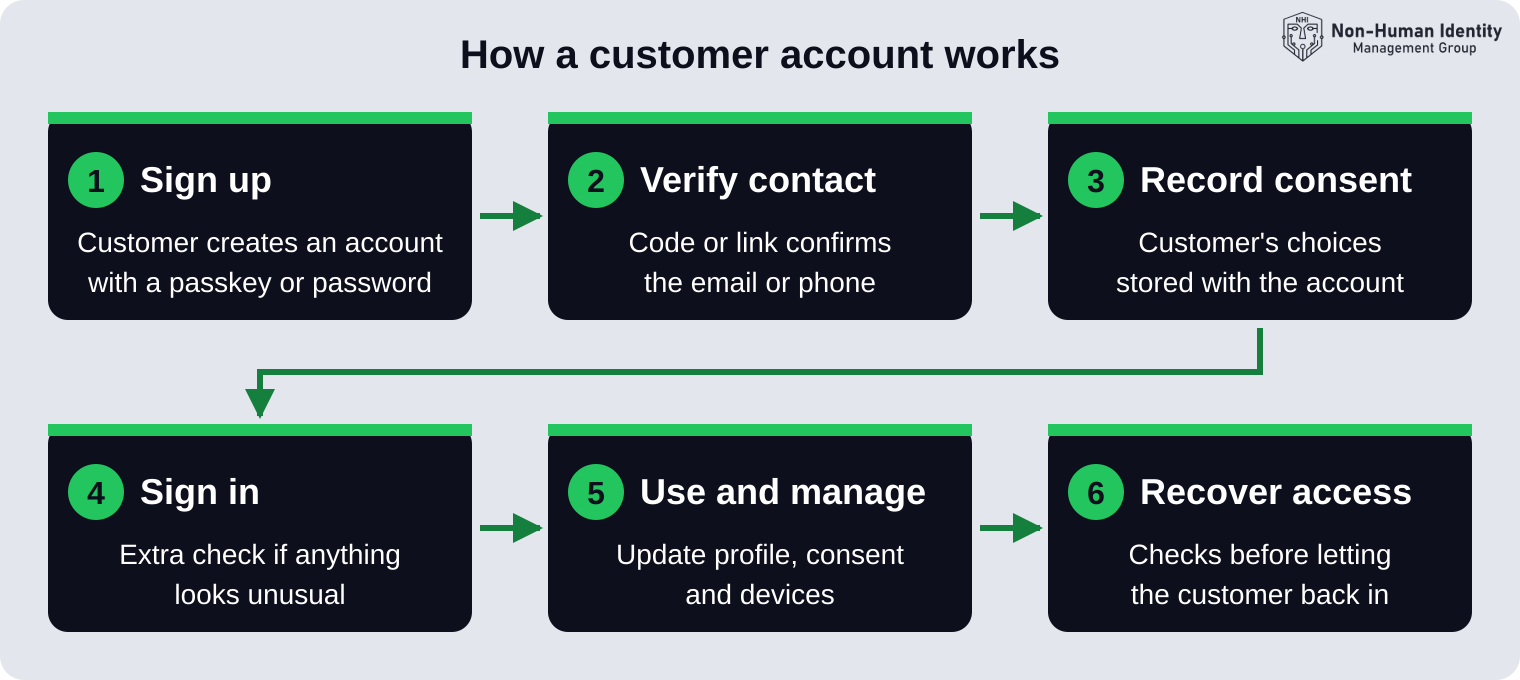
Different products use different words, but most customer accounts go through the same stages.
- Set up the rules. The organisation decides which sign-in methods to offer, what information to ask for, which consent choices to show and how recovery will work.
- Sign up. The customer creates an account, usually with an email address and either a password or a passkey. Some sites also offer social login, which means signing in with an account the customer already has elsewhere, such as Google or Apple. A good sign-up asks only for what is needed now; collecting more over time is called progressive profiling.
- Verify the contact details. The system sends a code or link to the email address or phone number to check the customer really controls it.
- Record consent. The customer chooses what they agree to, such as marketing emails, and the system stores that choice with the account.
- Sign in. The customer proves who they are. Behind the scenes, the system may look for warning signs, such as many failed attempts or a sign-in from a new device, and ask for an extra check if something looks unusual. This is often called risk-based authentication.
- Use the service and manage the account. The customer shops, pays or watches, and can update their profile, change consent choices, add a passkey or sign out of other devices.
- Recover access. If the customer forgets their password or loses their phone, a recovery process lets them back in after suitable checks.
Useful distinctions
- CIAM is not the same as workforce IAM. The building blocks are similar, but customers choose to be there, bring their own devices and expect a smooth experience, so you cannot simply force the controls you use for staff onto them.
- Passwords and passkeys work differently. A password is a secret you type, so it can be guessed, reused or typed into a fake site. The FIDO Alliance, which develops the passkey standards, describes passkeys as cryptographic credentials tied to a user's account on a website or app, and says phishing resistance is a core design goal.[3]
- Synced and device-bound passkeys differ. Synced passkeys are kept in step across a person's devices by a cloud service; device-bound passkeys never leave one device, such as a hardware security key.[3]
- Social login moves trust, it does not remove it. If a customer signs in with another provider, the security of their account now depends partly on that provider's account too.
- Password advice has changed. NIST, the US standards body, says services should not force regular password changes or impose composition rules such as "one capital and one symbol", but should check new passwords against a list of common or compromised ones. It sets a minimum of 15 characters for a password used on its own, and 8 when it is only one part of multi-factor sign-in.[2] These are NIST requirements for US federal systems; many organisations use them as good practice.
A worked example
Hilltop Plants is a fictional online garden shop with 12 staff and about 20,000 customer accounts. Customers sign in with an email address and password. Leila, who runs operations, notices two problems: about a third of new visitors abandon the sign-up form, and support staff spend hours each week on "I cannot get in" emails.
One Monday, the shop's sign-in logs show thousands of failed sign-ins from many different internet addresses in a single night, with a small number succeeding. A few customers then report loyalty points spent that they did not spend. The pattern matches credential stuffing: passwords leaked from other websites being tried against Hilltop's sign-in page.
Working with the company that hosts their online shop, Leila makes four changes:
- A shorter sign-up form: only an email address and a sign-in method at first; delivery details are asked for at the first order.
- Passkeys offered: customers can add a passkey, and are invited to do so after they next sign in.
- Extra checks when something looks odd: a one-time code by email is requested when someone signs in from a new device, and repeated failures from the same source are slowed down.
- Safer recovery and alerts: password reset links expire quickly, and customers get an email when their password or email address changes.
The affected customers have their passwords reset and their points restored. Over the next few months, fewer accounts are taken over and some support emails drop, but the risk does not disappear. Customers who still use a reused password and ignore alerts can still be caught out, and attackers may move on to phishing customers for codes. Leila's team keeps watching the sign-in logs and reviews the settings each quarter.
Myths and misunderstandings
| What people think | What is true |
|---|---|
| CIAM is just a login page. | It also covers sign-up, recovery, profile data, consent, sessions and spotting automated attacks. |
| More security always means more friction. | Not always. Passkeys can be both quicker to use and harder to phish than passwords, and extra checks can be saved for risky sign-ins. |
| Forcing customers to change passwords often keeps them safe. | NIST says services should not require regular password changes, only a change when there is evidence of compromise.[2] |
| If our own systems were never breached, our customers' accounts are safe. | Credential stuffing uses passwords stolen from other sites, so your customers can be affected even if you were never breached.[1] |
| The "forgot password" page is just a convenience. | It is another way into the account. If recovery is weaker than sign-in, attackers will use recovery. |
| We should collect as much customer data as we can at sign-up. | Every extra field puts some people off and is more data to protect. Ask for what you need, when you need it. |
Key terms
- Customer identity and access management (CIAM)
- The tools and processes that govern how customers and other external users sign up, sign in, recover access and manage their accounts and data.
- Credential stuffing
- An attack that tries username and password pairs stolen in earlier breaches against other services, relying on people reusing passwords.
- Account takeover
- Use of a real customer's account by someone else after they have obtained valid access, for example through stolen credentials.
- Passkey
- A passwordless credential based on public key cryptography: a private key stays on the user's device and the service stores the matching public key.
- Multi-factor authentication (MFA)
- Signing in with two or more independent kinds of proof, so a stolen password alone is less likely to open the account.
- Signing in to a service using an account you already have with another provider, such as Google or Apple.
- Progressive profiling
- Collecting only the minimum information at sign-up, then asking for more over time as it is needed.
- Risk-based authentication
- Changing how much checking is needed at sign-in based on how risky the attempt looks, for example asking for an extra code from a new device.
- Consent
- A person's informed permission for their personal data to be collected and used in a stated way.
- Identity provider
- The system that checks who a user is and tells other applications they have signed in.
- Bot detection
- Controls that spot automated traffic which is not behaving like a genuine customer.
Common questions
What is the difference between CIAM and IAM?
IAM is the general discipline of controlling who gets into what. CIAM is the part that deals with customers and other external users, who sign themselves up and use their own devices. Workforce IAM deals with staff.
Do small businesses need CIAM?
If customers have accounts with you, you already have CIAM of some kind, even if it is a feature of your shop platform. The question is whether its settings are sensible, not whether to buy something new.
Should we get rid of passwords?
Many organisations offer passkeys alongside passwords first, then encourage customers to switch. Passwords are not phishing-resistant, as NIST notes, so reducing reliance on them is a sensible long-term aim.[2]
Is social login safe?
It can reduce password reuse on your site, but it ties your customer's account to another provider's account. We suggest offering it as one option, not the only one, and still giving customers a way to recover access if they lose the other account.
Why not just block suspicious internet addresses?
OWASP notes that blocking addresses on its own is a weak defence, because attackers spread attempts across many addresses. It suggests combining several measures and keeping blocks temporary.[1]
Who owns CIAM in an organisation?
It varies. Often a product or digital team owns the experience, while security, fraud, support and legal teams set rules and watch for problems. Agreeing who decides what is an early, useful step.
First steps
Three things you can do this week:
- Find out what you already have. Write down where customer accounts live, which sign-in methods are offered and how password reset works.
- Look at your sign-in logs. Ask your platform or developer whether you can see failed sign-ins, and whether there are alerts for a sudden spike.
- Turn on one stronger option. If your platform supports passkeys or multi-factor sign-in for customers, switch it on as an option and tell customers about it. If a change causes problems, any rollback should be approved, written down and time-limited, with a date to try again.
Checklist
- We know which system holds our customer accounts and who manages it.
- Customers can use a passkey or multi-factor sign-in, at least as an option.
- New passwords are checked against a list of common or compromised passwords.
- Repeated failed sign-ins are slowed down or challenged, and spikes raise an alert.
- Password reset links expire quickly and customers are told when key details change.
- Recovery checks are at least as strong as sign-in checks.
- Sign-up asks only for the information we need at that moment.
- Consent choices are recorded and customers can change them easily.
- We review sign-in settings and logs at least every quarter.
Check your understanding
1. How is customer identity different from workforce identity?
Answer: customers sign themselves up, use their own devices and can leave if sign-in is painful; staff accounts are created and controlled by the organisation.
2. What is credential stuffing?
Answer: trying username and password pairs stolen from other websites against your sign-in page, hoping customers have reused them.
3. Why is account recovery a security issue?
Answer: because it is another way into the account. If it is weaker than sign-in, attackers will target it instead.
4. Why are passkeys harder to phish than passwords?
Answer: a passkey is a cryptographic credential tied to the real website or app, and there is no typed secret to hand over to a fake site.
Suggested learning pathway
- Identity Proofing for Beginners: a related beginner guide to read next.
- Credential Stuffing for Beginners: a related beginner guide to read next.
- Decentralised Identity for Beginners: a related beginner guide to read next.
- For the basics of access control, start with Identity and Access Management for Beginners.
- For second sign-in factors in plain English, see Multi-Factor Authentication for Beginners.
- For passkeys from the user's side, see the Passkeys for Everyone Guide.
- For how social login works underneath, see OpenID Connect for Beginners.
- For how customer and staff identity differ in detail, see CIAM vs Workforce IAM.
- For the full practitioner view, see the Customer IAM (CIAM) Guide.
- For defending sign-in pages, see the Password Spraying and Credential Stuffing Defence Guide.
Standards and references
- Credential Stuffing Prevention Cheat Sheet. OWASP Cheat Sheet Series, OWASP Foundation. https://cheatsheetseries.owasp.org/cheatsheets/Credential_Stuffing_Prevention_Cheat_Sheet.html, accessed 27 Nov 2026.
- SP 800-63B, Digital Identity Guidelines: Authentication and Authenticator Management (revision 4). National Institute of Standards and Technology (NIST), August 2025. https://pages.nist.gov/800-63-4/sp800-63b.html, accessed 27 Nov 2026.
- Passkeys. FIDO Alliance. https://fidoalliance.org/passkeys/, accessed 27 Nov 2026.
- Regulation (EU) 2016/679 (General Data Protection Regulation). Official Journal of the European Union, EUR-Lex, 27 April 2016. https://eur-lex.europa.eu/eli/reg/2016/679/oj.
- Art. 7 GDPR, Conditions for consent (unofficial consolidated text). gdpr-info.eu. https://gdpr-info.eu/art-7-gdpr/, accessed 27 Nov 2026.
Related NHI Mgmt Group resources: Top 10 CIAM Security Risks · Customer Identity and Account Takeover Executive Briefing · B2B vs B2C CIAM