Aadhaar is a twelve-digit identity number that India gives to residents who enrol.
This guide is for anyone in India, or anyone studying digital ID, who wants a plain explanation. If you run a business that checks customers or staff, you may be asked to use Aadhaar checks, so it helps to know what they share.
In short
- Aadhaar is a number linked to a central record of your basic details, fingerprints, iris scans and face photo.
- A service can ask the central record to confirm it is you. The answer is yes or no, or, with e-KYC, a set of your details.
- You can share less: a masked Aadhaar card, a temporary Virtual ID or an offline file you control.
- You can lock your fingerprints and iris scans, and check where your number has been used.
What you will learn
- Explain what an Aadhaar number is and who runs it.
- Spot the difference between a yes or no check and e-KYC.
- Check the ways to share less than your full number.
- Ask the right questions before you hand over your Aadhaar.
Details here were checked against official UIDAI sources on 28 November 2026. Services change, so check the official UIDAI website.
- The body that runs it (UIDAI)
- the Unique Identification Authority of India, which issues Aadhaar numbers and runs the central record.
- Instant customer check (e-KYC)
- a paperless way for a firm to confirm who you are and get your details from the Aadhaar record.
- Stand-in number (Virtual ID)
- a temporary number you can use in place of your Aadhaar number.
What is Aadhaar?
Think of a membership number at a big club with many branches. Staff at any branch can ring head office and ask, "Is this really member 0000?" Head office checks its records and says yes or no.
Aadhaar works in a similar way. UIDAI gives each person who enrols a twelve-digit random number.[1] At enrolment it records your name, date of birth or age, gender and address. It also records ten fingerprints, two iris scans and a face photo.[1]
Each person should get only one number. UIDAI checks new records against old ones, so the same person is not enrolled twice. This is called de-duplication.[1] Residents can choose whether to enrol. The number proves who you are. It does not prove citizenship.[1]
Where the comparison stops working: a club number only gets you into the club. An Aadhaar number is used by banks, phone companies and government offices, so it reaches much further, and that makes it worth protecting.
Why does it matter?
Aadhaar is used for many everyday tasks, from bank accounts to phone connections. That makes the number, and the codes linked to it, a target for scammers.
If you have an Aadhaar number
What could happen: a caller tricks you into reading out a one-time code, and uses it to pass a check in your name.
Check this: never share a code you did not ask for. Look at your authentication history in the official app.
If your business checks customers
What could happen: you keep photocopies of full Aadhaar cards, and then a leak exposes all of them.
Check this: ask whether a masked copy, a Virtual ID or an offline check would do the job.
If you are studying digital ID
What could happen: you treat Aadhaar like a wallet app, and miss that it relies on a central record.
Check this: compare it with the other kinds of national digital ID before drawing lessons.
What does it look like?
Here is a made-up scenario card. A shop asks for Aadhaar details to open an account. The notes show what to look for.
Example only. All values are made up.
EXAMPLE Mobile Shop - new connection form (FAKE)
Name:            Example Person
Aadhaar number:  XXXX XXXX 0000          (1)
or Virtual ID:   0000 0000 0000 0000     (2)
Check method:    OTP to your mobile      (3)
Details we get:  name, photo, address    (4)
Photocopy kept?  Yes, full card          (5)
- A masked number: only the last four digits show. In a real file, this line would contain your own masked number.
- A Virtual ID, a temporary stand-in for your Aadhaar number.
- A one-time code sent to your registered mobile. Only you should see it.
- With e-KYC, the shop gets these details from the central record.
- A red flag. A full copy of your card stored by the shop can leak later.
Why this is risky: a stored copy of your full card can leak. A code read out over the phone can be misused. Together, they help someone act in your name.
The safer way: offer a masked copy or a Virtual ID. Type the code in yourself, and ask the shop not to keep a full copy of your card.
How does it work?
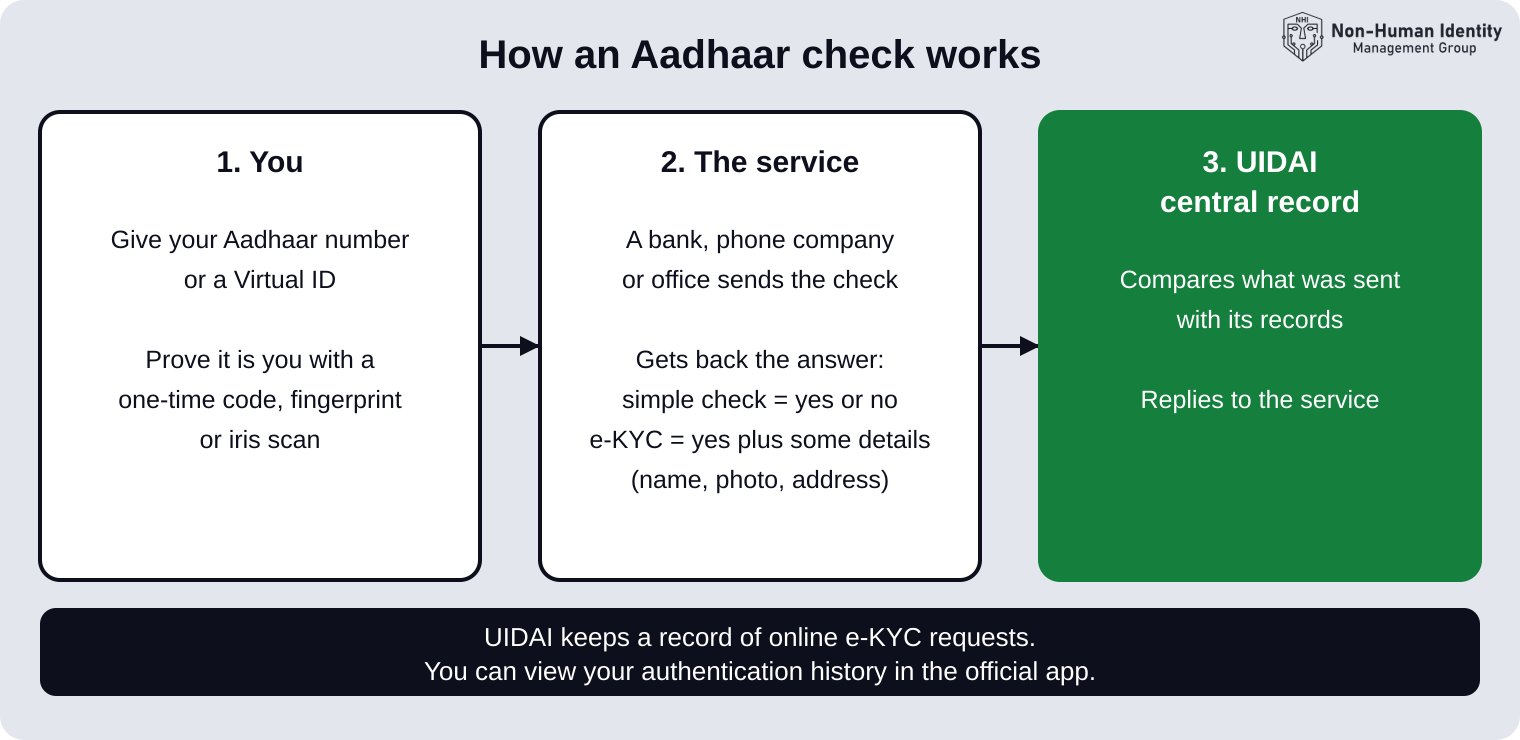
A check that uses Aadhaar usually follows these steps.
- A service asks. A bank, phone company or government office, called a requesting entity, asks to check you.[2]
- You give your number. You give your Aadhaar number, or a Virtual ID instead. A Virtual ID is a temporary, revocable sixteen-digit number linked to your Aadhaar.[3]
- You prove it is you. This may be a one-time code (OTP) sent to your registered mobile, a fingerprint or iris scan, or a mix of these.[2]
- The central record answers. For a simple check, the answer is yes or no.[2] For e-KYC, which uses only an OTP or a biometric check, the service also gets some of your details.[2]
- A record is kept. UIDAI keeps a record of online e-KYC requests for audit.[5] You can view your authentication history in the official Aadhaar app.[4]
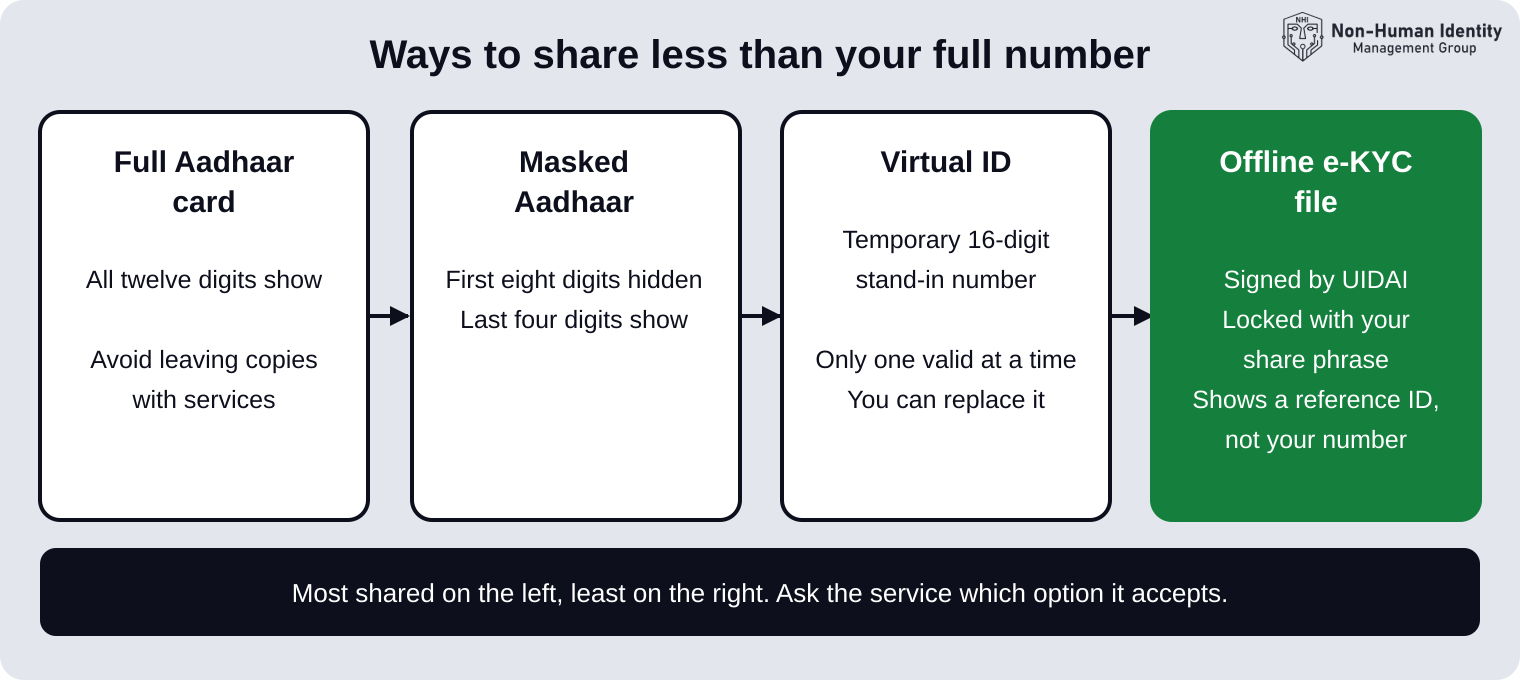
You also have ways to share less. A masked Aadhaar hides the first eight digits and shows only the last four. It is offered on the downloadable e-Aadhaar.[4] Only one Virtual ID is valid at a time, and you can replace it with a new one.[6]
There is also an offline route, called Paperless Offline e-KYC. You download a file signed by UIDAI and lock it with a share phrase you choose. The file shows a reference ID, not your full number, and you can share it without UIDAI being told.[5]
Two locks add more protection. A biometric lock stops your fingerprints, iris scans and face from being used for checks until you unlock them.[4] A full Aadhaar lock blocks every kind of check, and you need your latest Virtual ID to unlock it.[4]
A worked example
Nadia Wojcik has lived in Pune for three years and works at a design studio. She enrolled for Aadhaar when she settled there. Today she wants a new mobile connection.
At the shop, the assistant asks for a photocopy of her Aadhaar card. Nadia has read about masked copies. She asks if the shop can use e-KYC instead, with a code sent to her phone.
The assistant agrees. Nadia gives her Virtual ID rather than her Aadhaar number. She types the code into the shop's screen herself. She does not read it out. The check works, and the shop receives her name, photo and address from the record.
That evening, her colleague Kemal Grover mentions a scam. Someone rang him, claiming to be from his bank, and asked for "the code we just sent". He hung up. Nadia opens the official Aadhaar app and looks at her authentication history. She sees one check from today, at the time she was in the shop. Nothing else looks unfamiliar in the records available to her.
She makes two more changes. She turns on the biometric lock, because she rarely uses fingerprint checks. She also makes a new Virtual ID, so the one she gave the shop is replaced.
None of this makes Nadia's details safe from every risk. But she shared less, kept her code private and knows how to check where her number is used.
Myths and mistakes
| What people think | What is true |
|---|---|
| Aadhaar proves I am an Indian citizen. | UIDAI says the number does not give any right of citizenship or domicile.[1] |
| I must always give my full twelve-digit number. | A Virtual ID can stand in for it in authentication and e-KYC.[3] Ask if the service accepts one. |
| Every Aadhaar check sends my details to the service. | A simple check returns only yes or no. e-KYC shares some details.[2] |
| Reading out a code to a caller is harmless. | The code is part of the proof that it is you. Keep it to yourself. |
| A photocopy of my card is the safest thing to hand over. | A masked copy shows only the last four digits.[4] It leaves less to misuse if lost. |
What can I do this week?
- Install the official Aadhaar app from your phone's official app store.
- Look at your authentication history for checks you do not recognise.
- Make a Virtual ID, and use it in place of your number where it is accepted.
- Turn on the biometric lock if you rarely use fingerprint or iris checks.
- Download a masked Aadhaar to share instead of a full copy.
Checklist
- My registered mobile number is up to date and in my own name.
- I never share a one-time code I did not ask for.
- I use the official app or website only, not links in messages.
- I check my authentication history from time to time.
- I give a masked copy or Virtual ID where the service accepts it.
- I have considered the biometric lock.
- Our business does not keep full card copies it does not need.
Common questions
Is enrolling for Aadhaar compulsory?
UIDAI describes enrolment as voluntary for residents of India. In practice, many services ask for it, so many people enrol. Each person enrols only once. If a service insists on Aadhaar, ask whether another document or route is accepted for that task.[1]
What is the difference between a Virtual ID and my Aadhaar number?
A Virtual ID is a temporary sixteen-digit number linked to your Aadhaar. You can use it in place of your Aadhaar number for authentication and e-KYC. Only one is valid at a time, and you can replace it whenever you like, which your Aadhaar number does not allow.[3][6]
What does e-KYC share about me?
It shares some of your details from the central record with the service, such as your name, photo and address. It is used when a firm must know its customer, for example to open an account. It works only with a one-time code or a biometric check.[2][3]
Will the biometric lock stop me using Aadhaar?
Only for fingerprint, iris and face checks. Other checks, such as a one-time code, can still work. You can unlock them for a short time when needed. You need your registered mobile number, and can use the website, the app or an Aadhaar centre.[4]
Someone has my Aadhaar number. What should I do?
Stay calm and check. Look at your authentication history in the official app. Make a new Virtual ID, consider the biometric lock, and never share codes. If you see a check you do not recognise, contact UIDAI through its official website.[4]
Where next?
Ready for the detail? Read the practitioner guide: India Aadhaar and Digital Public Infrastructure. It goes further into the agencies that connect to Aadhaar, the rules they follow, and how Aadhaar fits into India's wider digital public services.
Also useful:
- National Digital ID for Beginners
- Identity Proofing for Beginners
- Identity Theft for Beginners
- Social Engineering for Beginners
Related NHI Mgmt Group resources: Identity Proofing and KYC Guide · OpenID Connect for Identity Assurance Guide · KYC vs KYB
Key terms
- Aadhaar
- India's twelve-digit identity number, issued by UIDAI and linked to a central record of personal and biometric details.
- Aadhaar e-KYC
- A paperless check that confirms who you are and shares some of your details from the Aadhaar record with a service.
- Virtual ID
- A temporary sixteen-digit number you can use instead of your Aadhaar number.
- Aadhaar OTP
- A one-time code sent to your registered mobile to confirm an Aadhaar check.
- Biometric authentication
- Proving who you are with a body feature, such as a fingerprint, iris or face.
- Offline verification
- An identity check done without asking the central record at that moment.
- Data minimisation
- Collecting and keeping only the personal details a task needs.
Sources and further reading
- About your Aadhaar. Unique Identification Authority of India (UIDAI). https://uidai.gov.in/en/my-aadhaar/about-your-aadhaar.html, accessed 28 Nov 2026.
- Authentication Ecosystem. UIDAI. https://uidai.gov.in/en/ecosystem/authentication-ecosystem.html, accessed 28 Nov 2026.
- Glossary (Virtual ID, e-KYC). UIDAI. https://uidai.gov.in/en/glossary, accessed 28 Nov 2026.
- Aadhaar Online Services (biometric lock, Aadhaar lock, masked Aadhaar, Aadhaar app). UIDAI. https://uidai.gov.in/en/aadhaar-online-services, accessed 28 Nov 2026.
- About Aadhaar Paperless Offline e-KYC. UIDAI. https://uidai.gov.in/en/ecosystem/authentication-devices-documents/about-aadhaar-paperless-offline-e-kyc.html, accessed 28 Nov 2026.
- Virtual ID (VID) frequently asked questions. UIDAI. https://uidai.gov.in/en/contact-support/have-any-question/284-faqs/aadhaar-online-services/virtual-id-vid.html, accessed 28 Nov 2026.