Active Directory recovery means bringing a company's sign-in system back safely after it breaks or is attacked.
This guide is for people new to IT work, students and managers who want to know what happens when Active Directory goes down. If staff cannot sign in, most other systems stop too, so recovery is a business problem as well as a technical one.
In short
- Active Directory holds the list of people, computers and service accounts, and checks who may sign in.
- Small mistakes, such as a deleted account, can often be undone with a built-in recycle bin if it was switched on.
- A full rebuild after an attack starts from a backup taken before the problem, restored away from the main network.
- Key passwords, including those of service accounts, are changed before people and systems reconnect.
What you will learn
- Explain why Active Directory recovery matters to the whole business.
- Tell a small undo from a full rebuild.
- Check whether your team has usable backups and a written plan.
- Ask who owns recovery and when it was last practised.
- Sign-in server (domain controller)
- a server that runs Active Directory and checks each sign-in.
- Whole directory (forest)
- the complete Active Directory set-up of an organisation, with all its domains.
- Safe copy (backup)
- a saved copy of a server that can be used to rebuild it.
What is Active Directory recovery?
Think of the security office in a big office block. It keeps the staff list and decides which doors each pass opens. Now imagine a fire, or a burglar who has quietly rewritten the list.
You cannot just reopen the office. You need a trusted copy of the list from before the trouble. You also need to change the locks the burglar may know about, and check nothing was left behind.
Active Directory, often called AD, plays that security office part on many Windows networks. It runs on servers called domain controllers. Recovery is the planned way of getting AD working and trustworthy again.
Recovery comes in sizes. Sometimes one account is deleted by mistake. At the other end, every domain controller fails, and the whole forest (the organisation's complete AD set-up) has to be rebuilt.[1]
Where the comparison stops working: a security office has one copy of the list. AD keeps copies on every domain controller and they sync with each other. So a bad change can spread to all of them, and a restored server can pick bad data back up.
Why does it matter?
When AD is down, staff often cannot sign in to laptops, email or shared files. Many apps and automated jobs also rely on it, so they stop as well.
If you are new to an IT team
What could happen: you are asked to "just restore last night's backup", which may bring an attacker's changes back with it.
Check this: ask where the written recovery plan is and who leads it.
If you manage a business or a team
What could happen: a ransomware attack takes out sign-ins, and work stops for days while the team works out what to trust.
Check this: ask when the team last practised restoring AD, and how long it took.
Next: Ransomware for Beginners
If you look after apps or automation
What could happen: after a rebuild, service account passwords change and your apps can no longer connect.
Check this: keep a list of service accounts, what uses each one and who owns it.
What does it look like?
Here is a made-up "Am I ready?" card. A small IT team might keep one with its plan.
Example only. All values are made up.
AD RECOVERY READINESS CARD (example.invalid)
Domain:            corp.example.invalid
Recycle Bin on?    NO                               (1)
Last full backup:  DC-EXAMPLE-01, 0000-00-00        (2)
Backups kept away from the network?  NOT SURE      (3)
Last restore test: never                            (4)
Service accounts listed with owners?  PARTLY       (5)
- The recycle bin is off. A deleted account is harder to bring back with its groups.
- Only one server is backed up. If that copy is bad, there is no other.
- If attackers can reach the backups, they may damage them too.
- A plan never tested is a guess about how long recovery will take.
- Unknown service accounts are hard to fix after their passwords change.
Why this is risky: each "no" or "not sure" can slow a real recovery. That delay comes when the business can least afford it.
The safer way: switch on the recycle bin. Back up at least two domain controllers in each domain. Keep backups out of attackers' reach, and practise a restore.[2][5]
How does it work?
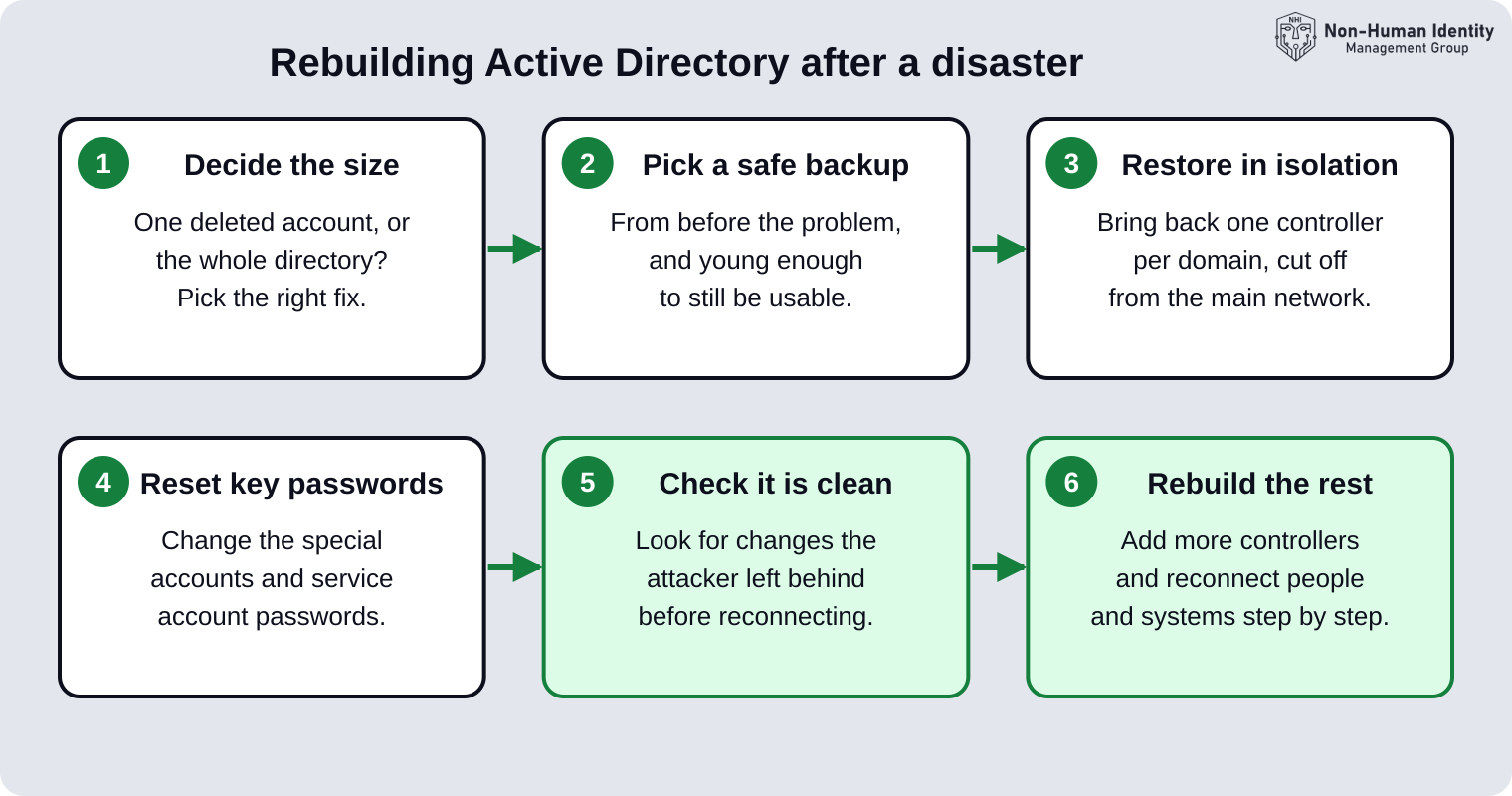
Here is the broad shape of a full recovery, based on Microsoft's own recovery guide.
- Decide the size of the problem. A deleted object can often be brought back with the AD Recycle Bin, if it was switched on beforehand. It is off by default.[5] A forest-wide failure needs the full process.[1]
- Pick a safe backup. Choose one from before the failure or attack. Microsoft suggests a few days before, and notes that backups past a certain age can no longer be used.[2] Microsoft recommends a full server backup, because it can be restored onto different hardware.[4]
- Restore one domain controller per domain, cut off. Restore it away from the main network, so bad data cannot copy back in. Start with the top domain of the forest.[3]
- Reset key passwords. These include a special built-in account that signs sign-in tickets, which is reset twice. Admin passwords are reset if an attack is suspected.[3]
- Rebuild the rest. Once the restored servers are stable, add more domain controllers and reconnect people and systems step by step.[3]
Non-human identities (NHIs) matter here too. An NHI is a digital identity, or the credential behind it, that represents a machine, application, automated process, service or AI agent. In AD, many of these are service accounts. If the AD database was compromised, Microsoft advises that some managed service accounts may need to be created again.[2] Apps that use them need updating, so a list of who owns each one saves time.
Microsoft also warns that the rush of a recovery can lead people to skip normal security care when handling backups.[2] A calm, written plan helps avoid that.
A worked example
Quinn Thorne has just joined the IT team at a fictional engineering firm with 300 staff. On a Monday morning, nobody can sign in. The help desk phones are ringing.
Wanda Jovanovic, the IT manager, calls the team together. Ransomware has hit several servers, including the domain controllers. She reminds everyone of the security office picture. They need a trusted copy of the staff list, not just any copy.
Quinn suggests restoring last night's backup. Wanda explains why that could be risky. The attackers may have been inside for a while, so recent backups could contain their changes.
The team checks its plan. They choose a backup from five days earlier, from before the first signs of the attack. The backups are kept on a separate system the attackers could not reach.
Kemal Osei restores one domain controller on an isolated network, cut off from everything else. The team resets the key passwords the plan lists, including admin accounts. They also check the restored directory for accounts or changes nobody recognises.
Next, they work through the list of service accounts. Each one gets a new password, and the owner of each app updates it. Two accounts have no named owner, which slows things down.
By Wednesday, staff can sign in again. In the review, Wanda adds owners for every service account and books a restore test every six months.
Myths and mistakes
| What people think | What is true |
|---|---|
| We have many domain controllers, so we do not need backups. | Controllers copy changes to each other, so a bad change or attack can spread to all of them. |
| The newest backup is always the best one. | A newer backup may hold an attacker's changes. Microsoft notes the trade-off between recent data and risk.[2] |
| Restore the server and plug it straight back in. | Restore it in isolation first, so bad data cannot copy back in.[3] |
| The recycle bin is on by default. | It is off by default, and once switched on it cannot be turned off.[5] |
| Only staff passwords matter after an attack. | Service accounts and other non-human identities can need new passwords too, and apps must be updated. |
What can I do this week?
- Ask whether the AD Recycle Bin is switched on.
- Find out which domain controllers are backed up, and where the backups are kept.
- Ask when a restore was last practised, and how long it took.
- Start a list of service accounts with what uses each one and who owns it.
Checklist
- A written AD recovery plan exists and names who leads it.
- The AD Recycle Bin is switched on.
- At least two domain controllers per domain are backed up regularly.
- Backups are kept where attackers on the main network cannot reach them.
- Backups are young enough to be used for a restore.
- A restore has been practised on an isolated network.
- Service accounts are listed with their owners and the apps that use them.
- The plan lists which passwords to reset after an attack.
Common questions
Can I bring back one deleted user without a full restore?
Often yes, if the AD Recycle Bin was switched on before the deletion. It keeps deleted objects with their details, so a restored user gets back their group memberships. It is off by default, so check it is on now.
Why not just restore the most recent backup?
Because it may include the problem. If an attacker made changes, a recent backup can bring them back. Microsoft suggests a backup from a few days before the failure, and isolating the restored server while it is checked.
How long does Active Directory recovery take?
It varies a lot. Undoing one deletion can be quick. A full rebuild after an attack can take days. It depends on the size of the network, the backups and how well the team has practised. Testing the plan is the best way to find out.
What about Entra ID and the cloud?
Cloud sign-in services such as Microsoft Entra ID have their own recovery options and limits. Many firms use both, linked together, so the order of recovery matters. The practitioner guide covers how the two fit together.
Who should own Active Directory recovery?
One named person should lead it, usually in the IT or identity team, with a deputy. Managers decide priorities, such as which systems come back first. App owners must be ready to update their service accounts. Write these roles into the plan.
Where next?
Ready for the detail? Read the practitioner guide: Identity Recovery Guide. It goes further into choosing a recovery path, forest recovery step by step, clean-room rebuilds and recovering Entra ID alongside AD.
Also useful:
- Active Directory for Beginners
- Active Directory Attacks for Beginners
- Backup Security for Beginners
- Non-Human Identities for Beginners
Related NHI Mgmt Group resources: Active Directory Forest Recovery Runbook Template · Active Directory Backup Strategy · How to Restore Deleted AD and Entra Objects · Active Directory Domain Compromise Response Playbook
Key terms
- Active Directory
- Microsoft's directory service that stores accounts and checks sign-ins on many Windows networks.
- Domain controller
- A server that runs Active Directory and checks sign-ins.
- Forest
- The complete Active Directory set-up of an organisation, with all its domains.
- Backup
- A saved copy of data or a server that can be used to rebuild it.
- AD Recycle Bin
- A feature that keeps deleted directory objects with their details so they can be restored.
- KRBTGT account
- A built-in account whose password signs sign-in tickets, reset twice in a recovery.
- Service account
- An account used by an application or automated process rather than a person.
- Isolated recovery environment
- A separate network where systems are restored and checked before reconnecting.
Sources and further reading
- Active Directory forest recovery guide. Microsoft Learn, Microsoft, updated 11 July 2025. https://learn.microsoft.com/en-us/windows-server/identity/ad-ds/manage/forest-recovery-guide/ad-forest-recovery-guide, accessed 28 Nov 2026.
- Active Directory Forest Recovery: Determine how to recover the forest. Microsoft Learn, Microsoft. https://learn.microsoft.com/en-us/windows-server/identity/ad-ds/manage/forest-recovery-guide/ad-forest-recovery-determine-how-to-recover, accessed 28 Nov 2026.
- Active Directory Forest Recovery: Performing the initial recovery. Microsoft Learn, Microsoft. https://learn.microsoft.com/en-us/windows-server/identity/ad-ds/manage/forest-recovery-guide/ad-forest-recovery-perform-initial-recovery, accessed 28 Nov 2026.
- Active Directory Forest Recovery: Back up a full server. Microsoft Learn, Microsoft. https://learn.microsoft.com/en-us/windows-server/identity/ad-ds/manage/forest-recovery-guide/ad-forest-recovery-backing-up-a-full-server, accessed 28 Nov 2026.
- Enable and use Active Directory Recycle Bin. Microsoft Learn, Microsoft. https://learn.microsoft.com/en-us/windows-server/identity/ad-ds/get-started/adac/active-directory-recycle-bin, accessed 28 Nov 2026.