A business impact analysis works out how badly each part of a business suffers when it stops.
This guide is for managers, small business owners and anyone asked to "help with the BIA" for the first time. You do not need to be technical to take part: the people who know the work best give the most useful answers.
In short
- A business impact analysis, or BIA, lists the main things your business does and what each one needs to run.
- It asks how much harm a stoppage would cause after an hour, a day and a week.
- The answers set how fast each activity must come back, and which comes back first.
- The business sets the targets, not only the IT team, and they are checked again when things change.
What you will learn
- Explain what a business impact analysis is in one sentence.
- Spot which of your activities would hurt most if they stopped.
- Check what each key activity depends on, including people and suppliers.
- Ask the right questions when you are interviewed for a BIA.
- Stoppage (disruption)
- anything that stops normal work, such as a power cut, a flood or a cyber attack.
- Back-up-and-running target (recovery time objective)
- the longest time an activity or system can stay down before the harm is too great.
What is a business impact analysis?
Think of a household getting ready for a power cut. The freezer can last most of a day with the door shut. A fridge holding medicine may only last a few hours. So you know which one to deal with first.
A business impact analysis does the same for a business. It lists the main activities, such as taking orders, making products or paying staff. For each one it asks two questions. How much harm would a stoppage cause, and how quickly would that harm grow?
It also asks what each activity needs to run. That means people, buildings, equipment, computer systems, data and suppliers. A list of these needs is often called the dependencies.
The result is a ranked list. It shows what must come back first, and how fast.
Where the comparison stops working: a freezer warms up at a steady rate. In a business, harm can jump suddenly, for example when a contract deadline passes or customers start to leave.
Why does it matter?
Without a BIA, recovery plans rest on guesses. IT may fix a system nobody needs today. The one that pays the bills has to wait.
If you run a small business
What could happen: you fix the website first, but missed deliveries lose you your biggest customer.
Check this: write down your top five activities and how long each could stop before real harm.
Next: Business Continuity and Disaster Recovery for Beginners
If you manage a team or department
What could happen: nobody asks your team what it needs, so the plan brings back the wrong things first.
Check this: list what your team needs to work, including suppliers and the logins you rely on.
If you are new to IT or risk work
What could happen: you set backup and recovery times that nobody in the business has agreed.
Check this: ask the business owner of each system to sign off its recovery target.
What does it look like?
A BIA is often a simple worksheet, filled in for each activity. Here is a made-up one for a laundry's delivery service.
Example only. All values are made up.
ACTIVITY: Collect and deliver hotel laundry
Owner:         Operations manager (EXAMPLE)
Harm after:    1 hour  - low                   (1)
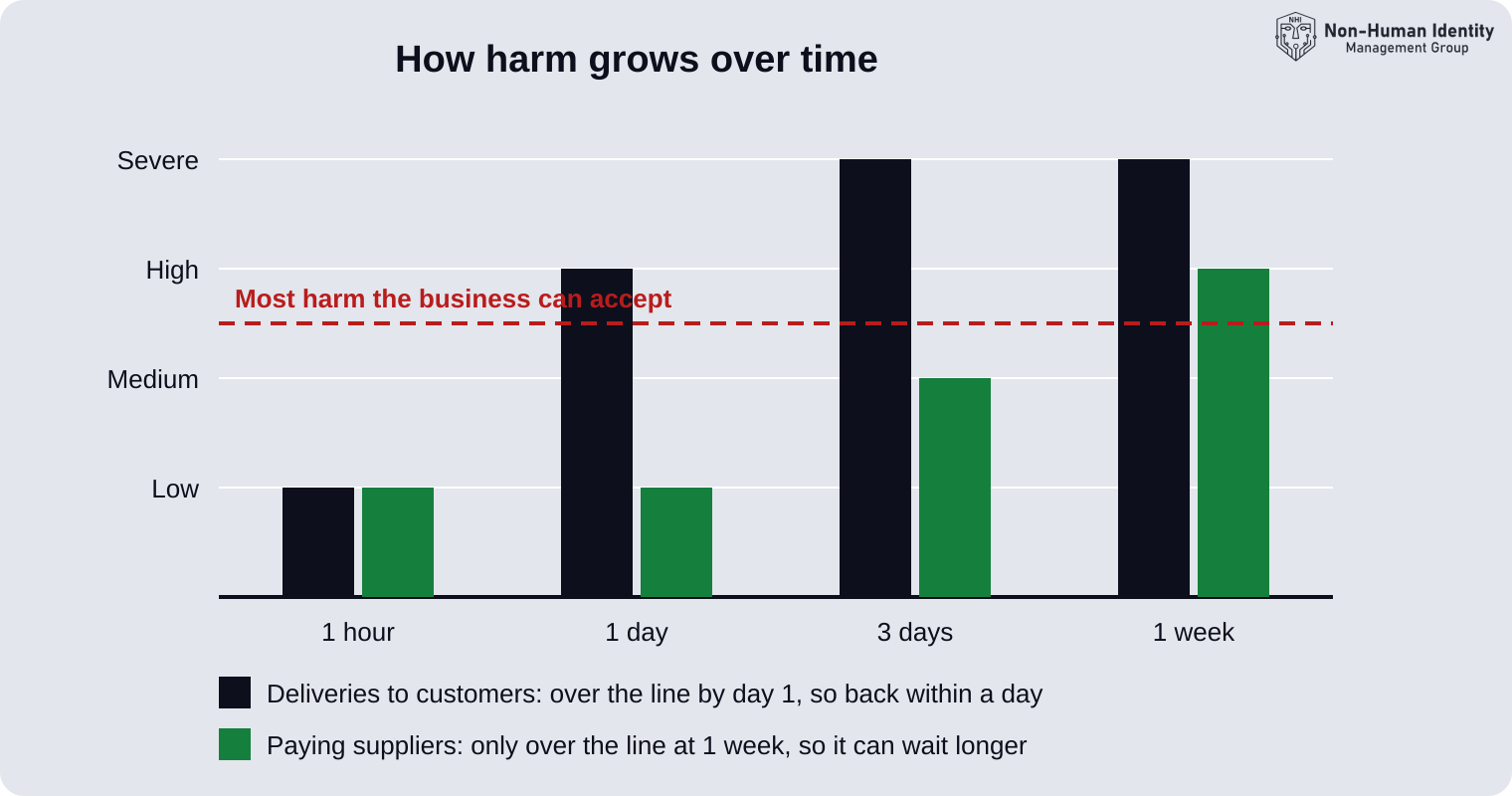
               1 day   - high, hotels complain
               3 days  - severe, contract at risk
Longest stop:  1 day                           (2)
Needs:         2 vans, route app, 3 drivers    (3)
               route app login (one person)    (4)
               fuel card supplier
Data loss OK:  up to 4 hours of bookings       (5)
- Harm is rated at set points in time, so you can see how fast it grows.
- The longest stoppage the business can accept. This sets the recovery target.
- Everything the activity needs: equipment, systems and people.
- A single login held by one person is a weak point. If they are away, nobody can get in.
- How much recent data the business could afford to lose. This guides how often backups run.
Why this is risky: a sheet like this is only useful if the owner agrees it. Without that, the targets are guesses. The single login also shows how one small gap can hold up a whole activity.
The safer way: interview the people who run each activity, record their answers and get the owner to sign off the targets. Then fix the weak points the sheet reveals.
How does it work?
A US government guide describes a BIA as a way to predict what a stoppage would do to a business.[1] Most BIAs follow similar steps.
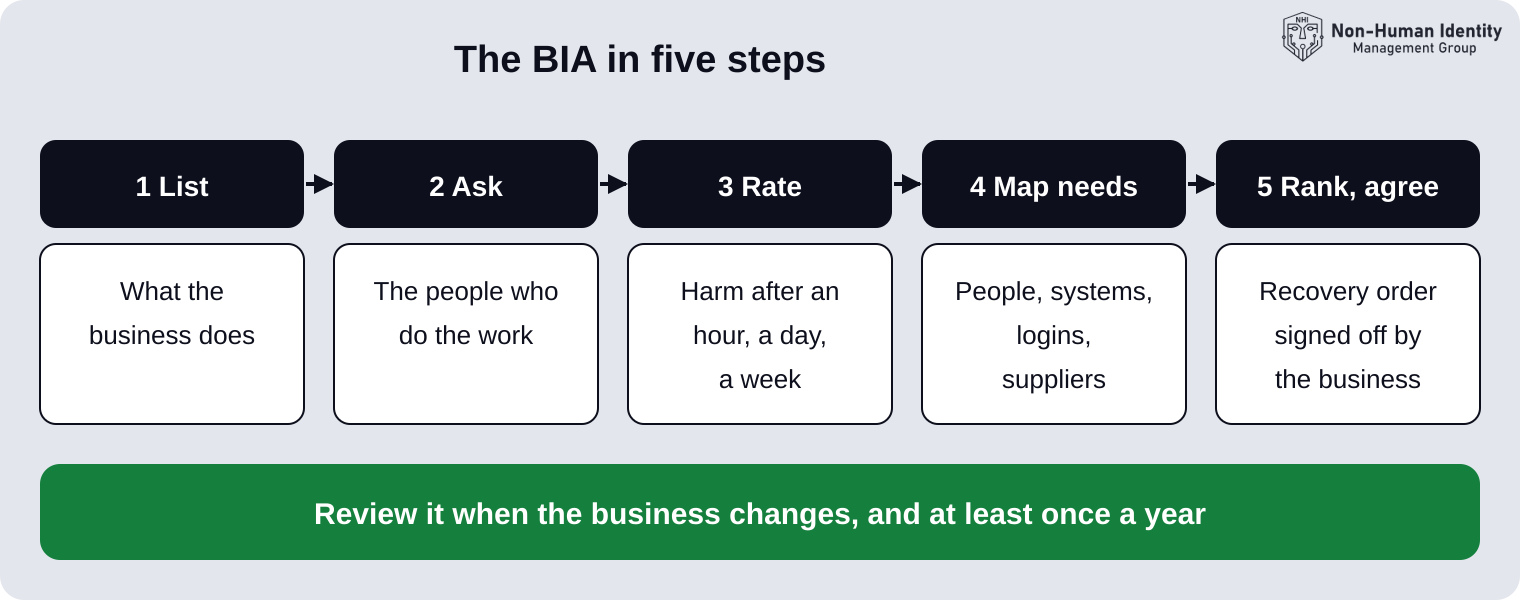
- List the activities. Write down what the business does, such as selling, making, delivering and paying.
- Ask the people who do the work. The same guide suggests a questionnaire for managers and others who know how the work is done.[1]
- Rate the harm over time. Look at lost income, extra costs, fines, contract penalties and lost customers. The guide notes that when and for how long a stoppage happens can change the loss a lot.[1]
- Set the targets. Agree the longest each activity can stop, how fast it must be back and how much data it could lose.[3][4]
- Map what each activity needs. Include people, systems, data, logins and suppliers. A supplier failing is one of the stoppages the guide lists.[1]
- Rank and agree. Put activities in recovery order, get the business to sign off and review the BIA when things change.
A US government standard for recovery planning uses three linked ideas.[2] The maximum tolerable downtime is how long an activity can stop without serious harm.[5] The recovery time objective is how long its systems can take to come back.[3] The recovery point objective is how far back the restored data may be.[4] We suggest setting the recovery time shorter than the downtime limit, to leave room for checks.
A worked example
Kaia Kader runs Wren Laundry, a fictional commercial laundry with 18 staff. It washes sheets and towels for local hotels. Her office manager, Bruno Nakamura, is asked to lead the firm's first BIA.
Bruno lists five activities: collecting and delivering, washing, booking, invoicing and payroll. He spends twenty minutes with each person who runs one.
The drivers explain that hotels can manage one day without fresh sheets, but not two. After three days, the biggest hotel could cancel its contract. Bruno marks deliveries as needing to be back within a day.
Invoicing tells a different story. A week's delay would be awkward, but the money would still come in. Payroll is the same, as long as it runs before payday.
Then Bruno maps what deliveries need. The vans, the drivers and the route app are obvious. But only one person, the route planner, knows the app's login. She is often on leave in August.
Bruno takes the sheet to Kaia. She agrees the targets and the order: deliveries first, then washing and booking, then invoicing and payroll.
They fix the weak point that week. A second named person gets their own login to the route app. Bruno also asks the app's supplier how quickly it could restore the service, and writes down the answer.
Kaia asks Bruno to review the sheet every year, or sooner if a big new contract arrives.
Myths and mistakes
| What people think | What is true |
|---|---|
| A BIA is an IT job. | The business sets the targets. IT helps work out whether they can be met. |
| Everything is critical. | If everything is first, nothing is. A BIA ranks activities so the most urgent come back first. |
| A BIA is the same as a risk assessment. | A risk assessment asks what could go wrong and how likely it is. A BIA asks how bad a stoppage would be, whatever the cause. |
| Once done, it is done. | New customers, systems and suppliers change the answers. Review it regularly. |
| Only systems need listing. | People, logins, buildings and suppliers can stop an activity too. |
What can I do this week?
- Write down your five most important activities.
- For each one, ask its owner how long it could stop before real harm.
- List what each needs, including suppliers and who holds the logins.
- Look for any task that only one person knows how to do.
- Share the list with whoever handles your backups and IT recovery.
Checklist
- Our main activities are listed, each with a named owner.
- Harm is rated at set points, such as an hour, a day and a week.
- Each activity has an agreed recovery target.
- We know how much data each activity could afford to lose.
- Dependencies are listed, including people, logins and suppliers.
- Single points of failure have been found and have a plan.
- The business owner has signed off the targets and recovery order.
- The BIA has a review date.
Common questions
How long does a business impact analysis take?
For a small firm, a first BIA can often be done in a few days of short interviews. Larger organisations with many activities and suppliers usually take longer. Starting small with your top five activities is a sensible first step, and you can widen it later.
Who should take part in a BIA?
The people who run each activity, because they know what it needs and what happens when it stops. A senior person should agree the final targets. IT and key suppliers help check whether the targets can be met, but they should not set them alone.
What is the difference between RTO and RPO?
The recovery time objective is how quickly a system must be back. The recovery point objective is how much recent data you could afford to lose, measured in time. A four-hour recovery point means backups need to run at least every four hours.
Is a BIA the same as a business continuity plan?
No. The BIA comes first and works out what matters most and how fast. The business continuity plan uses those answers to set out how you will keep working or recover. Without a BIA, the plan's priorities are guesses.
Does a cyber attack change the BIA?
Not the method, but it adds things to check. An attack may hit several systems at once, lock staff out of their accounts or affect backups. We suggest listing the logins and suppliers each activity needs, not just the systems.
Where next?
Ready for the detail? Read the practitioner guide: Business Impact Analysis Template. It goes further into rating scales, a ready-to-use worksheet and how to turn the results into signed recovery priorities.
Also useful:
- Business Continuity and Disaster Recovery for Beginners
- RTO and RPO Guide
- Business Impact Analysis vs Cyber Risk Assessment
- Cyber Risk Management for Beginners
Related NHI Mgmt Group resources: Backup Security for Beginners · Tabletop Exercises for Beginners · Cyber Resilience for Beginners
Key terms
- Business impact analysis
- A review of how badly a stoppage of each activity would hurt the business over time.
- Business continuity
- Keeping key work going through a stoppage and recovering afterwards.
- Recovery time objective
- The longest time a system can stay down before the harm is too great.
- Recovery point objective
- How much recent data you could afford to lose, measured in time.
- Maximum tolerable period of disruption
- The point after which a stoppage seriously threatens the business.
- Single point of failure
- One thing, person or login that can stop a whole activity if it fails.
Sources and further reading
- Business Impact Analysis. Ready.gov, US Federal Emergency Management Agency. https://www.ready.gov/business/planning/impact-analysis, accessed 28 Nov 2026.
- Business impact analysis (BIA), glossary entry, citing NIST SP 800-34 Rev. 1, Contingency Planning Guide for Federal Information Systems. NIST Computer Security Resource Center. https://csrc.nist.gov/glossary/term/business_impact_analysis, accessed 28 Nov 2026.
- Recovery time objective (RTO), glossary entry, citing NIST SP 800-34 Rev. 1. NIST Computer Security Resource Center. https://csrc.nist.gov/glossary/term/recovery_time_objective, accessed 28 Nov 2026.
- Recovery point objective (RPO), glossary entry, citing NIST SP 800-34 Rev. 1. NIST Computer Security Resource Center. https://csrc.nist.gov/glossary/term/recovery_point_objective, accessed 28 Nov 2026.
- Maximum tolerable downtime (MTD), glossary entry, citing NIST SP 800-34 Rev. 1. NIST Computer Security Resource Center. https://csrc.nist.gov/glossary/term/maximum_tolerable_downtime, accessed 28 Nov 2026.