Exposure management is a repeating routine for finding the weak spots an attacker could really use, then fixing those first.
This guide is for managers, students and new IT staff who keep hearing the term and want a plain answer. You do not need to run scans to be affected: if your firm has more security problems than time to fix them, exposure management is about choosing well.
In short
- Most firms find far more weak spots than they can fix. Exposure management helps choose which ones matter.
- It looks at flaws, risky settings and over-powered accounts together, not one list at a time.
- A weak spot matters most when an attacker can reach it and it leads to something important.
- It runs as a cycle: choose the scope, find, rank, test, then get the right people to fix it.
What you will learn
- Explain how exposure management differs from a long list of flaws.
- Spot the three questions that make a weak spot urgent.
- Explain the five steps of the cycle in plain words.
- Ask your team which fixes protect your most important systems.
- Weak spot (exposure)
- anything an attacker could use to get in or move closer to what matters.
- Route in (attack path)
- a chain of weak spots that leads from the outside to something important.
- Crown jewels (critical assets)
- the systems and data the business could least afford to lose.
What is exposure management?
Picture a town that floods. The council cannot sandbag every street. So it asks where water can actually get in, and which low points lead to the hospital or the power station. It tests the weak banks, then sends the right crews to fix them first.
Exposure management works the same way for computers. A weak spot might be a software flaw, a setting left open, or an account with more access than it needs. Many firms find thousands of these. Exposure management asks which ones an attacker could reach, and which lead to something that matters.
It builds on two older jobs. Attack surface work finds everything you have that could be reached. Vulnerability management finds and fixes flaws in software. Exposure management joins them up, adds accounts and settings, and ranks the lot by real-world risk.
Where the comparison stops working: floodwater goes wherever the ground lets it. Attackers choose. They often look for the easiest route, and they may already know about flaws that your team has not yet ranked.
Why does it matter?
Teams have limited time. If they fix weak spots in the order a scanner lists them, the one that leads straight to customer data may wait weeks. One research firm, Gartner, put forward a five-step cycle for this in 2023. It called it continuous threat exposure management (CTEM).[1]
If you manage a team or budget
What could happen: money goes on fixing hundreds of low-risk issues while one open route to key data stays open.
Check this: ask which of this month's fixes protect your most important systems.
If you are new to IT or security work
What could happen: you are handed a report of 5,000 findings and no idea where to start.
Check this: sort by three things: can it be reached, is it being used by attackers, and what does it lead to?
If you look after accounts and access
What could happen: an old software account with admin rights becomes the bridge from one weak laptop to the whole network.
Check this: include over-powered accounts in your list of weak spots, not just software flaws.
What does it look like?
Here is a made-up summary from one cycle at a small design firm. It shows how the same findings can be ranked two ways.
Example only. All values are made up.
EXAMPLE scope this cycle: client files and invoicing
Finding                          Score  Reachable  Leads to
A  Old flaw on print server      HIGH   No         Printers only     (1)
B  Remote login, no 2nd check    MED    Yes        File server       (2)
C  Backup account is admin       LOW    Via B      All client files  (3)
D  Flaw on website plug-in       HIGH   Yes        Website only      (4)
Fix first: B and C (they form one route)                             (5)
- High score, but nobody outside can reach it, and it leads nowhere important.
- Medium score, but open to the internet and it leads to the file server.
- Low score on its own. Combined with B, it reaches every client file.
- Reachable and serious, so it still needs a fix, but it does not lead to client data.
- In a real file, this line would name an owner and a date for each fix.
Why this is risky: a list sorted by score alone puts A and D first. The route that reaches client files, B then C, would wait.
The safer way: rank by reach, by signs that attackers already use a flaw, and by what it leads to. A US government agency, CISA, keeps a public list of flaws known to be used in real attacks. It advises firms to use that list when deciding what to fix first.[3]
How does it work?
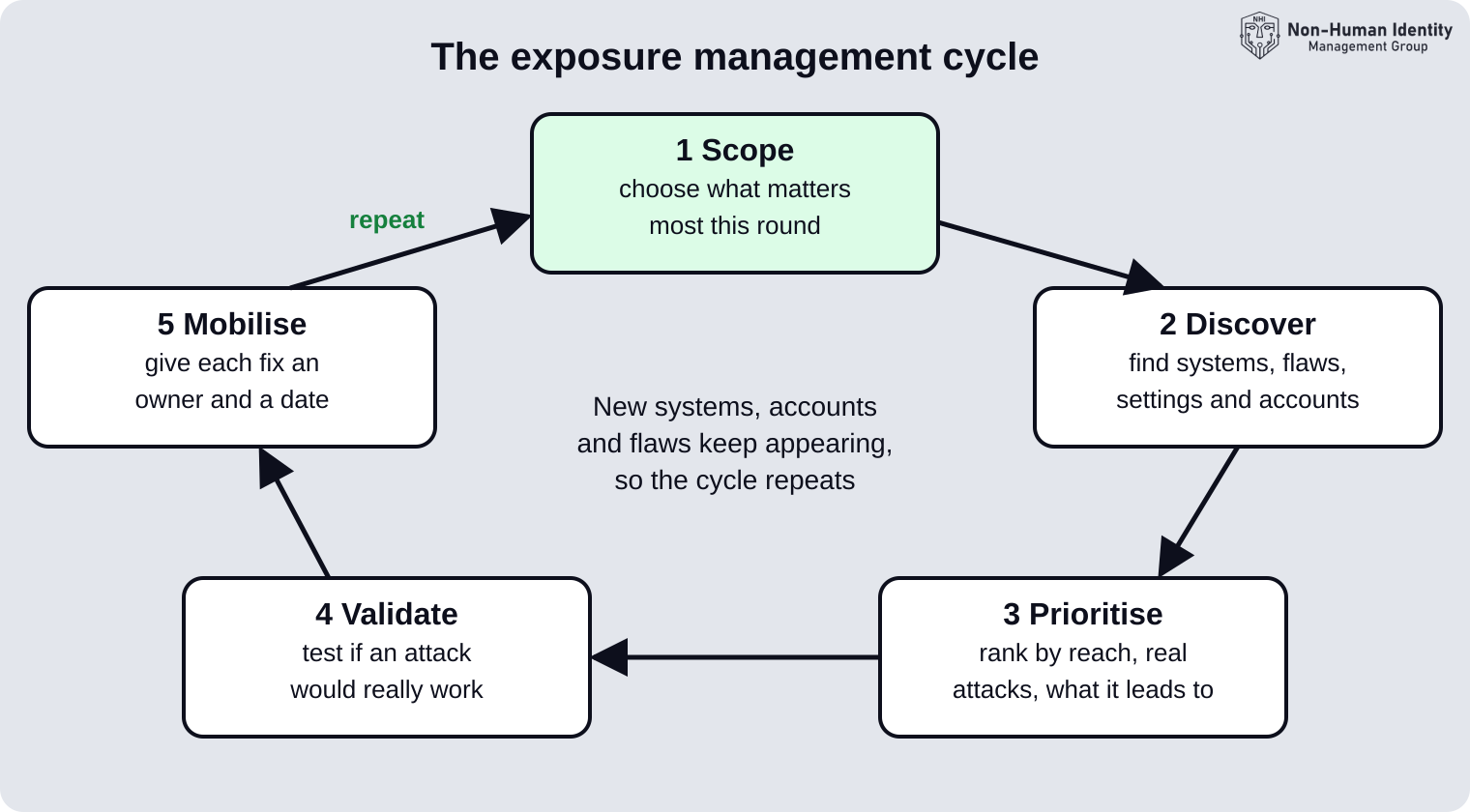
Exposure management runs as a cycle that repeats. Gartner names five stages.[1]
- Scope. Choose what this round covers, such as the website, cloud apps or payroll. Start with what matters most to the business.
- Discover. Find everything in that scope, and its weak spots: flaws, open settings and over-powered accounts.
- Prioritise. Rank weak spots by how likely they are to be used and what they lead to.
- Validate. Test whether an attack would really work, and whether your defences would notice. This might be a safe, approved test.
- Mobilise. Get the right people to fix it. That often means other teams, such as IT, cloud or a supplier, with a named owner and a date.
Then the cycle starts again, because new systems, accounts and flaws keep appearing.
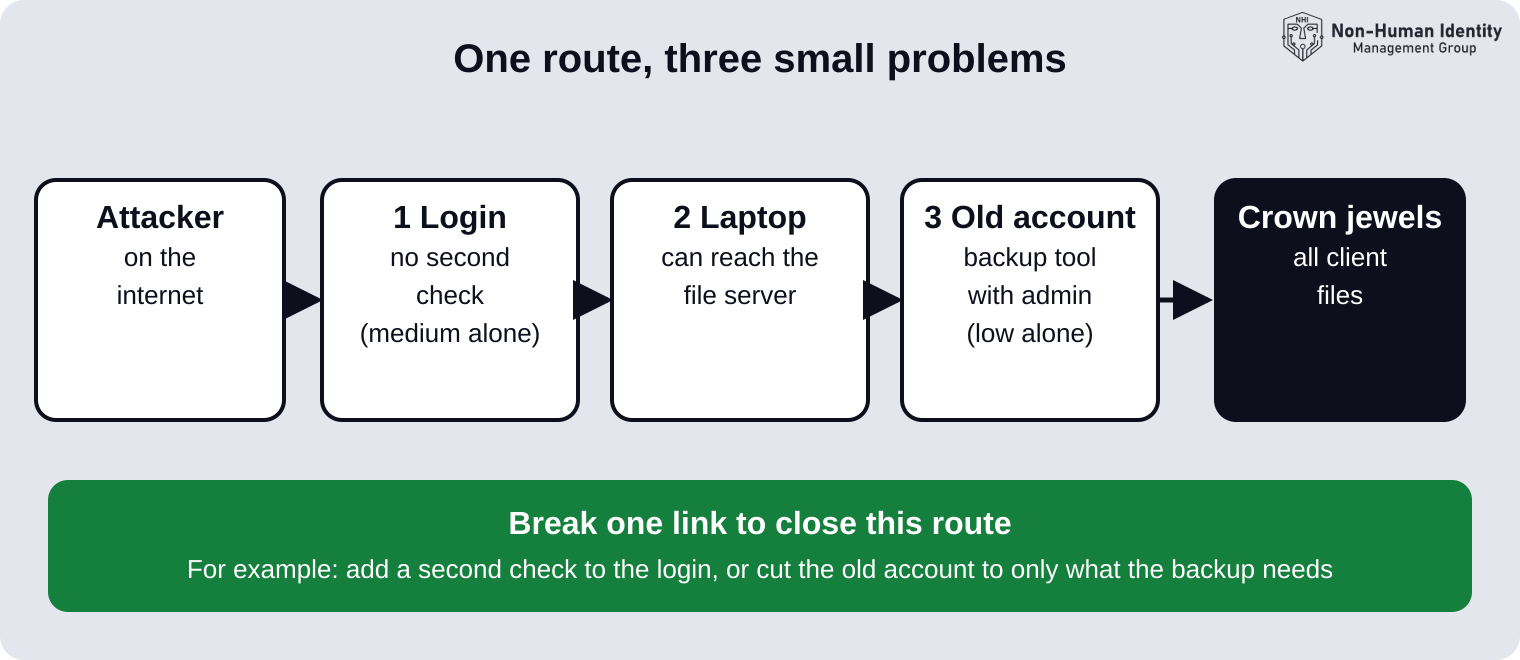
Some tools draw these routes as maps. One vendor, Microsoft, describes "attack paths" that show how an attacker might move through your systems. It also points out "choke points", single spots that many routes pass through.[2] Fixing one choke point can close several routes at once.
A worked example
Kaia Pajari runs operations at Thistle Studio, a made-up design agency with forty staff. Each month, the firm's IT supplier sends a scan report. It lists more than a thousand findings, sorted by score. The team fixes the top twenty and the list never seems to shrink.
Kaia asks a simpler question: "What would hurt us most?" The answer is client artwork and the invoicing system. She sets that as the scope for the next round.
Darius Rinaldi, the supplier's engineer, looks only at what could reach those two systems. He finds a remote login for designers with no second check. He also finds an old account, made years ago for a backup tool, that still has admin rights on the file server. Neither looked urgent on the scan report.
Together, they form a route. Someone who guessed a designer's password could log in, then use the old account to open every client folder.
With Kaia's written approval, Darius runs a careful test from a test account. The route works. He records what he tried and when.
The fixes are small. Remote login now asks for a second check, such as a code from a phone app. The backup account gets only the rights the backup needs, and it gets an owner. Darius tests again, and the route is closed.
Kaia keeps the monthly scan going. But now each round starts with one question: what could reach the things we cannot afford to lose?
Myths and mistakes
| What people think | What is true |
|---|---|
| Exposure management is a product you buy. | It is a way of working. Tools can help with finding and mapping, but someone still has to choose the scope and get fixes done. |
| Fix the highest scores first. | Scores describe a flaw on its own. Reach, known attacks and what it leads to often matter more.[3] |
| It is only about software flaws. | Risky settings and over-powered accounts are weak spots too, and they often link flaws into a route. |
| Low-risk findings can be ignored. | A low-risk item can be the missing link in a route. Look at how findings connect. |
| Once the list is fixed, we are done. | New systems, accounts and flaws keep appearing, so the cycle repeats. |
What can I do this week?
- Write down the three systems or sets of data your business could least afford to lose.
- Ask your IT team or supplier which open findings could lead to those three.
- Ask whether any finding is on a public list of flaws known to be used in attacks.
- List accounts with admin rights that no named person owns.
- Give each of the top five fixes a named owner and a date.
Checklist
- We know which systems and data matter most.
- Each round has a written scope.
- Our list of weak spots includes settings and accounts, not only software flaws.
- We rank by reach, real attacks and what a weak spot leads to.
- Tests of whether an attack would work are approved and recorded first.
- Every agreed fix has an owner and a date.
- We check that each fix worked.
- The cycle repeats on a set schedule, and after big changes.
Common questions
What is the difference between exposure management and vulnerability management?
Vulnerability management finds and fixes flaws in software. Exposure management is wider. It also covers risky settings and accounts. It asks how weak spots join up, tests them, and ranks them by what an attacker could reach. Many firms run vulnerability management as one part of it.
What does CTEM stand for?
Continuous threat exposure management. It is a name Gartner, a research firm, gave to a five-stage cycle: scope, discover, prioritise, validate and mobilise. Many vendors now use the term, so check what a product actually covers rather than trusting the label.[1]
Do small firms need exposure management?
Yes, in a simple form. You may not need a special tool. You do need to know what matters most, what could reach it, and who fixes what. A short list and a monthly review with your IT supplier can cover the basics.
What does "validate" mean here?
It means testing whether a route an attacker might use really works. It could be a penetration test, where an approved tester tries to break in. It could also be a tool that safely acts out an attack. Any test needs written approval first, and it should be recorded.
Where do accounts fit in?
Accounts are often the links that join weak spots together. An old software account, a non-human identity (NHI) with admin rights, can turn one small break-in into wide access. Include accounts and their permissions when you look for weak spots.
Where next?
Ready for the detail? Read the practitioner guide: Exposure Management and CTEM Guide. It goes further into ranking by exploitability and impact, identity exposures, validation methods and the metrics used to run a programme.
Also useful:
- CTEM vs Vulnerability Management
- Vulnerability Prioritisation Guide
- Attack Surface for Beginners
- Vulnerability Management for Beginners
- Non-Human Identities for Beginners
Related NHI Mgmt Group resources: Attack Path Management vs Vulnerability Management · CISA KEV Catalogue Guide · Breach and Attack Simulation (BAS) Guide
Key terms
- Exposure management
- A repeating routine for finding which weak spots attackers could reach and reducing them first.
- CTEM
- Continuous threat exposure management: a five-stage cycle of scope, discover, prioritise, validate and mobilise.
- Attack path
- A chain of accounts, permissions and systems an attacker could follow to reach something important.
- Attack surface
- Every point where an attacker could try to get in, cause harm or take data out.
- Vulnerability
- A flaw or weakness in code, settings or design that could be abused.
- Misconfiguration
- A setting that leaves something less protected than intended, such as storage left open to anyone.
- Penetration testing
- An approved test in which someone tries to break in the way a real attacker would.
Sources and further reading
- How to Manage Cybersecurity Threats, Not Episodes. Kasey Panetta, Gartner, 21 August 2023. https://www.gartner.com/en/articles/how-to-manage-cybersecurity-threats-not-episodes, accessed 28 Nov 2026.
- What is Microsoft Security Exposure Management? Microsoft Learn, Microsoft. https://learn.microsoft.com/en-us/security-exposure-management/microsoft-security-exposure-management, accessed 28 Nov 2026.
- Known Exploited Vulnerabilities. Cybersecurity and Infrastructure Security Agency (CISA). https://www.cisa.gov/known-exploited-vulnerabilities, accessed 28 Nov 2026.