The CCPA is California's privacy law, giving residents rights over the personal information businesses collect about them.
This guide is for Californians, small business owners and people new to US IT or privacy work. You do not need a legal background. If your website or app has customers in California, the law may apply to you.
In short
- The CCPA is one law. The CPRA is a 2020 update that voters approved, and it took effect in 2023.
- It covers larger for-profit businesses, and firms that buy, sell or share a lot of Californians' data.
- Californians can ask a business what it holds, ask it to delete or fix the data, and tell it to stop selling or sharing it.
- A state agency and the Attorney General enforce the law. People can sue only after certain data breaches.
What you will learn
- Explain the difference between the CCPA and the CPRA.
- Check whether a business is likely to be covered.
- Spot the six main rights and how to use them.
- Ask the right questions when a request comes in at work.
Status: correct as at 28 November 2026, based on the California Attorney General's CCPA page (updated 28 August 2026) and the California Privacy Protection Agency. Laws change; check the official text.
This guide explains the topic in general terms and is not legal advice.
- Information about you (personal information)
- details that can be linked to you or your household, such as your name, email or browsing history.
- Selling or sharing your data
- passing your details to other firms for money or other value, or for ads that follow you around the web.
- A request to stop (opt-out)
- telling a business not to sell or share your details any more.
What is the CCPA?
Think of a shop's customer service desk. You can walk up and ask what the shop has on file about you. You can ask it to throw your details away, and to stop passing them to other firms.
The CCPA gives Californians that desk. The letters stand for California Consumer Privacy Act. It was passed in 2018. In 2020, voters approved the California Privacy Rights Act, or CPRA, which updated it from 1 January 2023.[2] Today they work as one law.
A consumer here means any California resident, not only shoppers. Since the start of 2023 that includes workers and job applicants.[2]
The law covers for-profit businesses that do business in California and meet at least one test. Their yearly revenue is over a set amount, now about 26.6 million dollars. Or they buy, sell or share data on 100,000 or more Californians or households. Or half their revenue comes from selling that data.[1][3]
Where the comparison stops working: at a shop desk, you know which shop holds your details. Online, many firms you have never heard of may hold them. The law helps, but you still need to find the right business to ask.
Why does it matter?
California has a large share of US shoppers and tech firms. Its law shapes privacy buttons and settings that people across the country now see.
If you live in California
What could happen: apps pass your browsing habits to ad firms, and you never agreed to it.
Check this: look for a "Do Not Sell or Share" link at the bottom of sites you use.
If you run a small online business
What could happen: your site shares visitor data with ad tools, and that may count as sharing under the law.
Check this: work out whether you pass any of the three size or data tests.
If you are new to US IT or privacy work
What could happen: a request to delete data sits in a shared inbox until the deadline passes.
Check this: find out who logs requests and how the 45-day clock is tracked.
What does it look like?
Here is a made-up "Am I covered?" card that a small company might fill in.
Example only. All values are made up.
Company: EXAMPLE Outdoor Gear Inc (for-profit)
Sells to California residents: yes                  (1)
Yearly revenue: $9,000,000 (FAKE)                   (2)
Californians whose data we buy/sell/share: 140,000  (3)
Revenue from selling data: 0%
Ad tags on website: yes, adtool.example.com         (4)
Result: COVERED, because test 3 is met              (5)
- The firm does business in California, so it moves on to the three tests.
- Revenue is under the threshold, so the first test is not met.
- Over 100,000 Californians, so the second test is met. In a real file, this line would explain how the number was counted.
- Ad tags that track visitors across sites may count as sharing data.
- Meeting one test is enough for the law to apply.
Why this is risky: small firms often check only revenue and stop there. The data tests can bring them into the law anyway.
The safer way: check all three tests each year, and write down how you counted.
How does it work?
For a person using their rights, it usually goes like this.
- Find the request link. Covered businesses must give at least two ways to ask, such as a web form and a phone number.[1]
- Choose your right. You can ask to know, delete or correct your data. You can opt out of sale or sharing, and limit the use of sensitive details.[1]
- Prove who you are. For requests to know, delete or correct, the business checks you are the right person. This stops a stranger getting your data.
- Wait for the reply. Requests to know, delete or correct get an answer within 45 calendar days. The business can extend once, to 90 days, if it tells you.[1]
- Opt-outs move faster. They should be acted on as soon as possible, and no later than 15 business days.[1]
- Complain if it goes wrong. You can file a complaint with the state privacy agency online or by post.[2]
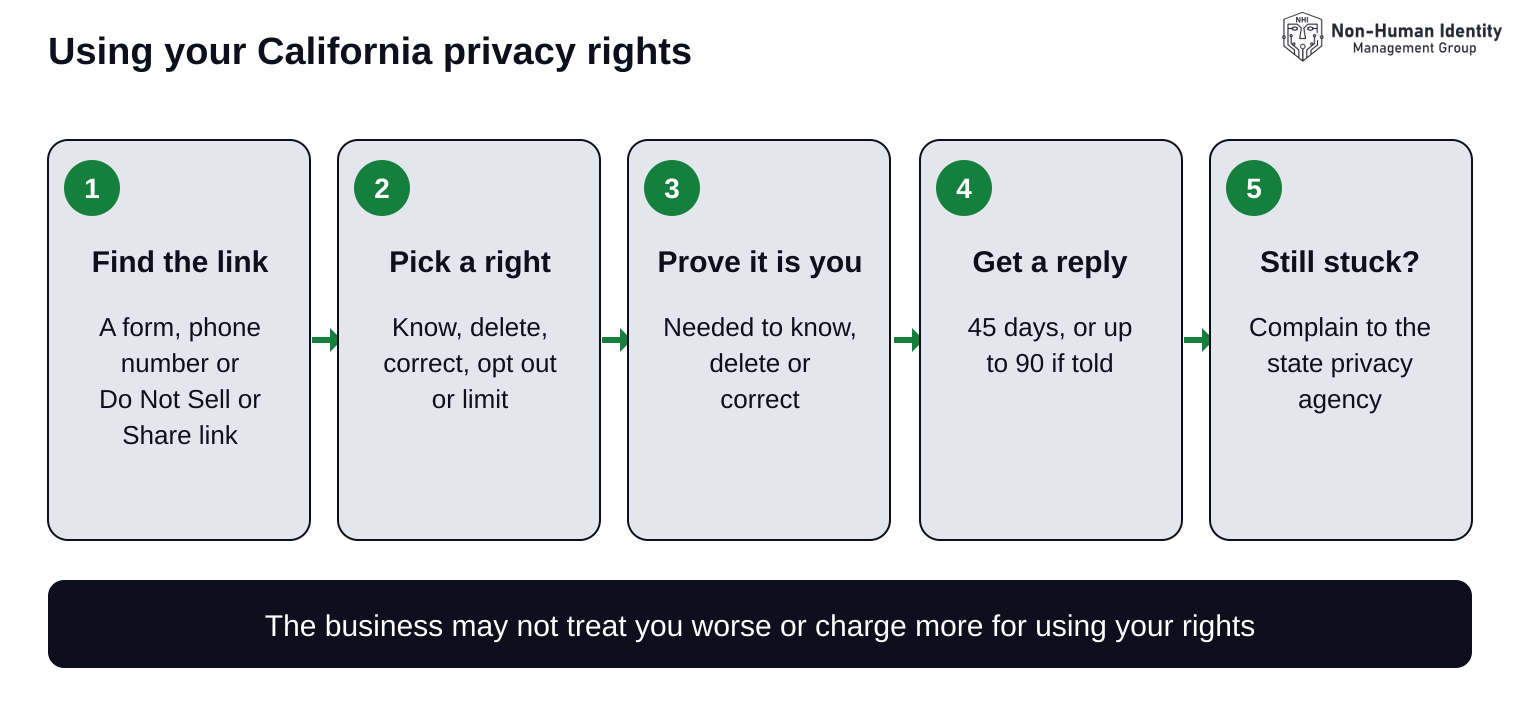
A business must not punish you for using your rights. It should not refuse service or charge you a different price because you asked.[1]
Some browsers and add-ons can send an automatic "do not sell or share" signal, called Global Privacy Control. Covered businesses that sell or share data must treat it as a valid opt-out.[1]
Fines are set for each breach of the law. They currently reach 2,663 dollars, or 7,988 dollars where it was on purpose or involves under-16s.[3] After certain data breaches caused by weak security, people can sue for 107 to 799 dollars each, or their real losses if higher.[3]
A worked example
Milo Rosen lives in Sacramento. He signed up for a made-up fitness app, PaceLine, two years ago. Lately he sees ads for running shoes on sites he has never told about his running.
He scrolls to the bottom of the PaceLine website. He finds a link marked "Your Privacy Choices". It leads to a form with options to know, delete, correct and opt out.
First, Milo opts out of sale and sharing. He also turns on Global Privacy Control in his browser, so other sites get the same message.
Next, he asks to know what PaceLine holds. The app asks him to confirm a code sent to his email address, so it knows the request is really his. He gets a reply in 30 days. It lists his profile, workout history and the ad partners that received data.
The list shows an old home address. Milo sends a request to correct it. He then decides to close his account and asks PaceLine to delete his data. The app explains it must keep some payment records for tax rules, and deletes the rest.
A few weeks later, the running shoe ads seem less frequent. Milo cannot be certain every partner has acted. But he has a written record of each request, and he knows he can complain to the state agency if he needs to.
Myths and mistakes
| What people think | What is true |
|---|---|
| The CCPA and the CPRA are two separate laws. | The CPRA updated the CCPA. Today they work as one law.[2] |
| It only covers big tech companies. | A smaller firm can be covered if it buys, sells or shares data on 100,000 or more Californians.[1] |
| Staff data is not covered. | The exemption for staff data ended at the close of 2022.[2] |
| I can sue any company that breaks the law. | People can usually sue only after certain data breaches. Most cases are for the state to bring.[1] |
| A browser setting cannot opt me out. | Covered businesses that sell or share data must treat Global Privacy Control as a valid opt-out.[1] |
What can I do this week?
- Turn on Global Privacy Control in your browser, or add a tool that sends it.
- Pick one app you use a lot and send a request to know what it holds about you.
- If you run a business, check all three tests and note the result.
- If you work in IT, find out where requests arrive and who tracks deadlines.
Checklist
- I can explain how the CCPA and the CPRA relate.
- I know the three tests that decide whether a business is covered.
- I can name the six main rights.
- I know requests to know, delete or correct get a reply within 45 days, or 90 if extended.
- I know opt-outs should be acted on within 15 business days.
- Our site has a clear way to opt out of sale or sharing, if we sell or share data.
- Our site treats Global Privacy Control as an opt-out, if we sell or share data.
- I know how to complain to the state privacy agency.
Common questions
Does the CCPA protect me if I do not live in California?
Usually not. The rights belong to California residents, including those briefly out of the state.[2] Other US states have their own privacy laws. Some businesses offer the same choices to everyone, so check their privacy page.
Is CPRA a new law I need to learn separately?
No. The CPRA is a set of changes to the CCPA that voters approved in 2020. It added rights such as correcting data and limiting sensitive data, and it set up the state privacy agency.[2] People now usually just say CCPA.
Does the law apply to charities or government bodies?
Generally not. The Attorney General says the CCPA generally does not apply to nonprofits or government agencies.[1] It is aimed at for-profit businesses that meet one of the size or data tests. Other laws may still cover those bodies.
Who enforces the law?
Two public bodies. The California Attorney General and the California Privacy Protection Agency can both act on most breaches of the law.[1] The agency has a five-member board and takes complaints from the public.[2]
Can a business charge me more for opting out?
No, not as a punishment. A business must not deny you goods or services, or charge a different price, because you used your rights.[1] Loyalty schemes are treated differently and have their own rules, which the practitioner guide covers.
Where next?
Ready for the detail? Read the practitioner guide: CCPA and CPRA. It goes further into the duty to keep reasonable security, contracts with suppliers, enforcement cases and the new audit rules.
Also useful:
- US Privacy Laws for Beginners
- Global Privacy Control for Beginners
- Data Brokers for Beginners
- GDPR vs CCPA/CPRA
Related NHI Mgmt Group resources: US State Privacy Laws Guide · California CCPA Cybersecurity Audit and Risk Assessment Regulations Guide · California Delete Act and Data Broker Registration Guide
Key terms
- Personal information
- Details that can be linked to a person or household, such as a name, email or browsing history.
- Sensitive personal information
- Details that need extra care, such as health or precise location; people can limit how they are used.
- CCPA
- California's consumer privacy law, updated by the CPRA, giving residents rights over their personal information.
- Opt out of sale
- A request telling a business to stop selling or sharing your personal information.
- Global Privacy Control
- A browser setting that sends an automatic opt-out signal to the websites you visit.
- Data subject rights
- The rights people have over their data, such as to know, delete or correct it.
- Data breach
- An event where personal information is exposed to people who should not have it.
Sources and further reading
- California Consumer Privacy Act (CCPA). State of California Department of Justice, Office of the Attorney General, updated 28 August 2026. https://oag.ca.gov/privacy/ccpa, accessed 28 Nov 2026.
- Frequently Asked Questions. California Privacy Protection Agency. https://cppa.ca.gov/faq, accessed 28 Nov 2026.
- Updated Monetary Thresholds in CCPA (Civil Code sections 1798.140(d)(1)(A), 1798.150(a)(1)(A), 1798.155(a) and 1798.199.90(a)), effective 1 January 2025. California Privacy Protection Agency. https://www.cppa.ca.gov/regulations/cpi_adjustment.html, accessed 28 Nov 2026.