Clickjacking is a trick where a hidden web page sits under a fake one, so your click lands somewhere else.
This guide is for students, people who run a website and anyone new to web security. You do not need to write code to be affected: if your business has a website with logins or account settings, it may need one small setting to protect its visitors.
In short
- A web page can show another site inside a frame, and that frame can be made invisible.
- An attacker lines up a hidden button from a real site under a harmless-looking button on their own page.
- If you are logged in to the real site, your click can change a setting or approve something there.
- Website owners can tell browsers not to show their pages inside other sites. That one setting blocks most of this trick.
What you will learn
- Explain clickjacking in one sentence.
- Explain why being logged in makes it work.
- Check whether a website you run allows itself to be framed.
- Ask your developer for the right protective setting.
- A page inside a page (iframe)
- a box on one web page that shows a different web page inside it.
- Instructions sent with a page (header)
- a short note a website sends to the browser, saying how to handle the page.
What is clickjacking?
Picture a poster for a free raffle, taped over a block of doorbells. Someone has cut a small hole where one bell sits. You press "Enter the raffle", but your finger rings the bell of the flat behind it.
Clickjacking works the same way on the web. A web page can show another website inside a box called an iframe. The attacker's page loads a real website in an iframe and makes it see-through, or hides it under other layers. Then they place a tempting button exactly over a real button on the hidden site.[1]
You see "Play video" or "Claim prize". What you actually click is the hidden button underneath. That is why it is also called a "UI redress" attack: the user interface is dressed up as something else.[1]
Where the comparison stops working: you might spot a hole cut in a poster. On a web page, the hidden layer can be fully invisible, so there is often nothing to see.
Why does it matter?
The hidden click counts as yours. If you are already logged in to the real site, it acts with your account. Past examples include tricking people into "liking" pages and into deleting their own emails.[1]
If you run a website with logins
What could happen: another site frames your account page and tricks a customer into changing a setting.
Check this: ask your developer whether your site tells browsers not to show it inside other sites.
If you are learning web development
What could happen: your app has a one-click button for something important, and any site can frame it.
Check this: send the anti-framing setting on every page, and ask for a second step before big actions.
If you browse the web
What could happen: a "click here to win" page uses your click on a site you are logged in to.
Check this: be wary of pages that push you to click quickly, and log out of important sites when you are done.
What does it look like?
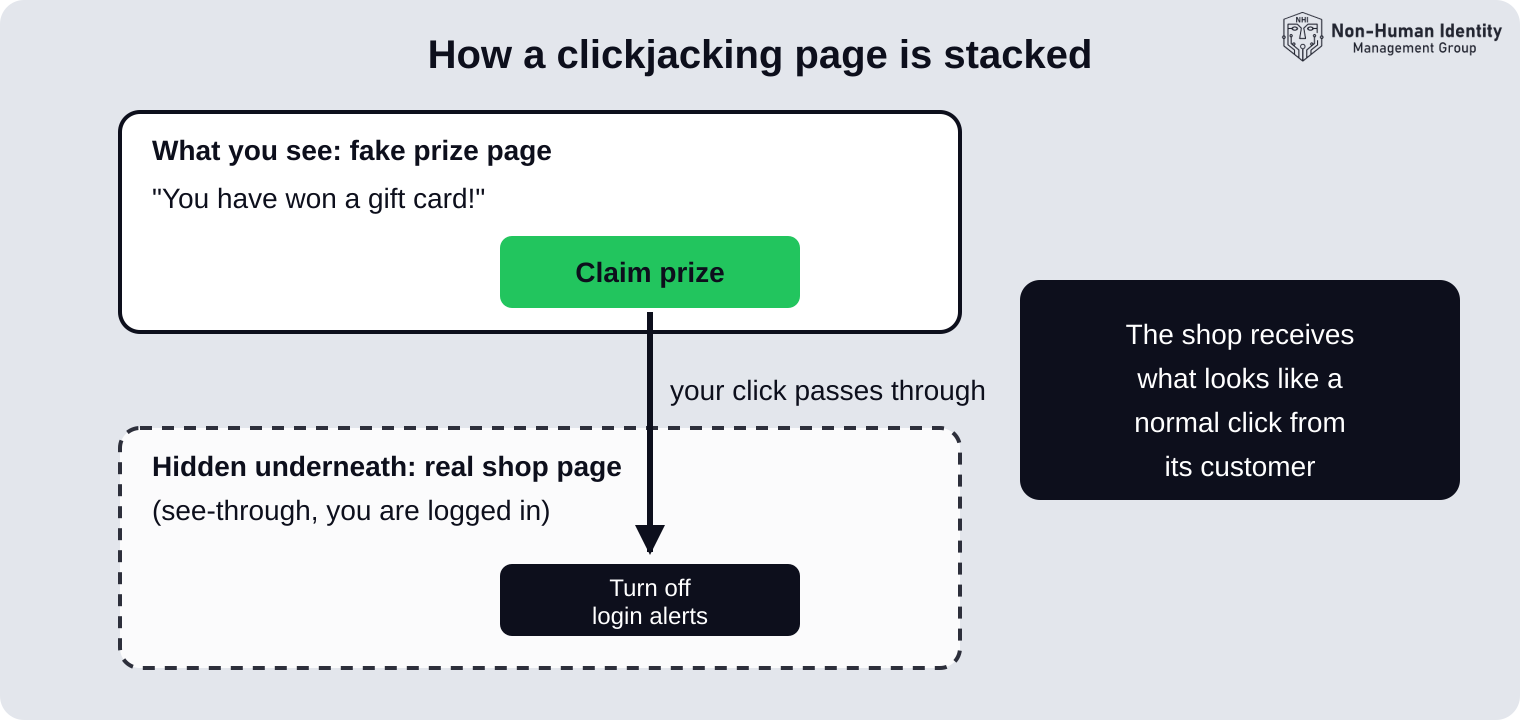
Here is a made-up scenario card showing the two layers of a clickjacking page. The top layer is what the visitor sees. The bottom layer is hidden.
Example only. All values are made up.
WHAT YOU SEE  (prizes.example.invalid)
  "You have won a FAKE gift card!"
  [ CLAIM PRIZE ]                          (1)

WHAT IS HIDDEN UNDERNEATH  (shop.example.com, see-through)
  Account settings for: customer-0000      (2)
  [ TURN OFF LOGIN ALERTS ]                (3)
- The visible button is bait. It does nothing by itself.
- In a real screen, this layer would contain a genuine site where the visitor is already logged in.
- The hidden button sits in exactly the same spot as the bait. The click goes here.
Why this is risky: the shop sees a normal click from a logged-in customer. It has no simple way to know the customer was tricked.
The safer way: the shop tells browsers not to show its pages inside other websites. The hidden layer then fails to load, and the trick has nothing to click.
How does it work?
Here are the steps, seen from the defender's side.
- The bait. The attacker builds a page with something tempting to click and gets people to visit it.
- The hidden frame. Their page loads a real site in an iframe and makes it see-through or hides it under other layers.[1]
- The line-up. The bait button is placed exactly over an important button on the hidden site.
- The click. The visitor clicks the bait. The browser sends the click to the hidden site, with the visitor's login.
- The defence. If the real site sends a header saying "do not show me inside other sites", the browser refuses to load it in the frame.[2]
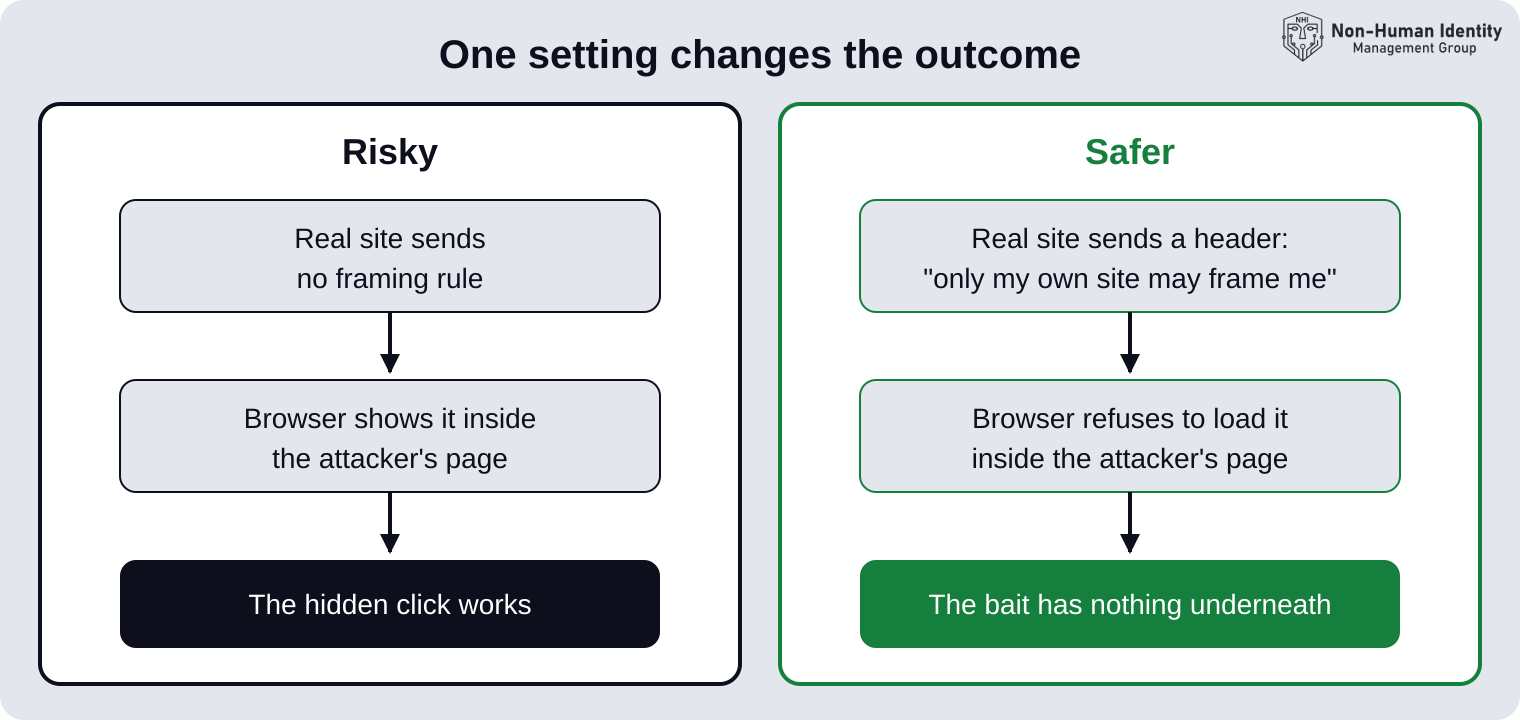
There are two common forms of this "do not frame me" setting. The newer one is part of a set of browser rules called Content Security Policy, and is named frame-ancestors. It lists which sites, if any, may show the page in a frame.[3] The older one is a header called X-Frame-Options. It can say "never" or "only my own site".[2] Security guidance prefers the newer one, and suggests using both for older browsers.[4]
Without either setting, browsers will generally let other sites show the page in a frame.[2] Both settings must be sent by the web server. Writing them into the page itself does not work.[2][3]
A worked example
Wanda Rinaldi runs Basalt Florist, a fictional flower shop that takes online orders. Customers have accounts where they save addresses and payment cards. Marek Marlow, a freelance developer, built and looks after the site.
Wanda reads a short article about clickjacking. She remembers the raffle poster over the doorbells and wonders if her site has the same problem. She sends Marek one question: "Can another website show our account pages inside itself?"
Marek checks. He makes a simple test page on his own computer that tries to frame the florist's account settings page. The page loads inside his test frame. That means any site could do the same.
He explains it to Wanda in plain words. A trick page could hide the "remove saved card" or "change email" button under a fake prize button. A logged-in customer might click it without knowing.
Marek adds the frame-ancestors setting to the web server, allowing only the florist's own site. He also adds X-Frame-Options set to "only my own site", for older browsers. He runs his test again, and this time the frame stays empty.
While he is there, he adds a second step before the most important account changes. Changing the email address now asks for the password again.
The fix takes under an hour. Wanda adds "check the anti-framing setting" to the list Marek reviews after each site update.
Myths and mistakes
| What people think | What is true |
|---|---|
| Clickjacking needs a virus on my computer. | It needs only a web page and your click. Nothing is installed. |
| A bit of JavaScript that "breaks out" of frames is enough. | Ways around those scripts are well known. Use the server settings instead.[4] |
| We can put the setting in a meta tag in the page. | Browsers ignore these settings in the page itself. They must come from the web server.[2] |
| Our site has no money features, so it does not matter. | Any one-click action can be misused, such as changing an email address or turning off alerts. |
| A general Content Security Policy covers framing automatically. | The framing rule must be set on its own. A strict default rule does not cover it.[3] |
What can I do this week?
- Ask your developer or web host whether your site sends frame-ancestors or X-Frame-Options.
- Ask for a second step, such as re-entering a password, before important account changes.
- Add the anti-framing check to the list of things tested after each site update.
- When browsing, close pages that rush you to click, and log out of important sites when finished.
Checklist
- Every page with logins or account actions tells browsers who may frame it.
- The frame-ancestors setting is sent by the web server, not written in the page.
- X-Frame-Options is also sent, for older browsers.
- Only sites you trust and need are allowed to frame your pages, if any.
- Important account changes ask for a second step.
- The setting is checked again after site updates and moves to a new host.
Common questions
What is clickjacking in simple terms?
Clickjacking is when a web page hides another site under a fake button, so your click lands on the hidden site. If you are logged in there, the click acts with your account. It is like pressing a raffle button that is really a doorbell underneath.
How do I protect my website from clickjacking?
Send a setting that tells browsers who may show your pages in a frame. The modern way is the frame-ancestors rule in Content Security Policy. Add X-Frame-Options too, for older browsers. Your developer or web host can add both on the web server.[4]
What is an iframe?
An iframe is a box on a web page that shows another web page inside it. Sites use iframes for useful reasons, such as showing a map or a video. Clickjacking misuses them by making the framed page invisible and lining up its buttons under fake ones.
Can I tell if a page is clickjacking me?
Often not, because the hidden layer can be invisible. The best protection is on the website's side. As a visitor, be careful with pages that push you to click quickly, and log out of important accounts when you finish using them.
Is clickjacking the same as CSRF?
No, but both make your browser act for someone else. In clickjacking you really click, on a hidden button. In cross-site request forgery (CSRF), a page sends a request for you without a click on the real site. See Cross-Site Request Forgery for Beginners.
Where next?
Ready for the detail? Read the practitioner guide: Clickjacking Guide. It goes further into attack variants, header settings for different web servers and how to test a site for framing.
Also useful:
- Content Security Policy for Beginners
- Security Headers Guide
- Cross-Site Request Forgery for Beginners
- Website Security for Beginners
Related NHI Mgmt Group resources: Content Security Policy Guide · Web Application Security Guide · Web Application Hardening Checklist
Key terms
- Clickjacking
- A trick that makes a person click something they did not intend, by hiding a real page under a fake one.
- Iframe
- A box on a web page that shows another web page inside it.
- X-Frame-Options
- An older header that tells browsers whether a page may be shown inside a frame.
- Frame-ancestors
- A Content Security Policy rule that lists which sites may show a page inside a frame.
- Content Security Policy
- A set of rules a website sends to browsers about what the page may load and who may frame it.
Sources and further reading
- Clickjacking. OWASP community attack page, OWASP Foundation. https://community.owasp.org/attacks/Clickjacking, accessed 28 Nov 2026.
- X-Frame-Options header. MDN Web Docs, Mozilla. https://developer.mozilla.org/en-US/docs/Web/HTTP/Reference/Headers/X-Frame-Options, accessed 28 Nov 2026.
- CSP: frame-ancestors. MDN Web Docs, Mozilla. https://developer.mozilla.org/en-US/docs/Web/HTTP/Reference/Headers/Content-Security-Policy/frame-ancestors, accessed 28 Nov 2026.
- Clickjacking Defense Cheat Sheet. OWASP Cheat Sheet Series, OWASP Foundation. https://cheatsheetseries.owasp.org/cheatsheets/Clickjacking_Defense_Cheat_Sheet.html, accessed 28 Nov 2026.