Cloud security posture management (CSPM) is the regular, automatic checking of cloud settings against a list of safe settings.
This guide is for anyone who has heard the term CSPM and wants to know what it does. You do not need to be a cloud expert. If your business keeps files, websites or customer data in the cloud, the settings on those services decide who can reach them.
In short
- Most cloud risk sits in your own settings. The provider secures its platform; you set up what you build on it.
- A CSPM tool lists your cloud resources, compares their settings with a safe list, called a baseline, and reports what does not match.
- The value comes from fixing the most serious findings first and stopping them coming back.
- The big cloud providers each offer a built-in starting point, and one of them has a free tier.
What you will learn
- Explain what CSPM is and the problem it solves.
- Spot a risky cloud setting in a made-up finding.
- Check whether posture checking is switched on in your cloud accounts.
- Ask who owns fixing each kind of finding.
- Wrong setting (misconfiguration)
- a setting that leaves something more open than it should be.
- Safe-settings list (security baseline)
- a written list of what good settings look like.
- Problem report (finding)
- one setting that failed a check, with a note on how serious it is.
What is CSPM?
Think of a safety inspector with a checklist who visits a building every day. Are the windows locked? Is the back door shut? Is the alarm set? CSPM does the same for your cloud.
Every cloud service has settings. A storage bucket, which is a cloud folder for files, can be private or open to anyone. A database can be reachable from the whole internet or only from your own systems.
A misconfiguration is a setting that leaves something more open than it should be. A CSPM tool checks all these settings automatically and lists every one that fails.
Your security posture simply means the overall security state of your cloud at a given moment. Microsoft describes CSPM as giving "continuous visibility into the security state of your cloud assets and workloads".[1]
Where the comparison stops working: a building rarely grows new rooms overnight. A cloud account can gain hundreds of new resources in a day, so the checks need to run again and again.
Why does it matter?
Cloud providers say clearly that your settings are your job. Amazon Web Services (AWS) calls this the shared responsibility model. AWS looks after security "of" the cloud, such as hardware and buildings. The customer looks after security "in" the cloud.[4]
If you run a small business
What could happen: one storage folder left open to the internet exposes customer files.
Check this: ask whoever runs your cloud whether posture checking is switched on.
If you are new to a security job
What could happen: you are handed hundreds of findings and do not know where to start.
Check this: sort by how serious each finding is and whether it can be reached from the internet.
If you are a manager
What could happen: teams assume the provider handles security, and nobody owns the settings.
Check this: make sure each cloud account has an owner who reviews serious findings.
What does it look like?
Here is a made-up list of findings, like the first screen a CSPM tool might show.
Example only. All values are made up.
Posture check: account EXAMPLE-TEST-0000
HIGH    Storage bucket "orders-copy-FAKE" can be read by anyone   (1)
HIGH    Database "db-EXAMPLE" accepts connections from any address (2)
MEDIUM  Main admin account has no second sign-in check             (3)
LOW     Bucket "web-images-FAKE" is public                         (4)
Score: 61 out of 100                                              (5)
- A folder of files anyone on the internet could read. In a real file, this line would contain the bucket's name.
- A database open to the whole internet, not just your own systems.
- The top account can sign in with a password alone.
- A public folder that may be meant to be public, such as images for a website.
- A score that tracks progress against one safe-settings list, not overall safety.
Why this is risky: the first two findings could let a stranger read or reach your data straight from the internet.
The safer way: fix the high findings first. Record any setting that is meant to be open as an approved exception, with a date to review it.
How does it work?
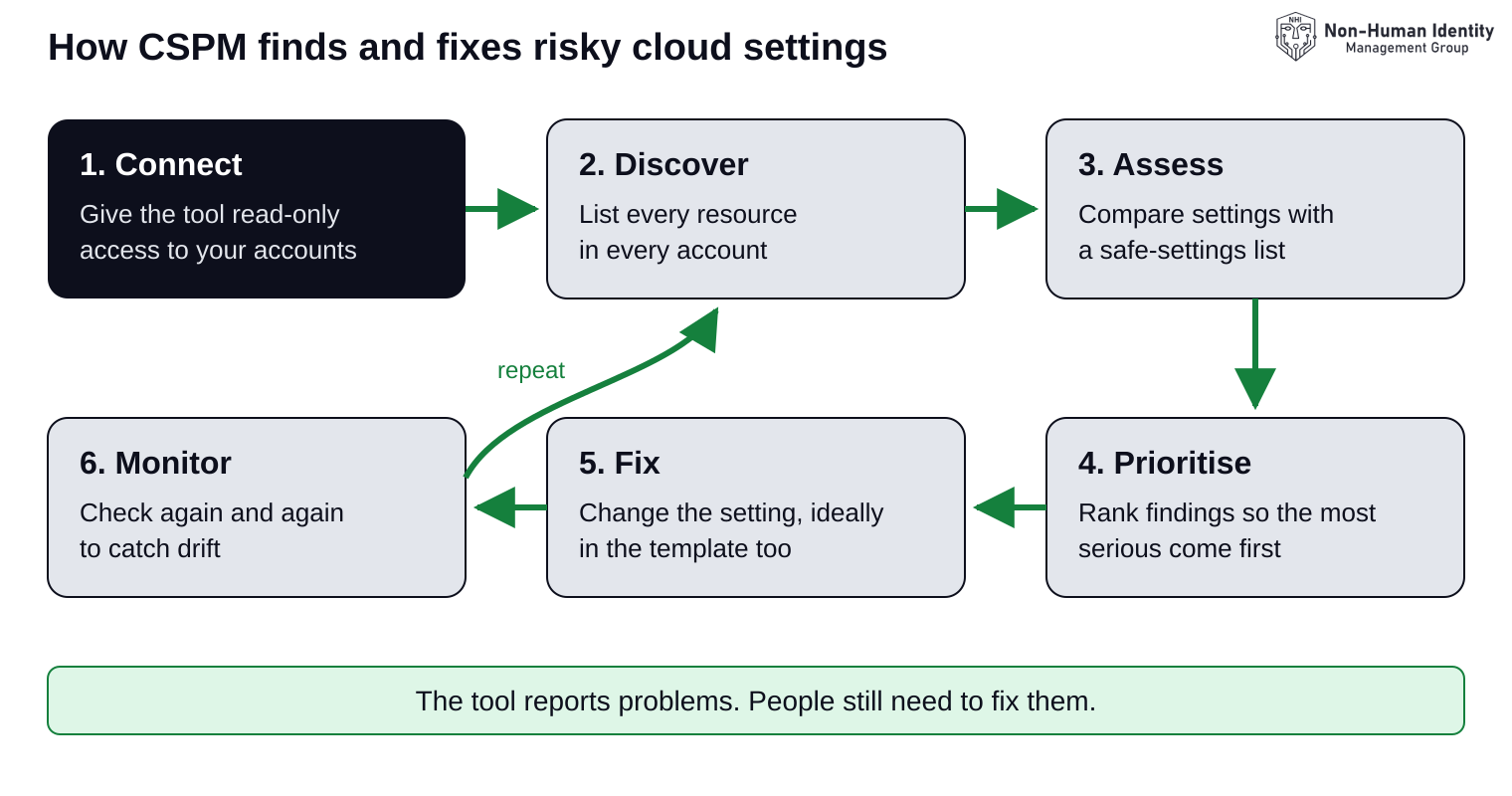
Products look different, but most CSPM tools follow the same steps:
- Connect. You give the tool access to your cloud accounts, usually read-only, which means it can look but not change.
- Discover. The tool lists every resource it can see, such as servers, buckets and databases. This often turns up forgotten ones.
- Assess. It compares each setting with a baseline, such as a provider's own best-practice list or a community checklist from the Center for Internet Security (CIS).
- Prioritise. Each failed check becomes a finding, ranked so the most serious come first.
- Fix. Someone changes the setting. It is best to fix it in the template that created the resource, so the next build does not bring the problem back.
- Monitor. The tool checks again and again. It catches drift, which is when a setting changes away from the approved state.
The three biggest cloud providers each have a built-in posture service. They are listed alphabetically, and the order is not a ranking:
- Amazon Web Services: AWS Security Hub CSPM checks accounts against security standards and best practices.[2]
- Google Cloud: Security Health Analytics, part of Security Command Center, scans for common wrong settings such as open firewalls. For many new set-ups, Google now points to its Compliance Manager instead.[3]
- Microsoft Azure: Microsoft Defender for Cloud offers Foundational CSPM, which Microsoft lists as free, and a paid plan with extra features.[1]
CSPM checks settings. It does not watch for attacks in progress. It tells you which doors are unlocked, not who is walking through them.
A worked example
Rohan Silva is the only engineer at a small made-up online print shop. The shop runs its website and orders in two cloud accounts, one for testing and one for live customers.
Rohan switches on his provider's built-in posture service in both accounts. After the first scan he has more than 200 failed checks. He does not try to fix them all. He sorts by how serious each is and whether it faces the internet.
Top of the list is a test bucket anyone can read. It holds a copy of last year's customer orders, uploaded to test a report. Rohan checks with the developer, makes the bucket private and deletes the copy.
Next, a database accepts connections from any address. He limits it to the shop's own servers. Then he turns on a second sign-in check for the main admin account.
One bucket holds website images and is meant to be public. Rohan records it as an approved exception, with a review date in six months.
Two weeks later, the open-bucket finding comes back. Someone rebuilt the test account from an old template. Rohan fixes the template itself, so the setting is right every time.
He checks the access records he has for the test bucket. He finds no sign of outside access in the records available, but some older history was not kept. The tool has not made the shop fully secure. It does mean the shop now finds its most serious mistakes in days, not by chance.
Real cases show the cost of a wrong setting. In 2019, Capital One said a "configuration vulnerability" had been reported to it. The incident affected about 100 million people in the US and about 6 million in Canada.[5] You can read more in our write-up of the Capital One Breach 2019.
Myths and mistakes
| What people think | What is true |
|---|---|
| The cloud provider secures our cloud for us. | The provider secures the platform. Your settings and data are your job.[4] |
| Once CSPM is on, we are safe. | CSPM reports problems. Nothing improves until someone fixes them. |
| Every finding must be fixed today. | Hundreds of findings on day one are common. Fix internet-facing, high findings first. |
| Fixing the setting on screen is enough. | If a template built the resource, the next build can bring the problem back. Fix the template too. |
| CSPM is only for big companies. | One account can hold a serious mistake, and built-in options exist on the big platforms.[1] |
| CSPM catches attackers. | It finds risky settings. Spotting live attacks needs logs, alerts and a response plan. |
What can I do this week?
- List every cloud account you have, including test ones, and who owns each.
- Switch on the built-in posture check in your live account, with one safe-settings list.
- Fix the five most serious findings, in the template as well as on screen.
- Record any setting that is meant to be open, with a reason and a review date.
Checklist
- We have a list of our cloud accounts, each with an owner.
- Posture checking is on in every account, including test accounts.
- We have chosen a baseline to check against.
- No storage or database is open to the internet without an approved, recorded reason.
- Top admin accounts in every cloud account use a second sign-in check.
- Serious findings are reviewed at least weekly, each with a named owner.
- Fixes are made in templates, not only on screen.
- Exceptions are recorded with a reason and a review date.
Common questions
What does CSPM stand for?
Cloud security posture management. "Posture" means the overall security state of your cloud at a point in time. "Management" means checking it, fixing what fails and keeping it in good shape over time, not just measuring it once.
Do I need to buy a CSPM tool?
Not always to start. The big cloud providers each have a built-in posture service, and Microsoft lists its Foundational CSPM as free.[1] Organisations that use several clouds often add a separate tool later, to see everything in one place.
What is a CIS Benchmark?
It is a guide to safe settings for a product, such as a cloud platform. The Center for Internet Security writes these guides with a community of experts, and offers them free for non-commercial use. Many CSPM tools can check your settings against them.[6]
How often does CSPM check my settings?
Usually on a schedule, and sometimes on every change. Some tools run scheduled scans, such as daily. Some also check a resource as soon as its settings change. Google Cloud, for example, describes both kinds of scan for its posture service.[3]
Is a public finding always a problem?
No. A bucket that holds images for a public website is meant to be public. Treat it as an approved exception: agreed, written down and reviewed on a set date. That way it does not hide among real problems.
Where next?
Ready for the detail? Read the practitioner guide: Cloud Security Posture Management (CSPM) Guide. It goes further into choosing baselines, rolling out a tool across many accounts and fixing findings at scale.
Also useful:
- Cloud Misconfiguration Guide
- Cloud Permissions and CIEM for Beginners
- CIEM vs CSPM
- Cloud Security for Beginners
Related NHI Mgmt Group resources: CNAPP and CSPM platform rollout playbook · CSPM vs DSPM · Top 10 Cloud Security Risks
Key terms
- Cloud security posture management
- Regular, automatic checking of cloud settings against a list of safe settings.
- Misconfiguration
- A setting that leaves something more open than intended.
- Security baseline
- A written list of the settings a system should have.
- The split of security jobs between the cloud provider and the customer.
- CIS Benchmark
- A community-agreed guide to safe settings for a product.
- Configuration drift
- When settings slowly change away from their approved state.
Sources and further reading
- What is Cloud Security Posture Management (CSPM). Microsoft Defender for Cloud, Microsoft Learn, Microsoft, last updated 30 Sep 2026. https://learn.microsoft.com/en-us/azure/defender-for-cloud/concept-cloud-security-posture-management, accessed 28 Nov 2026.
- Introduction to AWS Security Hub CSPM. AWS Security Hub User Guide, Amazon Web Services. https://docs.aws.amazon.com/securityhub/latest/userguide/what-is-securityhub.html, accessed 28 Nov 2026.
- Overview of Security Health Analytics. Security Command Center documentation, Google Cloud. https://docs.cloud.google.com/security-command-center/docs/concepts-security-health-analytics, accessed 28 Nov 2026.
- Shared Responsibility Model. Amazon Web Services. https://aws.amazon.com/compliance/shared-responsibility-model/, accessed 28 Nov 2026.
- 2019 Capital One Cyber Incident. Capital One. https://www.capitalone.com/digital/facts2019/, accessed 28 Nov 2026.
- CIS Amazon Web Services Benchmarks. Center for Internet Security. https://www.cisecurity.org/benchmark/amazon_web_services, accessed 28 Nov 2026.