SASE is networking and security delivered together as a cloud service, checking traffic close to each user.
This guide is for anyone who keeps hearing "SASE" or "SSE" and wants to know what they mean. You do not need a technical background. If your staff work from home and use cloud apps, these services may decide how their connections are checked.
In short
- SASE (said "sassy") moves security checks out of the head office and into cloud locations near each user.
- It is a bundle of services, not one product. SSE is the security part on its own, without the networking part.
- Decisions are based on who the user is, their device and the rules, not on being "inside" the office network.
- Most organisations move one step at a time, often starting with remote access or web filtering.
What you will learn
- Explain what SASE and SSE mean and how they differ.
- Name the main building blocks in plain words.
- Follow how a connection is checked on its way to an app.
- Ask suppliers the right questions before you buy.
- Cloud checkpoint (point of presence)
- a provider's network location near users, where traffic is checked.
- Web filter (secure web gateway)
- a service that checks web traffic going out and blocks harmful sites.
- One-app door (zero trust network access)
- a way to reach one private app after checks, without joining the whole network.
What are SASE and SSE?
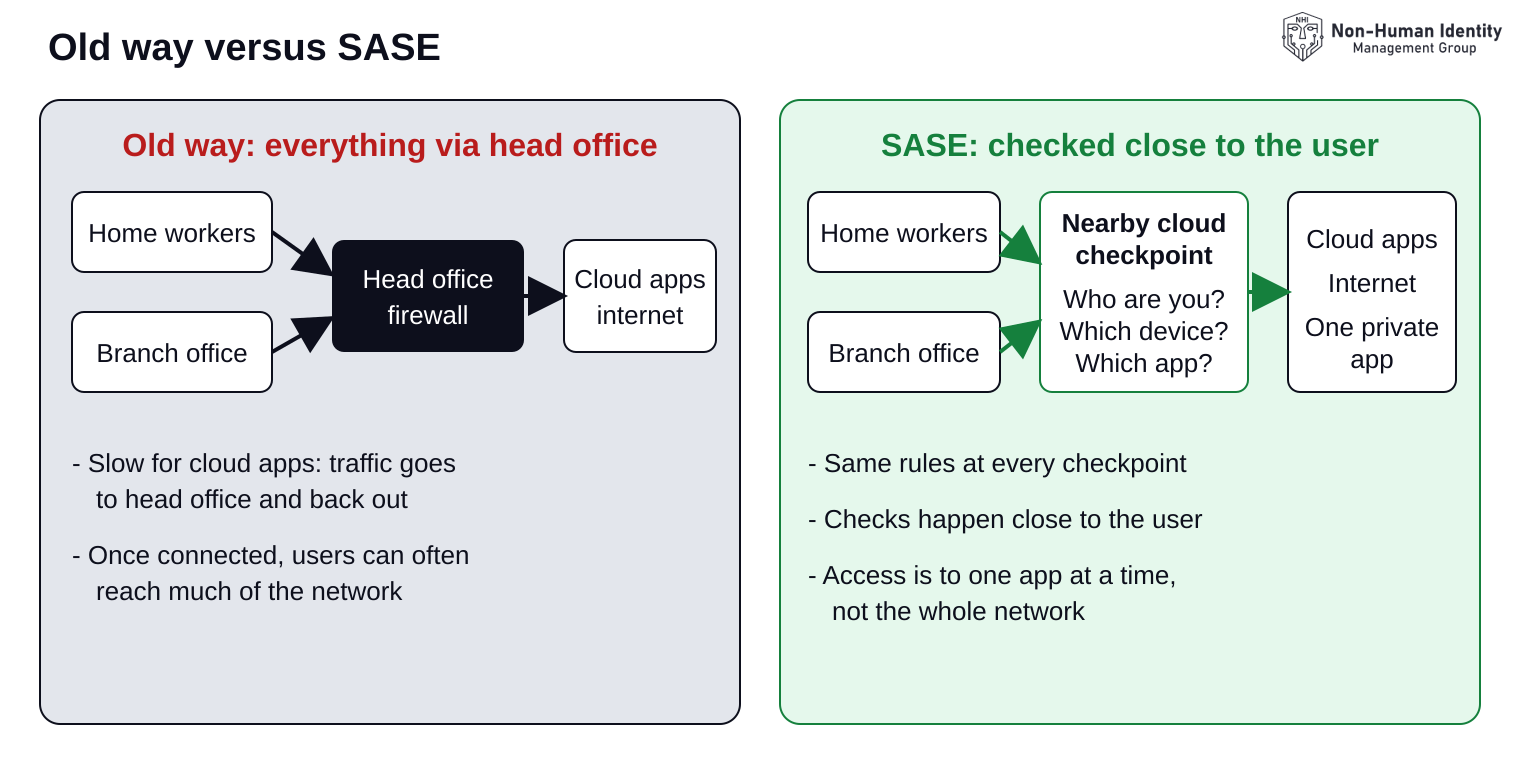
Think of a courier firm. In the old way, every parcel in the country went to one head office to be checked before delivery. The new way checks parcels at a local depot near you, with one rulebook for every depot.
Company networks used to work like that head office. Offices and home workers sent their traffic back to one central site, where firewalls checked it. That made sense when most apps lived there.
Today, many apps are cloud services and many people work from home. Sending every connection to head office and back out is slow. SASE, short for secure access service edge, checks traffic in cloud locations near each user instead.
SASE joins networking and security in one cloud service. Its parts usually include a web filter, cloud app controls, a cloud firewall and one-app access to private systems. It also includes a way to link offices, called SD-WAN.
SSE, short for security service edge, is the security part of SASE on its own. It leaves out the SD-WAN networking piece.
Where the comparison stops working: a parcel is checked once at the depot. SASE checks can carry on during a session, and the rules can change by user, device and app.
Why does it matter?
People now work from many places and use many cloud apps. SASE is one way to apply the same rules wherever they connect from.
If you run a small business
What could happen: staff working from home use cloud email and files with no web filtering at all.
Check this: ask your IT supplier whether the same web and access rules apply at home and in the office.
If you are new to a security job
What could happen: you nod along in a supplier meeting without knowing which parts an offer really includes.
Check this: learn the building blocks in the table below and ask which ones are in each offer.
Next: Zero Trust for Beginners
If you manage IT spending
What could happen: a big-bang switch touches networking, security and sign-in teams at once and stalls.
Check this: pick one clear first problem, such as slow remote access, and pilot with a few users.
What does it look like?
Here is a made-up access rule, the kind an IT team writes in a SASE service.
Example only. All values are made up.
Rule name:  EXAMPLE-finance-files                  (1)
Who:        Finance team (FAKE group)              (2)
Device:     company laptop, up to date             (3)
Sign-in:    password plus second step
App:        files.example.invalid                  (4)
Action:     allow view and edit, block download    (5)
              on personal devices
Log:        every decision recorded
- A clear name, so the team knows what the rule is for.
- Who the rule covers. In a real file, this line would contain the actual staff group.
- The device must be a checked company laptop.
- One app only, not the whole network.
- The decision: allow, limit or block.
Why this is risky: without rules like this, a remote worker on an old network link may reach almost every server once connected.
The safer way: write rules per app. Base them on who the user is and what device they use. Keep a record of every decision.
How does it work?
Product names differ, but a typical connection goes through these stages:
- Connect to the nearest checkpoint. A small app on the laptop, or a box in a branch office, sends traffic to the provider's nearest point of presence. These are network locations spread across a wide area.[2]
- Prove who you are. The user signs in through the organisation's sign-in service, ideally with a second step such as a phone prompt. The device's health can be checked too.
- Look up the rules. The service checks the rules for this user, device and app. US government guidance describes SASE access as based on identity, combined with real-time context and policy.[1]
- Inspect the traffic. Web traffic passes the web filter. Cloud app traffic can pass a cloud access security broker (CASB), which sits between users and cloud services.[2] Private app traffic goes through one-app access.
- Allow, limit or block. The request is allowed, allowed with limits such as view only, or blocked. Every decision is recorded so the team can review it.
The table below shows the building blocks. A product sold as SSE usually covers the security rows only.
| Building block | What it does, in plain words | Part of SSE? |
|---|---|---|
| SD-WAN | Links offices and sites over several internet lines, managed centrally. | No, it is the networking part |
| Secure web gateway (SWG) | Filters web traffic going out and blocks harmful sites. | Yes |
| Cloud access security broker (CASB) | Shows and controls how cloud apps are used. | Yes |
| Zero trust network access (ZTNA) | Lets a checked user reach one private app, not the whole network. | Yes |
| Firewall as a service (FWaaS) | Runs firewall rules in the cloud instead of in an office box. | Often included |
The term SASE was coined by the analyst firm Gartner in 2019.[2] The idea behind it is zero trust: no account or device should be trusted just because of where it connects from.[3]
A worked example
Zane Pereira looks after IT for a made-up architecture practice with 40 staff in two offices. Most staff work from home two or three days a week.
Today, home workers connect through a VPN, a private tunnel, to the main office. All web traffic goes through an ageing firewall there. Video calls stutter. Once connected, a home worker can reach almost every server.
Zane does not try to replace everything at once. He picks two first steps. First, web traffic from home workers goes to a cloud web filter near them, not back to the office. Second, the project file server goes behind one-app access. Staff reach it after signing in with a second step from a company laptop.
He runs a pilot with five people for a month. The old VPN stays available as a fallback, with a written end date, and he records who uses it.
After three months, only a handful of people still use the VPN, for two older apps. Calls are smoother. Zane can see in one record who reached the file server and from which device.
The offices are still linked the old way. Zane plans to look at SD-WAN when the office internet contracts end. The practice has not "finished SASE", but each step has reduced risk and made work easier.
Myths and mistakes
| What people think | What is true |
|---|---|
| SASE is one product you install. | It is a way of combining several services. Suppliers bundle them differently, so check what each offer includes. |
| SASE and SSE are the same thing. | SSE is usually the security services alone. SASE adds the SD-WAN networking part. |
| Buying SASE means we have zero trust. | It helps, but you still need strong sign-in, limited access and managed devices. |
| One-app access is just a new name for a VPN. | A VPN usually puts the user on the network. One-app access connects them only to the apps their rules allow. |
| Once traffic goes through the cloud service, we can stop worrying. | You still own the rules, the sign-in set-up and reviewing the records. |
What can I do this week?
- Sketch how people connect today: how home workers and offices reach the internet, cloud apps and internal apps.
- Pick one problem to solve first, such as slow remote access or no web filtering at home.
- Check your sign-in basics. Make sure a second sign-in step is on for everyone and old accounts are removed.
- Ask suppliers which building blocks they include, using the table above, before any demo.
Checklist
- I can explain the difference between SASE and SSE.
- We know how users and offices reach the internet, cloud apps and internal apps today.
- We have chosen one clear first problem to solve.
- A second sign-in step is on for everyone who will connect through the service.
- We can tell company devices from personal ones.
- Internal apps are reached one app at a time, not by joining the whole network.
- Records from the service are kept and someone reviews them.
- Any fallback to the old VPN is approved, recorded and has an end date.
Common questions
What does SASE stand for?
Secure access service edge. "Edge" means the cloud locations close to users, where the checks happen. The term was coined by the analyst firm Gartner in 2019 to describe networking and security joined up and delivered as a cloud service.[2]
What is the difference between SASE and SSE?
SSE is the security services: web filtering, cloud app control and one-app access. SASE is SSE plus SD-WAN, the networking that links offices and sites. A firm that already has good office links may start with SSE alone and add the rest later.
Does SASE replace our VPN?
Often, over time. One-app access is commonly used to replace VPN access to private apps, one app at a time. Some older apps may need the VPN for longer, so keep it as a controlled fallback with an end date.
Is SASE only for big companies?
No. Because it is delivered from the cloud, a small team can use web filtering and app access rules without running office hardware. Licence costs and set-up effort still matter, so start with one clear problem and a small pilot.
Does SASE cover software and service accounts?
Mostly not. It mainly controls traffic from people and offices. Scripts, servers and other software that connect to cloud services use their own keys and accounts. Those non-human identities need their own controls, such as owners, limited access and regular review.
Where next?
Ready for the detail? Read the practitioner guide: SASE and SSE Guide. It goes further into architecture choices, single or multiple suppliers and how to plan a move step by step.
Also useful:
- Zero Trust Network Access (ZTNA) for Beginners
- Zero Trust for Beginners
- VPNs for Beginners
- Network Security for Beginners
- Networking Fundamentals for Beginners
Related NHI Mgmt Group resources: SASE vs SD-WAN Guide · CASB vs SWG · Microsegmentation vs ZTNA · CASB Guide
Key terms
- Secure Access Service Edge
- Networking and security joined up and delivered as a cloud service, close to users.
- Security Service Edge (SSE)
- The security services of SASE, such as web filtering and one-app access, without the networking part.
- SD-WAN
- A centrally managed way of linking offices and sites over several internet lines.
- Secure Web Gateway
- A checkpoint for web traffic going out, which applies rules and blocks harmful sites.
- Cloud Access Security Broker
- A control layer that shows and manages how cloud apps and their data are used.
- Zero-Trust Network Access
- Access to one specific app, given only after identity, device and rule checks.
- Point of Presence
- A network location placed close to users that brings services nearer to them.
- Zero Trust
- A security approach that gives no automatic trust based on network location.
Sources and further reading
- SP 1800-35, Implementing a Zero Trust Architecture. National Institute of Standards and Technology (NIST), National Cybersecurity Center of Excellence, June 2025. https://nvlpubs.nist.gov/nistpubs/SpecialPublications/NIST.SP.1800-35.pdf, accessed 28 Nov 2026.
- SP 800-215, Guide to a Secure Enterprise Network Landscape. National Institute of Standards and Technology (NIST), November 2022. https://nvlpubs.nist.gov/nistpubs/SpecialPublications/NIST.SP.800-215.pdf, accessed 28 Nov 2026.
- SP 800-207, Zero Trust Architecture. National Institute of Standards and Technology (NIST), August 2020. https://csrc.nist.gov/pubs/sp/800/207/final, accessed 28 Nov 2026.