The shared responsibility model sets out which security jobs a cloud provider does and which stay with you.
This guide is for anyone whose work uses cloud services and who wants to know who keeps what safe. You do not need to be technical to be affected: if your business uses online email, file sharing or a rented server, part of keeping it safe is your job.
In short
- The provider looks after its buildings, machines and core software. You look after your accounts, your data and your settings.
- The more ready-made the service, the less you have to run, but your share does not drop to zero.
- The big providers all say your data and who can get in stay your job, whatever service you use.
- Write down who does each job, then check the settings that are yours.
What you will learn
- Explain the shared responsibility model in one sentence.
- Spot which jobs are yours in the services you use.
- Check the settings that most often go wrong on the customer side.
- Ask a supplier or provider the right questions about who does what.
- Cloud firm (cloud provider)
- a company that runs computers, storage or apps for you over the internet.
- Who-does-what list (shared responsibility model)
- the provider's statement of which security jobs are its own and which are yours.
- Wrong setting (misconfiguration)
- a setting left in an unsafe state, such as a folder open to everyone.
What is the shared responsibility model?
Think of renting a self-storage unit. The storage company guards the site, runs the gate and keeps the roof sound. You choose the padlock, decide who gets a key and decide what goes inside.
The cloud works in a similar way. A cloud provider runs huge data centres full of computers. It keeps the buildings, the machines and the core software safe. You use those services to store files, send email or run your own apps.
The shared responsibility model is the provider's written list of who does which security job. Amazon, the company behind AWS, sums it up as security "of" the cloud for the provider and security "in" the cloud for the customer.[1]
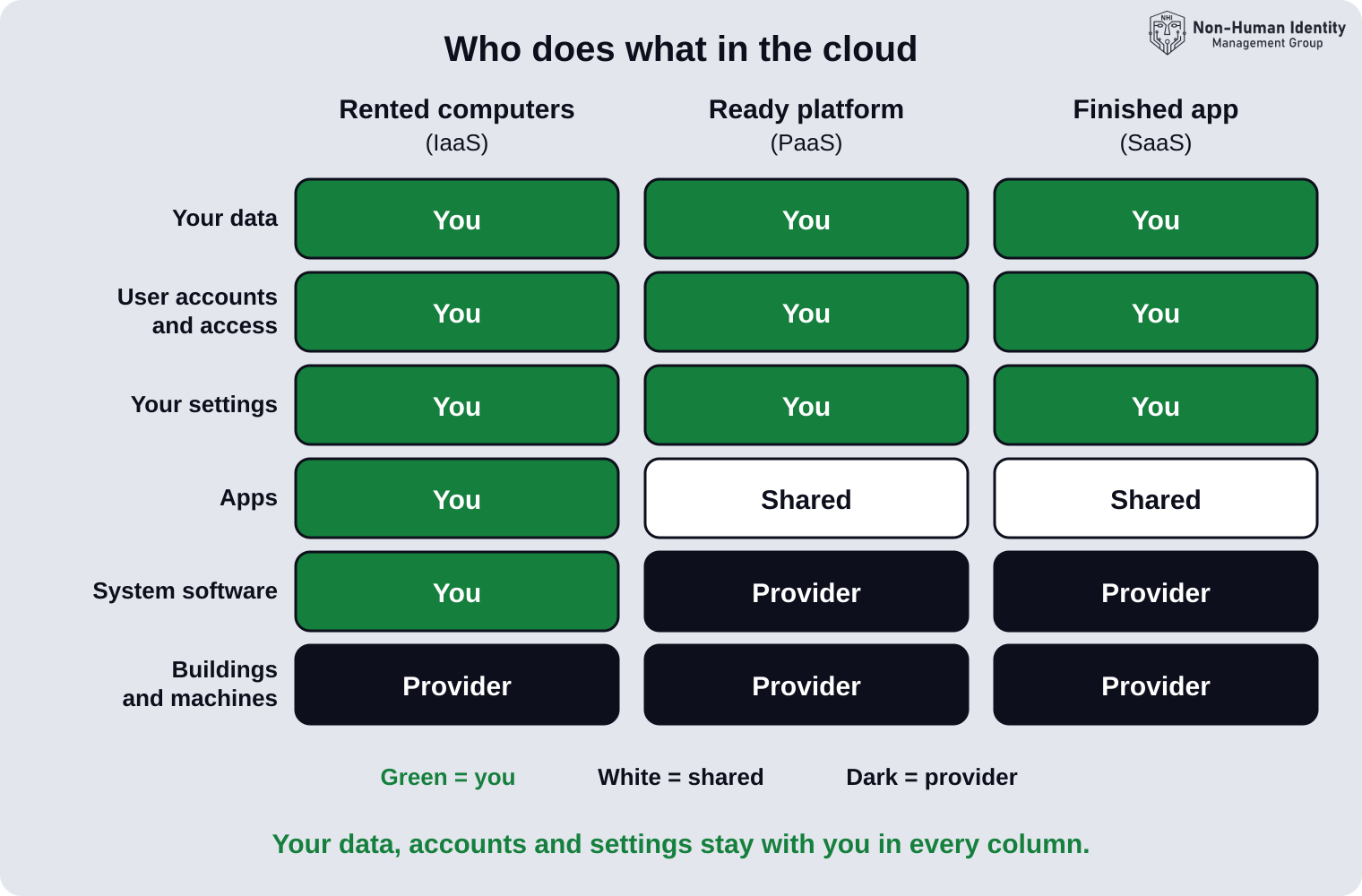
Your share depends on what you rent. There are three common types of service.[5]
- Rented computers, called IaaS (infrastructure as a service). You run your own software on them, so you have the most to do.
- A ready platform, called PaaS (platform as a service). The provider runs the system software. You bring your own app or data.
- A finished app, called SaaS (software as a service), such as online email. The provider runs almost everything.
Where the comparison stops working: a storage unit has one door and one padlock. A cloud account has many doors, and most are settings on a web page. One click can open a door, and nobody walking past will see it.
Why does it matter?
Many people think the provider handles all the security. The providers say otherwise. Microsoft states that for every type of cloud service, you own your data and your identities, meaning your user accounts and sign-ins.[2] Google says customers always stay responsible for their access rules and their data.[3]
If you run a small business
What could happen: a staff account without a second sign-in check is taken over, and your shared files are copied.
Check this: turn on a second sign-in step for every account in your email and file apps.
If you are new to IT work
What could happen: you set up a rented server and assume the provider will install its updates. It does not.
Check this: for each service you look after, write down who installs updates.
If you sign contracts or buy software
What could happen: a new app is bought, and nobody owns its settings, its users or its backups.
Check this: before you sign, ask the supplier for its who-does-what list and name an owner on your side.
What does it look like?
A simple way to start is a who-does-what card for each service you use. Here is a made-up one for an online file sharing app.
Example only. All values are made up.
Service: ExampleDrive (finished app, SaaS)
Our owner: EXAMPLE-NAME, office manager          (1)
Data centres and machines .......... Provider    (2)
App updates and fixes .............. Provider
Who has an account ................. Us          (3)
Second sign-in check turned on? .... Us   [ ? ]  (4)
Who can see shared folders ......... Us   [ ? ]
Laptops and phones used to sign in . Us
Backups of our files ............... Check contract (5)
- Every service needs a named person on your side. In a real file, this line would contain the owner's name.
- The provider runs the buildings, machines and app. You do not need to do these jobs.
- Adding and removing users is your job, even in a finished app.
- A question mark means nobody has checked yet. These are the gaps to close first.
- Some jobs depend on the contract. Read it, do not guess.
Why this is risky: the lines marked "Us" with a question mark are jobs that are yours but not yet done. A provider will not usually do them for you.
The safer way: fill in a card for each service, give every "Us" line an owner and check those settings on a schedule.
How does it work?
Here is how the split works in practice, from the choice you make to the checks you run afterwards.
- You pick a type of service. Rented computers, a ready platform or a finished app. This choice decides how much is left for you.
- The provider takes the bottom layers. In every type, it looks after the buildings, the machines and the network that joins them. With a finished app it also runs most of the app itself.
- You keep the top layers. In every type, your data, your user accounts and who can get in stay with you.[2]
- Some jobs are shared. Amazon gives updates as an example. It fixes its own systems, and you update the software you run on top.[1] Training is shared too: each side trains its own staff.
- You check your side. The provider gives you settings and tools. If you do not turn them on, the gap is yours.
The split follows the same pattern for newer services such as AI tools. Microsoft's guide for AI splits the work into layers. The layer for how people use the AI stays with the customer, including rules for staff and training.[4] Microsoft also notes that its guide is for illustration and does not change any contract.[4] So the contract is still the place to check.
A worked example
This story is made up to show how it can happen.
Darnell Hayes is the new office manager at Granite Peak Outfitters, a fictional outdoor clothing shop with 30 staff. The shop uses an online email and file app, and a rented server that runs its order website.
In his first week, a board member asks him a simple question. "The cloud company keeps us safe, right?" Darnell is not sure, so he looks it up.
He finds the provider's who-does-what page. It says the provider runs the buildings and machines. It also says the customer looks after its own accounts, data and settings.
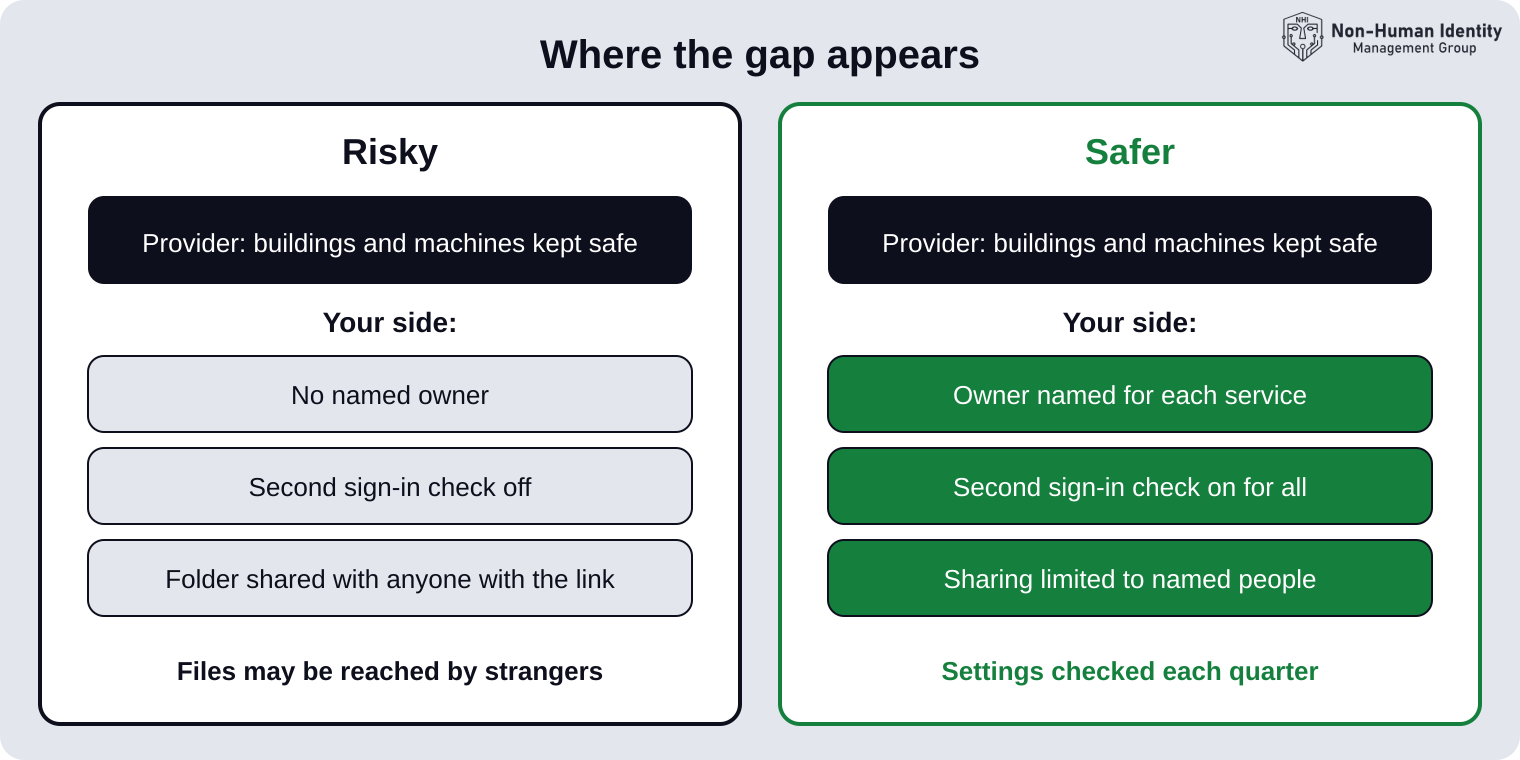
Darnell makes a card for each service. For the email and file app, he finds three gaps. Six staff have no second sign-in check. Two folders of customer records are shared with anyone who has the link. And nobody is named as the owner.
The rented server is a bigger surprise. Its system software, the base software that runs the machine, has not been updated for months. The website developer thought the provider did it. The provider's page says that job belongs to the customer on rented computers.
Darnell turns on the second sign-in check for all staff. He changes the two folders so only named people can open them. He asks the developer to install the updates and to set them to run on a schedule.
Then he adds a line to the board report. Each service now has an owner, and the owner checks the "Us" settings every quarter.
What made the difference: Darnell did not argue about whose fault it was. He wrote down who does each job, then did the ones that were his.
Myths and mistakes
| What people think | What is true |
|---|---|
| The cloud provider handles all the security. | The provider handles its own layers. Your accounts, data and settings stay with you in every type of service.[2][3] |
| With a finished app, there is nothing left for me to do. | There is less to do, not nothing. You still decide who has an account, how they sign in and what they share. |
| If the provider offers a security setting, it must already be on. | Some settings are on by default and some are not. Check each one rather than assume. |
| The split is the same for every provider and service. | It changes with the type of service, and each provider words it a little differently. Read the page for the service you use. |
| The provider's diagram is the contract. | The diagram is a guide. The contract and the service terms set what each side has agreed to.[4] |
What can I do this week?
- List every cloud service your team uses, including free ones staff signed up for.
- Find each provider's shared responsibility page and note which jobs are yours.
- Name one owner for each service.
- Turn on a second sign-in check for every account, starting with admin accounts.
- Look at what is shared publicly or "with anyone who has the link" and close what should not be.
Checklist
- I know which of our services are rented computers, ready platforms or finished apps.
- Each service has a named owner on our side.
- I have read each provider's who-does-what page.
- Every account uses a second sign-in check.
- Only people who need admin rights have them.
- Public and link sharing has been checked.
- We know who installs updates on any server we rent.
- We know what the contract says about backups and recovery.
Common questions
Is my data safe just because it is in the cloud?
Not on its own. The provider protects its buildings and machines, often to a high standard. But who can open your data depends on your accounts and sharing settings. Microsoft and Google both say data and access stay the customer's job.
Who is to blame if my cloud data leaks?
Usually the side whose layer failed. If a provider's machine was broken into, that is on the provider side. If a folder was shared publicly or an account had a weak password, that sits on your side. Your contract sets out what each side has agreed to.
Does the model change for AI tools?
The idea stays the same. The provider runs the AI service, and you decide who can use it, what data goes in and what rules staff follow. Microsoft publishes a version of its model for AI that shows this split in layers.
Where do I find my provider's version?
Search the provider's help pages for "shared responsibility". Amazon, Microsoft and Google each publish one. For smaller apps, ask the supplier directly and keep the answer with your contract papers.
Are backups the provider's job?
Sometimes, and only as far as the contract says. Many finished apps keep your data running, but that is not always the same as a backup you can restore from. Check the contract and ask how long deleted files can be recovered.
Where next?
Ready for the detail? Read the practitioner guide: Shared Responsibility Models Guide. It goes further into how the three big providers word their models, the split for SaaS and AI services, and how to turn a provider diagram into a control list with owners.
Also useful:
- Cloud Security for Beginners
- SaaS Security for Beginners
- CSPM for Beginners
- Multi-Factor Authentication for Beginners
Related NHI Mgmt Group resources: Third Party Risk Management for Beginners · Cloud Permissions and CIEM for Beginners · Small Business Cyber Security for Beginners
Key terms
- The split of security jobs between a cloud provider and its customer.
- Cloud service provider
- A company that runs computing, storage or software for customers over the internet.
- IaaS
- Infrastructure as a service: renting computers, storage and networks from a cloud provider and running your own software on them.
- PaaS
- Platform as a service: the provider runs the computers and the system software, and you add your own app or data.
- SaaS
- Software as a service: a finished app you use over the internet, such as online email.
- Misconfiguration
- A setting left in an unsafe state, such as a folder that anyone with the link can open.
- Multi-factor authentication
- Asking for two or more kinds of proof, such as a password and a code, before letting someone in.
Sources and further reading
- Shared Responsibility Model. Amazon Web Services. https://aws.amazon.com/compliance/shared-responsibility-model/, accessed 28 Nov 2026.
- Shared responsibility in the cloud. Microsoft Learn (Azure security fundamentals). https://learn.microsoft.com/en-us/azure/security/fundamentals/shared-responsibility, accessed 28 Nov 2026.
- Shared responsibilities and shared fate on Google Cloud. Google Cloud Architecture Framework. https://docs.cloud.google.com/architecture/framework/security/shared-responsibility-shared-fate, accessed 28 Nov 2026.
- Artificial intelligence (AI) shared responsibility model. Microsoft Learn (Azure security fundamentals). https://learn.microsoft.com/en-us/azure/security/fundamentals/shared-responsibility-ai, accessed 28 Nov 2026.
- The NIST Definition of Cloud Computing (SP 800-145; defines the IaaS, PaaS and SaaS service models). National Institute of Standards and Technology, September 2011. https://csrc.nist.gov/pubs/sp/800/145/final, accessed 28 Nov 2026.