Secrets rotation means replacing a password, API key, token or other secret with a new value on a planned schedule, or straight away if it may have been exposed, so that an old copy stops working.
This guide is for newcomers, students, career changers and managers who keep hearing "rotate your keys" and want to know what it really involves. It explains rotation for the credentials that software and machines use, which security teams call non-human identities. It covers when scheduled rotation makes sense, when it is better to move to credentials that expire on their own, how a safe rotation works step by step, a worked example and first steps for a small team.
By the end of this guide you will be able to:
- Explain what secrets rotation is and why it limits damage.
- Understand the difference between rotating a static secret and using short-lived credentials.
- Describe the steps of a rotation that does not break services.
- Identify which secrets in your organisation to rotate first.
Key takeaways
- Rotation shortens the useful life of a stolen secret. If a secret is replaced regularly, a copy an attacker took last month may no longer work.
- Rotation is for static secrets. Long-lived keys and passwords stay valid until someone changes them, so they need a rotation schedule. Short-lived credentials expire on their own, and the main controls are who can obtain them and what they allow.
- Overlap avoids most outages. A safe rotation creates the new secret first, moves every user of it across, tests, and only then switches off the old one.
- Automate it. Manual rotation is slow and error prone; secrets managers can create, store and track new versions for you.
- Rotate at once on any sign of exposure. A leaked secret should not wait for its next scheduled date.
What it is, in plain English
Software needs to prove who it is, just as people do. A non-human identity (NHI) is an identity with an account and credentials that represents software or a machine, such as an application, a script, a cloud workload or an AI agent. The secret is the credential that proves the NHI is allowed to act: an API key, a database password, a token or a certificate. See Non-Human Identities for Beginners for the full picture.
A static secret (also called a static credential) is one that stays valid until someone changes it. Many API keys and service account passwords work like this, sometimes for years. Rotation is the planned replacement of a static secret with a new value, followed by switching off the old one.
A short-lived credential works differently. It is issued when needed and expires by itself, often after minutes or hours. Because it dies on its own, rotation matters far less. What matters instead is who or what is allowed to request it, how much access it grants and whether its use is watched.
An everyday comparison is the code on a shared office door. If the code never changes, every former contractor and anyone who glimpsed it can still get in. Changing it every few months shuts out old copies. A short-lived credential is more like a visitor badge that stops working at the end of the day. Where the analogy breaks down: a door code is shared by many people, while good practice gives each piece of software its own secret, so you can change one without affecting the rest.
The OWASP Secrets Management Cheat Sheet advises rotating secrets regularly so that any stolen credentials only work for a short time, and recommends dynamic, per-session secrets where possible.[1]
Why it matters to you
- If you run a small business: a single API key for your payment, email or cloud service, copied years ago into a script or shared chat, may still open that service today. Rotation closes that door.
- If you are new to a security job: "when was this last rotated?" is one of the first questions auditors ask about service accounts and keys. Knowing the answer, and why, marks you out.
- If you are a manager: rotation is a cheap way to limit how long one leaked secret can hurt you, and automated rotation produces records you can show to customers and auditors.
Secrets leak in ordinary ways: pasted into code, saved in a configuration file, printed in a log or copied onto a laptop that is later lost. Nobody may notice for months. The longer a secret stays valid, the longer an unnoticed copy stays useful to an attacker. Security teams call the amount of damage one stolen credential can do its blast radius, and how long it stays valid is part of that.
Software secrets are not the same as human passwords here. NIST's digital identity guidance, SP 800-63B-4, says services shall not require people to change their passwords periodically, but shall force a change when there is evidence of compromise.[2] OWASP likewise excludes user credentials from regular rotation.[1] Machine secrets are a different case: a program does not forget or write down a new value, so scheduled, automated rotation of static machine secrets is practical in a way that frequent password changes for people are not. NIST SP 800-53 covers managing these credentials under control IA-5 Authenticator Management and cryptographic keys under SC-12.[8]
How it works, step by step
The order of the steps matters. Switching off the old secret before everything has moved to the new one is a common cause of outages.
- Know the secret. Find out what the secret is for, which service issues it, which programs use it and who owns it. You cannot rotate safely what you have not mapped.
- Create the new secret. Generate a new value while the old one still works. Many services let you hold two valid keys at once for exactly this reason; AWS, for example, allows a maximum of two access keys per IAM user.[5]
- Store it. Save the new value in a secrets manager, a service that stores secrets securely, controls who can read them and keeps versions.
- Update every user of it. Point each program, pipeline or integration at the new value. Programs that read the secret from the secrets manager at start-up or on a timer pick it up without code changes.
- Test. Check that every user works with the new secret before going further.
- Revoke the old secret. Once nothing is using it, switch the old value off at the service that issued it. Deleting it from a file is not enough: it must stop working.
- Record and repeat. Log what changed and when, and set the next rotation date.
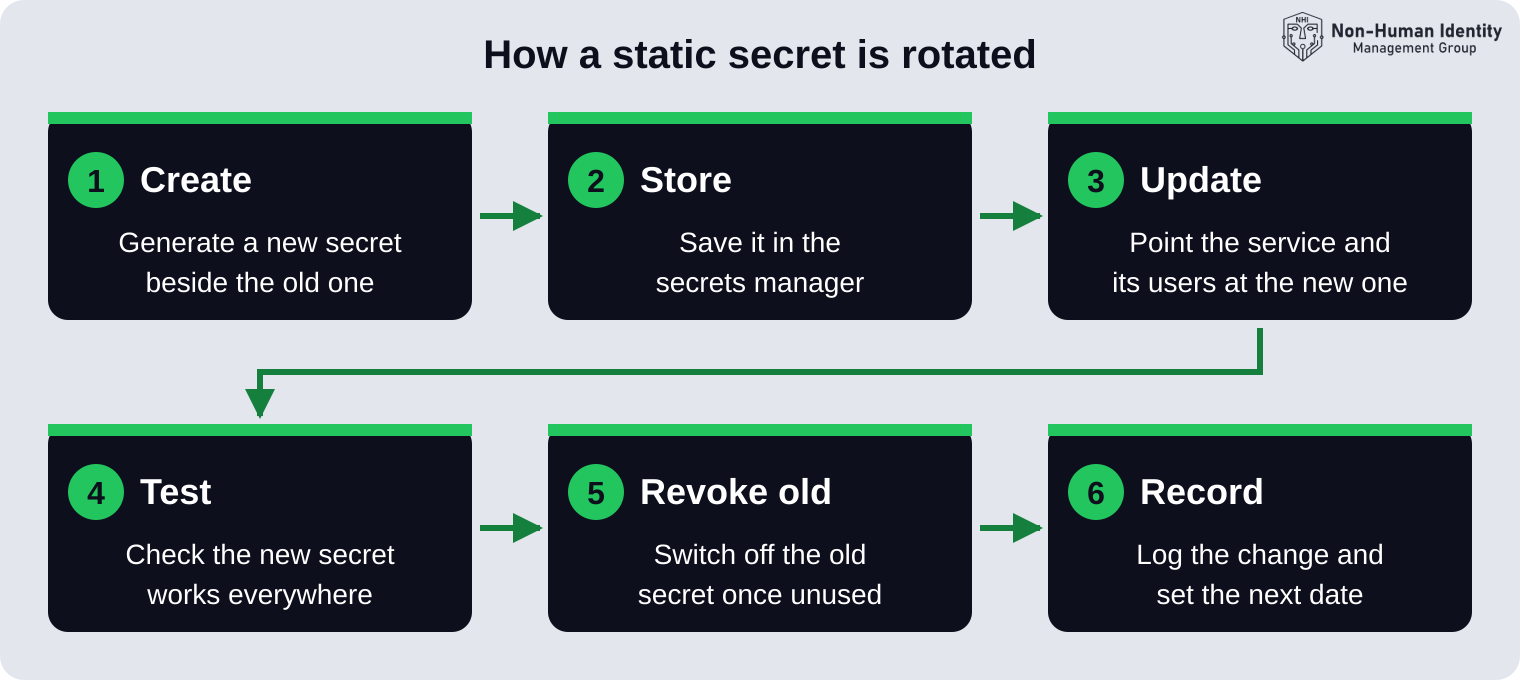
Cloud secrets managers automate parts of this cycle in different ways. The table below lists three examples alphabetically from their own documentation; the order is not a ranking.
| Platform | How rotation is described in its documentation |
|---|---|
| Amazon Web Services (AWS) Secrets Manager | Offers managed rotation for many secret types, or rotation by a Lambda function for others.[3] A Lambda rotation runs four steps (createSecret, setSecret, testSecret, finishSecret) and labels versions AWSPENDING, AWSCURRENT and AWSPREVIOUS, keeping the last known good version.[4] |
| Google Cloud Secret Manager | You set a rotation period and next rotation time; Secret Manager sends a SECRET_ROTATE message to the secret's Pub/Sub topics, and your own workflow creates the new version and deploys it.[7] |
| Microsoft Azure Key Vault | A documented pattern alternates between two credentials: thirty days before a secret expires, Key Vault publishes a near-expiry event, and a function regenerates the key not currently in use and stores it as the new version.[6] |
Rotate, or go short-lived?
Rotation makes a static secret less dangerous. Removing the static secret altogether is often better still. AWS advises using temporary security credentials, such as IAM roles, instead of long-term access keys as a best practice.[5] Microsoft's Key Vault rotation tutorial also recommends Microsoft Entra ID authorisation with a managed identity over shared storage account keys, and avoiding key rotation entirely where compliance allows.[6]
| Situation | A sensible approach |
|---|---|
| A workload runs inside a cloud platform that can give it an identity | Use the platform identity (role, managed identity or service account) and its short-lived credentials instead of a stored key. |
| A third-party service only accepts a static API key | Keep the key in a secrets manager and rotate it on a schedule, automatically if the service allows. |
| A database password used by an application | Use managed or automated rotation, or dynamic database credentials if your tools support them. |
| Any secret that may have been exposed | Rotate and revoke now, then investigate. See Leaked Secret Response for Beginners. |
| An encryption key protecting stored data | Plan carefully: OWASP notes that rotating some keys may need full or partial re-encryption of data.[1] |
A worked example
Harbour Books is a fictional online bookshop with 25 staff. Its website talks to a payment provider using one API key, and to its own database using one password. Both were set up four years ago by a contractor who has since left. Nobody is sure where else the values were copied.
Leila, the new operations lead, makes a plan:
- Map first: she finds that the payment key is used by the website and by a nightly reporting script, and that the database password also appears in an old backup script.
- Rotate the payment key with overlap: she creates a second key in the payment provider's dashboard, stores it in the company's cloud secrets manager, updates the website and the reporting script to read it from there, checks both work for a day, then revokes the old key.
- Automate the database password: she turns on the secrets manager's automated rotation for the database password on a set schedule, and changes the backup script to read the password from the secrets manager.
- Remove a key altogether: the website also used a stored cloud storage key. Leila replaces it with the platform's built-in workload identity, so there is no stored key left to rotate.
The first rotation of the payment key takes most of a day, mainly because of the forgotten reporting script. The second takes minutes. The changes do not make Harbour Books immune to leaks: if a key is copied tomorrow, it still works until the next rotation or until someone revokes it. But a copy of the contractor-era key no longer opens anything, and Leila now has a record of when each secret last changed.
Myths and misunderstandings
| What people think | What is true |
|---|---|
| Rotation means deleting the secret from the code. | Removing a value from a file does not switch it off. The old secret has to be revoked at the service that issued it. |
| If we rotate often, leaks do not matter. | A leaked secret works until it is rotated or revoked. Rotation shortens that window; it does not close it. Exposed secrets still need an immediate response.[1] |
| Short-lived credentials need rotating too. | They expire by themselves. The controls that matter are who can obtain them, how much they allow and whether their use is monitored. |
| Everyone should change their own password every 90 days as well. | NIST says services shall not require periodic password changes for people, only a change when there is evidence of compromise.[2] Scheduled rotation is aimed at machine secrets. |
| Rotation always causes downtime. | Not if the new secret is introduced before the old one is retired. Holding two valid credentials during the switch is a standard pattern.[6] |
Key terms
- Secret
- The credential that proves a non-human identity is allowed to act, such as an API key, token, password or certificate.
- Static credential
- A long-lived secret that stays valid until someone changes it, so it can be copied, stored and reused.
- Credential rotation
- Regularly replacing secrets with new values to limit how long a compromised one can be used; automated rotation enforced by policy is the preferred approach.
- Short-lived credentials
- Credentials that expire quickly, so a stolen copy is useful for only a short time before renewal is needed.
- Dynamic secret
- A secret generated on demand for a specific task and revoked automatically after use or expiry.
- Dual-credential rotation
- A way of replacing a secret without downtime: the old credential keeps working while the new one is issued, tested and adopted, then the old one is revoked.
- Secrets manager
- A system that stores, rotates and delivers credentials such as API keys, passwords, tokens and certificates.
- Secret revocation
- Invalidating a credential so it can no longer be used, in every system that trusts it.
- Blast radius
- The potential scope of damage if a specific credential or identity is compromised.
Common questions
How often should we rotate secrets?
There is no single number that suits every secret. We suggest setting the period by risk: shorter for powerful or widely shared secrets, longer where rotation is risky to perform, and always immediately on suspected exposure. Follow any period your regulator, contract or internal policy sets.
What is the difference between rotation and revocation?
Rotation replaces a secret with a new one in a planned way. Revocation switches a secret off so it no longer works. A full rotation ends with revoking the old value.
Does restarting the application get rid of a stolen secret?
No. OWASP points out that restarting an application does not revoke credentials that were already stolen; they stay valid until the issuing service expires or revokes them.[1]
Can a secrets manager rotate everything for us?
Not always. Some services offer fully managed rotation for supported secret types, while others only send a reminder or event and expect you to build the change yourself.[3][7]
Do AI agents need their secrets rotated?
AI agents are NHIs. If an agent uses a static API key, that key needs the same rotation and revocation as any other. Where possible, give agents short-lived, narrowly scoped credentials instead.
Is rotating a certificate the same idea?
Broadly yes: a certificate is replaced before it expires and the old one is retired. Certificates have their own tooling and expiry dates; see Machine Identities and Certificates for Beginners.
First steps
Three things you can do this week:
- List your oldest secrets. Pick your three most important services and write down every API key, password or token they use, who owns it and when it last changed.
- Rotate one, with overlap. Choose the oldest important secret, create its replacement, move every user across, test, then revoke the old one. Write down what you learned.
- Remove one stored key. Find one place where a cloud workload uses a stored key, and check whether the platform can give it its own identity instead. If a change causes problems, any temporary return to the old key should be a controlled rollback: approved, recorded, monitored and time-limited, with a date to try again.
Checklist
- We know which static secrets we have, what each one is for and who owns it.
- Each important static secret has a rotation period and a recorded last-rotated date.
- Secrets are stored in a secrets manager, not in code, chat or shared documents.
- Rotations create the new secret before the old one is revoked.
- Old secrets are revoked at the issuing service, not just deleted from files.
- Rotation is automated wherever the service supports it.
- Cloud workloads use platform identities with short-lived credentials where possible.
- We rotate immediately, outside the schedule, when a secret may have been exposed.
Simple measures that show progress: the number of static secrets older than their rotation period, the share of secrets rotated automatically, the number of stored keys replaced by platform identities, and the time from suspected exposure to revocation.
Check your understanding
1. Why does rotating a secret reduce risk?
Answer: an old copy of the secret, perhaps stolen without anyone noticing, stops working once the secret is replaced and the old value revoked.
2. Why do short-lived credentials need rotation far less?
Answer: they expire on their own. The important controls are who can obtain them, how much they allow and whether their use is monitored.
3. What is the safe order for a rotation?
Answer: create the new secret, store it, update every user, test, and only then revoke the old one.
4. A developer deletes an API key from the code. Is the key now safe?
Answer: no. The key still works until it is revoked at the service that issued it.
Suggested learning pathway
- Start with Non-Human Identities for Beginners for the identities these secrets belong to.
- Then read Secrets Management for Beginners for where secrets should live.
- For what to do when a secret escapes, see Leaked Secret Response for Beginners.
- For platform identities that remove stored keys, see Cloud Workload Identities for Beginners.
- For a ready-to-use procedure, see the Secrets Rotation Runbook Template.
- For rotating hundreds of secrets, see Credential Rotation at Scale.
- For credentials that expire on their own, see the Dynamic Secrets and Ephemeral Credentials Guide.
- NHI Foundation Level Training
Standards and references
- Secrets Management Cheat Sheet. OWASP Cheat Sheet Series, OWASP Foundation. https://cheatsheetseries.owasp.org/cheatsheets/Secrets_Management_Cheat_Sheet.html, accessed 27 Nov 2026.
- SP 800-63B-4, Digital Identity Guidelines: Authentication and Authenticator Management, section 3.1.1.2. National Institute of Standards and Technology (NIST). https://pages.nist.gov/800-63-4/sp800-63b.html, accessed 27 Nov 2026.
- Rotate AWS Secrets Manager secrets. AWS Secrets Manager User Guide, Amazon Web Services. https://docs.aws.amazon.com/secretsmanager/latest/userguide/rotating-secrets.html, accessed 27 Nov 2026.
- Lambda rotation functions. AWS Secrets Manager User Guide, Amazon Web Services. https://docs.aws.amazon.com/secretsmanager/latest/userguide/rotate-secrets_lambda-functions.html, accessed 27 Nov 2026.
- Manage access keys for IAM users. AWS Identity and Access Management User Guide, Amazon Web Services. https://docs.aws.amazon.com/IAM/latest/UserGuide/id_credentials_access-keys.html, accessed 27 Nov 2026.
- Automate the rotation of a secret for resources that have two sets of authentication credentials. Azure Key Vault documentation, Microsoft Learn. https://learn.microsoft.com/en-us/azure/key-vault/secrets/tutorial-rotation-dual, accessed 27 Nov 2026.
- Create rotation schedules in Secret Manager. Google Cloud documentation, Google. https://docs.cloud.google.com/secret-manager/docs/secret-rotation, accessed 27 Nov 2026.
- SP 800-53 Rev. 5, Security and Privacy Controls for Information Systems and Organizations (IA-5, SC-12). National Institute of Standards and Technology (NIST). https://csrc.nist.gov/pubs/sp/800/53/r5/upd1/final.
Related NHI Mgmt Group resources: Secrets Management Guide · Incomplete rotation breaches · Secrets in Code for Beginners