CompTIA Security+ is an entry-level exam that shows you understand the basics of cyber security.
This guide is for students, career changers and people in IT support who keep seeing Security+ in job adverts. It is also for managers who are asked to pay for it and want to know what they are buying.
In short
- Security+ is a certificate from CompTIA, an IT industry body. You earn it by passing one exam.
- The exam has up to 90 questions in 90 minutes, and some questions ask you to do a task, not just pick an answer.
- CompTIA recommends about two years of hands-on work first, but it is a suggestion, not a rule.
- The certificate lasts three years. You keep it by doing approved learning or passing another exam.
What you will learn
- Explain what Security+ is and who it is aimed at.
- Describe what the exam looks like on the day.
- Check whether you are ready to start studying for it.
- Plan how to keep the certificate once you have it.
- Proof of skills (certification)
- a title you earn by passing a test set by an outside body.
- Hands-on question (performance-based question)
- an exam task where you do something on screen, not just choose an answer.
- Topic list (exam objectives)
- the official list of everything the exam can ask about.
What is CompTIA Security+?
Think of a first aid certificate. It shows you know the basics and what to do first. It does not make you a doctor.
Security+ works the same way for cyber security. It is a certification, which is a title you earn by passing a test. It comes from CompTIA, a group that sets exams for IT workers. Passing it shows a boss you know the main words and ideas of the field.
The exam covers how attacks work and how to build safer systems. It covers how teams spot and fix problems. It also covers the rules that guide a security team.
CompTIA lists three jobs it is aimed at: security analyst, security engineer and systems administrator.[1] A systems administrator sets up and looks after a firm's computers and servers.
Where the comparison stops working: a first aid course often lasts a day or two. Security+ usually takes weeks of study, and it covers a much wider range of topics.
Why does it matter?
Many job adverts for first security jobs ask for a well-known certificate. Security+ is often one of the first a newcomer meets.
If you are a student or career changer
What could happen: you pay for a course and an exam before you know the basics, and struggle.
Check this: read the official topic list first and see how much of it makes sense to you.
If you work in IT support
What could happen: you already reset passwords and set up accounts, but cannot show it on paper.
Check this: list the security tasks you already do and match them to the exam topics.
If you manage a small IT team
What could happen: you fund a certificate that does not match the job the person does.
Check this: ask what the person will do better after passing, and agree time to study.
What does it look like?
Some exam questions describe a short scene and ask you to act. Here is a made-up question in that style, written for this guide. It is not taken from the real exam.
Example only. All values are made up.
Practice question 0000 (FAKE)
A staff member at shop.example.com gets an email.     (1)
It says their password expires today and gives a link.
The link goes to login.example.invalid.               (2)
Task: pick TWO things the help desk should do first.  (3)
  A. Tell the staff member not to click the link
  B. Reset every password in the company
  C. Report the email to the security team
  D. Turn off the email system
- The first lines set the scene in one or two sentences.
- The link goes to a different web address from the company's own. That is the clue.
- Some questions ask for more than one answer, so read the task closely. Here the best picks are A and C.
Why this is risky: people who only learn facts by heart can miss the clue in a scene like this. Questions like this test whether you can apply what you know.
The safer way: study each topic with an everyday example in mind. Ask yourself what you would actually do first, and why.
How does it work?
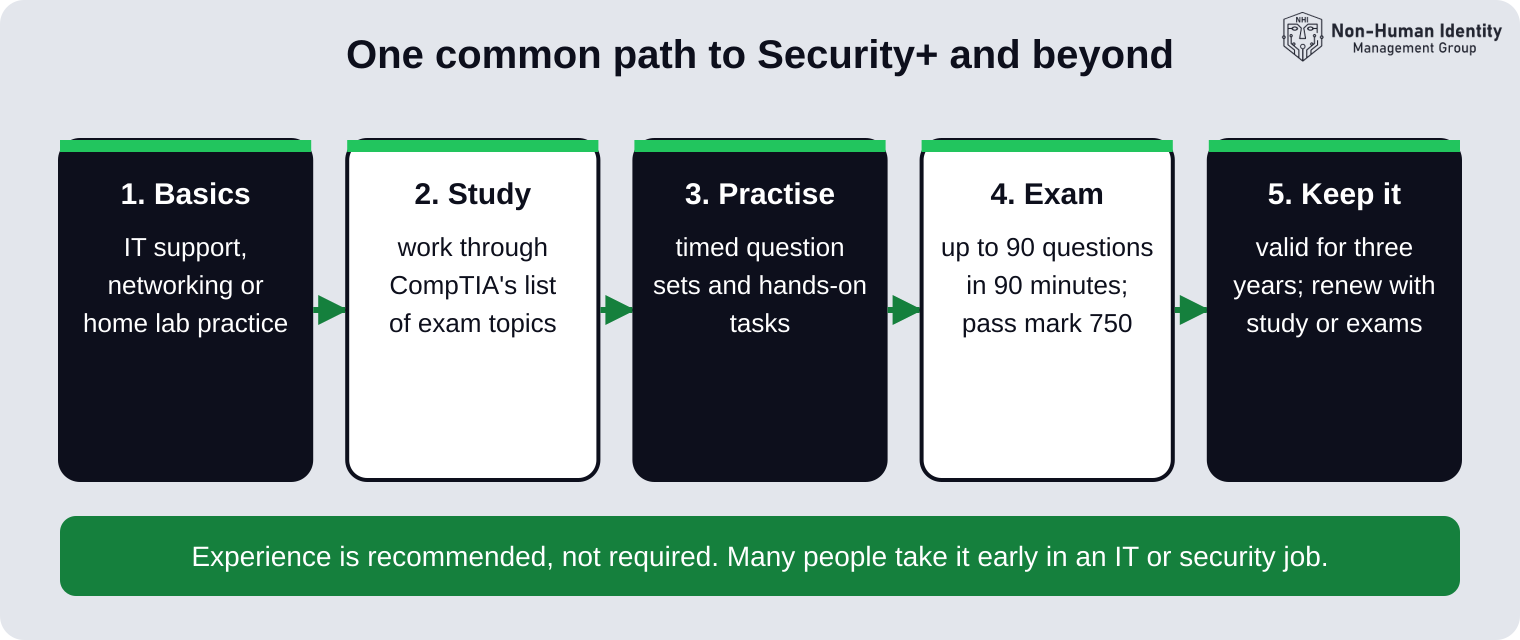
Here is the usual path from first interest to holding the certificate.
- Pick the version. CompTIA released a new version, V8 (exam code SY0-801), on 17 November 2026.[2] The older V7 English exam is due to retire on 11 June 2027.[1] Your books and practice tests should match the version you sit.
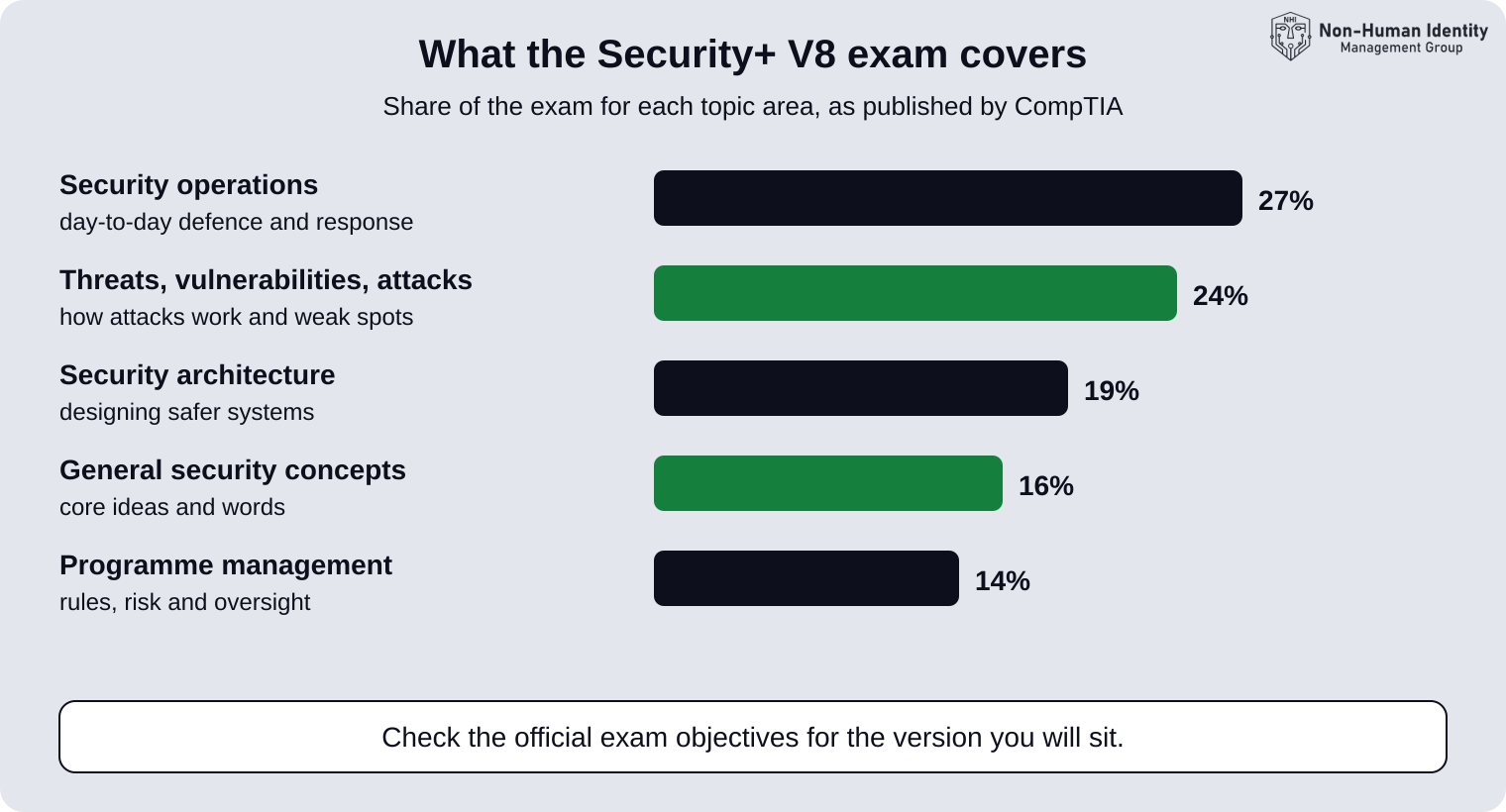
- Study the topic list. The exam objectives list everything that can be asked. For V8, security operations is the largest area at 27% of the exam.[2]
- Practise. Use timed question sets and hands-on tasks. Some questions are performance-based, which means you complete a task on screen.[2]
- Book and sit the exam. You can sit it at a test centre or online with a remote supervisor, called a proctor. Online, you run a system check first, show photo ID and sit alone in a quiet, private room.[5]
- Get the result. The exam allows up to 90 questions in 90 minutes. The pass mark is 750 on a scale of 100 to 900.[2]
- Keep it current. The certificate lasts three years. You renew it with 50 learning credits, an online CompTIA course or a higher exam.[3]
If you do not pass, you can book a second try straight away. A third or later try needs a gap of at least 14 days, and each try costs the full exam price.[4] Prices vary by country, so check CompTIA's own shop for yours.
A worked example
Kemal Yeboah works on the help desk at Elm Dental, a fictional group of four dental surgeries. He resets passwords, sets up laptops for new staff and fixes printers. He wants to move into security.
His manager, Xena Kader, agrees to pay for one exam if Kemal has a plan. Kemal starts by downloading the official topic list for the V8 exam. He goes through it with a highlighter. Green means "I do this at work". Yellow means "I have heard of it". Red means "no idea".
About a third of the list is red. Most of it is about networks: how computers talk to each other and how a firewall decides what to let through. Kemal spends his first month on those basics with a free online course.
Then he studies one topic area at a time, for about eight hours a week. For each topic he writes one line saying where he has seen it at Elm Dental. Password resets go under identity. The odd email the reception team reported last month goes under threats.
In week nine he sits two timed practice exams. He runs out of time on the hands-on questions, so he practises those for another fortnight.
He books the exam online. The day before, he runs the system check on the same laptop and home network he will use, and clears his desk.
He passes. Xena asks him to share what he learned with the team. Kemal sets a reminder for two and a half years' time, so he can plan his renewal well before the three years are up.
Myths and mistakes
| What people think | What is true |
|---|---|
| Security+ gets you a security job on its own. | It helps you get noticed. Employers usually also look for hands-on practice and some IT experience. |
| You must have two years' experience to sit it. | CompTIA recommends experience but does not require it.[2] |
| It is all multiple choice, so memorising answers is enough. | Some questions ask you to do a task on screen. Practise applying ideas, not just recalling them. |
| Any Security+ book will do. | Books are written for one exam version. Check the code on the cover matches the exam you will sit. |
| Once you pass, you have it for life. | It lasts three years. If it lapses, CompTIA says you need to pass the exam again.[3] |
What can I do this week?
- Download the official exam objectives for the current version from CompTIA.
- Mark each topic as "know it", "heard of it" or "new to me".
- Pick one networking basics course if most of your marks are "new to me".
- Talk to your manager about study time and who pays for the exam.
Checklist
- I know which exam version I am studying for.
- My books, courses and practice tests all name the same exam code.
- I can explain the basics of how computers connect over a network.
- I have practised hands-on questions, not just multiple choice.
- I have done at least one full timed practice exam.
- If testing online, I have run the system check on the same computer and network.
- I have a plan to renew within three years.
Common questions
Is Security+ good for complete beginners?
Yes, if you are willing to learn some IT basics first. CompTIA suggests about two years of hands-on work, but it is not a rule. People with no IT background often start with networking basics, then move on to Security+ study.
How long does it take to study for?
It varies from person to person. Someone already working in IT might need a couple of months of steady study. A complete newcomer often needs longer, because they also have to learn how computers and networks work. A timed practice exam is a good way to judge readiness.
Which version should I take?
Most people starting from scratch now will study for V8, the newer version CompTIA recommends. If you are already deep into V7 study, the English V7 exam is due to stay available until 11 June 2027. Leave time for a second try before that date.
Can I take the exam at home?
Yes, CompTIA offers online exams through Pearson VUE. You need a suitable computer, a webcam, a stable connection and valid photo ID. You must sit alone in a quiet, private room. If your home set-up is not reliable, a test centre is the safer choice.
What comes after Security+?
Usually a more advanced exam that fits the job you want. People who defend networks often move on to a more advanced analyst exam. People who test systems often look at penetration testing exams. Our practitioner guide sets out the common next steps for each path.
Where next?
Ready for the detail? Read the practitioner guide: CompTIA Security+ Guide. It goes further into the V7 and V8 topic weightings side by side, a ten-week study plan and the full renewal options.
Also useful:
- Cyber Security Certifications for Beginners
- CompTIA Network+ Certification Guide
- ISC2 Certified in Cybersecurity (CC) Guide
- CEH vs Security+
- SOC Analyst for Beginners
Related NHI Mgmt Group resources: CompTIA CySA+ Guide · Career Change into Cyber Security Guide · Certification Renewal and CPE Requirements Guide
Key terms
- Certification
- A title you earn by passing a test set by an outside body.
- Exam objectives
- The official list of every topic an exam can ask about.
- Performance-based question
- An exam task where you do something on screen, not just pick an answer.
- Proctor
- A person who watches over an exam, in a room or online, to check the rules are followed.
- Continuing education units (CEUs)
- Credits for approved learning that you collect to renew a certificate.
- Systems administrator
- A person who sets up and looks after an organisation's computers and servers.
Sources and further reading
- CompTIA Security+ certification overview (V8 and V7, job roles, V7 retirement dates). CompTIA. https://www.comptia.org/en-us/certifications/security/, accessed 28 Nov 2026.
- CompTIA Security+ V8 (SY0-801) exam details. CompTIA. https://www.comptia.org/en-us/certifications/security/v8/, accessed 28 Nov 2026. See also the V7 (SY0-701) page: https://www.comptia.org/en-us/certifications/security/v7/.
- How long does the CompTIA Security+ certification last? CompTIA. https://www.comptia.org/en-us/blog/how-long-does-the-comptia-security-certification-last/, accessed 28 Nov 2026.
- CompTIA certification retake policy. CompTIA. https://www.comptia.org/en-gb/resources/test-policies/comptia-certification-retake-policy/, accessed 28 Nov 2026.
- Online testing for CompTIA (OnVUE). Pearson VUE. https://www.pearsonvue.com/us/en/comptia/onvue.html, accessed 28 Nov 2026.