An endpoint security engineer protects the laptops, phones and servers an organisation uses, to make attacks harder.
This guide is for students, career changers and IT staff who want to know what this security job involves. You do not need to be a security expert to read it. If you have ever set up a laptop for someone at work, you have already done a small part of the job.
In short
- An endpoint is any device people use to reach work systems, such as a laptop, phone, tablet or server.
- Endpoint security engineers choose, set up and tune the tools that protect those devices and spot attacks on them.
- Much of the work is careful settings, testing changes and working with the teams who watch for alerts.
- Many people come into the role from IT support, systems administration or a security operations team.
What you will learn
- Explain what an endpoint security engineer does in one sentence.
- Describe the main tools the role looks after.
- Spot why testing a change matters before it reaches every device.
- Check which of your skills could lead into the job.
- Work device (endpoint)
- any laptop, desktop, phone, tablet or server that connects to an organisation's systems.
- Device watchdog (EDR)
- software that records what happens on a device, spots signs of attack and can help respond.
- Device rulebook (policy)
- a set of settings sent to many devices at once, such as "screen lock after five minutes".
What is an endpoint security engineer?
Think of a locksmith who looks after every door and window on a large estate. They choose the locks, fit them, check them and fit alarms. When a lock fails, they find out why and fix every door with the same lock.
An endpoint security engineer does this for work devices. An endpoint is any device used to reach a network, such as a computer, phone, tablet or server.[1] The engineer picks the protection tools, sets them up and keeps them working on thousands of devices.
A key tool is endpoint detection and response (EDR). It keeps watch on devices and collects data about what happens on them, which helps teams spot and respond to attacks sooner.[2]
Where the comparison stops working: a lock stays the same once fitted. Devices change every week as software is added and updated, so the engineer's settings need regular checking too.
Why does it matter?
Laptops and phones are where people open email, click links and store files. That makes them a common way in for attackers. Good device settings can make an attack harder and easier to spot.
If you work in IT support
What could happen: you set up devices by hand and miss a security setting on some of them.
Check this: ask which device settings your team sends out automatically, and which are done by hand.
If you are a student or career changer
What could happen: you assume security jobs are all about hacking, and miss this hands-on defensive role.
Check this: read three endpoint security job adverts and note the tools they mention.
If you work in a security operations team
What could happen: the same false alarm fills your queue every day because nobody tunes the tool.
Check this: find out who owns your device protection settings and how to request a change.
What does it look like?
Engineers often look at a dashboard that shows the health of every device. Here is a made-up, simplified view.
Example only. All values are made up.
DEVICE HEALTH  EXAMPLE Corp  (2,000 devices)
Protection running:       1,962                  (1)
Protection not reporting:    38                  (2)
Disk encryption on:       1,990                  (3)
Updates over 30 days old:    55                  (4)
Users with local admin:     120                  (5)
New alert: LAPTOP-FAKE-0042 unusual script      (6)
- Devices where the protection software is running and reporting in.
- Devices that have gone quiet. They may be switched off, broken or tampered with.
- Encryption scrambles stored data so a lost laptop is harder to read.
- Devices missing recent updates. These need chasing.
- People who can install anything on their device. In a real file, this line would contain the list of names.
- An alert for the security operations team to look at.
Why this is risky: small gaps, such as quiet devices and old updates, are easy to ignore when the totals look good.
The safer way: chase each gap to a cause, fix the setting that let it happen and check again next week.
How does it work?
The details vary, but the work often follows these steps.
- Know the devices. Keep a list of every device, who uses it and what software it runs.
- Set safe defaults. Send out settings such as screen locks, encryption, updates and limits on admin rights. Device management tools do this for many devices at once.[3]
- Run the protection tools. Install and tune antivirus and EDR so they catch real threats without too many false alarms.
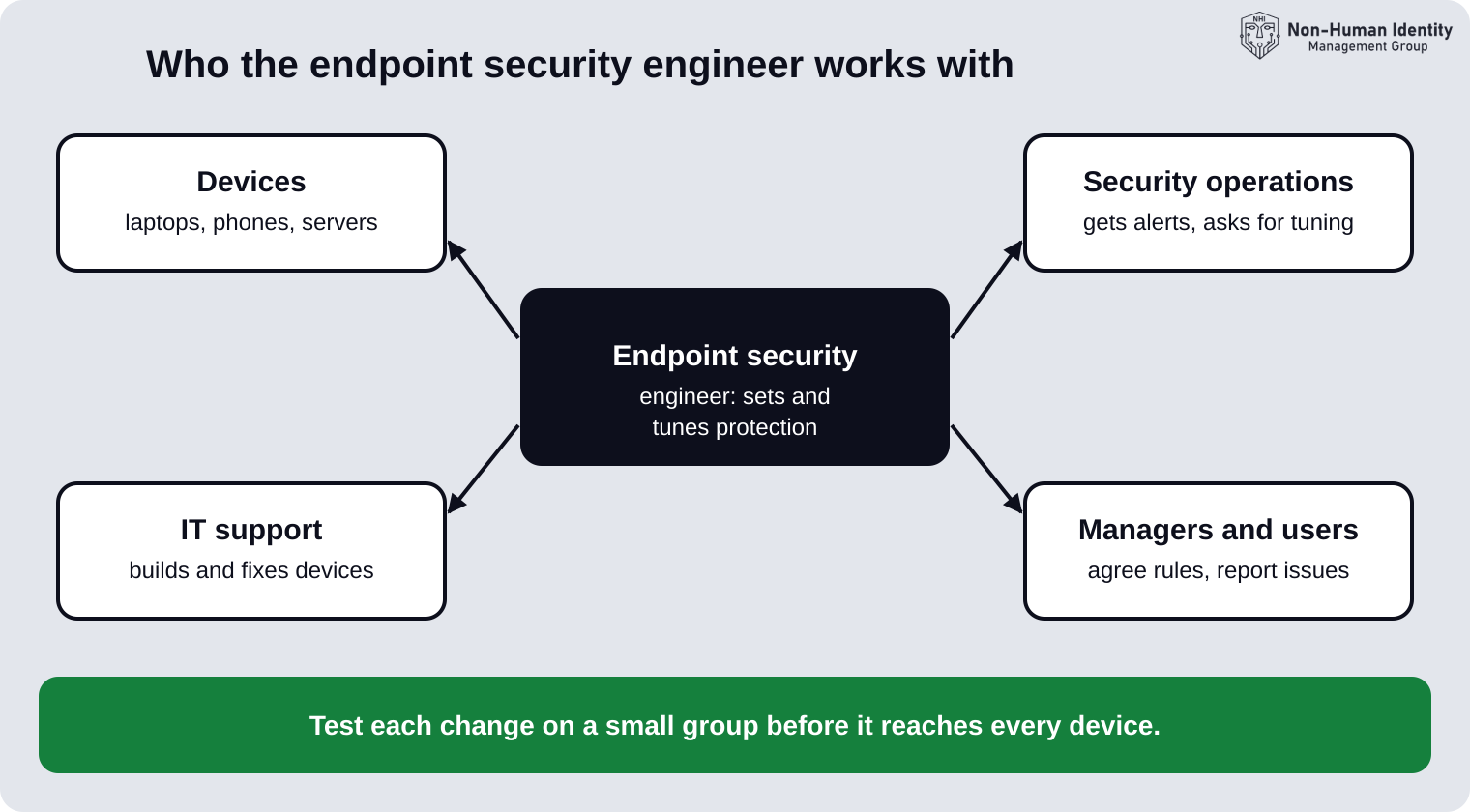
- Test before rolling out. Try each change on a small group first, so one bad setting does not stop everyone working.
- Support the response. Help the security operations team look into alerts, cut off an infected device from the network and fix the cause.
The work also keeps devices updated. The UK's national cyber security agency advises turning on automatic updates where possible and installing them promptly. It also advises replacing devices and software that are no longer supported.[4]
Skills and tools
- Operating systems. Windows, macOS, Linux, iOS and Android, and how their security settings work.
- Device management tools. Systems that send settings and software to many devices.
- Protection tools. Antivirus, EDR, disk encryption and application control, which allows only approved programs to run.
- Testing habits. Trying changes safely and rolling them back if they cause problems.
- Basic scripting. Short scripts to check settings or collect data from devices.
- Teamwork. Working with IT support, the alert team and users who just want their laptop to work.
Routes in
Few people start in this role straight from school. Many begin in IT support or systems administration, then move into security. In England, the official careers service lists college courses, apprenticeships and trainee jobs as ways into IT support. It names IT security co-ordinator as one possible next step.[5] Others come from a security operations team, where they learned what alerts look like.
A worked example
Imani Fairweather is an endpoint security engineer at a fictional retailer with 2,000 staff. On Tuesday, the security operations team flags a problem. The same harmless office tool keeps setting off alerts. The team is losing hours on it each week.
Imani thinks of the estate locksmith. A lock that jams on every door is a lock problem, not a door problem. She looks at the alerts and confirms the tool is approved and signed by its maker. She writes a narrow exception for that one tool and records why.
She does not send it to everyone at once. She tests it on 50 IT staff laptops for two days. The false alarms stop, and other alerts still come through.
Her colleague Uma Iyer from IT support reports that 38 devices have stopped sending data. Imani checks them. Most are switched off in a store cupboard. Three, though, have the protection software turned off. She works with Uma to fix them and adds a setting so users cannot switch it off.
On Friday, Imani rolls the exception out to all devices. She notes the change, tells the alert team, and books a check in a month to see if it still fits.
Myths and mistakes
| What people think | What is true |
|---|---|
| Antivirus is the whole job. | Antivirus is one tool. The role also covers updates, encryption, admin rights, EDR and device settings. |
| Once the tool is installed, the work is done. | Tools need tuning, checking and updating, because devices and threats keep changing. |
| More alerts means better security. | Too many false alarms can hide real ones. Tuning matters. |
| Servers are not endpoints. | Many definitions include servers as endpoints, along with laptops and phones.[1] |
| Changes can go to every device at once. | A bad setting can stop people working. Test on a small group first. |
What can I do this week?
- Read three endpoint security engineer job adverts and list the tools they share.
- Check the security settings on your own laptop: updates, screen lock and disk encryption.
- Read our EDR, XDR and MDR for Beginners guide.
- Ask someone in IT how new laptops are set up at your workplace.
Checklist
- I can explain what an endpoint security engineer does in one sentence.
- I know what an endpoint, EDR and a device policy are.
- I understand why changes are tested on a small group first.
- I know why a device that stops reporting needs checking.
- I can name the teams this role works with.
- I have looked at official careers pages, not just job boards.
- I have picked one first learning step.
Common questions
Is this an entry-level job?
Usually not. Most employers want some experience with devices first, often from IT support or systems administration. Those jobs teach how devices are built and fixed. The security part can then be learned on the job, through training and through certifications.
How is this different from a SOC analyst?
A SOC analyst watches alerts and decides which ones are real attacks. An endpoint security engineer builds and tunes the device tools that create those alerts. The two work closely, and some people move between the roles. See SOC Analyst for Beginners.
Do I need to know one product?
It helps, but the ideas carry across. Job adverts often name the products an employer uses. Learn the common features first: device management, antivirus, EDR and encryption. Product skills then come faster.
Does the role cover phones too?
Often, yes. Phones and tablets reach work email and files, so many teams protect them as endpoints. A US standards body publishes guidance on managing the security of mobile devices at work.[3] In some firms a separate mobile team does this.
How much does an endpoint security engineer earn?
Pay varies by country, employer and experience, so we do not quote a figure. Official bodies do not publish one for this exact job title. Check your own country's official careers or labour statistics service for related security roles.
Where next?
Ready for the detail? Read the practitioner guide: Endpoint Security Guide. It goes further into how the protection tools fit together, which settings matter most, how to roll them out and how to measure whether they work.
Also useful:
- EDR Guide
- Endpoint Security for Beginners
- Systems Administrator for Beginners
- Mobile Device Administrator for Beginners
- Security Engineer for Beginners
Related NHI Mgmt Group resources: Cybersecurity Careers Guide · IT to Cyber Security Career Guide · Patch Management for Beginners
Key terms
- Endpoint
- Any device, such as a laptop, phone or server, used to reach an organisation's systems.
- Endpoint detection and response
- Software that records activity on devices, spots signs of attack and helps teams respond.
- Mobile device management
- Tools that send settings, apps and updates to many devices from one place.
- Device encryption
- Scrambling the data stored on a device so it is hard to read without the right key.
- Application control
- A setting that lets only approved programs run on a device.
- Hardening
- Changing settings to remove features and access that a device does not need.
- Isolation
- Cutting a device off from the network so a problem cannot spread.
Sources and further reading
- Glossary: endpoint (from NIST SP 800-63-4). US National Institute of Standards and Technology, Computer Security Resource Center. https://csrc.nist.gov/glossary/term/endpoint, accessed 28 Nov 2026.
- M-22-01, Improving Detection of Cybersecurity Vulnerabilities and Incidents on Federal Government Systems through Endpoint Detection and Response. US Office of Management and Budget, 8 October 2021. https://bidenwhitehouse.archives.gov/wp-content/uploads/2021/10/M-22-01.pdf, accessed 28 Nov 2026.
- SP 800-124 Rev. 2, Guidelines for Managing the Security of Mobile Devices in the Enterprise. US National Institute of Standards and Technology, May 2023. https://csrc.nist.gov/pubs/sp/800/124/r2/final, accessed 28 Nov 2026.
- Keeping devices and software up to date, Device security guidance. National Cyber Security Centre (UK), version 2.1, reviewed 13 May 2025. https://www.ncsc.gov.uk/collection/device-security-guidance/managing-deployed-devices/keeping-devices-and-software-up-to-date, accessed 28 Nov 2026.
- IT support technician, job profile. National Careers Service (England). https://nationalcareers.service.gov.uk/job-profiles/it-support-technician, accessed 28 Nov 2026.