Core security principles are the few simple ideas behind almost every security decision.
This guide is for anyone new to security who wants the basics in plain words. You do not need a technical job to use them: if you look after any information, at home or at work, these ideas help you decide what to protect and how.
In short
- Security protects three things about information: who can see it, whether it is correct, and whether you can get to it when you need it.
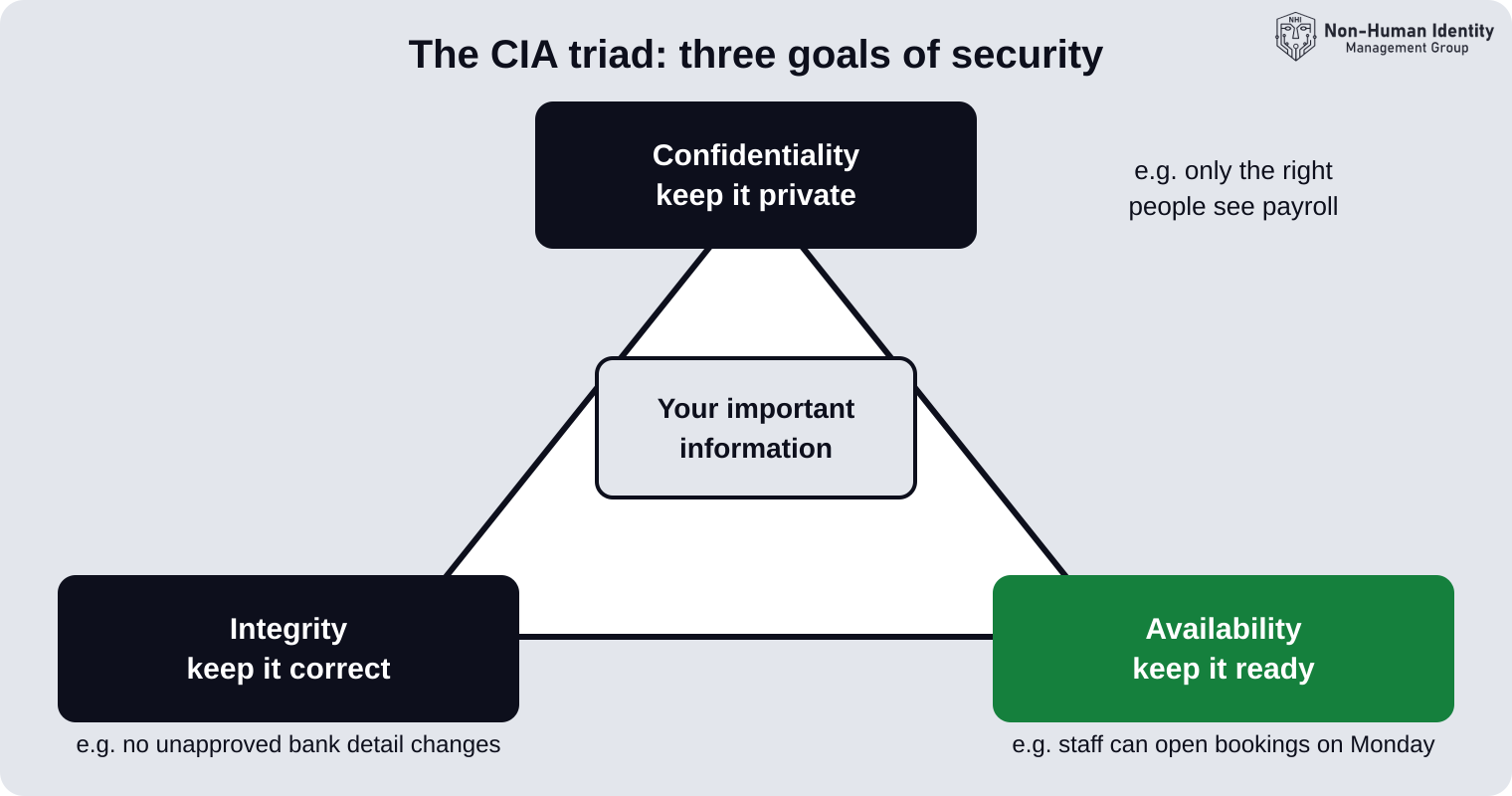
- These three goals are called the CIA triad: confidentiality, integrity and availability.
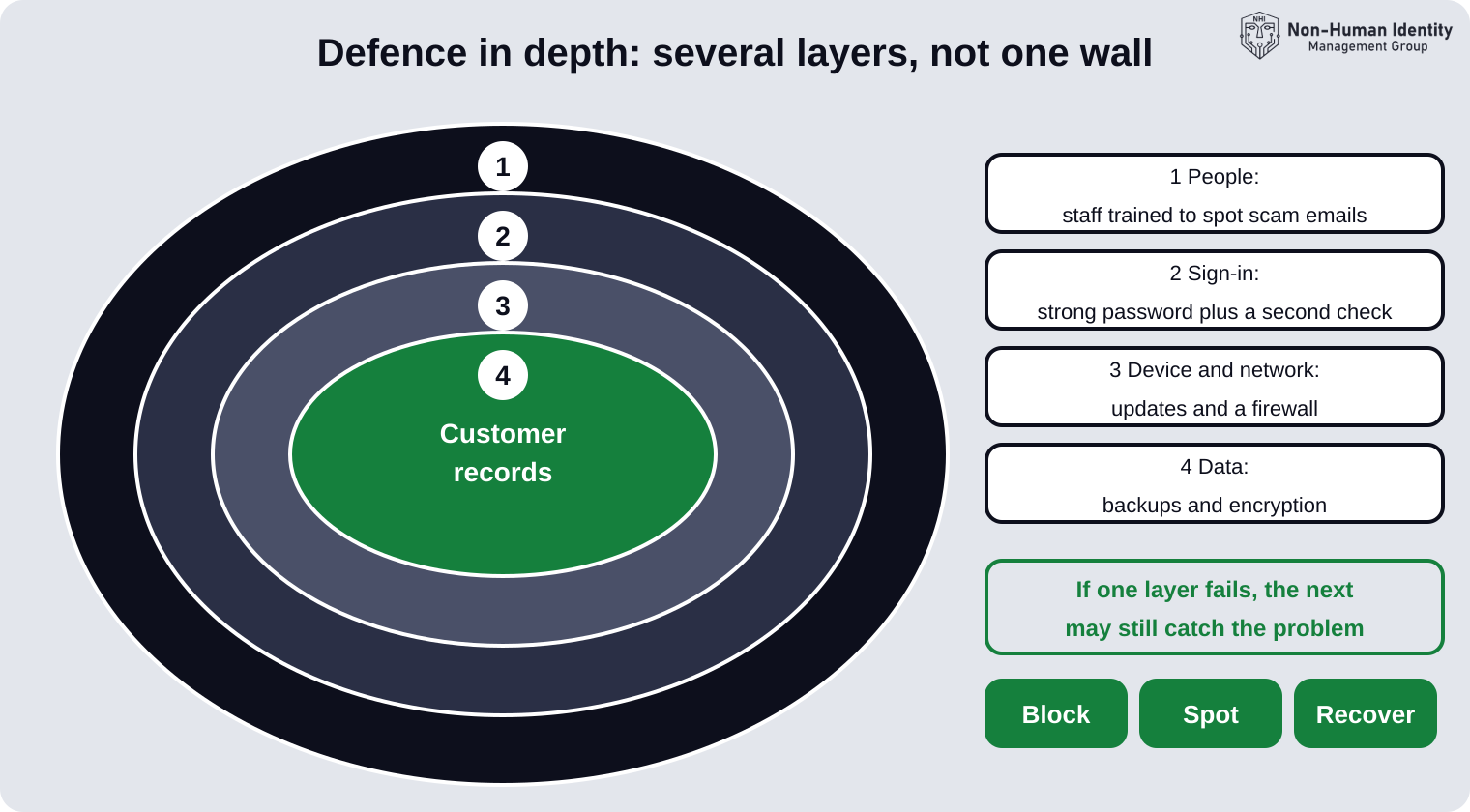
- No single protection is enough, so you stack several layers. This is called defence in depth.
- Each protection is a security control. Good plans mix controls that block, spot and help you recover.
What you will learn
- Explain the CIA triad in your own words.
- Spot which of the three goals a problem affects.
- Check whether you have more than one layer of protection.
- Sort a protection into block, spot or recover.
- Keeping it private (confidentiality)
- only the right people can see the information.
- Keeping it correct (integrity)
- nobody changes or deletes the information without permission.
- Keeping it ready (availability)
- the right people can get to it when they need it.
What are core security principles?
Think of how you protect your home. A lock keeps strangers out, an alarm tells you if someone gets in, and insurance helps you recover if the worst happens. You do not rely on just one of them.
Keeping information safe works the same way. It starts with a question: what are we trying to keep safe? The usual answer has three parts, called the CIA triad. It has nothing to do with spies. CIA stands for:
- Confidentiality: keeping information private, so only the right people see it.
- Integrity: keeping information correct, so nobody changes it without permission.
- Availability: keeping information ready, so the right people can use it when they need it.
US law uses these three ideas to say what security means. For example, it says being ready means people can get to the information on time and rely on it.[1]
The next idea is defence in depth. It means using several layers, so if one fails, the next may still catch the problem. Each protection on its own is called a security control. It is any step that helps keep information safe.[4]
Where the comparison stops working: a burglar has to visit your house. Online, someone can try your digital doors from anywhere in the world, many times a minute, using automatic tools.
Why does it matter?
These ideas help you spend time and money on what matters most. They also give everyone, from a new starter to a manager, the same simple words to talk about risk.
If you run a small business
What could happen: you protect the customer list from prying eyes but have no backup, so a broken laptop loses it all.
Check this: for your most important information, ask all three questions: private, correct and ready?
If you are new to IT or security work
What could happen: you fix one weak spot and assume the job is done, while one failure still exposes everything.
Check this: for each system, name at least two layers that protect it.
Next: What Is Cyber Security? A Beginner's Guide to Protecting People, Data and Systems
If you manage a team
What could happen: one person can make a large payment alone, and a single tricked email leads to a big loss.
Check this: make sure important actions need a second person or a second check.
What does it look like?
Here is a made-up scenario card for a small dental practice's booking system. It checks each goal and the layers in place.
Example only. All values are made up.
System: EXAMPLE Dental bookings (bookings.example.com)
Private (confidentiality)
  - Each staff member has their own login     yes
  - Second check at sign-in (MFA)             no    (1)
Correct (integrity)
  - Changes to records are logged             yes
Ready (availability)
  - Daily backup kept away from the main PC   no    (2)
  - Tested a restore in the last 6 months     no    (3)
- Only one layer protects the logins. A stolen password could be enough to get in.
- If the main computer fails or is locked by criminals, the bookings may be lost.
- A backup that has never been tested may not work when it is needed.
Why this is risky: the practice has thought about privacy, but its "ready" column is weak. A single failure could stop it seeing patients.
The safer way: add a second sign-in check, keep a backup away from the main computer and test a restore. Then each goal has more than one layer.
How does it work?
You can use the principles as a simple routine for anything you look after.
- Name what matters. List the information and systems you could not do without, such as customer records or the payroll file.
- Ask the three questions. For each one, what would hurt most: someone seeing it, someone changing it, or losing access to it?
- Add controls that block. These try to stop a problem, such as passwords, a second sign-in check (multi-factor authentication) or giving people only the access they need.
- Add controls that spot. These tell you something is wrong, such as alerts for strange sign-ins or a log of changes.
- Add controls that help you recover. These get you back on your feet, such as backups and a plan for who does what.
- Layer them. Aim for more than one control on what matters most, so one failure is less likely to be the end of the story.
Controls come in different kinds. Some are technology, like encryption (scrambling data so only the right key can read it). Some are about people, like training. Some are processes, like needing two people to approve a payment. US government guidance describes defence in depth as bringing together people, technology and operations to build barriers across several layers.[2]
A widely used US framework sorts security work into six jobs: govern, identify, protect, detect, respond and recover.[3] The block, spot and recover idea above is a simpler version of the same thinking.
A worked example
Eilidh MacLeod runs a small dental practice in Inverness. Her nephew, Owen Price, has just started a job in IT support. He offers to help her think about security over a cup of tea.
Owen starts with the home picture. "You lock the door, you have an alarm and you have insurance. Let's do the same for the practice."
First they list what matters: the booking system, patient records and the payroll file.
Then they ask the three questions. Patient records must stay private. Payroll bank details must stay correct, because a changed account number could send wages to a criminal. The booking system must stay ready, or the practice cannot open.
Next they look at the layers. Each person has their own login, which is good. But there is no second check at sign-in, so Eilidh switches it on for email and the booking system.
For payroll, she adds a simple rule. Any change to bank details needs a phone call to the person, using a number already on file, plus a second person to approve it.
For the booking system, Owen finds that backups run every night, but nobody has ever tried a restore. They test one on a spare laptop. It works, and Eilidh writes down the steps.
In one afternoon, each of her three most important things now has more than one layer. None of it is perfect, but one mistake is less likely to stop the practice.
Myths and mistakes
| What people think | What is true |
|---|---|
| Security is only about keeping secrets. | Privacy is one goal of three. Keeping information correct and ready matters just as much. |
| A good firewall or antivirus is enough. | Any single control can fail. Layers give you a second chance. |
| Backups are an IT chore, not security. | Backups protect availability, one of the three core goals. Test that they restore. |
| Security controls are all technology. | Training, clear rules and second approvals are controls too. |
| Once it is set up, we are done. | Systems, people and threats change. Check your layers from time to time. |
What can I do this week?
- Write down the three to five things your home or business could not do without.
- For each one, ask whether it needs to be private, correct and ready, and note which matters most.
- Turn on a second sign-in check for email and your most important systems.
- Test that you can get one file back from your backup onto another computer.
- Pick one important action, such as changing bank details, and add a second check.
Checklist
- You know which information and systems matter most.
- Each of those has been checked for privacy, correctness and readiness.
- Important accounts use a second sign-in check.
- People have only the access their job needs.
- Someone would notice strange sign-ins or changes.
- Backups exist, are kept apart from the main system and have been test-restored.
- Important actions need a second person or a second check.
- There is a simple plan for what to do if something goes wrong.
Common questions
What does CIA stand for in security?
Confidentiality, integrity and availability. In plain words: keep information private, keep it correct and keep it ready for the people who need it. It is a way of thinking about security, and nothing to do with the US intelligence agency. See the CIA Triad Guide.
What is a simple example of defence in depth?
Signing in to email with a password and a code from an app. If someone steals the password, the code is a second layer. Add alerts for strange sign-ins and a backup of important messages, and you have layers that block, spot and help you recover.
Which of the three goals matters most?
The answer changes with the information, so ask about each goal. For medical records, privacy is often the biggest worry. For bank details, being correct matters most. For a shop's till system, being ready to use may matter most.
What are the main types of security control?
Most controls do one of three jobs: block a problem, spot a problem or help you recover from it. They can be technology, such as a firewall, people, such as training, or process, such as a second approval. Good plans use a mix.
Are there other core principles I should know?
Yes. A key one is least privilege: give each person or program only the access it needs. Another is separation of duties: split important tasks so one person cannot finish them alone. The practitioner guide covers these and more.
Where next?
Ready for the detail? Read the practitioner guide: Core Security Principles Guide. It goes further into least privilege, separation of duties, fail secure, complete mediation and secure defaults, with examples from service accounts and API keys.
Also useful:
- CIA Triad Guide
- Defence in Depth Guide
- Least Privilege for Beginners
- Multi-Factor Authentication for Beginners
- NIST Cybersecurity Framework for Beginners
Related NHI Mgmt Group resources: Zero Trust for Beginners · Cyber Resilience for Beginners · Backup Security for Beginners
Key terms
- CIA triad
- The three goals of information security: confidentiality, integrity and availability.
- Confidentiality
- Keeping information private, so only the right people can see it.
- Integrity
- Keeping information correct, so nobody changes or deletes it without permission.
- Availability
- Making sure the right people can get to information when they need it.
- Defence in depth
- Using several layers of protection, so one failure is less likely to expose everything.
- Security control
- Any safeguard that protects information, from a password rule to a backup or a training session.
- Least privilege
- Giving each person or program only the access it needs to do its job.
- Multi-factor authentication
- Signing in with two or more different kinds of proof, such as a password and a code from an app.
Sources and further reading
- 44 U.S. Code 3552, Definitions (information security, integrity, confidentiality, availability). Legal Information Institute, Cornell Law School. https://www.law.cornell.edu/uscode/text/44/3552, accessed 28 Nov 2026.
- Glossary: defense-in-depth (from NIST SP 800-53 Rev. 5 and others). NIST Computer Security Resource Center. https://csrc.nist.gov/glossary/term/defense_in_depth, accessed 28 Nov 2026.
- NIST Releases Version 2.0 of Landmark Cybersecurity Framework. NIST, 26 February 2024. https://www.nist.gov/news-events/news/2024/02/nist-releases-version-20-landmark-cybersecurity-framework, accessed 28 Nov 2026.
- Glossary: security control (from NIST SP 800-53 Rev. 5 and others). NIST Computer Security Resource Center. https://csrc.nist.gov/glossary/term/security_control, accessed 28 Nov 2026.