Credential dumping is when an attacker copies saved passwords or login data out of a computer they have broken into.
This guide is for students, people new to IT work and anyone who has seen the term in a security alert. It explains the idea in plain words, from the defender's side. If your business uses Windows computers that share logins, this is one of the main ways a small break-in becomes a big one.
In short
- Windows keeps login data in memory after you sign in, so you do not have to type your password again and again.
- An attacker who gains admin rights on a computer may be able to copy that data, and then use it to log in elsewhere.
- One copied admin login can open many computers, especially when they share the same admin password.
- Turn on Windows' built-in protections, give each computer its own admin password and keep admin rights rare.
What you will learn
- Explain what credential dumping is in one sentence.
- Explain why admin rights on one computer can lead to many more.
- Spot a credential dumping alert and know who to tell.
- Check which Windows protections are switched on.
- Login details (credentials)
- anything that proves who you are to a computer, such as a password or a scrambled version of it.
- Scrambled password (hash)
- a one-way coded version of a password that Windows can use to check it.
- Windows sign-in guard (LSASS)
- the part of Windows that checks sign-ins and holds login data in memory.
What is credential dumping?
Think of the key box behind an office reception desk. Staff hang their keys there during the day, so they can come and go easily. A thief who gets behind the desk can copy every key in the box.
Windows has a key box too. When you sign in, a part of Windows called LSASS checks who you are. It then keeps some login data in the computer's working memory. That way, you can open files and shared drives without typing your password each time.[2]
Credential dumping means copying that saved login data out of the computer. The copy may hold a readable password, or a hash (a scrambled version that Windows can still accept as proof).[1]
The attacker first needs a way in, and usually high-level rights on that computer, called admin rights.[1] Dumping is what turns one broken-in computer into a set of stolen keys.
Where the comparison stops working: a missing key is easy to spot. Copied login data leaves the original in place, so nothing looks wrong to the person who owns it.
Why does it matter?
Stolen logins let an attacker move from one computer to the next. To the network, they look like a real user. This is called lateral movement, and dumping logins is a common way it starts.[1]
If you are new to IT work
What could happen: you sign in to a user's laptop with your admin account. If the laptop is infected, your login data is left there to copy.
Check this: use a separate account with less power for day-to-day jobs.
If you run a small business
What could happen: every PC shares one admin password, so one copied login opens them all.
Check this: ask your IT provider whether each computer has its own admin password.
If you are studying security
What could happen: you learn the names of attack tools, but not the defences that make them fail.
Check this: for each attack you study, learn which setting or alert blocks or spots it.
What does it look like?
Most people meet credential dumping as an alert from security software. Here is a made-up one.
Example only. All values are made up.
ALERT  Severity: HIGH
Title:    Possible credential dumping                 (1)
Device:   PC-EXAMPLE-0000
User:     example\fake-admin                          (2)
Activity: Unknown program tried to read the
          memory of lsass.exe                         (3)
Action:   Blocked                                     (4)
- The security tool thinks someone tried to copy login data.
- In a real file, this line would contain the account that ran the program. An admin account here is a bad sign.
- Reading the sign-in guard's memory is the core of the attack.
- Blocked is good news, but the attacker was still on the computer.
Why this is risky: even a blocked attempt means someone may already have admin rights on that computer. Microsoft notes that some normal programs also touch LSASS, so alerts need checking, not panic.[5]
The safer way: treat the alert as a sign of a break-in. Tell your security contact, and let them check the computer and the accounts used on it.
How does it work?
Here is the usual path, from the defender's side. No tool steps are shown.
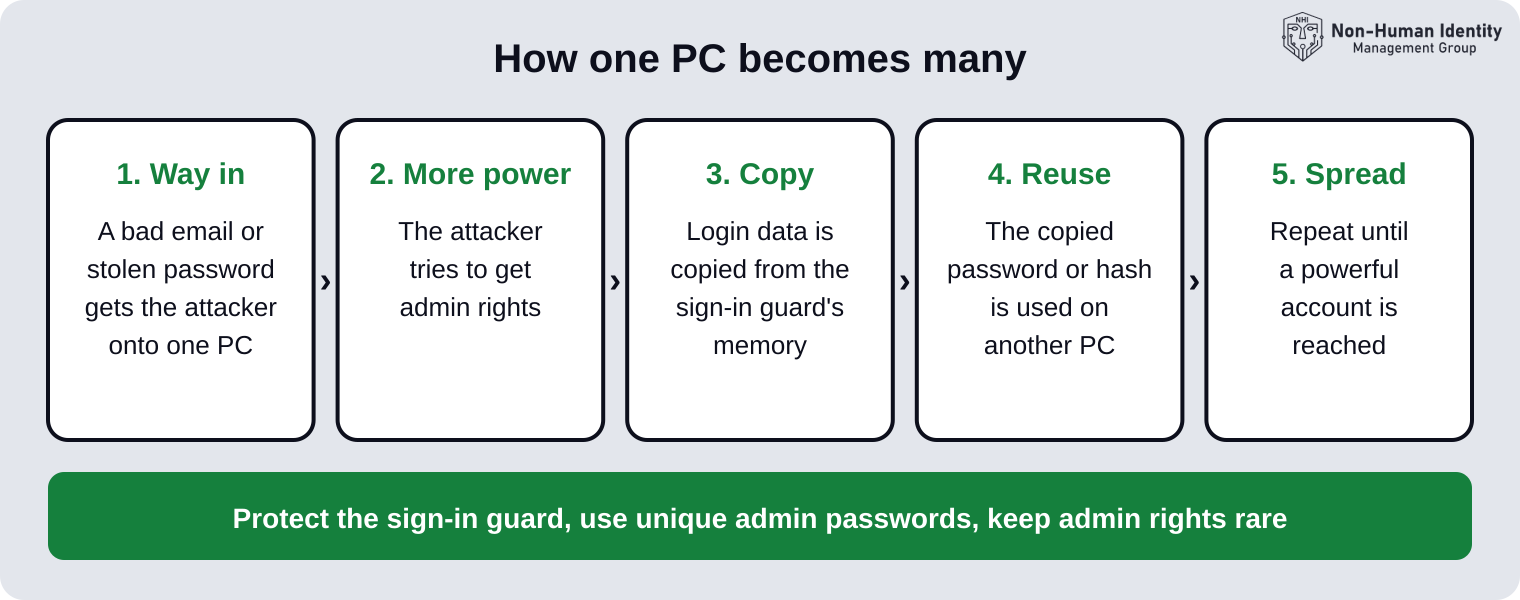
- The way in. An attacker gets onto one computer, often through a bad email or a stolen password.
- More power. They try to get admin rights on that computer, because reading the sign-in guard's memory usually needs them.[1]
- The copy. They copy login data for everyone who has signed in there, including any IT staff.
- The reuse. They use that data to sign in to other computers. Some attacks reuse a hash without ever learning the password. This is called pass-the-hash.[3]
- The spread. Each new computer may hold more login data, until they reach the most powerful accounts.
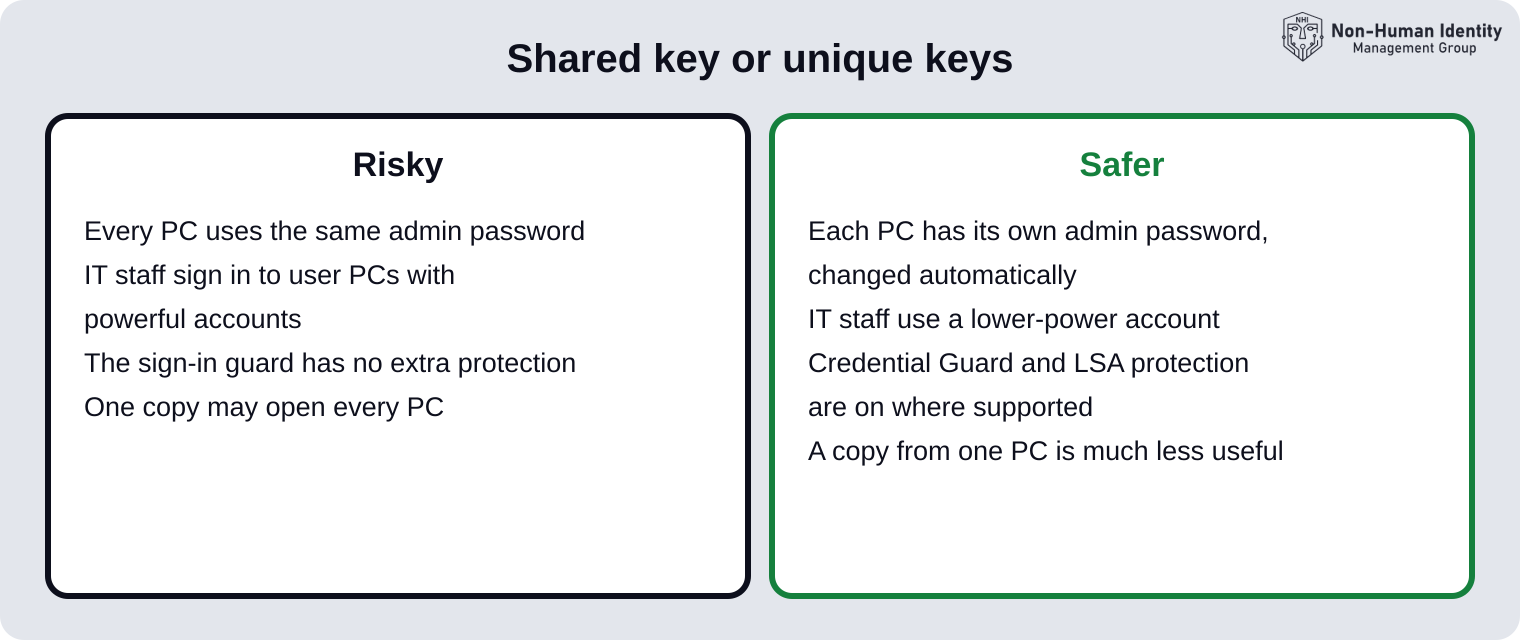
Windows has built-in protections. Credential Guard moves key login data into a sealed-off area that the rest of Windows cannot read. Microsoft says this blocks pass-the-hash style attacks, even by harmful software with admin rights.[3] It does not protect every store of passwords, so it is one layer, not the whole answer.[3]
LSA protection is a simpler setting. It stops programs that Windows does not trust from reading the sign-in guard's memory.[2]
A worked example
Uma Erikson has just started on the IT desk at Birch Kitchens, a fictional kitchen fitting firm with sixty staff. Yusuf Strand is the IT manager.
On Thursday, an alert pops up: possible credential dumping on a sales laptop. The action says "Blocked".
Uma remembers the key box. Blocked means the thief did not copy the keys this time. But it also means someone was behind the reception desk.
She does not try to fix it alone. She calls Yusuf straight away, as the firm's plan says.
Yusuf takes the laptop off the network. He asks who has signed in to it this week. Uma admits she signed in with her admin account on Monday to install a printer.
So Yusuf changes Uma's admin password, and the passwords of the laptop's user. He checks the sign-in records for those accounts on other computers. He finds no unusual sign-ins in the records available to him.
The laptop is wiped and rebuilt. Yusuf then makes three changes. Each PC gets its own admin password, changed automatically by a Windows feature built for this.[4] Uma gets a lower-power account for daily jobs. And Yusuf checks that Credential Guard is on for every laptop that supports it.
Uma's quick call meant a near miss stayed small.
Myths and mistakes
| What people think | What is true |
|---|---|
| A blocked alert means we are safe. | The attempt was stopped, but someone may still have admin rights on that computer. Investigate. |
| Strong passwords stop credential dumping. | A copied hash can work without the password being known. Strong passwords help, but they do not fix this on their own. |
| Antivirus will catch every attempt. | Attackers keep changing their methods. Use Windows' built-in protections as well as security software.[3] |
| The same admin password on every PC is easier to manage. | It is also easier to abuse. One copied login can then open every machine.[4] |
| Only big firms face this. | The method works on any Windows computer that someone has broken into, whatever the size of the firm. |
What can I do this week?
- Ask your IT team if Credential Guard and LSA protection are turned on.
- Check if all your computers share the same admin password.
- Make sure IT staff use a second, low-power account for day-to-day jobs.
- Agree who gets the call when a dumping alert pops up.
Checklist
- Credential Guard is on for computers that support it.
- LSA protection is on, or an equivalent security software rule is used.
- Each computer has its own local admin password, changed automatically.
- Very few people have admin rights, and only when they need them.
- Powerful admin accounts are not used to sign in to everyday computers.
- Credential dumping alerts go to a named person and are always checked.
- After a confirmed case, passwords for every account used on that computer are changed.
Common questions
What is LSASS?
LSASS is the part of Windows that checks people when they sign in and applies local security rules.[2] It keeps some login data in memory so you do not have to keep typing your password. That is why attackers try to read it.
Is credential dumping the same as an infostealer?
No, but they are related. An infostealer is harmful software that grabs saved logins, often from web browsers, and sends them away. Credential dumping usually means copying Windows login data, often after the attacker already has admin rights. See Infostealers for Beginners.
Is Credential Guard on by default?
Sometimes. Microsoft says it is on by default on newer Windows 11 business computers that are joined to a company network and meet the hardware needs.[3] It needs the Enterprise or Education edition, so check rather than assume.
What should I do if I see a credential dumping alert?
Tell your security contact or IT manager straight away, even if it says blocked. Do not try to clean it up yourself. They will likely take the computer off the network and change passwords for accounts used on it.
Do security testers use these methods too?
Yes. A public list of attack methods notes that some of the same tools are used by both attackers and hired security testers.[1] Testers do it with written permission, to show where defences need work.
Where next?
Ready for the detail? Read the practitioner guide: Credential Dumping Guide. It goes further into where Windows keeps login data, how to choose and roll out each protection, and how to respond to a confirmed case.
Also useful:
- Windows Credential Guard and VBS Guide
- Lateral Movement for Beginners
- Password Hashing for Beginners
- Local Admin Passwords for Beginners
- Windows Security for Beginners
Related NHI Mgmt Group resources: LSA Protection Guide · Lateral Movement Guide · Privileged Access Management Guide
Key terms
- Credential dumping
- Copying saved passwords or login data out of a computer an attacker has broken into.
- LSASS
- The part of Windows that checks sign-ins and holds login data in memory.
- Password hash
- A one-way scrambled version of a password, used to check it without storing it in plain form.
- Pass-the-hash
- Signing in with a stolen password hash instead of the password itself.
- Lateral movement
- An attacker moving from one computer or account to others inside a network.
- Credential Guard
- A Windows feature that keeps key login data in a sealed-off area the rest of Windows cannot read.
- LAPS
- A Windows feature that gives each computer its own local admin password and changes it regularly.
Sources and further reading
- OS Credential Dumping (T1003) and LSASS Memory (T1003.001). MITRE ATT&CK, version 20.1. https://attack.mitre.org/techniques/T1003/, accessed 28 Nov 2026.
- Configure added LSA protection. Microsoft Learn, Microsoft. https://learn.microsoft.com/en-us/windows-server/security/credentials-protection-and-management/configuring-additional-lsa-protection, accessed 28 Nov 2026.
- Credential Guard overview. Microsoft Learn, Microsoft. https://learn.microsoft.com/en-us/windows/security/identity-protection/credential-guard/, accessed 28 Nov 2026.
- Windows LAPS overview. Microsoft Learn, Microsoft. https://learn.microsoft.com/en-us/windows-server/identity/laps/laps-overview, accessed 28 Nov 2026.
- Attack surface reduction rules reference: Block credential stealing from the Windows local security authority subsystem. Microsoft Learn, Microsoft. https://learn.microsoft.com/en-us/defender-endpoint/attack-surface-reduction-rules-reference, accessed 28 Nov 2026.