A local admin password unlocks the all-powerful account built into one Windows computer.
This guide is for people new to IT work and for anyone who looks after a small business's computers. If your business has more than a handful of Windows PCs, how these passwords are set affects how far one break-in can spread.
In short
- Most Windows computers have a built-in admin account that only works on that one machine.
- If every PC uses the same admin password, one stolen copy can help an attacker reach all of them.
- Windows LAPS is a free, built-in Windows feature that gives each PC its own admin password and changes it on a schedule.
- The passwords are stored centrally, and only approved staff should be able to read them.
What you will learn
- Explain what a local admin account is in one sentence.
- Spot the risk of one shared admin password across many PCs.
- Explain what LAPS does, in plain words.
- Check who in your team can read the stored passwords.
- Built-in boss account (local administrator)
- an account on one computer that can change anything on that computer.
- Password manager for PCs (LAPS)
- a Windows feature that sets, changes and stores a different admin password for each computer.
- Moving sideways (lateral movement)
- an attacker using one computer they control to get into others.
What is a local admin password?
Think of a block of flats where every front door opens with the same key. That is handy for the caretaker. It is just as handy for a burglar who gets hold of one copy.
A Windows computer has accounts that live only on that machine, called local accounts. One of them is the local administrator. It can install software and change security settings. It can also read other users' files on that computer. IT teams use it to fix a machine when normal sign-in fails.
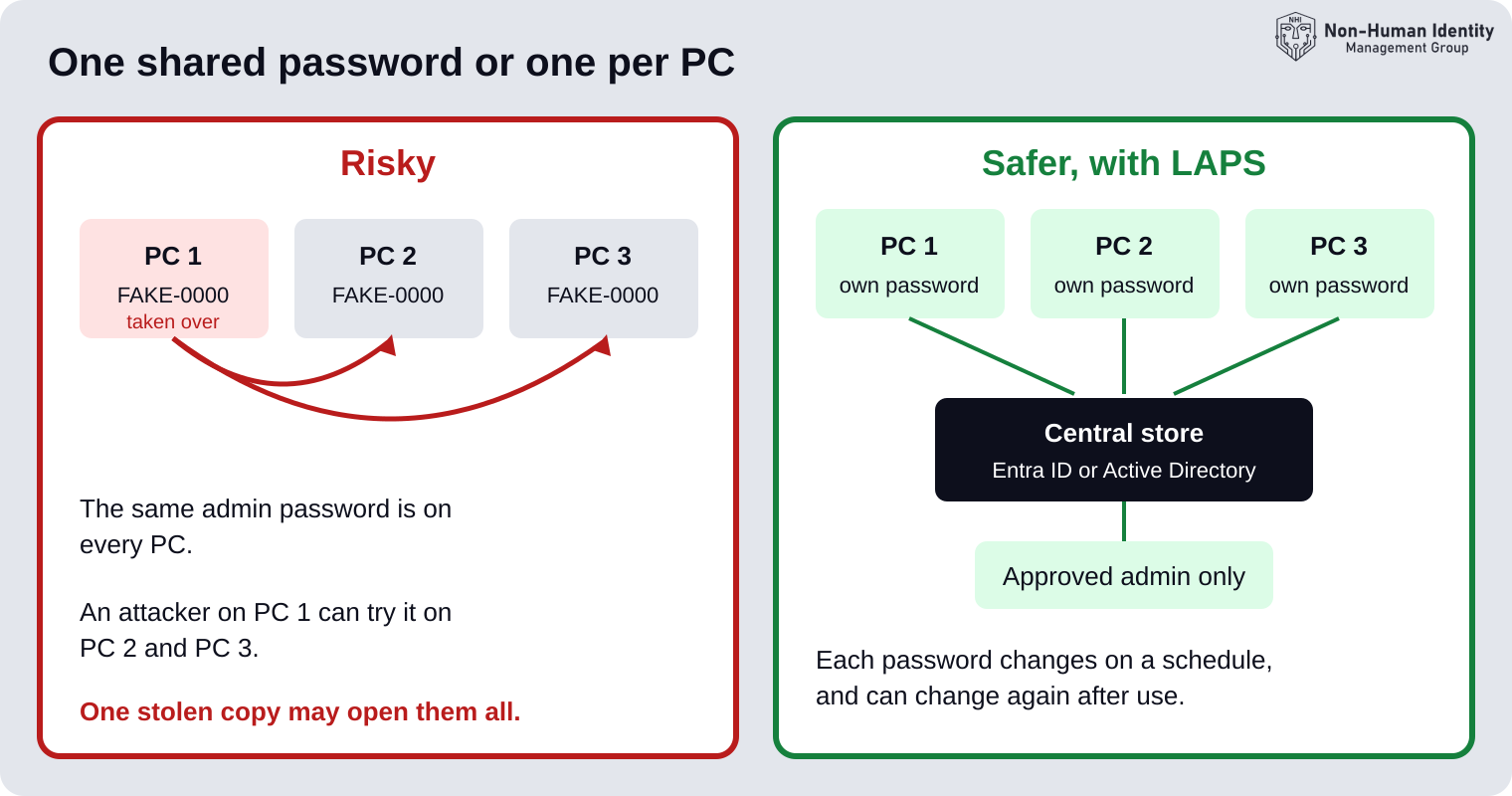
The quick shortcut is to set the same local admin password on every PC, often when copying one set-up to all machines. Then one password opens every "flat" in the building.
LAPS stands for Local Administrator Password Solution. It gives each computer its own admin password, changes it regularly, and stores it where approved staff can look it up.[1]
Where the comparison stops working: a copied flat key is a physical thing you might notice missing. A copied password leaves no gap. On some networks an attacker may not even need the password. A scrambled copy taken from the computer can be enough.
Why does it matter?
Microsoft says shared local admin passwords across many devices let attackers move from one machine to the next. It describes Windows LAPS as protection against these attacks, including one called pass-the-hash, where a scrambled copy of a password is reused.[1]
If you are new to IT work
What could happen: you are handed one admin password "for all the PCs" on your first day.
Check this: ask whether LAPS is in use, and where the passwords are kept.
If you run a small business
What could happen: one infected laptop becomes a route into every office PC.
Check this: ask your IT supplier, in writing, whether each PC has its own admin password.
If you manage an IT team
What could happen: too many people can read the stored passwords, so the protection is weaker than it looks.
Check this: review who has permission to read LAPS passwords.
What does it look like?
Here is a made-up note from an IT handover sheet. It shows the shortcut this page is about.
Example only. All values are made up.
IT handover notes - office PCs
All 14 PCs set up from one master copy        (1)
Local admin user:  Administrator
Local admin pass:  FAKE-Joinery-0000          (2)
Same on every PC, never changed since 2021    (3)
Written on the sticky note in the server cupboard (4)
- Copying one set-up to all PCs often copies the admin password too.
- In a real file, this line would contain the actual admin password.
- One password for every machine, unchanged for years.
- A second copy, on paper, where visitors could see it.
Why this is risky: anyone who learns the password may be able to sign in as admin on all fourteen PCs. They might read the note or take it from one infected PC. Staff who leave still know it.
The safer way: LAPS sets a different, long password on each PC and changes it on a schedule. Approved staff look it up when they need it, and it can be set to change again soon after it is used.[2]
Example only. All values are made up.
Computer   Admin password       Next change
PC-01      EXAMPLE-a1b2-FAKE     in 30 days
PC-02      EXAMPLE-c3d4-FAKE     in 30 days
PC-03      EXAMPLE-e5f6-FAKE     changed today after use
How does it work?
Here is what Windows LAPS does once an IT team turns it on.
- The setting. IT switches on a LAPS policy, a central rule sent to each managed PC.
- The new password. Each PC makes its own random admin password.
- The safe copy. The PC stores the password in the company's central directory. This is Microsoft Entra ID (Microsoft's cloud sign-in service) or Active Directory (the office network's list of users and computers).[1]
- The look-up. When someone needs to fix a PC, an approved admin reads that PC's password. Only people given that permission should be able to see it.[2]
- The change. The password changes on a schedule. LAPS can also change it soon after it has been used, after a short grace period.[2]
Windows LAPS is built into current versions of Windows and Windows Server, and older supported versions received it in an April 2023 update.[1] An older, separate download called legacy Microsoft LAPS also exists. Microsoft says that older product is deprecated (being phased out) on Windows 11 23H2 and later, and points people to Windows LAPS.[1]
A worked example
Tomas Sorensen owns Marigold Joinery, a fictional workshop with fourteen office and workshop PCs. Dario Tanaka has just joined as its first in-house IT person.
On his first day, Dario finds the handover sheet. Every PC uses the same admin password, and it is also on a sticky note in the cupboard.
He thinks of the block of flats. If one PC is ever infected, the same key may open all fourteen doors. He explains this to Tomas in two minutes, and Tomas agrees to fix it this week.
First, Dario checks that the PCs run a version of Windows that includes LAPS. They do. He then turns on a LAPS policy for all of them, set to store passwords in the company's cloud directory.
Next, he picks who can read the passwords. Only he and the outside IT supplier get that permission. Tomas does not need it, and agrees.
Then he sets each password to change on a schedule, and again soon after anyone uses it. He tests the look-up on one PC before rolling it out to the rest.
Last, he shreds the sticky note and removes the password from the handover sheet. Once every PC has its own new password, the old shared one should no longer open any of them. He writes a short note for the team: "Admin passwords are now different on each PC. Ask IT if you need one."
Myths and mistakes
| What people think | What is true |
|---|---|
| A long, strong admin password is enough. | If it is the same on every PC, one stolen copy can still open them all. Each PC needs its own. |
| LAPS costs extra. | Windows LAPS is built into current Windows versions.[1] Check your licence and set-up with your IT supplier. |
| Once LAPS is on, the job is done. | Who can read the passwords matters just as much. Keep that group small.[2] |
| We should keep the old shared password as a backup. | That brings the shared key back. Use LAPS look-ups, and a planned emergency process, instead. |
| Local admin is the same as a domain or cloud admin. | A local admin account works on one computer. A domain or cloud admin can reach many. Both need care. |
What can I do this week?
- Ask whether your PCs share one local admin password.
- Ask your IT supplier if Windows LAPS is turned on.
- List who can read the stored admin passwords.
- Remove admin passwords from notes, sheets and chats.
- Check that staff do not use admin accounts for everyday work.
Checklist
- Every Windows PC has its own local admin password.
- Windows LAPS is on for all managed PCs and servers.
- Passwords are stored in one central place, not in notes or files.
- Only a small, named group can read the passwords.
- Passwords change on a schedule and after use.
- Old shared admin passwords have been retired.
- Anyone who leaves the IT team loses read access the same day.
Common questions
What does LAPS stand for?
LAPS stands for Local Administrator Password Solution. It is a Microsoft feature that gives each Windows computer its own local admin password. It changes the password regularly and stores it centrally, so approved staff can look it up when they need to fix a machine.
Is LAPS built into Windows?
Yes, for current versions. Microsoft says Windows LAPS is built into Windows 11 23H2 and later, and Windows Server 2025. Older supported versions got it through an April 2023 update. The older separate download, legacy LAPS, is being phased out.
Why not just disable the local admin account?
Some teams do, and that can be a good choice. But IT often needs a way to fix a PC when normal sign-in fails. LAPS keeps that route open while making sure each machine has its own password, so one leak does not open them all.
Who should be able to see the passwords?
Only the few people who fix computers. Microsoft says that, by default in its cloud directory, only certain admin roles can read them. Keep the list short, review it often and remove people when their job changes.
Does LAPS work on Macs?
Windows LAPS is for Windows computers. Macs and Linux machines have their own admin accounts and need their own way to manage those passwords. Ask your device management supplier what they offer for non-Windows machines.
Where next?
Ready for the detail? Read the practitioner guide: Local Administrator Password Solution (LAPS) Guide. It goes further into policy settings, read permissions, moving from legacy LAPS and how to watch for misuse.
Also useful:
- Legacy LAPS vs Windows LAPS
- Admin Rights for Beginners
- Lateral Movement for Beginners
- Privileged Access Management for Beginners
Related NHI Mgmt Group resources: Default Passwords for Beginners · Windows Security for Beginners · Active Directory for Beginners
Key terms
- Local administrator account
- A built-in account that can change anything on one computer.
- LAPS
- A Windows feature that gives each computer its own admin password, changes it and stores it centrally.
- Lateral movement
- An attacker using one computer they control to reach other computers on the network.
- Pass-the-hash
- An attack that reuses a scrambled copy of a password to sign in without knowing the password itself.
- Local admin rights
- Permission to make big changes, such as installing software, on one computer.
Sources and further reading
- What is Windows LAPS? Microsoft Learn, Microsoft. https://learn.microsoft.com/en-us/windows-server/identity/laps/laps-overview, accessed 28 Nov 2026.
- Windows LAPS concepts overview. Microsoft Learn, Microsoft. https://learn.microsoft.com/en-us/windows-server/identity/laps/laps-concepts-overview, accessed 28 Nov 2026.