Server-side request forgery is when an outsider tricks a website's server into visiting places it should not.
This guide is for anyone who builds, buys or runs web apps, especially in the cloud. You do not need to write code to be affected: if your business runs apps in the cloud, this flaw can expose the keys those apps use.
In short
- Some apps fetch web addresses for you, for example to show a link preview or import a picture.
- If the app fetches any address it is given, an outsider can point it at private systems inside the network.
- In the cloud, one such inside system can hand out temporary keys for the app, which makes the flaw more serious.
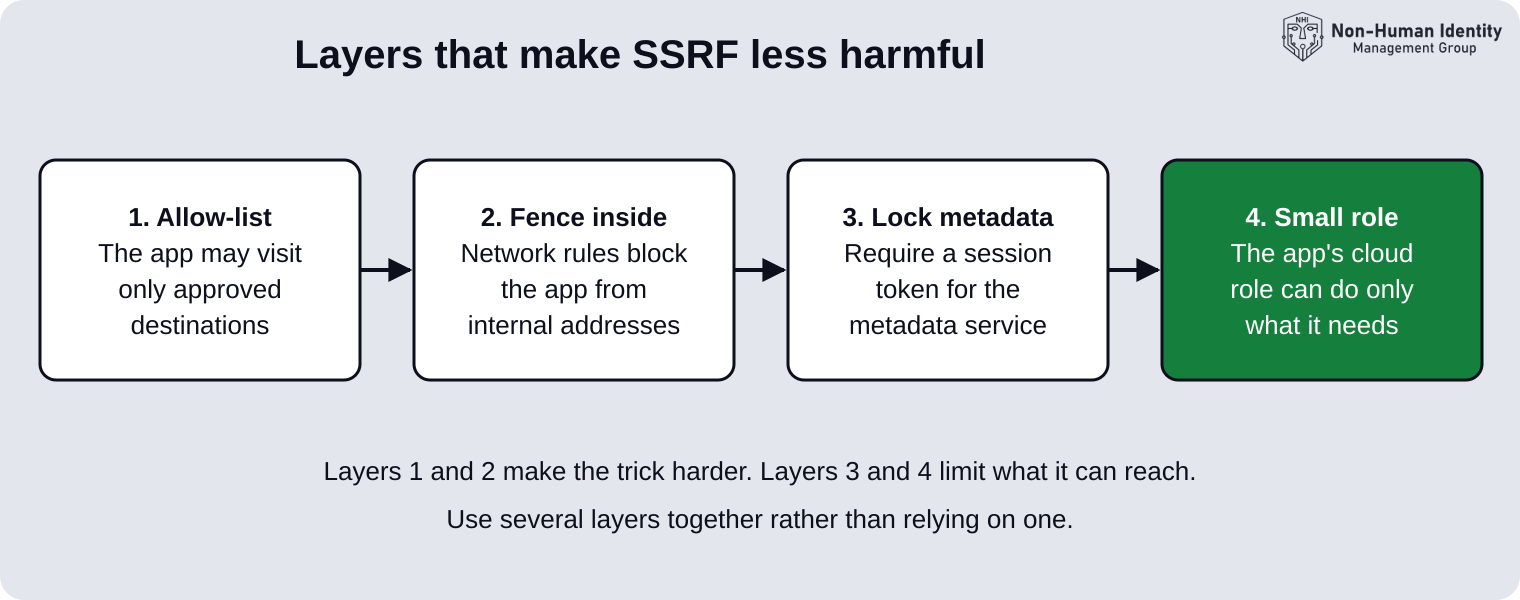
- Defences include an approved list of addresses, network rules, locked-down metadata settings and small app permissions.
What you will learn
- Explain what server-side request forgery is in one sentence.
- Explain why it matters more in the cloud.
- Spot app features that fetch web addresses.
- Ask your team or supplier about the four main layers of defence.
- Server (web server)
- the computer that runs a website or app and answers visitors' requests.
- Cloud information desk (metadata service)
- a service inside a cloud computer that tells the apps on it about their setup, and can hand them temporary keys.
- Cloud job title (role)
- a set of permissions a cloud app uses, which decides what its keys can do.
What is server-side request forgery?
Think of an office runner who fetches any document you name. You ask for a public leaflet, and they bring it. A stranger asks for a file from the locked room upstairs, and the runner, who has a key, brings that too.
Server-side request forgery, often shortened to SSRF, works the same way. Some apps fetch web addresses on a visitor's behalf. If the app fetches whatever it is given, an outsider can point it at places they cannot reach themselves. Those might be private systems inside the company network, or the server itself.[1]
The outsider borrows the server's position inside the network. Requests come from a trusted machine, so private systems may answer them.
Where the comparison stops working: a runner might ask why a stranger wants a locked file. An app usually just follows the address, unless it is built to check.
Why does it matter?
In the cloud, a computer can ask a built-in metadata service for temporary keys, so its apps can use other cloud services.[3] Security guidance warns that SSRF is often used to steal these keys.[1] With those keys, an outsider may act as the app, with whatever access its cloud role has.
If you run apps in the cloud
What could happen: a link preview feature hands an outsider your app's cloud keys.
Check this: ask whether your cloud computers require tokens for the metadata service.
If you are learning web development
What could happen: an "import from URL" feature lets visitors reach systems you never meant to share.
Check this: only fetch addresses from an approved list, and turn off automatic redirects.
If you manage cloud permissions
What could happen: an app's role can read far more data than the app needs.
Check this: review what each app's role can do, and trim it.
What does it look like?
Here is a made-up record from a protected "import picture from a web address" feature. It shows the defence at work.
Example only. All values are made up.
# picture import log, app.example.com (sketch only)
request  https://images.example.com/hotel-0000.jpg     (1)
result   allowed: on approved list

request  http://admin.example.invalid/staff-records    (2)
result   blocked: not on approved list

request  http://metadata.example.invalid/keys          (3)
result   blocked: inside address
- A normal request to a picture site the app is meant to use.
- In a real file, this line would show someone asking the app to reach a private staff system.
- In a real file, this line would show a request aimed at the cloud metadata service, where temporary keys live.
Why this is risky: without checks, the app would fetch lines 2 and 3 and might send back what it found. The outsider would see private data, or even the app's keys.
The safer way: the app checks each address against an approved list, and network rules block inside addresses.[1]
How does it work?
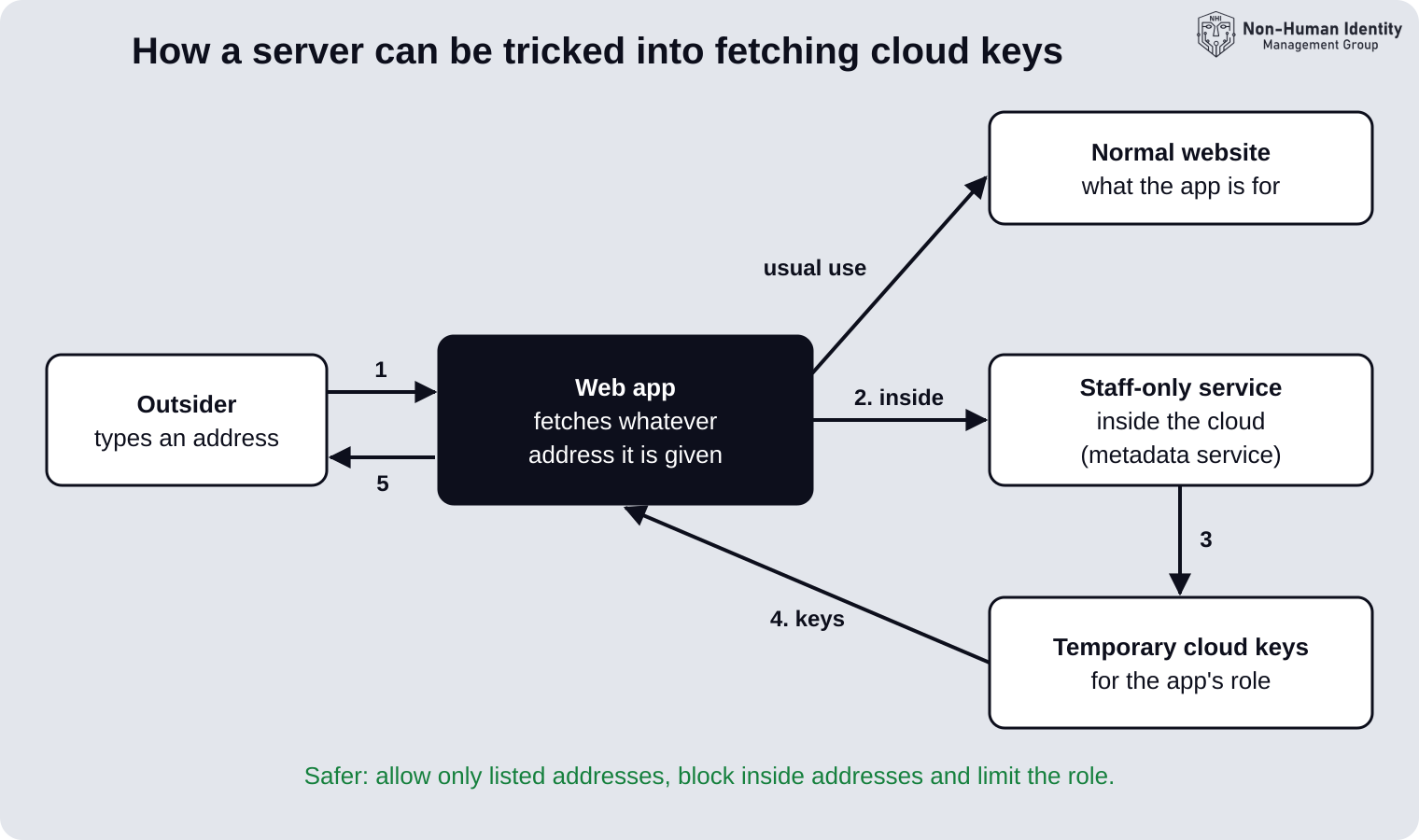
Here is how an outsider might move from a harmless feature to cloud keys, and where defences step in.
- The feature. An app offers to fetch a web address, for a preview or an import.
- The swap. An outsider gives an inside address instead of a normal website.
- The fetch. The server makes the request from inside the network, where private systems may trust it.[1]
- The keys. If the address is the metadata service, the reply may include the app's temporary cloud keys.[3]
- The defence. Approved address lists, network rules, locked metadata settings and small roles each cut the risk.[1]
Cloud providers offer extra protection for the metadata service. For example, Amazon Web Services (AWS) offers a newer version, called IMDSv2, that needs a session token before it answers. AWS lets customers require it, so requests without a valid token are refused.[2] OWASP, a non-profit that publishes free web security advice, calls this a defence-in-depth layer that helps against some SSRF cases.[1]
A real case shows the scale. Capital One said an outsider used a configuration weakness in March 2019. It said about 100 million people in the US and 6 million in Canada were affected.[4] Read our Capital One breach page for how researchers link it to SSRF and cloud role keys.
A worked example
Pia Park is the operations manager at Lark Rise Travel, a fictional tour company. Its booking site runs in the cloud. Staff can add hotel photos by pasting a web address, and the site fetches the picture.
Imran Siddiqui, the company's developer, is preparing for a security review. He notices that the photo feature will fetch any address at all, including addresses inside the cloud network.
He explains it to Pia. "If someone got into a staff account, they could point this at our private systems. The worst case is our cloud keys."
Pia thinks of the office runner with the master key. The runner should fetch leaflets, not files from the locked room. So she asks Imran to fix it before the review.
Imran limits the feature to an approved list of hotel picture sites. He turns off automatic redirects, so an approved site cannot bounce the request somewhere else. He sets the cloud computers to require tokens for the metadata service. He also trims the app's cloud role, so it can reach only the photo store and the booking database.
Then he checks the cloud records for unusual use of the app's keys. He sees no signs of misuse in the records available to him.
Pia adds a new question to the supplier checklist. "Does any feature fetch web addresses, and how is it limited?" She thanks Imran for catching it early.
Myths and mistakes
| What people think | What is true |
|---|---|
| Our private systems are safe because they are not on the internet. | SSRF uses your own server to reach them from inside.[1] |
| Blocking a few bad addresses is enough. | Addresses can be written many ways. An approved list of destinations is stronger.[1] |
| Temporary cloud keys are harmless. | They expire, but while they work they carry the role's full access.[3] |
| Requiring metadata tokens fixes SSRF. | It helps against some cases. The app still needs address checks.[1] |
| SSRF and CSRF are the same thing. | CSRF tricks a person's browser. SSRF tricks a website's server. |
What can I do this week?
- List every app feature that fetches a web address, such as previews, imports and webhooks.
- Ask whether each one uses an approved list of destinations.
- Check that your cloud computers require tokens for the metadata service.
- Review what each app's cloud role can do, and remove what it does not need.
Checklist
- Features that fetch addresses accept only approved destinations.
- Automatic redirects are turned off for those features.
- Network rules stop web apps from reaching inside addresses they do not need.
- Cloud computers require session tokens for the metadata service.
- Each app's cloud role has only the access it needs.
- Unusual use of app keys raises an alert.
- Suppliers are asked how their features that fetch addresses are limited.
Common questions
Why is SSRF so dangerous in the cloud?
Because cloud computers have a built-in service that hands apps temporary keys. An outsider who makes the app fetch from that service may see the reply. That reply can hold keys that carry the app's cloud permissions.
How is SSRF different from CSRF?
SSRF tricks a website's server into making requests, often to private systems. CSRF tricks a person's browser into sending a request to a site they are logged into. Both forge requests, from different places. See Cross-Site Request Forgery for Beginners.
Does a firewall stop SSRF?
Not on its own. A firewall at the edge of the network looks at traffic coming in, but SSRF requests start from your own server, inside. Network rules that limit where the server itself can connect help more.
What is IMDSv2?
It is a newer version of the Amazon Web Services metadata service, which answers only requests that first get a session token. Customers can make it required, so older-style requests without a token are refused.[2] Guidance calls it an extra layer, not a full fix.[1] See EC2 Instance Metadata Service Hardening Guide.
Do other cloud providers have metadata services?
Yes. The major cloud platforms have similar services that tell a computer about its setup and can supply credentials. Each has its own protections. See Cloud Instance Metadata Services Compared Guide.
Where next?
Ready for the detail? Read the practitioner guide: SSRF Prevention Guide. It goes further into address checking, network design, metadata settings by cloud and testing.
Also useful:
- Cloud Instance Metadata Services Compared Guide
- EC2 Instance Metadata Service Hardening Guide
- Cloud Workload Identities for Beginners
- Least Privilege for Beginners
- Cross-Site Request Forgery for Beginners
Related NHI Mgmt Group resources: SSRF vs CSRF · The OWASP Top 10 for Beginners · Non-Human Identities for Beginners
Key terms
- Server-side request forgery (SSRF)
- A flaw where an outsider makes a website's server fetch addresses it should not.
- Cloud metadata service
- A service inside a cloud computer that tells its apps about their setup and can supply temporary keys.
- IMDSv2
- The AWS metadata service version that needs a session token before it answers.
- IAM role
- A set of cloud permissions that an app or service uses instead of a fixed password.
- Allow-list
- A list of the only values or destinations a program will accept.
- Least privilege
- Giving each person or program only the access it needs, and no more.
Sources and further reading
- Server-Side Request Forgery Prevention Cheat Sheet. OWASP Cheat Sheet Series, OWASP Foundation. https://cheatsheetseries.owasp.org/cheatsheets/Server_Side_Request_Forgery_Prevention_Cheat_Sheet.html, accessed 28 Nov 2026.
- Configure the Instance Metadata Service. Amazon EC2 User Guide, Amazon Web Services. https://docs.aws.amazon.com/AWSEC2/latest/UserGuide/configuring-instance-metadata-service.html, accessed 28 Nov 2026.
- Retrieve security credentials from instance metadata. Amazon EC2 User Guide, Amazon Web Services. https://docs.aws.amazon.com/AWSEC2/latest/UserGuide/instance-metadata-security-credentials.html, accessed 28 Nov 2026.
- Information on the Capital One cyber incident. Capital One, 2019. https://www.capitalone.com/digital/facts2019/, accessed 28 Nov 2026.