Cyber security for museums and libraries means protecting catalogues, visitor data and building systems from attacks and mistakes.
This guide is for staff, volunteers, managers and trustees at museums, galleries, archives and libraries. You do not need to be technical: if your catalogue, ticketing or public computers go down, everyone feels it.
In short
- Museums and libraries hold catalogues, member and donor details, and run public computers and building systems.
- A ransomware attack on the British Library in 2023 took its online catalogue down for months.
- Common weak spots are remote access without an extra login check, old systems and untested recovery plans.
- The basics are the extra login check, removing old accounts, tested backups kept apart and a plan for a total outage.
What you will learn
- Explain what a museum or library needs to protect.
- Spot the weak spots the British Library review found.
- Check who can log in from outside the building.
- Ask your IT team or supplier the right questions.
- Extra login check (MFA)
- a second step at login, such as a code on your phone, as well as the password.
- Lock-and-demand attack (ransomware)
- harmful software that locks or steals files and demands payment.
- Logging in from outside (remote access)
- a way for staff or suppliers to reach internal systems from elsewhere.
What is cyber security for museums and libraries?
Think of how a museum cares for its collection. Each object is listed in a register. Store rooms are locked, and only named staff hold the keys. There is a plan for a flood or fire.
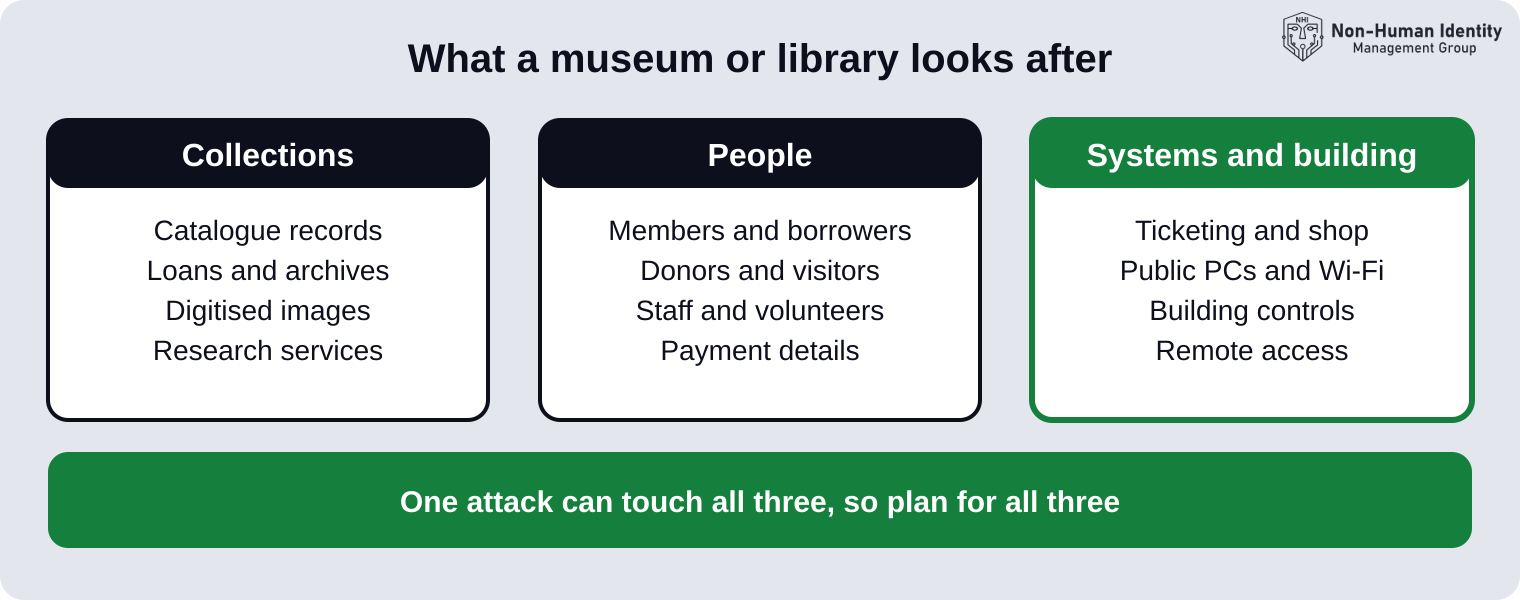
Cyber security is the same care for the digital side. It covers the catalogue, loan and archive records, digitised images, member and donor details, ticketing, public computers and Wi-Fi. It also covers building systems, such as heating and humidity controls, that may be connected to the network.
It is not only an IT job. Directors and trustees set priorities and budget. Collections and front-of-house staff use the systems every day. An IT team, council or supplier often runs the technical side.
Where the comparison stops working: a missing object leaves a gap on the shelf. A copied file leaves nothing missing, so a theft of data can go unnoticed for days.
Why does it matter?
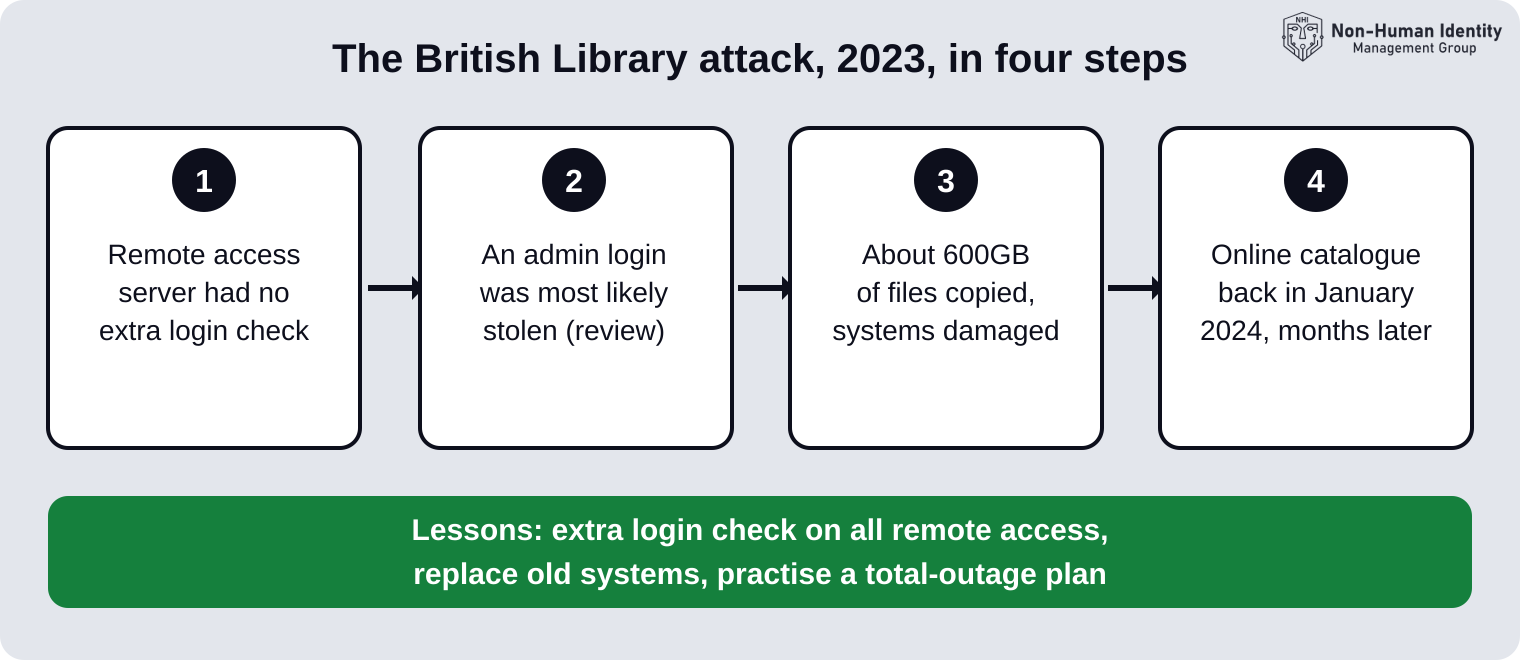
When systems go down, readers cannot search, loans stop and staff may lose email and records. Data about members, staff and donors can also be stolen. The British Library's review says about 600GB of files were taken in its 2023 attack, including personal data of users and staff.[1]
If you are a director or trustee
What could happen: a long outage closes services, and recovery costs far more than the basics would have.
Check this: ask when the recovery plan was last practised, and what old systems are still in use.
Next: Ransomware for Beginners
If you work with collections or archives
What could happen: the catalogue and digitised records are locked, and some cannot be rebuilt in their old form.
Check this: ask where copies of the catalogue are kept, and whether a restore has been tested.
If you manage volunteers or front of house
What could happen: a volunteer's shared login stays open long after they leave.
Check this: give each person their own login, and close it when they go.
If you are new to IT work here
What could happen: a supplier's remote login, with only a password, becomes the way in.
Check this: list every way to log in from outside, and make sure each has the extra login check.
What does it look like?
Here is a made-up "Are we ready?" card a small museum or library service might fill in once a year.
Example only. All values are made up.
Are we ready? Annual check (EXAMPLE library service)
Ways to log in from outside:     3 found, 1 password only  (1)
Accounts for people who left:     5 still open              (2)
Systems with no security updates: catalogue server FAKE-01  (3)
Catalogue backup restore tested?  Not this year             (4)
Public PCs separate from staff?   Not sure                  (5)
Plan if everything is down?       Written, never practised  (6)
- A login from outside that needs only a password is a common way in.
- Open accounts for leavers or old volunteers can be used by someone else.
- In a real file, this line would contain the name of any system that no longer gets security updates.
- A backup that has never been restored may not work when you need it.
- Public computers should not share a network with staff systems.
- A plan nobody has practised is hard to follow when systems are down.
Why this is risky: the British Library review found a similar mix. A remote access server had no extra login check, and old systems made recovery much harder.[1]
The safer way: give each line an owner and a date. Close old accounts and add the extra login check first, because they are quick wins.
How does it work?
Ransomware attacks on cultural bodies often follow a familiar path. In plain words:
- A way in is found. Attackers look for logins from outside that need only a password. The US cyber agency CISA advises the extra login check on all remote access.[2]
- A login is stolen. Passwords are taken by fake emails or by trying many guesses.
- The attacker spreads. On a network with no internal walls, one way in can lead to every system. Splitting the network into zones, called network segmentation, limits this.
- Data is copied and systems locked. Attackers copy files to threaten a leak, then lock or damage systems. Backups that are kept apart and tested give you a way back.[2]
- Recovery takes time. Old systems may not be restorable in their old form, so a practised plan for a total outage matters.[1]
The British Library attack shows these steps in practice. Its own review says the likely way in was a remote access server for partners and IT staff. That server did not use the extra login check. A ransomware group claimed the attack. The Library did not pay, and its searchable online catalogue returned on 15 January 2024.[1]
A worked example
Ivo Novak manages a fictional town museum and library run by a small charity. Hana Osei is the part-time IT officer. After reading about the British Library attack, the trustees ask Ivo for a simple check.
Ivo and Hana sit down with the "Are we ready?" card. They start with logins from outside the building.
Hana finds three. Staff email already uses the extra login check. So does the catalogue supplier's portal. But the ticketing supplier connects with a password only. Hana asks the supplier to turn on the extra login check, and they agree a date.
Next, she looks at accounts. Five belong to volunteers who left last year. She closes them, and agrees with Ivo that each new volunteer gets their own login.
Then she tests a restore of the catalogue to a spare computer. It works, but it takes most of a day. Ivo adds that to the risk list so the trustees know what to expect.
Hana also finds that the public computers share a network with the office. She asks the broadband supplier how to split them, and adds the job to next quarter's plan.
Last, Ivo runs a one-hour exercise with staff. The question is simple: what do we do if every system is down on a Saturday morning? They agree to keep paper loan slips and a printed contact list at the front desk.
Myths and mistakes
| What people think | What is true |
|---|---|
| Nobody would attack a museum or library. | Many attacks hit whoever is open. The British Library was attacked in 2023, and personal data was stolen.[1] |
| A password is enough for supplier logins. | The British Library's likely way in had no extra login check. Add it to every login from outside.[1] |
| We have backups, so we can recover quickly. | Backups help only if attackers cannot reach them and a restore has been tested.[2] |
| Old systems are fine if they still work. | Old systems can be hard to secure and hard to restore after an attack.[1] |
| Cyber security is for the IT team alone. | The review says senior leaders and boards need to understand cyber risk.[1] |
What can I do this week?
- List every way staff and suppliers log in from outside the building.
- Ask for the extra login check on any of them that use only a password.
- Close accounts for staff and volunteers who have left.
- Ask when a catalogue backup was last restored as a test.
- Print a contact list for what to do if every system is down.
Checklist
- A named person owns cyber security and reports to trustees or the board.
- Every login from outside uses the extra login check, including supplier access.
- Each staff member and volunteer has their own login, closed when they leave.
- Software gets security updates, and old systems have a plan to replace them.
- Public computers and Wi-Fi are kept apart from staff systems.
- Backups of the catalogue and key records are kept apart, and restores are tested.
- A plan for a total outage exists and has been practised.
- Staff have short cyber training at least once a year.
Common questions
Why would anyone attack a museum or library?
Mostly for money. Attackers lock systems and threaten to leak stolen data, hoping the organisation pays. Many attacks are not aimed at one body but hit whoever has a weak spot. Museums and libraries hold personal data and depend on their systems to open.
What did the British Library attack teach?
Its own review lists lessons. They include the extra login check on all logins from outside, splitting the network and replacing old systems. They also include practising a total-outage plan and making sure leaders understand the risk. Recovery took months because some old systems could not be restored as they were.[1]
Should we pay if we are hit by ransomware?
That is a decision for leaders with expert advice, but many choose not to. The British Library did not pay.[1] Paying may not get your data back, and stolen data may still be leaked. Talk to your IT support, insurer and the police, and follow your plan.
Do we have to report a cyber attack?
Often, if personal data is involved. In the UK, a personal data breach that is likely to put people at risk must be reported to the regulator. The report is due within 72 hours where feasible.[3] Your funder, council or insurer may also expect to be told.
Are public computers and Wi-Fi a risk?
Yes, if they share a network with staff systems. A problem on a public computer could then spread. Keep public machines and guest Wi-Fi on their own separate network, and reset public computers regularly so nothing is left behind.
Where next?
Ready for the detail? Read the practitioner guide: Cyber Security for Museums, Galleries and Libraries Guide. It goes further into the British Library review, identity and network controls, and a phased plan by size of organisation.
Also useful:
- Ransomware for Beginners
- Network Segmentation for Beginners
- Cybersecurity for Charities and Non-Profits Guide
- Volunteer and Seasonal Workforce Access
- Ransomware Response and Recovery Guide
Related NHI Mgmt Group resources: Rhysida Ransomware Profile Guide · Cybersecurity for Local Government Guide · Building Management System Security Guide
Key terms
- Ransomware
- Harmful software that locks or steals files and demands payment.
- Multi-factor authentication
- A login that needs a second check, such as a phone code, as well as a password.
- Network segmentation
- Dividing a network into zones so a problem in one does not spread to all.
- Legacy system
- An older system still in use, often hard to update or replace.
- Third-party access
- Access given to suppliers or partners who are not staff.
- Business continuity
- Keeping key services going during a disruption and getting them back afterwards.
Sources and further reading
- Learning lessons from the cyber-attack: British Library cyber incident review. British Library, 8 March 2024. https://www.bl.uk/home/british-library-cyber-incident-review-8-march-2024.pdf, accessed 28 Nov 2026.
- #StopRansomware Guide. CISA, MS-ISAC, NSA and FBI, September 2023. https://www.cisa.gov/stopransomware/ransomware-guide, accessed 28 Nov 2026.
- Personal data breaches: a guide. Information Commissioner's Office (ICO). https://ico.org.uk/for-organisations/report-a-breach/personal-data-breach/, accessed 28 Nov 2026.