A dark pattern is a screen design that nudges you into a choice you did not mean to make.
This guide is for anyone who shops, signs up or clicks "Accept" online, and for people who design or run websites. If your business sells online, the way your screens are laid out can now land you in trouble with regulators.
In short
- Dark patterns are design tricks, such as fake countdown timers, hidden fees and cancel buttons that are hard to find.
- They push you to spend more, share more data or stay subscribed longer than you planned.
- Regulators in the US, the EU and the UK treat many of these tricks as unfair, and some firms have paid large penalties.
- Slow down, look for the full price and the "no" option, and keep proof when a site makes leaving hard.
What you will learn
- Spot the most common dark patterns on a shopping or sign-up screen.
- Explain why a design can be unfair even when every word is on the page.
- Check a subscription before you join, so you know how to leave.
- Ask your own team whether your screens give people a fair choice.
- Design trick (dark pattern)
- a screen layout or wording that steers you towards the choice the business wants.
- Hidden extra cost (drip pricing)
- a price that grows as fees are added step by step at checkout.
- Subscription trap
- a plan that is easy to join and hard to cancel.
Status: correct as at 28 November 2026, based on the US Federal Trade Commission, the European Data Protection Board and the UK government. Laws change; check the official text.
This guide explains the topic in general terms and is not legal advice.
What is a dark pattern?
Think of a shop where the way out is hidden behind the sweets aisle. You can still leave, but the layout keeps walking you past things to buy.
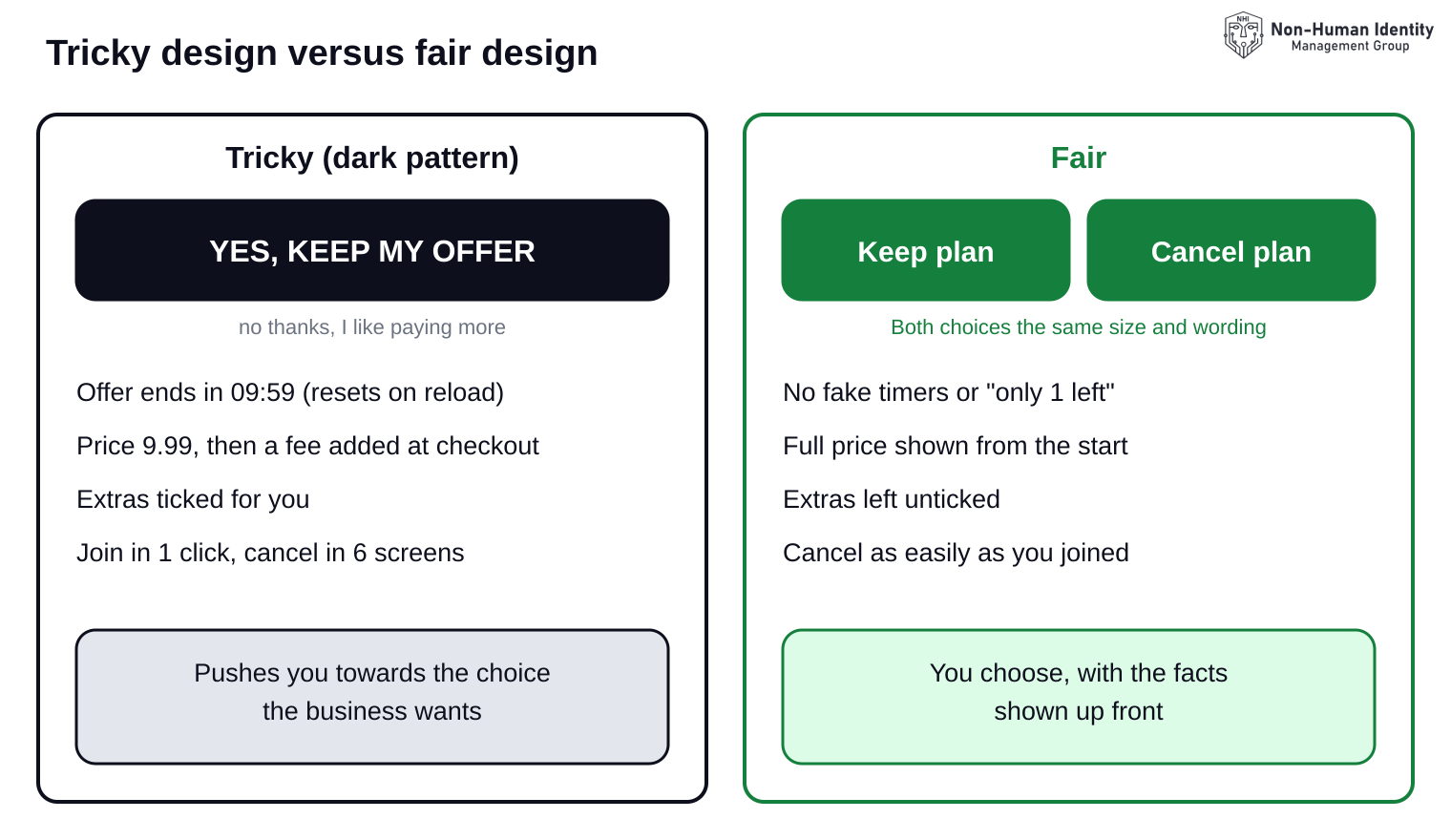
A dark pattern does the same on a screen. The site still lets you say no, but it makes "yes" big and easy and makes "no" small, grey or hard to find. Some people also call this deceptive design.
The Federal Trade Commission (FTC) is the US consumer regulator. It says dark patterns are designs that can trick people into buying things or giving up their privacy.[1]
Where the comparison stops working: you can see the whole of a shop floor. On a website, the business can change the layout for each visitor and test which version makes the most people say yes.
Why does it matter?
Small nudges add up. They can cost you money, sign you up for things you did not want and share more of your personal data than you meant to.
Regulators take this seriously. In September 2025 the FTC announced a settlement worth 2.5 billion US dollars with Amazon. The FTC had alleged that Amazon signed people up to Prime without clear consent and made cancelling hard.[4]
If you shop or subscribe online
What could happen: a "free trial" turns into a monthly charge you struggle to stop.
Check this: before you join, find the cancel steps and the date the first payment is taken.
If you design screens or run a website
What could happen: a layout you tested for more sign-ups is judged unfair by a regulator.
Check this: make the "no" or "leave" option as easy to use as the "yes" option.
If you care about your personal data
What could happen: a pop-up keeps asking until you agree to share more than you want.
Check this: look for a clear "reject" or "manage settings" option before you tap anything.
What does it look like?
Here is a made-up checkout screen for an online film service. It packs several tricks into one page.
Example only. All values are made up.
EXAMPLE FILMS  (example.com)
Hurry! Offer ends in 09:59                      (1)
Only 2 places left at this price                (2)
Monthly plan: 4.99*                             (3)
[x] Add Film Insurance for 1.99 a month         (4)
[  YES, START MY FREE TRIAL  ]
no thanks, I don't like films                   (5)
*price rises to 12.99 after 1 month. Cancel by phone only.  (6)
- A countdown timer. In a real screen, a timer like this may reset when you reload the page.
- Pressure to act now, with no way for you to check the claim.
- A low headline price with a star that leads to the full price.
- An extra already ticked for you, so you pay unless you notice it.
- The "no" option is small and tries to make you feel silly for choosing it. This is sometimes called confirmshaming.
- The full price and the hard cancel route are buried in small print.
Why this is risky: each trick on its own looks minor. Together they push you into paying more than you planned, for longer than you planned. The FTC lists fake countdown timers, buried fees and hard cancellation among the tactics it has seen.[1]
The safer way: a fair screen shows the full monthly price up front and leaves extras unticked. It gives "yes" and "no" the same size and style. It also lets you cancel online as easily as you joined.
How does it work?
Most dark patterns follow a few simple moves. The FTC groups them into four kinds in its 2022 report.[1][2]
- Making you believe something false. Adverts dressed up as reviews or news, fake timers, and claims that stock is about to run out.
- Hiding key facts. Fees that appear only at the last step, and limits buried in long terms.
- Making it hard to stop paying. Free trials that turn into paid plans, and cancel routes that are long, confusing or offline only.
- Steering your privacy choices. The option that shares the most data is the easiest to pick, or is already picked for you.
European data protection regulators have their own guidance on deceptive design in social media apps. It looks at the whole life of an account, from signing up to leaving.[3]
The rules depend on where you live. In the UK, new rules took effect on 7 April 2025. They let the Competition and Markets Authority (the UK consumer regulator) decide for itself whether consumer law was broken. It can fine a firm up to 10% of its global turnover. Drip pricing is on the list of banned practices.[5]
A worked example
Odile Dube wants to watch one film on a Friday night. She finds a fictional streaming site that offers a free 7-day trial.
The sign-up screen has a timer counting down from ten minutes. Odile feels rushed. Then she remembers the shop with the hidden exit. A timer is the site's layout, not her deadline.
She slows down and reads the small print. The trial turns into a 12.99 monthly plan on day 8. A film insurance add-on is already ticked, so she unticks it.
Next, she looks for the cancel steps. The help page says she must phone during office hours. That is a warning sign, so she takes a screenshot of the sign-up page and the help page.
Odile decides the film is worth it, and she joins. She puts a reminder in her phone for day 6.
On day 6 she tries to cancel online first. There is no button, so she phones. The agent offers two discounts before she gets her cancel confirmation. She asks for it by email and saves it.
Two weeks later a 12.99 charge appears anyway. Odile sends her bank the confirmation email and the screenshots and asks it to dispute the payment. She also reports the site to her national consumer body. Her evidence makes both steps much easier.
Myths and mistakes
| What people think | What is true |
|---|---|
| If it is in the small print, it is fair. | Regulators look at the whole design. Hiding key facts can be unfair even when the words are on the page.[1] |
| Only people who are careless get caught. | These designs are built and tested to work on busy, normal people. Anyone can be caught out. |
| Dark patterns are only about cookie pop-ups. | They also show up in checkouts, free trials, privacy settings and cancel pages.[3] |
| A countdown timer means the deal really ends. | Some timers are fake. Fake countdown timers are one of the examples the FTC gives.[1] |
| Designers can use any trick that boosts sign-ups. | Large penalties show the risk. Test for fairness, not only for clicks.[4] |
What can I do this week?
- List your subscriptions and check how to cancel each one.
- Set a reminder two days before any free trial ends.
- Before you pay, scroll to the final total and untick any extras you did not choose.
- Take screenshots of sign-up and cancel pages when a site makes leaving hard.
- If you build websites, ask your team to try cancelling your own service.
Checklist
- I pause when a timer or "only a few left" message rushes me.
- I check the full price, with all fees, before I pay.
- I untick extras I did not ask for.
- I know how to cancel before I start a trial.
- I keep cancel confirmations and screenshots.
- I look for a clear "reject" option on privacy pop-ups.
- If I run a site, "no" is as easy to choose as "yes".
Common questions
Are dark patterns illegal?
Many can be, depending on the country and the trick. US, EU and UK regulators use consumer and data protection laws against unfair designs such as hidden fees, hard cancellation and pushed consent. Not every nudge breaks the law, so check your local consumer body.
What is confirmshaming?
Confirmshaming is wording that makes you feel bad for saying no. A button like "No thanks, I don't want to save money" is an example. It works on feelings rather than facts. Read the choice again in plain words and pick what you want.
What should I do if I cannot cancel a subscription?
Keep trying through every route the site offers, and save proof of each attempt. Ask for a written confirmation. If charges continue, contact your bank or card provider about the payment, and report the business to your national consumer body. See Reporting Scams and Cybercrime for Beginners.
Is every pop-up or sale banner a dark pattern?
No. A genuine sale with a real end date, shown clearly, is fair. A design becomes a dark pattern when it misleads you, hides key facts or makes one choice much harder than the other. Ask whether you would choose the same with all the facts in front of you.
How do dark patterns affect my privacy?
They can push you into sharing more data. Common examples are settings that share the most data by default, and pop-ups that keep asking after you said no. The FTC lists tricking people into sharing data as one of its four main groups.
Where next?
Ready for the detail? Read the practitioner guide: Dark Patterns and Deceptive Design. It goes further into the laws that apply in each region, the names regulators give each pattern and a review method for product and design teams.
Also useful:
- Cookie Consent Banners for Beginners
- Safe Online Shopping for Beginners
- Data Privacy for Beginners
- Privacy by Design for Beginners
Related NHI Mgmt Group resources: Cookie and Tracker Compliance Guide · Consent Management Guide · CCPA and CPRA Guide
Key terms
- Dark pattern
- A design that steers people towards a choice they might not make if the options were shown fairly.
- Deceptive design
- Another name for dark patterns: screens built to mislead or pressure people.
- Drip pricing
- Showing a low price first, then adding fees step by step during checkout.
- Confirmshaming
- Wording that makes people feel bad for saying no.
- Subscription trap
- A plan that is easy to join but made hard to cancel.
- Consent
- A clear, free choice to agree to something, such as the use of your data.
Sources and further reading
- FTC report shows rise in sophisticated dark patterns designed to trick and trap consumers. US Federal Trade Commission, 15 September 2022. https://www.ftc.gov/news-events/news/press-releases/2022/09/ftc-report-shows-rise-sophisticated-dark-patterns-designed-trick-trap-consumers, accessed 28 Nov 2026.
- Bringing Dark Patterns to Light (staff report). US Federal Trade Commission, September 2022. https://www.ftc.gov/reports/bringing-dark-patterns-light, accessed 28 Nov 2026.
- Guidelines 03/2022 on deceptive design patterns in social media platform interfaces: how to recognise and avoid them, version 2.0. European Data Protection Board, 24 February 2023. https://www.edpb.europa.eu/our-work-tools/our-documents/guidelines/guidelines-032022-deceptive-design-patterns-social-media_en, accessed 28 Nov 2026.
- FTC secures historic 2.5 billion dollar settlement against Amazon. US Federal Trade Commission, 25 September 2025. https://www.ftc.gov/news-events/news/press-releases/2025/09/ftc-secures-historic-25-billion-settlement-against-amazon, accessed 28 Nov 2026.
- CMA to boost consumer and business confidence as new consumer protection regime comes into force. UK Government (Competition and Markets Authority), 7 April 2025. https://www.gov.uk/government/news/cma-to-boost-consumer-and-business-confidence-as-new-consumer-protection-regime-comes-into-force, accessed 28 Nov 2026.