Safe online shopping means checking a shop or seller is real and paying in a way that protects your money.
This guide is for anyone who buys things online, from big shops, small websites or second-hand marketplaces. You do not need any technical skills, just a few habits before you pay.
In short
- Fake shops copy real ones and lure you with prices that look too good to be true.
- Type a shop's address yourself or search for it, instead of following links in ads and messages.
- Pay by credit card or a payment service with buyer protection, not by bank transfer.
- If something goes wrong, tell your bank straight away, then report it.
What you will learn
- Spot the common signs of a fake shop or seller.
- Explain why the way you pay matters so much.
- Check a marketplace seller before you send money.
- Know who to call if you think you have been scammed.
- Fake shop
- a website or listing set up to take your money or card details, with no real goods behind it.
- Getting your money back (chargeback)
- asking your card provider to reverse a payment when goods do not arrive or are not as described.
What is safe online shopping?
Think of a market stall that appears one weekend with amazing prices and is gone by Monday. You hand over cash, and there is nobody left to complain to. A fake online shop works the same way.
Safe online shopping is a set of simple checks. Before you buy, you check the shop or seller is genuine. When you pay, you pick a method that gives you a way to get your money back.
Most online shopping goes fine. The risk comes from shops that copy real brands and ads that link to them. It also comes from marketplace sellers who ask you to pay outside the app.
Where the comparison stops working: a market stall is easy to see for what it is. A fake website can look polished, show a padlock in the address bar and copy a real shop's logo. A padlock only means the connection is private, not that the seller is honest.[2]
Why does it matter?
Losing the money for one order hurts. Giving your card details to a fake shop can also lead to more payments you never made.
If you shop online at home
What could happen: you pay for a bargain that never arrives, and the site disappears.
Check this: search for reviews on other websites before buying from a shop you do not know.
If you buy or sell second-hand
What could happen: a buyer or seller moves you off the app and asks for a bank transfer.
Check this: keep messages and payment inside the marketplace.
If you help an older relative
What could happen: they click an ad for a "closing down sale" and enter their card details.
Check this: show them how to type a shop's address instead of using ad links.
What does it look like?
Example only. All values are made up.
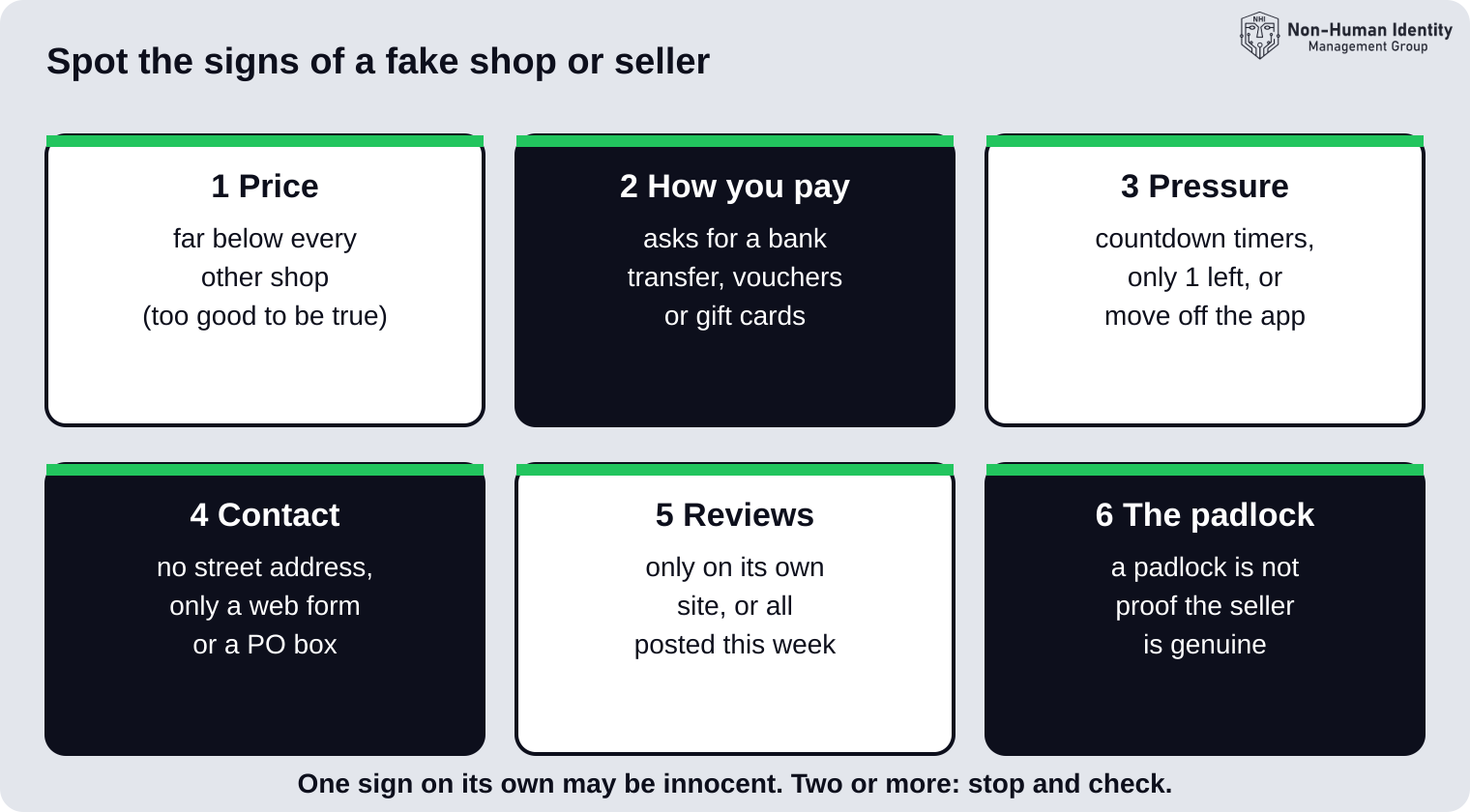
shop.example.invalid  [padlock]                    (1)
CLOSING DOWN SALE!  Air fryer  £19.99  (was £149)   (2)
Only 1 left! Offer ends in 09:59                    (3)
Pay by: Bank transfer (5% extra off)  |  Card: unavailable  (4)
Contact us: web form only                           (5)
Reviews: 5.0 stars (all posted this week)           (6)
- The padlock shows a private connection. It does not show the shop is genuine.
- A price far below every other shop is the classic lure.
- Countdown timers push you to pay before you check.
- A push towards bank transfer removes your easiest route to a refund.
- No street address or phone, so nobody to chase.
- Reviews only on the shop's own page, all brand new.
Why this is risky: each sign alone might be innocent. Together they describe a shop built to take money and vanish.
The safer way: close the page, search for the shop's name plus "reviews" on other sites, and if you still buy, pay by credit card.
How does it work?
This is a simple view so you can spot the trick. It is not a guide to running one.
- The bait. Criminals set up a shop or a listing that copies a real brand, or one that offers a very low price to catch your eye.
- The route in. They spread links to it through social media ads, emails, text messages and sometimes search results.
- The rush. Timers and "only one left" messages push you to pay before you check.
- The payment. They steer you to bank transfer, vouchers or gift cards, which are hard to reverse.[2]
- The vanish. Nothing arrives, or a cheap copy turns up instead, and the shop stops replying to your messages.
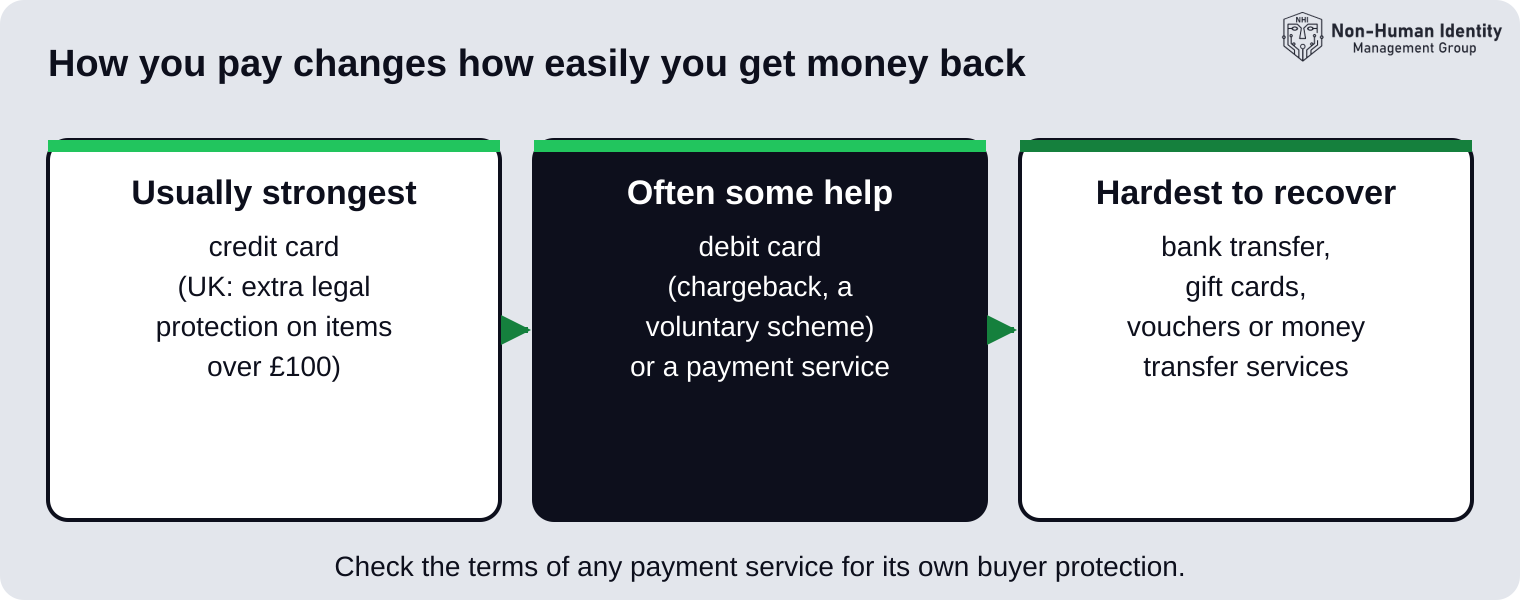
How you pay changes what happens next. In the UK, a credit card can give extra legal protection on single items costing over £100. A debit card may let you ask for a chargeback, a voluntary scheme run by card companies. A bank transfer gives you the least protection, so the NCSC advises against paying that way.[1]
A worked example
This story is made up to show how it can happen.
Kaveh Abernethy is a teaching assistant in Bristol. He wants a games console for his son's birthday, but every big shop has sold out.
On a marketplace app he finds a seller with the console for much less than the shops charge. The photos look real. The seller replies quickly and sounds friendly. Then he asks Kaveh to pay by bank transfer, because "the app fees are too high". He offers to post it the same day.
Kaveh pauses. Two things feel wrong: the low price and the push to leave the app. He checks the seller's profile. It is three weeks old, with no past sales.
He replies that he will only pay through the app's own checkout. The seller says another buyer is ready to pay now. Then he stops answering.
A week later he sees the same photos on a different seller's listing. He reports both listings to the marketplace.
In the end he buys from a well-known shop when new stock arrives. He pays by credit card and checks out as a guest, so he does not create another account to keep safe.[1]
What made the difference: Kaveh treated "pay me outside the app" as a warning on its own. He kept his money where he had a route to get it back.
Myths and mistakes
| What people think | What is true |
|---|---|
| A padlock in the address bar means the shop is safe. | It means the connection is private. It does not prove the seller is genuine.[2] |
| Bank transfer is fine if the seller seems friendly. | Bank transfers are hard to reverse. Use a card or the marketplace's own checkout.[1] |
| Five-star reviews on the shop's site prove it is real. | Reviews on the shop's own site can be fake. Look for reviews on independent sites.[2] |
| Saving my card in every shop makes buying easier, so it is fine. | Each stored card is another place it can leak. Check out as a guest where you can.[1] |
| If I was scammed, it is too late to do anything. | Call your bank straight away. Quick action can sometimes stop or recover a payment. |
What can I do this week?
- Turn on two-step verification, or set up a passkey, on your main shopping and marketplace accounts.[1]
- Remove saved cards from shops you rarely use.
- Bookmark the real addresses of the shops you use most.
- Save your bank's fraud number somewhere you can find it fast.
Checklist
- I type shop addresses myself or search for them, rather than following ad links.
- I check reviews on independent sites before buying from a new shop.
- I pay by credit card or a payment service with buyer protection.
- I never pay a stranger by bank transfer, vouchers or gift cards.
- I keep marketplace chats and payments inside the app.
- My shopping accounts use a passkey or two-step verification.
- I know to call my bank first if something goes wrong.
Common questions
How can I tell if a shopping website is fake?
Look for several signs together. Common ones are a very low price, pressure to pay fast, no street address and a push to pay by bank transfer. Search for the shop's name plus "reviews" on other websites before you buy.[2]
What is the safest way to pay online?
A credit card is usually the safest, followed by a debit card or a payment service with buyer protection. In the UK, credit cards can add legal protection on single items over £100. Bank transfers give the least protection, so avoid them with sellers you do not know.[1]
What should I do if I paid a fake shop?
Call your bank straight away, using the number on your card or its official app. Ask it to stop the card and the payment. Then report the scam to Report Fraud in England, Wales and Northern Ireland, or to Police Scotland in Scotland.[1][3]
Is it safe to buy from social media ads?
Many ads are genuine, but fake shops can use ads too. Instead of clicking the ad, search for the shop yourself and check it has independent reviews. If the price is far below other shops, treat that as a warning sign.[1][2]
Why do marketplace sellers ask me to pay outside the app?
Often because the app's protection would let you get your money back if nothing arrives. Paying outside the app usually loses that protection. Keep chats and payments inside the marketplace, and report sellers who push you to leave it.
Where next?
Ready for the detail? Read the practitioner guide: Online Marketplace Buying and Selling Safely Guide. It goes further into seller checks, safe meet-ups, overpayment tricks and scams that target sellers.
Also useful:
- Online Scams for Beginners
- Payment Fraud for Beginners
- Phishing for Beginners
- Text Message Scams for Beginners
Related NHI Mgmt Group resources: Amazon Account Security and Scams Guide · AI Shopping Agents Safety Guide · Password Managers for Beginners
Key terms
- Chargeback
- A request to your card provider to reverse a payment, for example when goods never arrive.
- Brand impersonation fraud
- A scam that copies a real company's name, logo or website to win your trust.
- Phishing
- A message pretending to be from someone you trust, sent to trick you into clicking, paying or sharing details.
- HTTPS
- The private connection shown by a padlock in your browser. It protects data on the way, but says nothing about the seller.
- Passkey
- A way to sign in without a password, where a secret key stays on your device.
- Card-not-present transaction
- A card payment made online or by phone, where the shop never sees the physical card.
Sources and further reading
- Shopping and paying safely online. National Cyber Security Centre (NCSC), reviewed 24 November 2026. https://www.ncsc.gov.uk/guidance/shopping-online-securely, accessed 28 Nov 2026.
- Check if something might be a scam. Citizens Advice. https://www.citizensadvice.org.uk/consumer/scams/check-if-something-might-be-a-scam/, accessed 28 Nov 2026.
- Report Fraud service goes live. Report Fraud (City of London Police), 4 December 2025. https://www.reportfraud.police.uk/news/report-fraud-service-goes-live/, accessed 27 Nov 2026.