Privacy by design means planning how to protect people's personal information from the start of a project.
This guide is for students, new developers, product managers and anyone who builds or buys an app, website or service. You do not need to write code to be affected: if your business chooses software that holds customer details, you make privacy choices every time you pick a setting.
In short
- Privacy by design means thinking about personal information while you plan, not after you launch.
- Privacy by default means the starting settings collect and share only what each task needs.
- In the UK and EU, the law expects organisations that decide how personal data is used to do both, whatever their size.
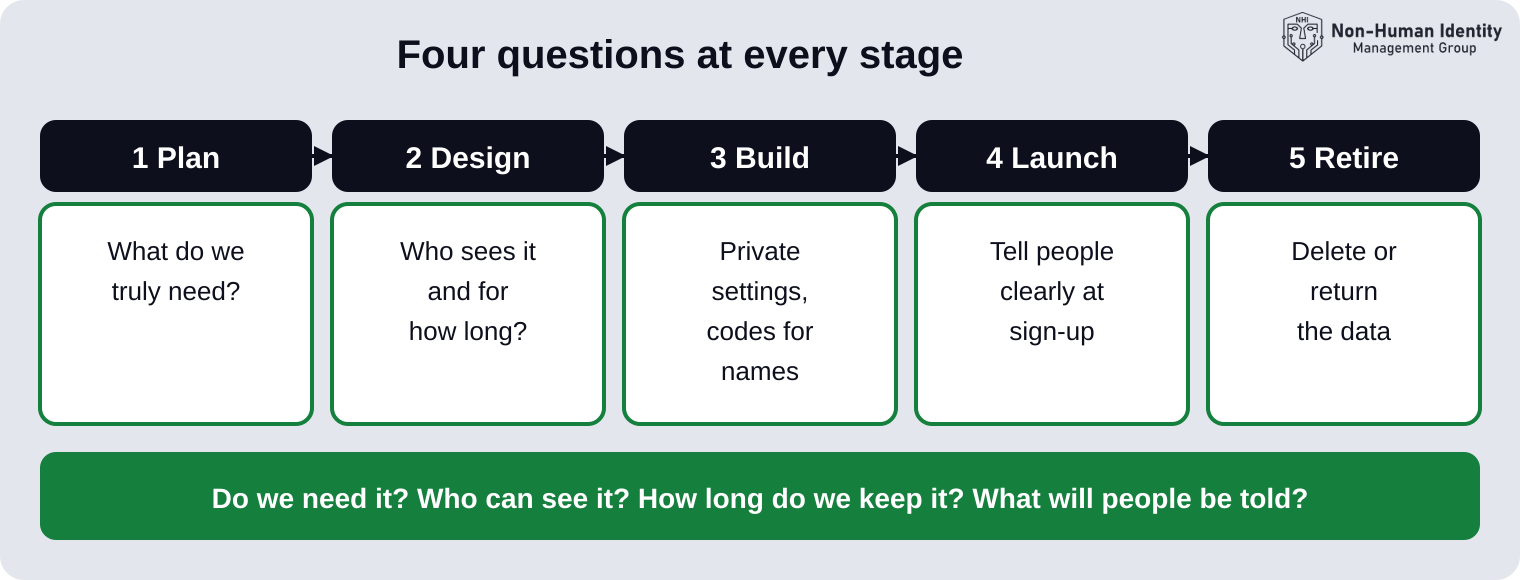
- Ask simple questions at each stage: do we need this, who can see it, how long do we keep it, and what will people be told?
What you will learn
- Explain privacy by design and privacy by default in plain words.
- Spot a design choice that collects or shares more than it needs.
- Ask four privacy questions at each stage of a project.
- Check the default settings of a product you build or buy.
Status: correct as at 28 November 2026, based on the UK Information Commissioner's Office guidance and the EU GDPR text on data protection by design and by default. Laws change; check the official text.
This guide explains the topic in general terms and is not legal advice.
- Details about a person (personal data)
- any information that can be linked to a living person, such as a name, email address or location.
- Starting settings (defaults)
- the choices a product makes for people before they change anything.
- Collect only what you need (data minimisation)
- gathering and keeping the smallest amount of personal data that does the job.
What is privacy by design?
Think of a new building. If the architect draws a ramp into the plans, wheelchair users can get in from the first day. Adding a ramp after the doors and steps are built costs more and often looks bolted on.
Privacy works the same way. A team building an app, a website or a new process decides early what personal data (details about a person) it needs. It decides who can see it and how long to keep it. Those choices then shape the design, so protection is part of the product rather than a patch added later.
There is a second half, called privacy by default. It means the product's starting settings use only the personal data each task needs. A person should not have to hunt through menus to stop their details being shared.
The idea is older than today's laws. A Canadian privacy commissioner, Ann Cavoukian, set it out as seven principles, starting with "proactive not reactive" and "privacy as the default setting".[4] UK and EU law later turned the idea into a duty called data protection by design and by default.[1]
Where the comparison stops working: a ramp is built once and stays put. A product changes every few weeks, so privacy has to be checked again each time a new feature or new kind of data arrives.
Why does it matter?
Data you never collect cannot leak, be misused or need deleting later. The UK regulator says the work starts at the first planning stage. It carries on until the system is switched off.[1] European regulators say the duty applies to small and large firms alike.[3]
If you plan products or features
What could happen: a feature ships that gathers extra details "in case they are useful", and nobody can later say why.
Check this: for every field on a form, write down what it is for.
If you are learning to code
What could happen: you copy real customer records into a test system that many people can open.
Check this: use made-up test data unless there is a clear, agreed reason not to.
If you buy software for a small business
What could happen: a booking tool shares customer lists with every staff member because that is its default.
Check this: before go-live, look at who can see what, and turn off sharing you do not need.
Next: UK GDPR for Beginners
If you use apps every day
What could happen: a new app makes your profile public unless you find the setting to hide it.
Check this: after sign-up, open the privacy settings and see what is shared.
What does it look like?
Here is a made-up design note for the sign-up form of a cake shop's loyalty app, before a privacy review.
Example only. All values are made up.
DESIGN NOTE: EXAMPLE Cakes loyalty app, sign-up form
Fields:   name, email, full date of birth        (1)
          home address, phone number             (2)
Profile:  visible to other members               (3)
Offers:   box already ticked                     (4)
Keep data: no end date set                       (5)
Test data: copy of live customer list            (6)
- The shop sends a birthday treat, so it needs the day and month. The year is not needed.
- The app never posts anything, so an address and phone number are not needed.
- Members' profiles are shown to strangers unless they change a setting.
- A pre-ticked box nudges people into marketing emails they did not choose.
- With no end date, details of people who left years ago stay on file.
- In a real file, this line would contain a full copy of customer details, kept in a less protected test system.
Why this is risky: the form gathers more than the app uses and shares it by default. Every extra field is one more thing to protect, explain and delete.
The safer way: ask for name, email and birthday (day and month only). Keep profiles private by default and leave the offers box unticked. Set a rule to delete inactive accounts, and test with made-up data. The UK regulator gives this same cake shop birthday example.[1]
How does it work?
Privacy by design is not one tool. It is a habit of asking the same few questions at every stage.
- Plan. Write down what the project is for and what personal data it truly needs, then drop anything that is only "nice to have".
- Design. Decide who can see each piece of data, how long it is kept and what people will be told. For risky projects, run a data protection impact assessment (a structured risk check, often called a DPIA).[1]
- Build. Set private starting settings, and hide or replace names where the job does not need them. Swapping names for codes is called pseudonymisation.[2]
- Launch. Give people clear privacy information at the moment they hand over details, and offer fair choices with no nudging.[1]
- Change. Each new feature goes back through the same questions. New data, new uses or new sharing may need a fresh look.
- Retire. When a system is switched off, delete or return the personal data it held.[1]
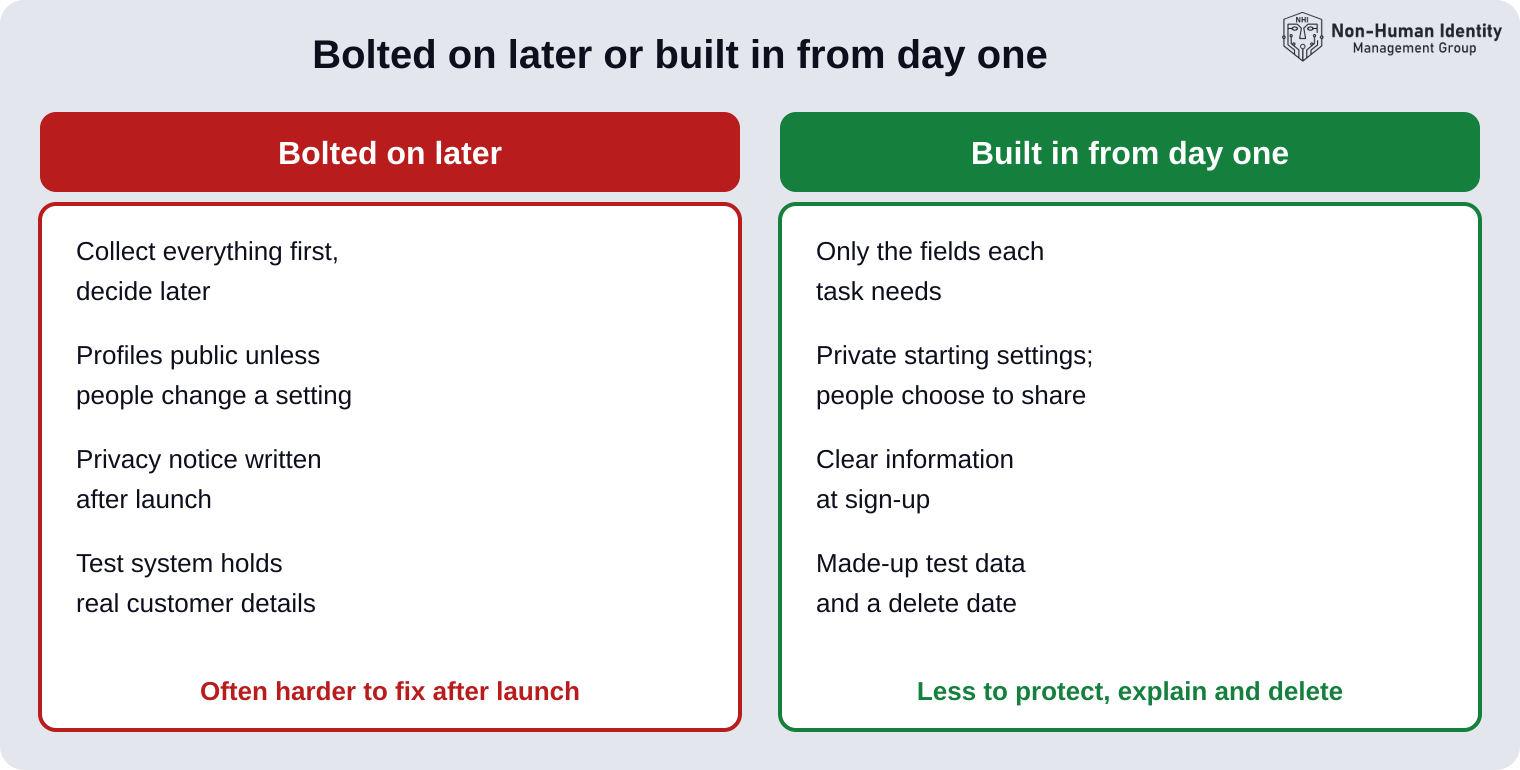
Privacy by default does not mean switching every feature off. It means each setting starts at the least data the purpose needs, and people choose to share more.[1] The law also says personal data should not be opened up to an unlimited number of people without the person's own action.[2]
A worked example
Yusuf Corrigan is a product manager at a small, fictional start-up building a running club app. Bruno Achterberg is the developer.
The first sketch has a big sign-up form. It asks for home address, weight and full date of birth. Each run is saved as a map, and every map is public.
Yusuf remembers the ramp. Changes are cheap now, while the plans are still on paper. So he and Bruno go through the form, one field at a time, asking "what do we use this for?"
The home address goes, because the app never posts anything. Weight becomes optional, with a short line saying it is only used to estimate calories. Date of birth shrinks to an age range, which is all the club leagues need.
The maps are the bigger issue. A public map that starts and ends at the same front door shows where someone lives. Bruno makes new maps private by default. Members can choose to share them, and the app can hide the first and last part of each route.
They also agree a delete rule. Accounts with no activity for two years are removed after a reminder email. Test systems get made-up runners, not real ones.
Before launch, Yusuf writes a short privacy notice for the sign-up screen and links the full version. Because the app tracks location, the team also runs a short impact assessment. It finds one more fix: map data should be kept for less time.
Two months later, a member asks why the app does not want her address. Yusuf smiles. "Because we never needed it."
Myths and mistakes
| What people think | What is true |
|---|---|
| Privacy by design is only for big tech firms. | European regulators say it applies to small businesses and large companies alike.[3] |
| Privacy by default means everything is switched off. | It means starting settings use only what each purpose needs. People can then choose to share more.[1] |
| A privacy notice is enough. | A notice explains your choices. Privacy by design is about making good choices in the first place. |
| We can add privacy before launch. | The work starts at the first planning stage, when changes are cheapest.[1] |
| Our software supplier handles all of this. | The organisation that decides how data is used stays responsible, so it should pick products that help it follow the rules.[1] |
What can I do this week?
- Pick one form you run and write down why you need each field.
- Open the settings of one tool you use and check what is shared by default.
- Ask your team whether test systems hold real customer details.
- Add the four questions to your project start-up checklist.
Checklist
- Every piece of personal data we collect has a written purpose.
- We do not collect details "just in case".
- Starting settings are private, and sharing is something people choose.
- Only the people who need personal data can see it.
- Each kind of personal data has a delete date or rule.
- Test systems use made-up data where possible.
- People get clear privacy information when they hand over their details.
- New features go back through the same privacy questions.
Common questions
Is privacy by design a legal requirement?
Yes, in the UK and EU, for any organisation that decides how and why personal data is used. Their data protection laws call it data protection by design and by default. Many other countries encourage the same idea. The practitioner guide covers the legal wording in more depth.
What is the difference between privacy by design and privacy by default?
By design is the process: thinking about privacy at every stage of a project. By default is the result people see. The starting settings use and share only what each task needs. Nobody has to dig through menus to protect themselves.
Is privacy by design the same as secure by design?
No, but they overlap. Secure by design is about keeping systems safe from attack. Privacy by design also asks whether you should hold the data at all, who should see it, and whether people know what happens to it. Strong security is one part of good privacy.
Do I need a DPIA for every project?
Not always. In the UK and EU, an impact assessment is required where a use of personal data is likely to be high risk. The UK regulator also calls it good practice for other projects, and many teams run a short version for every new feature.[1]
Does privacy by design slow a project down?
It adds a few questions early on. In return, there is less data to protect, explain and delete later. Fixing a design on paper is usually quicker than rebuilding a live product after a complaint or a leak.
Where next?
Ready for the detail? Read the practitioner guide: Privacy by Design Guide for Engineering Teams. It goes further into what the law requires, design patterns and privacy code review checklists.
Also useful:
- Data Minimisation for Beginners
- Data Protection Impact Assessments for Beginners
- Secure by Design for Beginners
- Dark Patterns for Beginners
Related NHI Mgmt Group resources: LINDDUN Privacy Threat Modelling · DPIA Template · Data Minimisation
Key terms
- Privacy by design
- Planning how to protect personal data at every stage of a project, from the first idea to switch-off.
- Privacy by default
- Starting settings that use and share only the personal data each task needs.
- Personal data
- Any information that can be linked to a living person.
- Data minimisation
- Collecting and keeping only the personal data you need for a clear purpose.
- Pseudonymisation
- Replacing names and other direct identifiers with codes, so data cannot easily be linked to a person without extra information.
- Data protection impact assessment
- A structured check of the privacy risks of a project, done before it starts.
- Data controller
- The organisation that decides why and how personal data is used.
Sources and further reading
- Data protection by design and by default. Information Commissioner's Office (UK). https://ico.org.uk/for-organisations/uk-gdpr-guidance-and-resources/accountability-and-governance/guide-to-accountability-and-governance/data-protection-by-design-and-by-default/, accessed 28 Nov 2026.
- General Data Protection Regulation (EU) 2016/679, Article 25: Data protection by design and by default. Text via gdpr-info.eu. https://gdpr-info.eu/art-25-gdpr/, accessed 28 Nov 2026. Official text: EUR-Lex.
- Guidelines 4/2019 on Article 25 Data Protection by Design and by Default, version 2.0. European Data Protection Board, 20 October 2020. https://www.edpb.europa.eu/our-work-tools/our-documents/guidelines/guidelines-42019-article-25-data-protection-design-and_en, accessed 28 Nov 2026.
- Operationalizing Privacy by Design: A Guide to Implementing Strong Privacy Practices. Ann Cavoukian, Information and Privacy Commissioner of Ontario, December 2012. https://www.ipc.on.ca/en/media/1769/download, accessed 28 Nov 2026.