A data pipeline is a set of automatic steps that copies data from one system to another.
This guide is for career changers, new data analysts and anyone who uses reports built from company data. You do not need to build pipelines to be affected: if your business has dashboards or a data warehouse, pipelines are filling them, and they hold keys to your most important systems.
In short
- A pipeline collects data from apps and databases, tidies it, and drops it into one big store for reports.
- Each step logs in to a system with its own service account, and those accounts often reach a lot of data.
- Leaks tend to happen at the joins: a stolen login, a copy left in a temporary folder or a store anyone can read.
- Give each pipeline its own service account with only the access it needs, keep its keys in a locked store and watch for unusual reads.
What you will learn
- Explain what a data pipeline does in one sentence.
- Spot the places where data can leak as it moves.
- Check who owns the accounts your pipelines use.
- Ask your data team three useful safety questions.
- Big store for reports (data warehouse)
- one central place where copies of company data are kept for analysis.
- Service account (non-human identity)
- an account used by a program, not a person, to log in to another system.
- Collect, tidy, load (ETL)
- short for extract, transform, load: a common kind of pipeline.
What is a data pipeline?
Think of a parcel delivery route. Vans collect parcels from many senders, take them to a depot to be sorted, then deliver them to one big warehouse.
A data pipeline does the same with data. It collects data from sources such as a shop's website, its customer list and its card payments. It tidies the data on the way. Then it drops the result into a data warehouse (a big central store) or a data lake (a store that keeps raw files). Reports and dashboards read from there.[1]
A common pattern is called ETL, short for extract, transform, load. The pipeline takes the data out, changes it into a tidy shape, then loads it. A newer pattern, ELT, loads the raw data first and tidies it inside the warehouse later.[1]
Pipelines run on their own, often every night or every few minutes. To do that, each step needs to log in to the systems it reads from and writes to. It uses a non-human identity (NHI), usually a service account, with a password or key.
Where the comparison stops working: a parcel leaves the sender when it is collected. Data is copied, not moved. The original stays at the source, and new copies appear at every stop.
Why does it matter?
A pipeline puts copies of data from all over the business in one place. Its accounts can often read a lot of that data. That makes them worth stealing.
In 2024, a criminal group broke into customer accounts at Snowflake, a cloud data store. They used passwords stolen by malware. Investigators said the accounts had no second login check, and some passwords were years old. About 165 firms were told they might be affected.[3] Read our Snowflake breach page for the full story.
If you are new to data work
What could happen: you copy a pipeline password into a shared notebook so a colleague can test something.
Check this: ask where pipeline passwords are meant to live, and never paste them into notes or chat.
If you use dashboards to run a business
What could happen: customer details end up in a report store that far more people can open than the original system.
Check this: ask who can read the raw customer data in your data warehouse.
If you manage an IT or data team
What could happen: one stolen pipeline account gives a stranger read access to every source it touches.
Check this: make sure each pipeline account has a named owner and a second login check where the service supports it.
What does it look like?
Many pipelines are set up in a short settings file. Here is a made-up one for a removals firm. It copies bookings into a warehouse each night.
Example only. All values are made up.
# nightly-bookings pipeline (EXAMPLE)
schedule: every night at 02:00
source: bookings-db.example.invalid
source_user: admin                         (1)
source_password: FAKE-Passw0rd-0000        (2)
copy_tables: ALL                           (3)
staging_folder: shared-temp/bookings/      (4)
destination: warehouse.example.invalid
owner: (blank)                             (5)
- The pipeline logs in as the database's main admin account, which can do far more than read bookings.
- In a real file, this line would contain the database password, typed straight in where anyone with the file can read it.
- Every table is copied, including ones the reports never use.
- A shared temporary folder holds a full copy of the data partway through the trip.
- Nobody is named as responsible for the pipeline or its account.
Why this is risky: anyone who gets this file gets an admin password to the bookings system. The extra tables and the shared folder make more copies of personal data than the firm needs.
The safer way: the pipeline has its own account that can only read the tables it needs. Its password lives in a locked secrets store, not in the file. Short-term copies go to a private folder that is cleared after each run. A named person owns the pipeline.
How does it work?
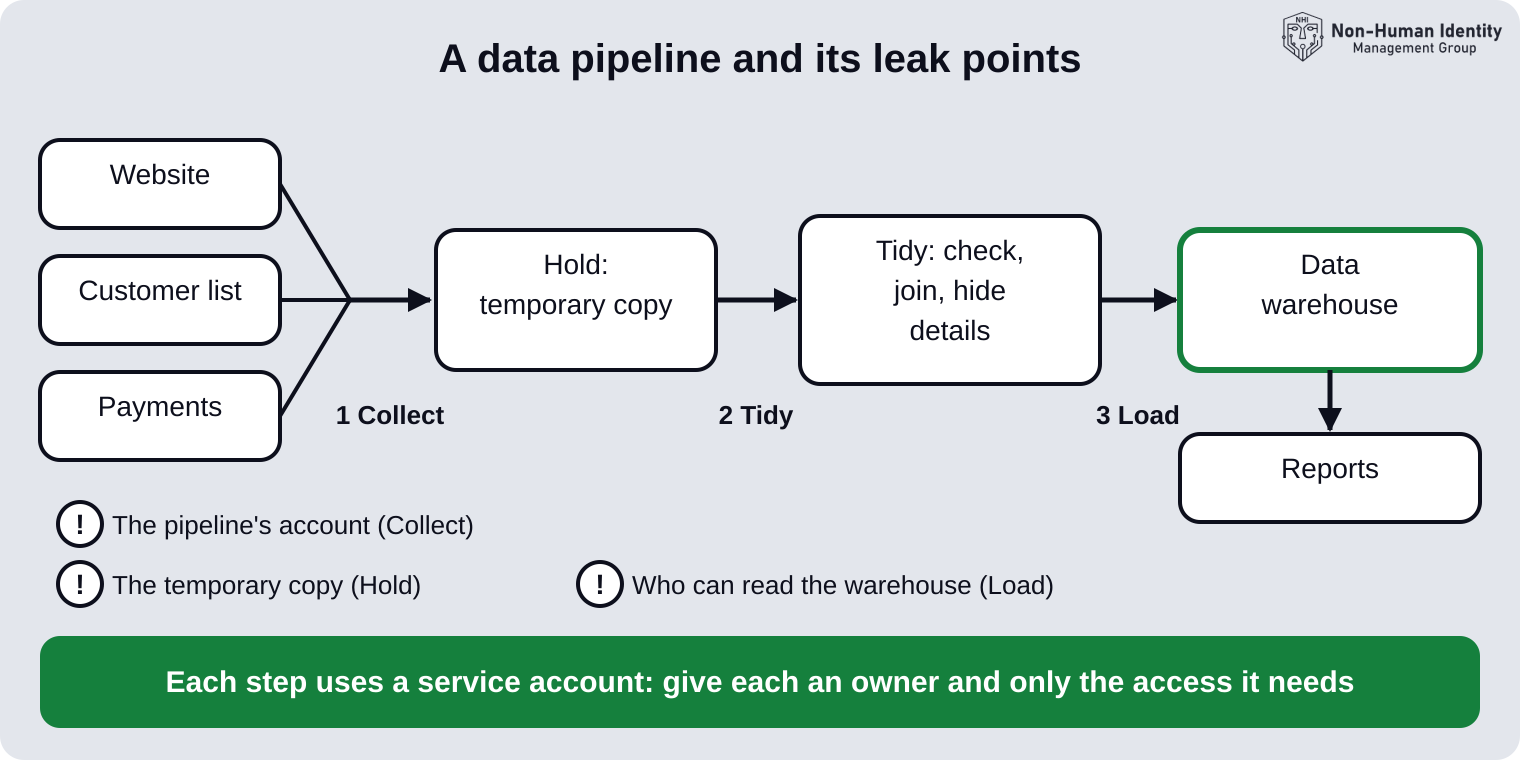
Here is a simple pipeline from start to finish, with the points where data can slip out.
- Collect. A program logs in to each source, such as a database or an online app, and reads the data. Pipelines can pull data on a schedule or receive it as it happens.[1] Leak point: the account used here.
- Hold. The data often waits in a temporary area while it is worked on. Leak point: temporary copies that are not cleared or are open to too many people.
- Tidy. The data is sorted, checked, joined and reshaped. Duplicate rows are removed.[1] This is a good place to hide or remove details the reports do not need.
- Load. The result is written into the warehouse or lake. Leak point: a store that too many people or programs can read.
- Run on a timer. A scheduling tool, called an orchestrator, starts each step in order. Some popular tools let the people who write pipeline jobs reach the passwords those jobs use, so their access matters too.[2]
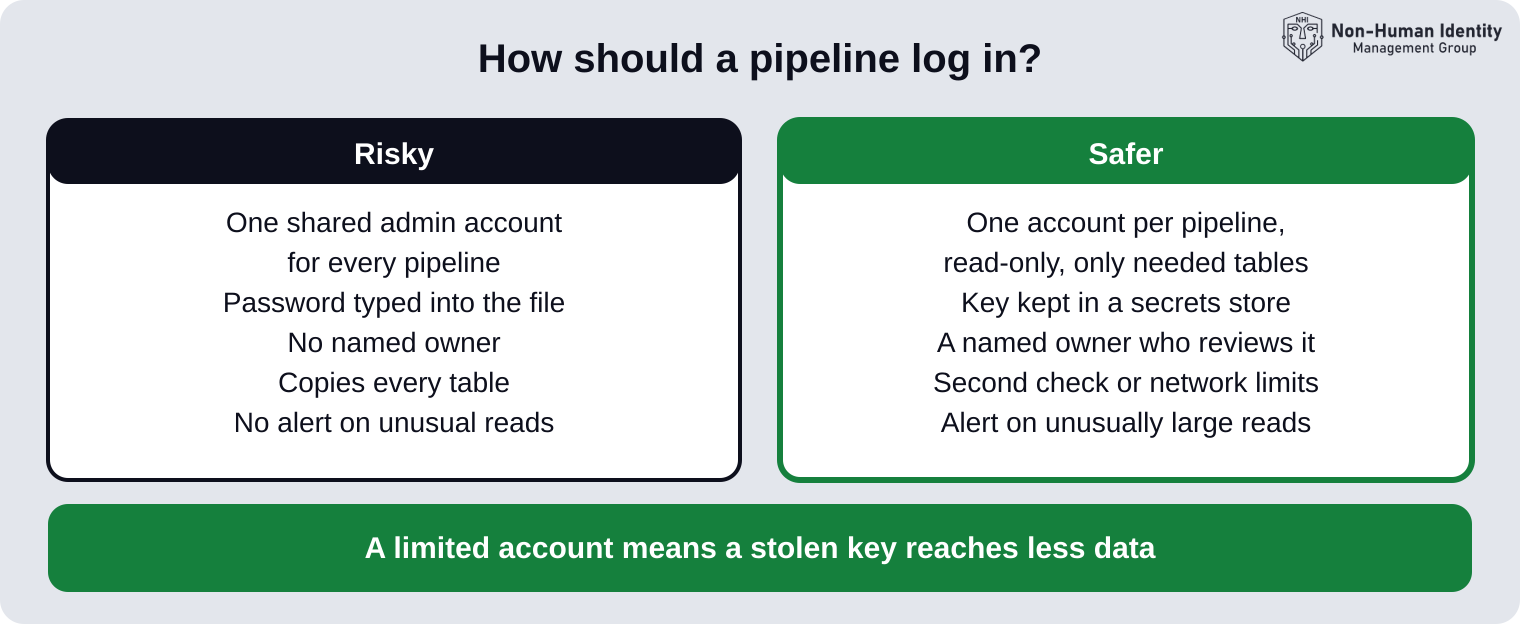
The Snowflake investigators gave advice that fits most pipelines. Use a second login check and change passwords that may have leaked. Only allow logins from trusted networks, and alert on unusual access.[3]
A worked example
Leila Okafor runs the office at Ochre Removals, a fictional removals firm with forty staff. A contractor, Soren Bergmann, built a pipeline that copies bookings into a data warehouse each night, so Leila can see a sales dashboard.
Ochre is hiring its first data analyst, Umar Novak. On his first week, Umar asks how the pipeline logs in. Soren checks and finds it uses the bookings system's main admin account. The password is typed into the settings file.
Leila thinks about the parcel route. If one van driver has a key to every sender's building, losing that key is a big problem. So she asks Soren to fix the account first.
Soren creates a new service account just for the pipeline. It can read the bookings tables and nothing else. He puts its password in the warehouse service's locked secrets store and removes it from the file. Then he changes the admin password, since the old one sat in a file for months.
Next, Umar looks at what is copied. The dashboard only needs dates, prices and postcodes. So the pipeline stops copying customer phone numbers and full addresses.
Soren also sets the temporary folder to clear after each run. He turns on an alert if the pipeline account reads far more data than usual.
Last, Leila writes Soren's name next to the pipeline as owner, with a review date in six months.
The dashboard looks the same as before. Behind it, there are fewer copies of personal data and one less powerful password in a file.
Myths and mistakes
| What people think | What is true |
|---|---|
| A pipeline just moves data, so it is not a security issue. | It copies data and holds credentials for many systems. Both need looking after. |
| The pipeline needs an admin account to work. | Most pipelines only need to read some tables. A limited account is usually enough. |
| Copy everything now, decide what we need later. | Every extra copy of personal data is one more thing to protect. Copy what the reports use. |
| Data in the warehouse is safe because it is inside the company. | Warehouses are often reachable over the internet. Who can log in, and from where, matters.[3] |
| If the pipeline runs without errors, all is well. | A stolen pipeline credential can work perfectly. Watch for unusual amounts of data being read. |
What can I do this week?
- Ask your data team for a list of pipelines and the account each one uses.
- Check that each pipeline account has a named owner.
- Look for passwords typed into pipeline settings files, and move them to a secrets store.
- Ask whether the data warehouse needs a second login check, and turn it on where it can be used.
- Pick one pipeline and check it only copies the data its reports use.
Checklist
- We have a list of our data pipelines and what each one copies.
- Each pipeline has its own service account, not a shared admin account.
- Pipeline accounts can only read the data they need.
- Pipeline passwords and keys are kept in a secrets store, not in files.
- Each pipeline and its account has a named owner.
- Temporary copies are private and cleared after each run.
- Logins to the data warehouse use a second check or are limited to trusted networks.
- Someone is alerted when a pipeline account reads much more data than usual.
Common questions
Is a data pipeline the same as ETL?
Not quite. ETL is one kind of data pipeline. It takes data out, tidies it, then loads it. Some pipelines load the raw data first and tidy it later, which is called ELT. Some just copy data without changing it.
Who looks after a data pipeline?
Usually a data engineer, though analysts and outside contractors often build them too. What matters is that each pipeline has a named owner. That person knows what it copies, which accounts it uses and who to call if it goes wrong.
Why are pipeline accounts such a target?
Because one account can often read a lot of data from key systems. It also runs with no person watching. If it is stolen and has no second login check, a stranger may be able to use it just as the pipeline does.
Do I need to understand code to ask good questions?
No. Ask what each pipeline copies and which account it uses. Ask where the password is kept, who owns it and who can read the warehouse. The answers tell you a lot without reading any code.
What is the difference between a data warehouse and a data lake?
Both are big stores for analysis. A data warehouse usually holds tidy, organised tables ready for reports. A data lake usually keeps raw files in many formats. Many businesses use both, and both need the same care over who can read them.
Where next?
Ready for the detail? Read the practitioner guide: ETL and ELT Pipeline Security Guide. It goes further into the accounts and keys each pipeline tool uses, how to secure a scheduling tool such as Airflow, and what to monitor on each platform.
Also useful:
- Securing the data warehouse and lakehouse itself
- Apache Airflow Security Guide
- Service Accounts for Beginners
- Tokenisation for Beginners
- Data Security for Beginners
Related NHI Mgmt Group resources: Service Accounts in Snowflake Guide · If your data warehouse and lakehouse is compromised · Non-Human Identities for Beginners
Key terms
- Data pipeline
- A set of automatic steps that copies data from sources to a store for analysis.
- ETL pipeline
- A pipeline that extracts data, transforms it into a tidy shape, then loads it into a store.
- Data warehouse
- A central store of organised data used for reports and analysis.
- Orchestrator
- A scheduling tool that starts each pipeline step in the right order.
- Service account
- An account used by software, not a person, to log in to other systems.
- Least privilege
- Giving an account only the access it needs to do its job.
- Data masking
- Hiding parts of sensitive data, such as most of a phone number, so it can be used more safely.
Sources and further reading
- What is a data pipeline? Amazon Web Services. https://aws.amazon.com/what-is/data-pipeline/, accessed 28 Nov 2026.
- Airflow security model. Apache Airflow documentation, The Apache Software Foundation. https://airflow.apache.org/docs/apache-airflow/stable/security/security_model.html, accessed 28 Nov 2026.
- UNC5537 targets Snowflake customer instances for data theft and extortion. Mandiant, Google Cloud Threat Intelligence, 10 June 2024 (updated 17 June 2024). https://cloud.google.com/blog/topics/threat-intelligence/unc5537-snowflake-data-theft-extortion, accessed 28 Nov 2026.