Database security means keeping the store of your organisation's data safe from people who should not reach it.
This guide is for anyone who runs, pays for or works near a database and wants to know how to protect it. You do not need to be a database expert to be affected: if your business keeps customer, staff or order records in an app, those records live in a database.
In short
- A database is where apps keep their records, such as customers, orders and payments.
- Common ways in are a database left open to the internet, default or shared passwords, and too much access.
- Protect it in layers: hide it, use proper sign-ins, give each app and person only the access it needs, and scramble the data.
- Keep it updated, record who does what, and keep tested backups.
What you will learn
- Explain what a database is and why it attracts attackers.
- Spot the risky set-ups that let people in.
- Check the five layers of protection a database needs.
- Ask your IT supplier the right questions.
- Data store (database)
- an organised store of records that apps can search and change.
- Only what you need (least privilege)
- giving each person or app just the access its job needs, and no more.
- Scrambling (encryption)
- turning data into code that only someone with the right key can read.
What is database security?
Think of a records room in an office. It holds every customer file. Database security is the locked door, the short list of who holds keys and the signing-in book by the door.
A database is a store of records that software can search and update. Your shop website, booking system or payroll app almost certainly uses one behind the scenes. People rarely open it directly. Apps talk to it for them.
Database security covers who can reach the database and how they prove who they are. It covers what each of them may do. It also asks if the data stays safe when someone gets a copy. Records of activity and backups are part of it too.
Where the comparison stops working: a records room has one door. A database can have many ways in, through apps, networks and admin tools. A copy of all of it can leave without leaving a gap that anyone sees.
Why does it matter?
The database is often the thing attackers want most, because it holds data they can sell, misuse or hold to ransom.
If you run a small business
What could happen: customer details leak, and you may have to tell customers and a regulator.
Check this: ask your supplier where your database lives and whether it can be reached from the internet.
If you are new to IT work
What could happen: a test copy of real data sits on a laptop or open server with a default password.
Check this: never leave a default admin account switched on, even on a test system.
If you build apps
What could happen: a search box passes typed text straight into the database, and a stranger reads every record.
Check this: keep user input separate from database commands, and keep the database password out of your code.
If you manage a team
What could happen: people who left months ago still have access to customer data.
Check this: ask for a list of who can reach the database, and review it every few months.
What does it look like?
Here is the kind of summary a supplier might send after a quick check.
Example only. All values are made up.
Database check: members-db.example.invalid
  Reachable from internet ......... YES        (1)
  Admin account name .............. admin      (2)
  Admin password .................. FAKE-0000  (2)
  Accounts used by apps ........... 1 shared   (3)
  Connections encrypted ........... NO         (4)
  Last security update ............ 2 years    (5)
  Activity records kept ........... NO         (5)
- Anyone on the internet can try the door. In a real file, this line would show the server's address.
- A built-in admin account with an easy password. Attackers often try these first.
- Every app and person shares one account. You cannot tell who did what.
- Data travels in plain form, so it could be read on the way.
- Old software helps attackers. No records means attacks are hard to spot.
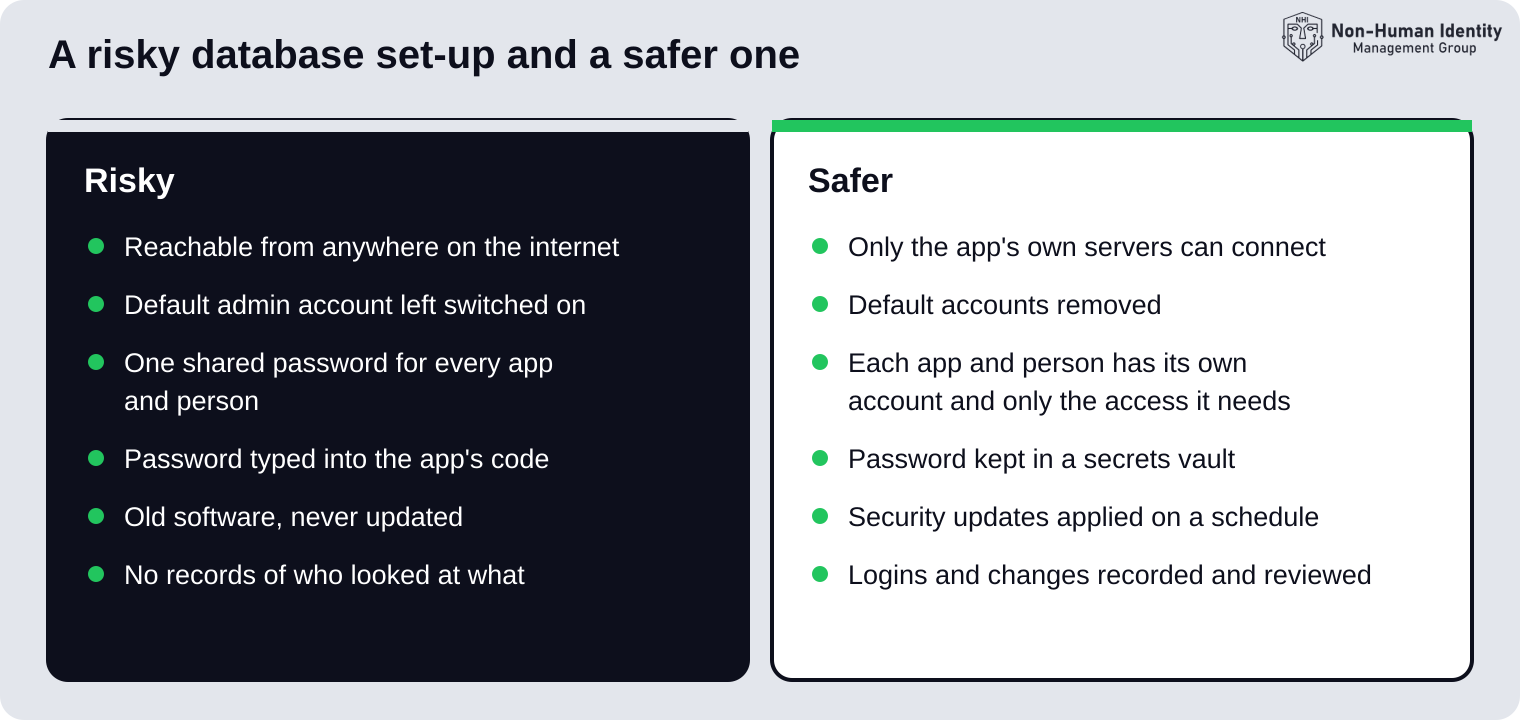
Why this is risky: each line is a weak spot. Together they make the database easy to find, easy to get into and hard to check.
The safer way: hide the database from the internet and remove default accounts. Give each app its own account. Turn on scrambling and activity records.
How does it work?
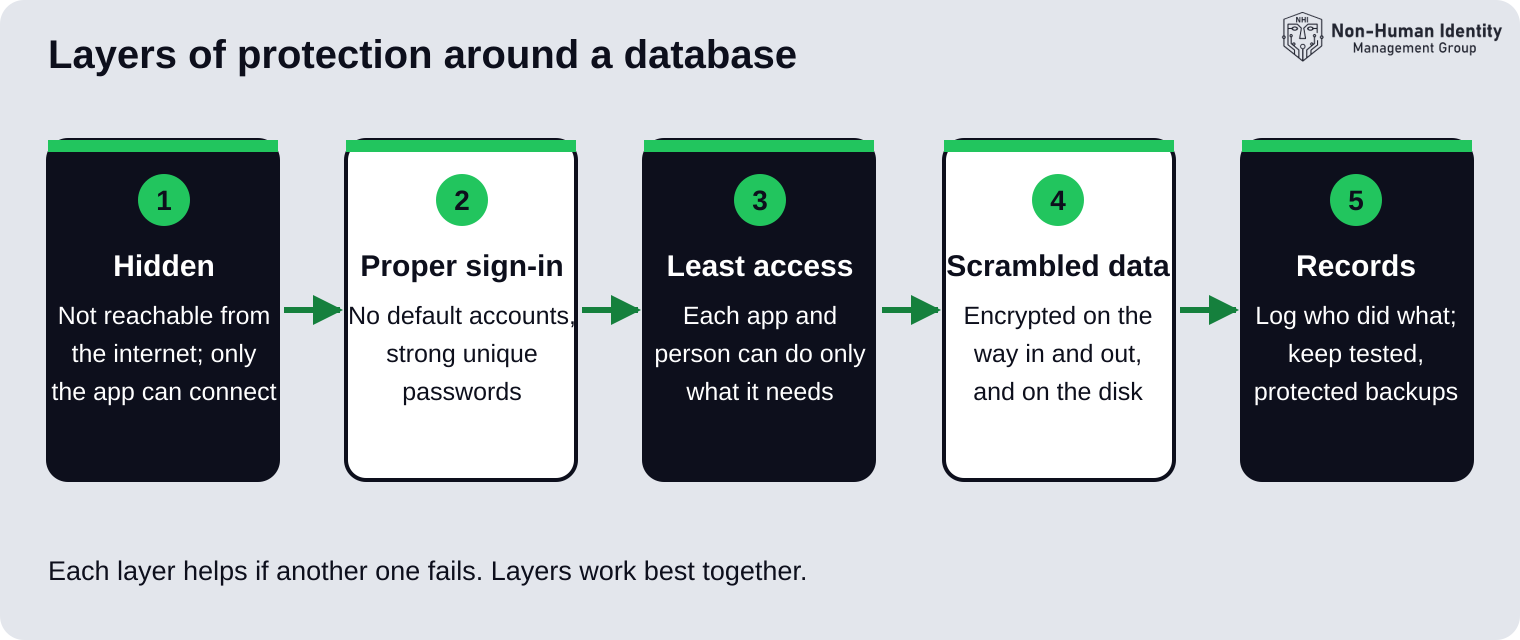
Good database security works in layers. If one fails, the next one still helps.
- Hide it. Keep the database on a private part of the network that only the app's own servers can reach.[1] A firewall, a filter that blocks unwanted connections, helps do this.[2]
- Sign in properly. Remove default accounts and give each account a strong, unique password.[1] Keep passwords out of the app's code, in a locked store for secrets called a vault.
- Give only the access needed. Each app and person gets its own account, with only the rights its job needs.[1][2]
- Scramble the data. Encrypt data as it travels to and from the database, and where it is stored on disk and in backups.[1][3]
- Keep records, updates and copies. Record who signs in and what they change.[3] Apply security updates. Keep regular backups, protected and ideally encrypted.[1]
There is one more way in that starts in the app, not the database. If an app mixes what a user types into a database command, an attacker can change the command. This is called SQL injection. The main fix is to keep the command and the typed text separate.[4]
A worked example
This story is made up to show how it can happen.
Logan Pierce is the office manager at Prairie Grain Co-op, a farmers' co-operative in Kansas. The co-op keeps its members' names, addresses and payment details in a database. A contractor set it up three years ago.
Logan reads a news story about a leaked customer database and wonders about his own. He is not technical, so he emails the contractor five plain questions. Can the database be reached from the internet? Are any default accounts still on? Who has access? Is the data encrypted? When was it last updated?
The answers worry him. The database can be reached from the internet. One shared admin account is used by the website, the payment app and two former staff. The last update was over a year ago.
Logan agrees a short plan with the contractor. First, the database is moved so only the co-op's own web server can connect. Next, the shared account is replaced. The website and the payment app each get their own account with only the access they need. The former staff lose access.
The contractor applies the missing updates and turns on encryption and activity records. The new passwords go into a vault, not into the website's code. Backups are tested by restoring one to a spare server.
They check the old records they can find. There are no signs of strangers getting in within the records available, but Logan now has a list to review every quarter.
What made the difference: Logan asked simple questions and did not assume the set-up was safe because nothing had gone wrong yet.
Myths and mistakes
| What people think | What is true |
|---|---|
| Our database is safe because it has a password. | A password is one layer. If the database is open to the internet and the password is weak or shared, it may not hold. |
| Nobody would bother with a small business. | Attackers often use automated tools that look for open systems, whatever the owner's size. |
| One shared account is simpler and fine. | Shared accounts make it hard to limit access or see who did what. Give each app and person its own. |
| Encryption means nobody can ever read the data. | Encryption protects data when someone gets a copy without the key. A person or app that signs in normally still sees the data, so access limits still matter. |
| We have backups, so we are covered. | Only if the backups are protected, recent and tested. Restore one now and then to check. |
What can I do this week?
- Find out where your databases live and who looks after them.
- Ask whether each one can be reached from the internet.
- Ask for a list of every account that can reach the database, and remove ones that are no longer needed.
- Check that security updates are being applied and when the last one was.
- Ask when a backup was last restored as a test.
Checklist
- Our database cannot be reached from the internet.
- Default accounts and sample data are removed.
- Each app and person has its own account, with only the access it needs.
- Database passwords are kept in a vault, not in code.
- Data is encrypted in transit and at rest.
- Security updates are applied on a schedule.
- Sign-ins and changes are recorded and someone reviews them.
- Backups are protected and have been tested by restoring one.
Common questions
How do I stop people getting into my database?
Use layers. Keep it off the internet so only your app can reach it. Remove default accounts and use strong, unique passwords. Give each app and person only the access it needs. Encrypt the data, apply updates, keep activity records and test your backups.
Does a cloud database look after its own security?
Partly. The cloud provider looks after the buildings, hardware and much of the software. You usually still choose who can connect, which accounts exist, what they may do and whether settings like encryption and records are turned on. Ask your provider what it covers.
What is the difference between database security and SQL injection?
SQL injection is one way in, through a weak app. Database security is the whole picture: who can reach the database, how they sign in, what they may do and whether the data is protected. Fixing injection is part of it, not all of it.
Why should the app not use the admin account?
Because if the app is tricked or broken into, the attacker gets everything the account can do. An app account that can only read and add orders limits the damage. Admin accounts are best kept for a few people, used only when needed.
Where next?
Ready for the detail? Read the practitioner guide: Database Security Guide. It goes further into network design, service account rights, encryption choices and activity monitoring.
Also useful:
- SQL Injection for Beginners
- Encryption for Beginners
- Backup Security for Beginners
- Secrets Management for Beginners
- Database Credential and Access Security Guide
Related NHI Mgmt Group resources: Database Patching · Database Breach Response Playbook · Database Security Policy Template
Key terms
- Database
- An organised store of records that software can search, update and manage.
- Least privilege
- Giving each person, app or system only the access it needs for its job, and no more.
- Encryption at rest
- Scrambling stored data on disks, databases and backups so it cannot be read without the key.
- Encryption in transit
- Scrambling data while it moves across a network so others cannot read it on the way.
- SQL injection
- A flaw where text typed into an app is treated as part of a database command.
- Audit logging
- Recording who signed in and what they did, so it can be checked later.
- Firewall
- A filter that blocks unwanted network connections before they reach a system.
Sources and further reading
- Database Security Cheat Sheet. OWASP Cheat Sheet Series. https://cheatsheetseries.owasp.org/cheatsheets/Database_Security_Cheat_Sheet.html, accessed 28 Nov 2026.
- Security Checklist for Self-Managed Deployments. MongoDB Documentation. https://www.mongodb.com/docs/manual/administration/security-checklist/, accessed 28 Nov 2026.
- SQL Server security best practices. Microsoft Learn, last updated 20 July 2026. https://learn.microsoft.com/en-us/sql/relational-databases/security/sql-server-security-best-practices, accessed 28 Nov 2026.
- SQL Injection Prevention Cheat Sheet. OWASP Cheat Sheet Series. https://cheatsheetseries.owasp.org/cheatsheets/SQL_Injection_Prevention_Cheat_Sheet.html, accessed 28 Nov 2026.