Device fingerprinting is recognising a phone or computer from many small details about its settings.
This guide is for anyone who uses websites and apps, and for people who build them, such as product managers. You do not need to be technical to be affected: sites you visit may recognise your device this way, for security or for tracking.
In short
- Your device shares small details with every website, such as screen size, language, time zone and browser version.
- Put together, these details can make your device stand out from most others, a bit like a fingerprint.
- Banks and shops use it to spot fraud, and advertisers can use it to follow you across sites.
- Unlike cookies, you cannot simply delete a fingerprint, but some browsers have settings that reduce it.
What you will learn
- Explain what device fingerprinting is in one sentence.
- Spot the difference between a fingerprint and a cookie.
- Explain why fraud teams use it and why privacy groups worry about it.
- Check the anti-tracking settings in your own browser.
- Device recognition (device fingerprinting)
- working out which device is visiting from details about its software and hardware.
- Small saved file (cookie)
- a note a website saves in your browser so it can remember you next time.
- Browser label (user agent)
- a short line your browser sends that names the browser, its version and the operating system.
What is device fingerprinting?
Think of a doorman at a busy club who never checks ID cards. He still knows his regulars by their coat, their shoes and the way they walk. No single clue is enough, but together they point to one person.
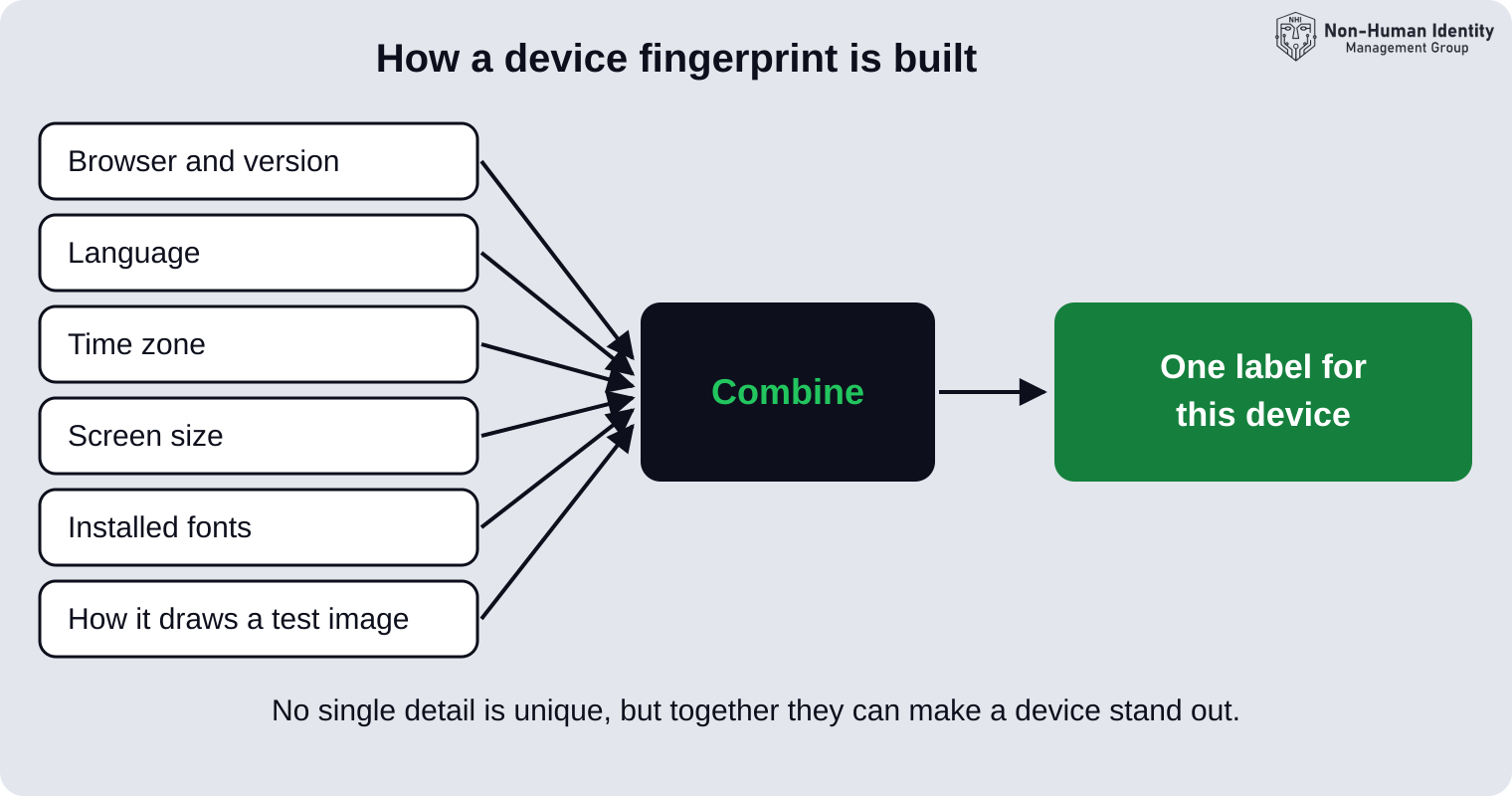
Websites can do the same with your device. Each time you visit, your browser shares small details so the page displays properly. These include your screen size, language, time zone, browser version and the fonts you have installed.[1] Some sites also run a small program in the page to measure more, such as how your device draws a hidden image.[2]
Put together, these details can make your device look different from most other visitors. That combination is the fingerprint. The UK privacy regulator, the ICO, describes it as collecting pieces of information about a device's software or hardware.[3]
Where the comparison stops working: you can change your coat, and the doorman may still know you. A fingerprint can also change when you update your browser or plug in a new screen. So it is a strong clue, not proof of who you are.
Why does it matter?
Device fingerprinting cuts both ways. It helps protect accounts, and it can also track people without them knowing.
If you use online banking or shopping
What could happen: a criminal signs in with your stolen password from their own laptop, and the site notices the unknown device.
Check this: if a site asks for an extra code on a new device, that may be the check working.
If you care about your privacy
What could happen: you clear your cookies, but an advertiser still recognises your device and links your visits.
Check this: turn on your browser's protection against tracking and fingerprinting.
If you are a product manager
What could happen: your team adds a fingerprinting tool for fraud checks, then quietly reuses the data for marketing.
Check this: write down the one purpose for the tool and ask your privacy lead whether you need consent.
What does it look like?
Here is a made-up summary of what a site might see when a laptop visits. Real tools collect many more details.
Example only. All values are made up.
Browser:      ExampleBrowser 000 on ExampleOS   (1)
Language:     en-GB
Time zone:    Europe/London                     (2)
Screen:       0000 x 0000
Fonts found:  42 (incl. FakeSans, DemoSerif)    (3)
Drawing test: result code FAKE-0000             (4)
Device ID:    EXAMPLE-DEVICE-0000               (5)
- In a real file, this line would contain the browser label your browser sends anyway.
- Time zone and language narrow down where you might be.
- Installed fonts differ a lot between devices, so they add a lot to the fingerprint.
- A small hidden drawing. Devices draw it in slightly different ways.
- The tool combines everything above into one label for the device.
Why this is risky: the site does not need to ask before reading most of these details. The label can stay the same after you clear cookies, so it can be used to follow you.[2]
The safer way: a site uses the label only to protect accounts and says so in its privacy notice. It asks for consent where the law needs it.[4]
How does it work?
Here is what happens, step by step, when a site fingerprints a device.
- You visit. Your browser sends a few details with every request, such as the browser label and your language.[2]
- The page measures more. A script on the page can read things like screen size, fonts and how the device draws a test image.[2]
- The details are combined. The tool turns the mix into one label for the device.
- The label is compared. The site checks whether it has seen that label before, and with which accounts.
- The site decides. A fraud team might ask for an extra check on an unknown device. An ad network might link your visit to earlier ones.
The same label can be used in two very different ways.
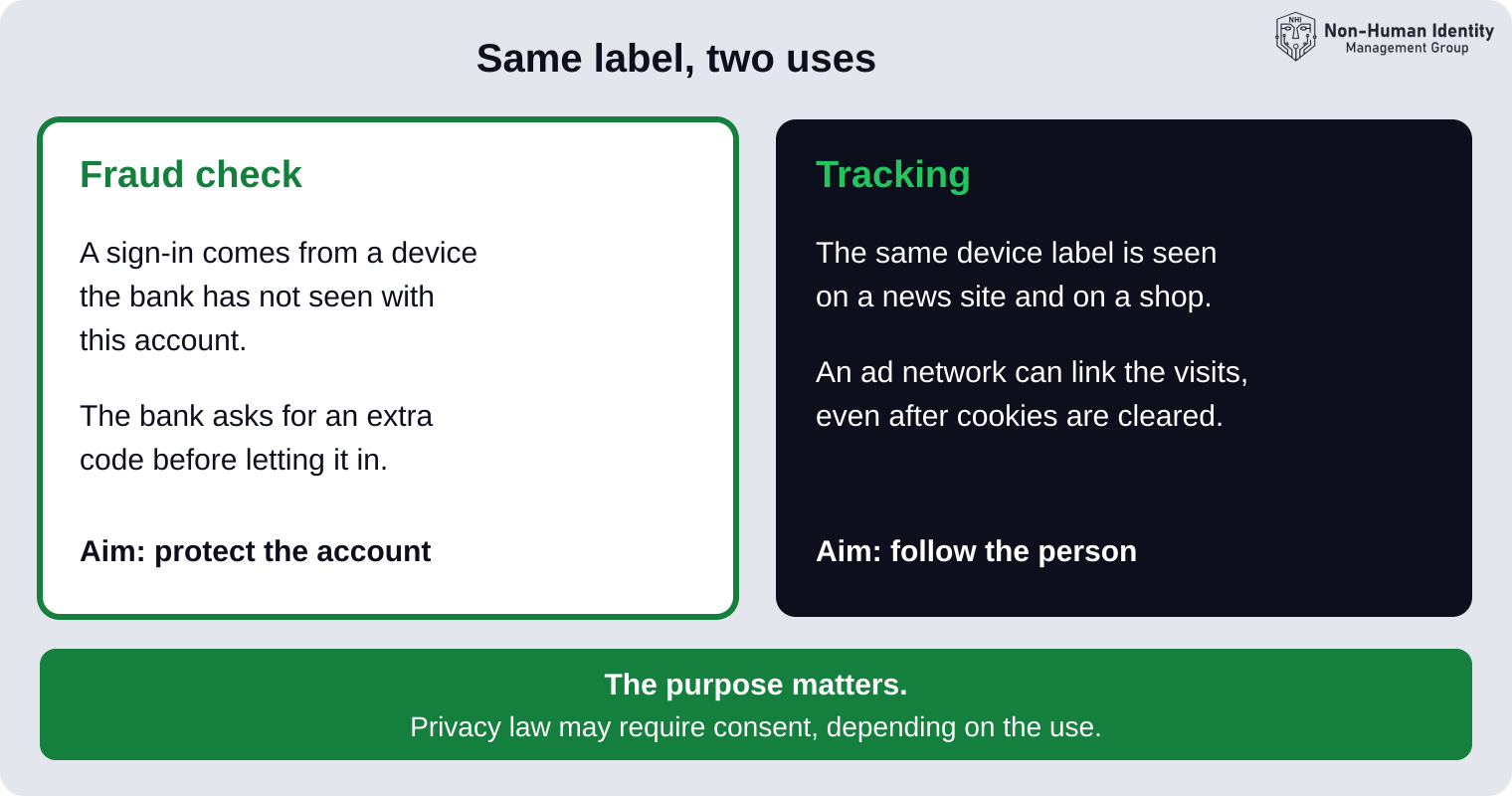
The rules depend on the purpose. In the UK, the ICO says privacy law applies to fingerprinting, and firms must give people fair choices about tracking.[3] Its guidance says preventing or detecting fraud can count as strictly necessary, which may mean consent is not needed. That only holds if the data is used for that purpose alone.[5]
A worked example
Wanda Ulrich buys a new laptop and signs in to her online bank for the first time on it. The bank asks her to type in a code sent to her phone.
She is a little annoyed. On her old laptop, it never asked.
Her friend Sana Zeller works as a product manager at Basalt Joinery, a fictional furniture maker with an online shop. Sana explains the doorman idea. The bank did not know Wanda's new laptop by its coat and shoes yet, so it asked for proof.
That week, Sana has her own decision to make. Her team wants a fingerprinting tool for the shop's checkout, to spot fraud. The supplier's sales sheet also offers "audience insights" for marketing.
Sana remembers the two uses. She asks the privacy lead to review the plan. They agree the tool will be used only for fraud checks on sign-in and checkout. The marketing feature stays switched off, and the privacy notice will explain the fraud use in plain words.
At home, Wanda looks at her own browser. She turns on its stricter tracking protection, which includes protection against known fingerprinting scripts.[6] One recipe site shows odd fonts afterwards, so she relaxes the setting for that one site.
Both of them now understand the same tool from two sides: one as a customer, one as a builder.
Myths and mistakes
| What people think | What is true |
|---|---|
| Clearing cookies stops sites recognising me. | A fingerprint does not live in a cookie, so clearing site data may not reset it.[3] |
| Private browsing hides my device. | It mainly stops your own history and cookies being kept. Many device details are still shared. |
| A fingerprint proves who someone is. | It is a strong clue, not proof. Devices change, and many look alike. |
| Fraud prevention means no privacy rules apply. | Privacy law can still apply. Fraud use may avoid the consent step only if the data is used for that alone.[5] |
| Blocking fingerprinting has no downside. | Stronger protection can make some sites show the wrong fonts or behave oddly.[6] |
What can I do this week?
- Open your browser's privacy settings and look for tracking or fingerprinting protection.
- Keep your browser up to date, since newer versions often add privacy protection.
- Treat an extra sign-in check on a new device as a good sign, not a fault.
- If you build a product, list every tool that reads device details and what each one is for.
- Ask your privacy lead whether each of those tools needs consent.
Checklist
- I can explain the difference between a cookie and a device fingerprint.
- My browser's tracking protection is switched on.
- I know that clearing cookies may not stop all tracking.
- Any fingerprinting tool we use has one written purpose.
- Fraud data is not reused for marketing without the right legal basis.
- Our privacy notice explains device recognition in plain words.
- Someone checks the consent rules before a new tool goes live.
Common questions
Is device fingerprinting legal?
It can be, depending on the purpose and the country. In the UK, the ICO says privacy law applies to fingerprinting. Fraud prevention may not need consent if the data is used only for that. Tracking for advertising usually needs consent. This is general information, not legal advice.
How is a fingerprint different from a cookie?
A cookie is a small file a site saves on your device, and you can delete it. A fingerprint is worked out from details your device already shares. There is nothing saved to delete, so it can survive clearing your cookies.
Can I stop websites fingerprinting my device?
You can reduce it, but probably not stop it fully. Some browsers block known fingerprinting scripts and blur some device details. Standards writers say it is unlikely that technical measures alone can remove fingerprinting completely. Keep your browser updated and its tracking protection on.
Why did my bank ask for a code on my new phone?
Most likely because it did not recognise the device. Banks and shops often treat an unknown device as riskier and ask for a second check. It is usually a sign the security is working. If you did not try to sign in, contact your bank.
Does a VPN hide my fingerprint?
Only partly. A VPN hides your internet address, which is one clue. Your screen size, fonts, browser and other details still travel to the site, so the rest of the fingerprint can stay much the same.
Where next?
Ready for the detail? Read the practitioner guide: Device Intelligence and Fingerprinting Guide. It goes further into fingerprinting techniques and their limits, mobile device checks, how fraudsters fake devices and the privacy rules for builders.
Also useful:
- Cookies and Online Tracking for Beginners
- Device Fingerprinting vs Behavioural Analytics
- Browser Privacy and Security Settings Guide
- Identity Fraud for Beginners
Related NHI Mgmt Group resources: Card Testing and Carding Attacks Defence Guide · Bot Management Guide · Email Tracking Pixels Guide
Key terms
- Device fingerprinting
- Recognising a device from details of its hardware and software, without a cookie.
- Browser fingerprinting
- Device fingerprinting done through the details a web browser shares or can be made to reveal.
- A small file a website saves in your browser to remember you.
- User agent
- The label a browser sends to name itself, its version and the operating system.
- IP address
- The number that identifies a device or network on the internet.
- Consent
- A person's clear, freely given agreement to something, such as being tracked.
- Risk-based authentication
- Asking for more proof at sign-in when something, such as an unknown device, looks risky.
Sources and further reading
- GDPR and browser fingerprinting: how it changes the game for the sneakiest web trackers. Electronic Frontier Foundation, June 2018. https://www.eff.org/deeplinks/2018/06/gdpr-and-browser-fingerprinting-how-it-changes-game-sneakiest-web-trackers, accessed 28 Nov 2026.
- Mitigating Browser Fingerprinting in Web Specifications. W3C. https://w3c.github.io/fingerprinting-guidance/, accessed 28 Nov 2026.
- Our response to Google's policy change on fingerprinting. Information Commissioner's Office, 19 December 2024. https://ico.org.uk/about-the-ico/media-centre/news-and-blogs/2024/12/our-response-to-google-s-policy-change-on-fingerprinting/, accessed 28 Nov 2026.
- What are storage and access technologies? Guidance on the use of storage and access technologies, Information Commissioner's Office. https://ico.org.uk/for-organisations/direct-marketing-and-privacy-and-electronic-communications/guidance-on-the-use-of-storage-and-access-technologies/what-are-storage-and-access-technologies/, accessed 28 Nov 2026.
- What are the exceptions? Guidance on the use of storage and access technologies, Information Commissioner's Office. https://ico.org.uk/for-organisations/direct-marketing-and-privacy-and-electronic-communications/guidance-on-the-use-of-storage-and-access-technologies/what-are-the-exceptions/, accessed 28 Nov 2026.
- Firefox's protection against fingerprinting. Mozilla Support, Mozilla. https://support.mozilla.org/en-US/kb/firefox-protection-against-fingerprinting, accessed 28 Nov 2026.