A third-party script is code from another company that runs inside your website, in each visitor's browser.
This guide is for small business owners, people who look after a website, and students. You do not need to write code to be affected: if your site has a chat box, analytics, adverts or a booking widget, it almost certainly runs other companies' code.
In short
- Chat boxes, analytics, adverts and payment widgets are usually small programs loaded from another company's server.
- These scripts often run with the same power as your own page, so they may be able to read what visitors type.
- The provider can change the code at any time, and a hacked provider can change it too.
- Keep a list of every script, remove the ones you do not need, and use browser checks that limit what can load.
What you will learn
- Explain what a third-party script is and why sites use them.
- Spot the scripts your own website loads.
- Check which scripts run on pages where visitors type personal or payment details.
- Ask your web supplier the right questions.
- Outside code (third-party script)
- a small program your web page loads from another company's server.
- Script organiser (tag manager)
- a tool that loads many outside scripts through one line of code.
What is a third-party script?
Think of a shop that lets other companies put their own staff on its till. One counts visitors, one runs the loyalty card, one takes card payments. They work behind your counter and see what customers hand over.
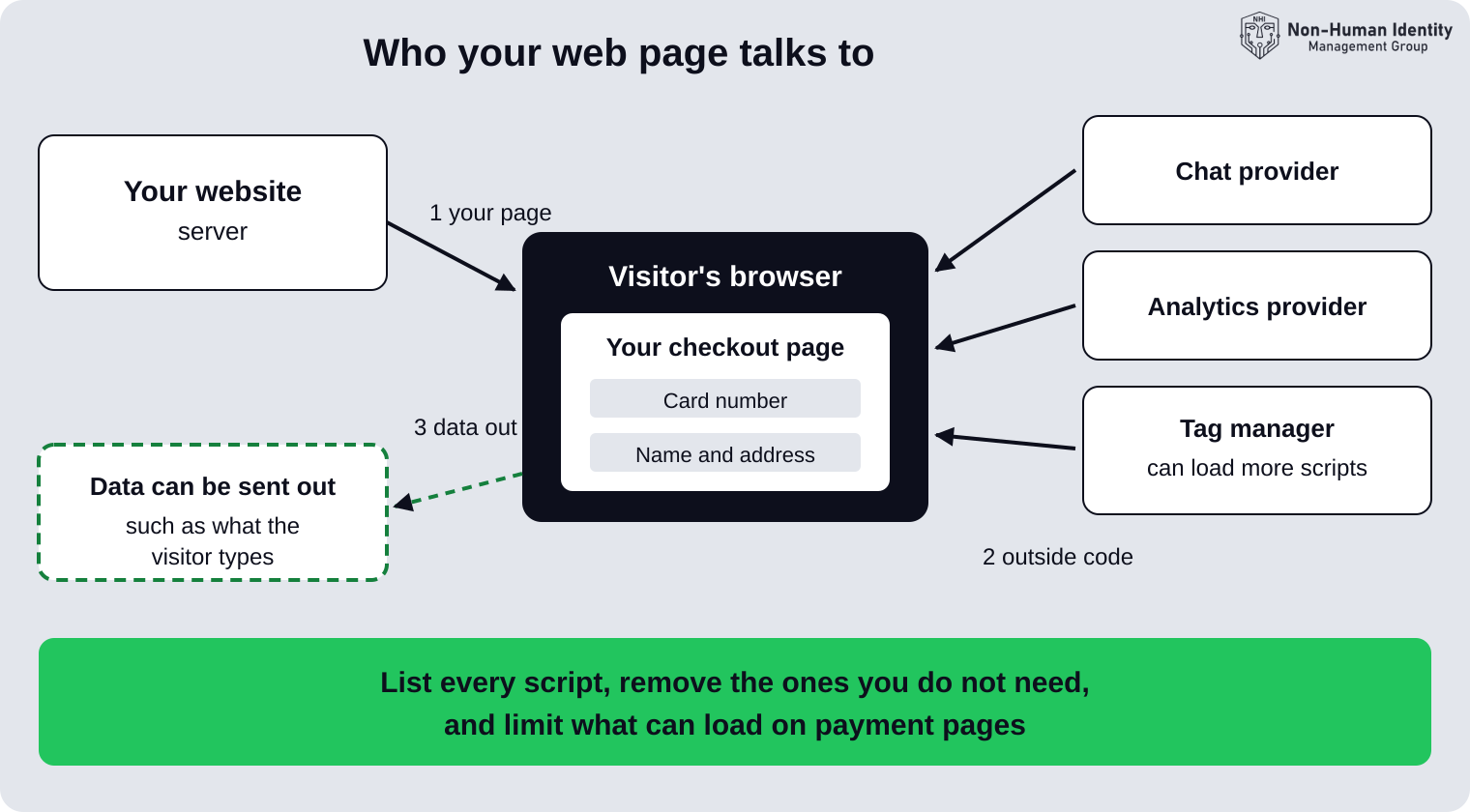
A website works in a similar way. Your page asks the visitor's browser to fetch small programs, called scripts, from other companies. These scripts power things like a chat box, a visitor counter or an advert. Because they come from someone other than you or the visitor, they are called third-party scripts.
Once loaded, a script usually runs with the same rights as your own page. A leading web security guide notes that sites rarely review this outside code before adding it.[1]
Where the comparison stops working: you could watch staff at your till. A script's code can change on the provider's server at any time. Your visitors get the new version on their next visit, and you may not see it.[1]
Why does it matter?
Outside scripts are useful. But each one is a door into your visitors' browsers that someone else controls.
If you run a small online shop
What could happen: a changed script on your checkout page copies card details as customers type them. This is called web skimming.
Check this: ask which outside scripts run on your checkout and login pages.
If you look after a website
What could happen: a marketing tool sends visitor details to a company you never agreed to share them with.
Check this: keep a list of each script, who added it and why.
If you are a website visitor
What could happen: a trusted site shows a normal page while an outside script quietly reads the form.
Check this: check your card statements, and use card protections your bank offers.
What does it look like?
Here is a made-up view of the top of a shop's checkout page.
Example only. All values are made up.
<!-- checkout page for an example shop -->
<script src="https://shop.example.com/basket.js"></script>          (1)
<script src="https://chat.example.net/widget.js"></script>         (2)
<script src="https://tags.example.org/all-tags.js"></script>       (3)
<script src="https://cdn.example.invalid/old-offer.js"></script>    (4)
- The shop's own code, from its own address.
- A chat box from another company. It runs on the payment page too.
- A tag manager. This one line can load many more scripts.
- A script for an offer that ended last year. In a real file, this line might point to an address nobody checks.
Why this is risky: three of the four lines load outside code. It runs on the page where customers type card details.
The safer way: remove scripts you no longer need. Keep payment pages as bare as you can. Use browser rules that limit what can load.
How does it work?
- The visit. A visitor opens your page. Their browser reads your code.
- The fetch. Your code tells the browser to download scripts from other companies' servers. The browser contacts those servers directly, so they can see details such as the visitor's internet address.[1]
- The run. Each script runs inside your page. It can often read and change what is on the screen, including forms.
- The change. If the provider updates the script, or an attacker breaks into the provider, every visitor gets the changed version on their next visit.[1]
- The checks. Browsers offer two main checks. One, called subresource integrity, lets the page give a fingerprint for a file. If the file no longer matches, the browser refuses to load it.[2] The other, a Content Security Policy, is a list of rules about which sources the page may load scripts from.[3]
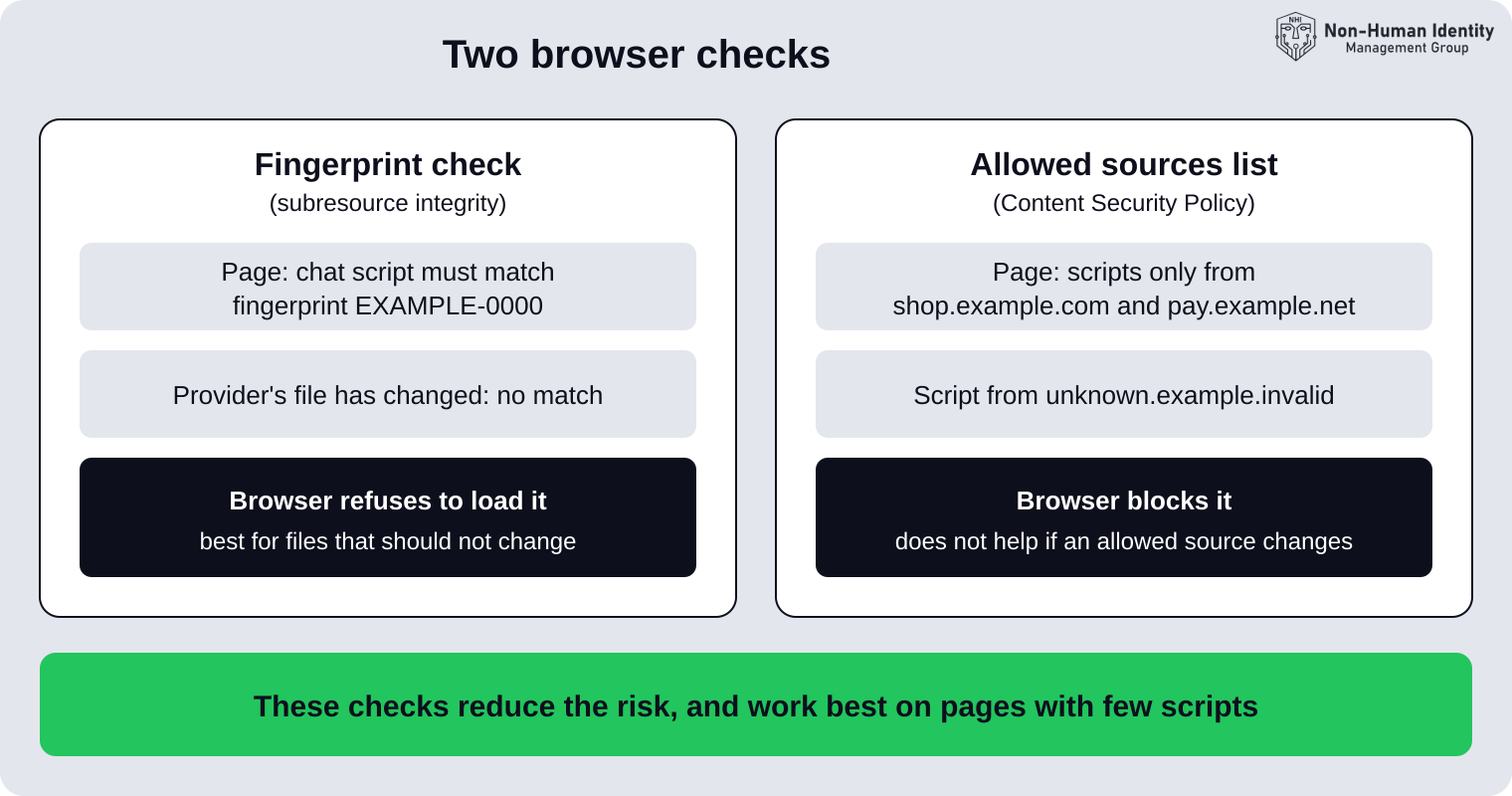
Neither check is perfect. A fingerprint suits a file that should not change, so it fits poorly with scripts a provider updates often. An allowed-sources list does not help if a trusted source itself is changed. They work best together, on pages with few scripts.
A worked example
Nadia Novak runs Ochre Nursery, a small plant shop with an online store. Her nephew built the site three years ago. Since then, several tools have been added: a chat box, a reviews widget, two analytics tools and a discount pop-up.
Nadia reads about web skimming in a trade newsletter and wonders what runs on her checkout page. She asks Lina Fairweather, a freelance web developer, to take a look.
Lina opens the checkout page in her browser's developer tools, which can show every file the page loads. She finds eleven outside scripts. The chat box, the reviews widget and the discount pop-up all load on the checkout page, where they are not needed. One script comes from a discount company Nadia stopped using last year.
Lina makes a simple list: each script, what it does, who added it and which pages need it. With Nadia's agreement, she removes the old discount script. She sets the chat box and reviews to load only on product pages, not at checkout.
Next, she adds a Content Security Policy to the checkout page that allows scripts only from the shop and its payment provider. She tests it before switching it on fully, so the payment form still works.
Nadia now has a list she can check every few months. Her checkout page loads two outside sources instead of eleven. That does not remove every risk, but it shrinks the number of companies whose code sees her customers' card details.
Myths and mistakes
| What people think | What is true |
|---|---|
| The provider is a big name, so its script is safe. | Big providers can be hacked or make mistakes. The script still runs with your page's rights. |
| We checked the script when we added it. | The provider can change the code at any time after that.[1] |
| Our payment provider handles card security, so it is not our problem. | If card details are typed on your page, scripts on your page may be able to read them. |
| Old scripts do no harm if we stopped using the tool. | Forgotten scripts still load. Remove what you no longer use. |
| A tag manager is one script, so it is one risk. | It can load many scripts, chosen in a separate tool by other people.[1] |
What can I do this week?
- Ask your web supplier for a list of every outside script on your site.
- Find out which ones load on checkout, login and contact-form pages.
- Remove scripts for tools you no longer use.
- Find out who can add new scripts, including through a tag manager.
- Ask whether your site uses a Content Security Policy, and on which pages.
Checklist
- There is a list of every outside script, with an owner and a reason.
- Payment and login pages load only the scripts they need.
- Scripts for unused tools are removed.
- Access to the tag manager is limited to named people.
- A Content Security Policy is in place on sensitive pages.
- Scripts that should not change use a fingerprint check.
- The list is reviewed every few months and after any new tool is added.
Common questions
How do I see which scripts my website loads?
Open the page and use your browser's developer tools. The network or sources view lists every file the page loads and where it comes from. Look for addresses that are not your own. Your web supplier or a script monitoring tool can give a fuller list.
What is a tag manager?
A tag manager is a tool that loads many outside scripts through one line on your page. Marketing teams like it because they can add tools without a developer. That also means scripts can reach your site without a code review, so limit who can use it.
Is a third-party script the same as a cookie?
No. A cookie is a small piece of stored data. A script is a program that runs. Many tracking tools use scripts to set or read cookies. But a script can do much more, such as read what a visitor types into a form.
Can I just host the script on my own server?
Sometimes, and it can help. A copy on your own server only changes when you change it. The cost is that you must update it yourself to get fixes. Some services need their live script and do not allow copies, so ask the provider first.
What is web skimming?
Web skimming is when harmful code on a real web page copies what visitors type, often card details at checkout. A changed third-party script is one common way it gets there. See Web Skimming for Beginners for how it works and what to do.
Where next?
Ready for the detail? Read the practitioner guide: Third-Party JavaScript Management Guide. It goes further into building a script inventory, governing tag managers, choosing controls by script type and meeting card payment rules.
Also useful:
- Content Security Policy for Beginners
- Web Skimming for Beginners
- Subresource Integrity (SRI) Guide
- Cross-Site Scripting for Beginners
- PCI DSS for Small Businesses for Beginners
Related NHI Mgmt Group resources: Web Skimming Incident Playbook · Supply Chain Attacks for Beginners · Cookies and Online Tracking for Beginners
Key terms
- Third-party script
- A small program a web page loads from another company's server.
- Tag manager
- A tool that loads many outside scripts through one line of code.
- Web skimming
- Harmful code on a web page that copies what visitors type, such as card details.
- Subresource integrity
- A browser check that refuses an outside file if its contents have changed.
- Content Security Policy
- A set of rules a website gives the browser about what it may load and run.
- Third-party script inventory
- A kept list of every outside script on a site, what it does and who owns it.
Sources and further reading
- Third Party JavaScript Management Cheat Sheet. OWASP Cheat Sheet Series, OWASP Foundation. https://cheatsheetseries.owasp.org/cheatsheets/Third_Party_Javascript_Management_Cheat_Sheet.html, accessed 28 Nov 2026.
- Subresource Integrity. MDN Web Docs, Mozilla. https://developer.mozilla.org/en-US/docs/Web/Security/Subresource_Integrity, accessed 28 Nov 2026.
- Content Security Policy (CSP). MDN Web Docs, Mozilla. https://developer.mozilla.org/en-US/docs/Web/HTTP/Guides/CSP, accessed 28 Nov 2026.