Digital forensics is the careful collection, preservation and examination of data from computers, phones, networks and cloud services so that it can show what happened during an incident and still be trusted afterwards.
This guide is for newcomers, students, career changers and managers who keep hearing the word "forensics" after a cyber attack and want to know what investigators actually do. It explains the idea in plain English, walks through the steps of an investigation, gives a worked example and lists simple things your organisation can do now so that evidence exists when you need it. It does not teach tool use; for that, follow the practitioner guides linked at the end.
By the end of this guide you will be able to:
- Explain what digital forensics is and how it differs from fixing the problem.
- Describe the main steps investigators follow, from collection to reporting.
- Understand why evidence must be copied, fingerprinted and tracked.
- Identify practical steps that make a future investigation possible.
Key takeaways
- Forensics answers questions. What happened, when, how the attacker got in and what they touched. Without those answers, a clean-up is guesswork.
- Fragile data goes first. Memory and live network connections disappear when a machine is switched off, so investigators collect the most short-lived data before anything else.
- Work on copies, never the original. Investigators make an exact copy, check it with a digital fingerprint called a hash, and examine only the copy.
- Every hand-over is written down. A chain of custody record shows who held the evidence, when and why, so others can trust it later.
- Preparation decides what is possible. If logs were never kept, or clocks were wrong, no expert can rebuild what was not recorded.
What it is, in plain English
Digital forensics means finding, protecting and studying digital traces so they can explain an event and stand up to scrutiny. Those traces are called digital evidence: files, logs, emails, messages, memory contents, network records and the details stored about them, known as metadata (for example when a file was created).
The US National Institute of Standards and Technology (NIST) wrote one of the best-known guides on the subject, SP 800-86, which explains forensics from an IT point of view rather than a police one, covering files, operating systems, network traffic and applications.[1] In companies, forensics usually sits inside incident response, the wider process of detecting, containing and recovering from a security incident. Together they are often called DFIR (digital forensics and incident response).
A good comparison is a crime scene. Detectives photograph the room, bag items, label them and record who carried each bag to the lab. They do not tidy up first. Digital investigators do the same with data: they record and copy before anyone "fixes" the machine. Where the analogy breaks down: a physical object stays the same in a bag, but digital data can change just by being looked at the wrong way, and some of it vanishes the moment power is lost.
Why it matters to you
- If you run a small business: after a break-in you need to know whether customer data was taken, how the attacker got in and whether they are still there. Wiping and rebuilding a laptop straight away can destroy the only evidence that answers those questions.
- If you are new to a security job: you may be the first person to touch an affected system. Knowing what not to do (do not switch it off, do not run clean-up tools, write down what you see) is often more valuable than knowing any tool.
- If you are a manager: regulators, insurers, lawyers and your own board may ask for evidence of what happened. Forensic findings support those conversations and help you fix the real cause rather than the symptom.
NIST's incident response guidance, SP 800-61 Revision 3, links incident response directly to wider cyber risk management under the NIST Cybersecurity Framework 2.0.[5] That framework includes outcomes such as collecting incident data while preserving its integrity and provenance, and recording the actions taken during an investigation.[6] In other words, keeping evidence trustworthy is part of responding well, not an optional extra.
How it works, step by step
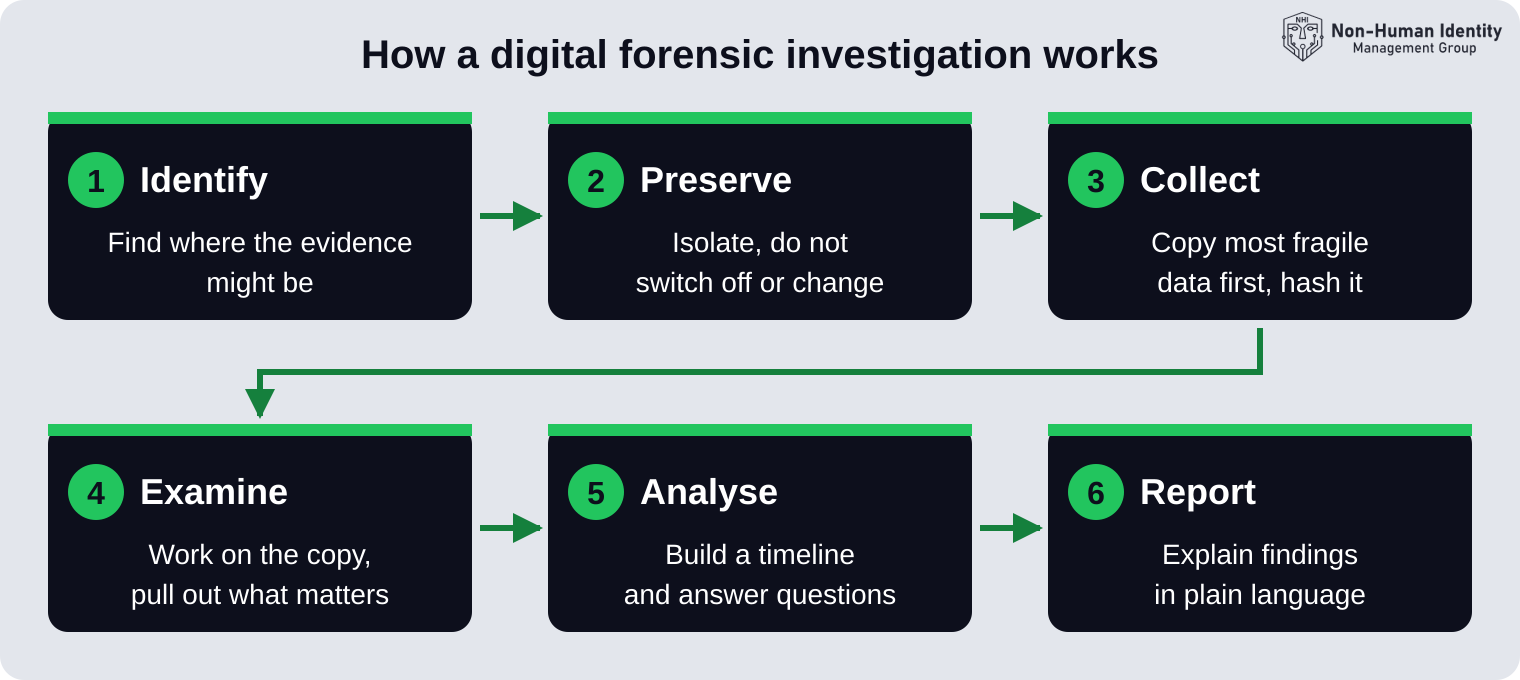
NIST SP 800-86 describes four basic phases: collection, examination, analysis and reporting.[1] In practice there are a couple of steps before collection, so the full journey looks like this.
- Identify. Work out where useful evidence might be: the affected laptop, a server, email accounts, cloud logs, firewall records, a phone. The international standard ISO/IEC 27037 gives guidance on identifying, collecting, acquiring and preserving digital evidence across devices such as storage media, phones, cameras and networked computers.[3]
- Preserve. Stop the evidence from changing. That can mean isolating a machine from the network in a controlled way, rather than pulling the plug. The Internet Engineering Task Force (IETF) guidance RFC 3227 warns against shutting down before collection is complete, because evidence may be lost and an attacker may have changed start-up or shutdown scripts. It also warns that simply cutting network access can trigger hidden "deadman switches" that wipe data.[2]
- Collect, most fragile first. RFC 3227 calls this the order of volatility: collect from the most short-lived data to the least, starting with processor registers and cache, then memory and live network tables, then temporary files, then disk, then remote logs, and finally archived backups.[2] Disks are usually copied bit for bit into a forensic image, often through a write blocker, a device or program that allows reading but blocks writing.
- Fingerprint and record. Investigators calculate a hash (a short fingerprint of the data) of the original and the copy and compare them. NIST describes this as computing the message digest of the original and copied data and checking that they match.[1] Each hand-over goes on the chain of custody record: where, when and by whom evidence was found, collected, handled, stored and transferred.[2]
- Examine. Process the copy to pull out what matters, such as deleted files, browser history, log entries or signs of malware, while keeping its integrity.[1]
- Analyse. Put the pieces together, often as a timeline of events, to answer the questions that started the investigation: how did they get in, what did they do, what data was touched.[1]
- Report. Explain what was found, how, with which tools and procedures, and what should change next.[1]
The table below shows the main kinds of evidence a beginner is likely to hear about and why each matters.
| Evidence source | What it can show | How fragile it is |
|---|---|---|
| Memory (RAM) | Running programs, open network connections, sometimes passwords or keys in use | Very fragile: lost when the machine is powered off |
| Live network state | Which other computers a machine is talking to right now | Very fragile: changes from second to second |
| Disk or storage | Files, deleted files, programs installed, browser history | Fairly stable, but changes as the machine keeps running |
| Logs (system, cloud, email) | Who signed in, from where, what was changed and when | Stable if kept, but many systems delete old logs automatically |
| Backups and archives | What things looked like before the incident | Least fragile |
Useful distinctions
- Forensics is not the same as recovery. Recovery gets you running again. Forensics explains what happened. Rebuilding first can erase the evidence, so where possible collect first, then rebuild.
- A full image is not always needed. Copying a whole disk takes time. Teams often start with a quicker triage collection of the most useful files and logs, then decide whether a full image is worth it. The Digital Forensics (DFIR) Guide compares the options.
- Tools should be tested. NIST runs the Computer Forensics Tool Testing (CFTT) programme to set out a method for testing forensic software, with topics including disk imaging and hardware and software write blocking.[4]
- Accounts used by software leave evidence too. Many attacks use stolen keys, tokens or service accounts rather than a person's password. Logs of what those non-human identities did are part of the evidence; see Non-Human Identities for Beginners.
A worked example
Hartley Dental is a fictional practice with 25 staff and one part-time IT contractor, Joel. On a Monday morning the practice manager, Anita, notices that the shared email account sent dozens of strange invoices over the weekend.
Anita's first instinct is to ask Joel to wipe the reception computer. Joel suggests a different order:
- Preserve: he changes the email account's password, ends its active sessions and turns on extra sign-in checks, but leaves the reception computer running and disconnects it from the network in a recorded, controlled way.
- Collect: he calls the practice's cyber insurer, whose specialist firm guides him to capture memory from the computer and export the email account's sign-in and audit logs before they age out. Each file is hashed and logged on a simple custody sheet with the time, his name and where it is stored.
- Examine and analyse: the specialists work on the copies. The sign-in logs show a successful login from an unfamiliar location on Friday night, shortly after a staff member clicked a link in a fake delivery notice. The reception computer shows no malware.
- Report: the report sets out the timeline, the likely way in and the steps taken. It cannot rule out that the attacker read other emails, so Hartley Dental takes advice on whether it needs to notify anyone.
Because the evidence was kept, the practice fixed the real cause (a stolen password and no multi-factor sign-in) instead of only replacing a computer that was never infected. The investigation did not answer every question, which is normal: forensics shows what the evidence supports, nothing more.
Myths and misunderstandings
| What people think | What is true |
|---|---|
| The first thing to do is switch the infected machine off. | Switching off can destroy memory and other fragile evidence. Guidance such as RFC 3227 advises against shutting down before collection is complete. |
| Forensics is only for police and court cases. | Most corporate forensics is about understanding and fixing an incident. Keeping evidence trustworthy still matters in case it is needed later. |
| Deleted means gone. | Deleted files and old records can often be recovered, but not always. Results depend on the device, how long it kept running and whether data was overwritten. |
| An expert can always find out what happened. | Only if the evidence exists. Missing logs, short retention and wrong clocks leave gaps that no tool can fill. |
| Looking around the machine to "check" is harmless. | Opening files and running programs on the original system changes timestamps and can overwrite evidence. Copy first, then examine the copy. |
Key terms
- Digital forensics
- The process of collecting, preserving, analysing and presenting digital evidence so it can support an investigation or legal process.
- Digital evidence
- Information stored or transmitted electronically, such as logs, files, messages and metadata, that can support an investigation, audit or legal proceeding.
- Chain of custody
- A documented record of who collected, handled, transferred and stored evidence, and when, preserving its integrity.
- Forensic image
- A bit-for-bit copy of digital data made for investigation and evidence preservation.
- Write blocker
- A hardware or software control that allows read-only access to a storage device and blocks changes to it during collection.
- Cryptographic hash
- A fixed-length fingerprint used to check that data has not changed.
- Order of volatility
- The sequence for collecting data from a system, most short-lived first.
- Volatile memory
- Memory, such as RAM, that loses its contents when power is removed.
- Timeline analysis
- Ordering system and file events by time to understand what happened, when and how activity progressed.
- Incident response
- The set of actions used to detect, contain, investigate and recover from a security event.
Common questions
What is digital forensics in simple terms?
It is detective work on computers and data. Investigators collect digital traces without changing them, then study copies to explain what happened.
Is digital forensics the same as incident response?
No. Incident response is the whole effort to detect, contain and recover from an incident. Forensics is the evidence part of that effort. The two work closely, which is why people say DFIR.
Why not just switch the computer off?
Because memory, live connections and other short-lived data disappear when power is lost, and some malicious software is set up to damage evidence on shutdown or disconnection.[2] Isolate the machine in a controlled way and ask for help.
What is a hash and why does it matter?
A hash is a short value calculated from data. If even one bit changes, the hash changes. Matching hashes of the original and the copy show the copy is exact.[1]
Can forensics be done on cloud services?
Yes, but it relies mostly on logs and snapshots that the provider and your settings make available, because you cannot take the provider's hardware. See the Cloud Forensics Guide.
Do small organisations need a forensics team?
Usually not in-house. Many rely on an incident response retainer or their cyber insurer's approved firm. What they do need is a plan, logs that are kept long enough and a short list of "do not touch" rules for staff.
First steps
Three things you can do this week:
- Write a one-page "if something looks wrong" note for staff: do not switch off or wipe the device, disconnect it from the network only as instructed, write down what you saw and when, and call a named person.
- Check how long your key logs are kept. Look at sign-in and audit logs for email, cloud and firewalls. If they are deleted after a few days, we suggest extending retention for the most important ones.
- Know who you would call. Find out whether your cyber insurer or an IT partner provides incident response and forensics, and save their contact route in your incident plan.
Checklist
- Staff know not to switch off, wipe or "clean up" a suspect device before getting advice.
- We have a named person or firm to call for forensic help.
- Sign-in and audit logs for our main systems are switched on and kept long enough to investigate.
- Logs are copied somewhere an attacker on one machine cannot easily delete them.
- Computer and server clocks are synchronised to a reliable time source.
- We have a simple chain of custody form ready to use.
- Evidence copies are hashed and stored with restricted access.
- Our incident plan says when to collect evidence before rebuilding systems.
Simple measures that show progress: how many key systems have logging turned on, how many days of logs you keep, how long it takes to get a forensic contact on the phone, and whether every evidence item in your last exercise had a matching hash and custody record.
Check your understanding
1. Why do investigators collect memory before copying the disk?
Answer: memory is more volatile. It is lost when power goes, while the disk keeps its data, so the order of volatility puts memory first.
2. What does a matching hash prove?
Answer: that the copy is identical to the original at the time both were hashed, so analysis of the copy can be trusted.
3. What is a chain of custody record for?
Answer: it shows who found, handled, stored and transferred each item of evidence, and when, so others can trust that it was not tampered with.
4. Why can forensics fail even with skilled investigators?
Answer: because evidence that was never recorded, or was deleted or overwritten, cannot be recovered. Preparation, such as keeping logs, decides what is possible.
Suggested learning pathway
- Start with the bigger picture in Incident Response for Beginners.
- Learn what to record in Security Logging for Beginners.
- See how logs become alerts in SIEM for Beginners.
- For the full practitioner view, including acquisition options and Windows artefacts, read the Digital Forensics (DFIR) Guide.
- For handling and recording evidence properly, see the Evidence Handling and Chain of Custody Guide.
- For copying disks safely, see the Disk Imaging and Forensic Acquisition Guide.
- For investigations in cloud services, see the Cloud Forensics Guide.
Standards and references
- SP 800-86, Guide to Integrating Forensic Techniques into Incident Response. National Institute of Standards and Technology (NIST), August 2006. https://csrc.nist.gov/pubs/sp/800/86/final, accessed 27 Nov 2026.
- RFC 3227, Guidelines for Evidence Collection and Archiving (BCP 55). Internet Engineering Task Force (IETF), February 2002. https://www.rfc-editor.org/rfc/rfc3227.
- ISO/IEC 27037:2012, Guidelines for identification, collection, acquisition and preservation of digital evidence. International Organization for Standardization (ISO), October 2012, confirmed 2018. https://www.iso.org/standard/44381.html, accessed 27 Nov 2026.
- Computer Forensics Tool Testing Program (CFTT). National Institute of Standards and Technology (NIST). https://www.nist.gov/itl/ssd/software-quality-group/computer-forensics-tool-testing-program-cftt, accessed 27 Nov 2026.
- SP 800-61 Rev. 3, Incident Response Recommendations and Considerations for Cybersecurity Risk Management: A CSF 2.0 Community Profile. National Institute of Standards and Technology (NIST), April 2025. https://csrc.nist.gov/pubs/sp/800/61/r3/final, accessed 27 Nov 2026.
- The NIST Cybersecurity Framework (CSF) 2.0, NIST CSWP 29 (outcomes RS.AN-06 and RS.AN-07). National Institute of Standards and Technology (NIST), February 2024. https://nvlpubs.nist.gov/nistpubs/CSWP/NIST.CSWP.29.pdf, accessed 27 Nov 2026.
Related NHI Mgmt Group resources: Chain of Custody Form Template · Anti-Forensics Detection Guide · Cloud Incident Response Guide