Drone security means protecting your own drone and its data, and handling other people's drones safely.
This guide is for hobby pilots, site and building managers, and members of the public who see a drone and wonder what to do. You do not need to fly a drone to be affected: if you run a site, a drone overhead can film it, and if you fly one, your photos and flight history are data worth protecting.
In short
- A drone is a flying computer with a camera, a radio link and an app, and each part can leak data or be misused.
- Remote ID is a radio "number plate" that many drones now must send out while they fly.
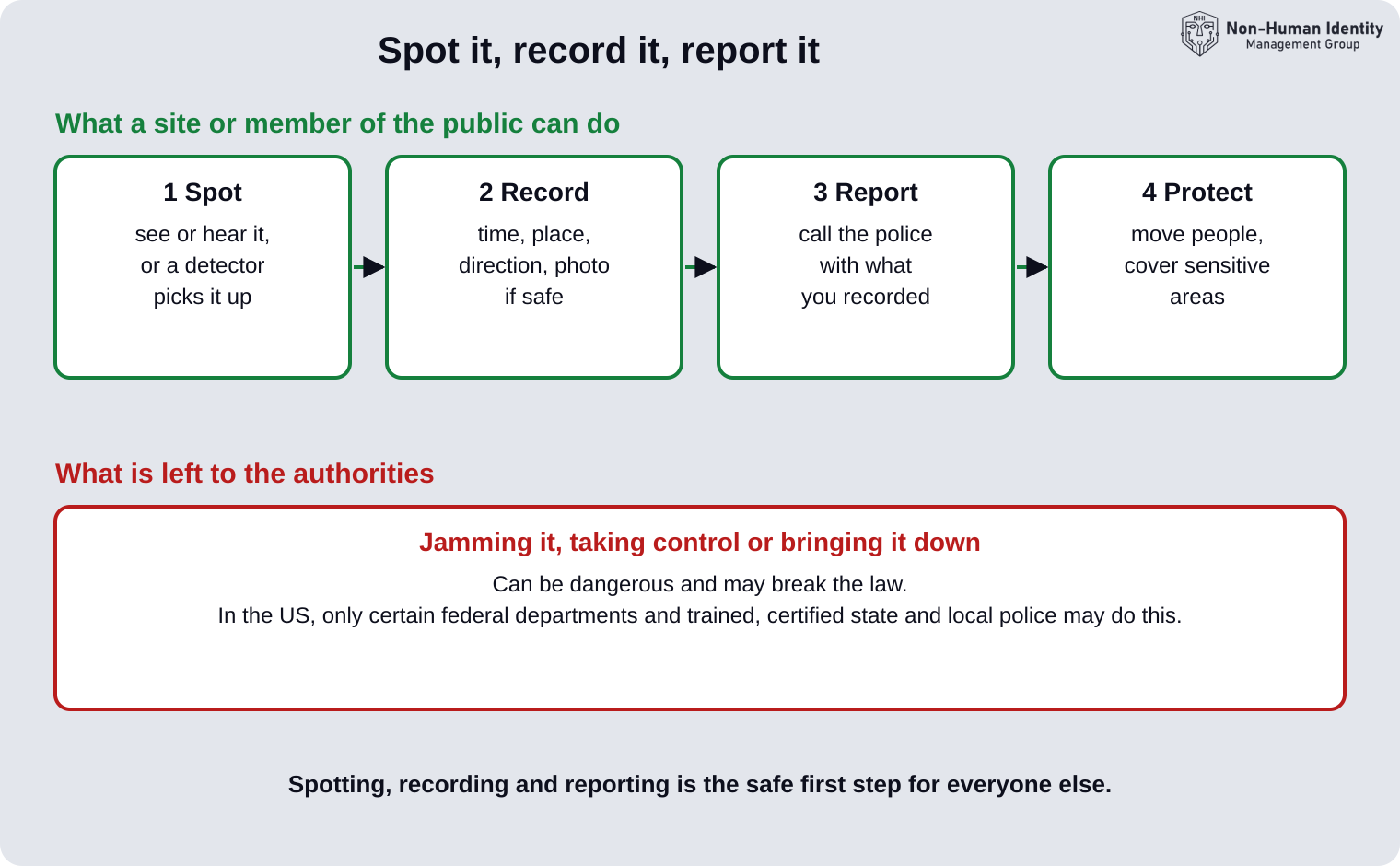
- If you see a drone where it should not be, spot it, record what you can safely and report it to the police.
- Jamming, taking control or bringing down a drone is left to authorities, and in many places it may break the law for anyone else.
What you will learn
- Explain what drone security covers in one sentence.
- Explain what Remote ID shares and what it keeps private.
- Check your own drone's app and data settings.
- Know what to do, and what not to do, about a drone over your site.
- Drone (unmanned aircraft)
- an aircraft with no pilot on board, flown from the ground by a person or a computer.
- Radio number plate (Remote ID)
- a short radio message a drone sends while flying, showing an ID number and where it is.
- Stopping a drone (mitigation)
- jamming, taking control of or bringing down a drone, which is left to authorities.
What is drone security?
Think of a car's number plate. You cannot see who is driving, but you can note the plate and report it. The police can then look up the owner.
Remote ID works like a number plate for drones, sent by radio instead of painted on. Drone security is the wider job around it. It has two sides:
- Your own drone. A drone is a flying computer. It has a camera, a radio link to the controller, an app on a phone and often an online account. Each part holds or sends data.
- Other people's drones. A drone over a site, an event or a home can film what it should not, carry things in or cause a hazard. The task is to spot it and get the right people involved.
The US government's cyber security agency notes that weak spots in a drone's software can lead to stolen data or someone else taking control. It also warns that the radio link between drone and pilot can be attacked if it is not protected.[4]
Where the comparison stops working: a number plate is fixed to every car. Remote ID can be missing on some older or home-built drones. A drone flown by someone breaking the rules may not send it at all.
Why does it matter?
Drones are cheap, easy to fly and can carry good cameras. That makes them useful, and it also makes them easy to misuse. A drone can also collect a lot about its owner: flight paths, photos and where it takes off from.[4]
If you fly a drone for fun
What could happen: your app shares flight logs and photos online, including where you live and take off from.
Check this: look at your app's data settings, and turn on a strong password and a second check for the account.
If you manage a site
What could happen: a drone films your yard, gates or sensitive areas, and staff do not know what to do.
Check this: agree a simple "spot, record, report" plan and who calls the police.
If you see a drone near your home
What could happen: you worry it is filming you, and are tempted to deal with it yourself.
Check this: note the time and place, and report it to the police if you think it is unsafe or unlawful.
What does it look like?
Here is a made-up record a site guard might fill in after seeing a drone. It is a simple card, and it is the kind of detail the police may ask for.
Example only. All values are made up.
DRONE SIGHTING RECORD             site: depot.example.com
Date and time:   EXAMPLE 14:05 to 14:20          (1)
Where:           over the north yard, about 40 m up
Moving:          slow, towards the loading bays   (2)
Remote ID seen:  operator ID FAKE-0000-EXAMPLE    (3)
Pilot seen:      no
Reported to:     police, reference EXAMPLE-0000   (4)
- The time it was first and last seen.
- Which way it went helps the police work out where the pilot might be.
- The operator ID, if the site has a receiver that picked it up.
- The reference number the police gave.
Why this is risky: without a plan, staff may guess, argue or try to stop the drone themselves. A blurry memory also gives the police little to work with.
The safer way: keep a blank card like this at reception. Agree in advance who fills it in and who makes the call.
How does it work?
Remote ID sends a short radio message, again and again, while the drone flies.[1] In the UK, the aviation regulator says the message includes:[2]
- An operator ID, the number the owner registered with the regulator.
- The drone's serial number, unique to that aircraft.
- Where it is: its position, its height and the direction it is moving.
- Where the pilot is, so the person flying it can be found.
- Any emergency, such as a low battery.
The UK regulator says the message does not include personal details such as the pilot's name. Only the regulator and organisations it authorises can see who the operator is.[2]
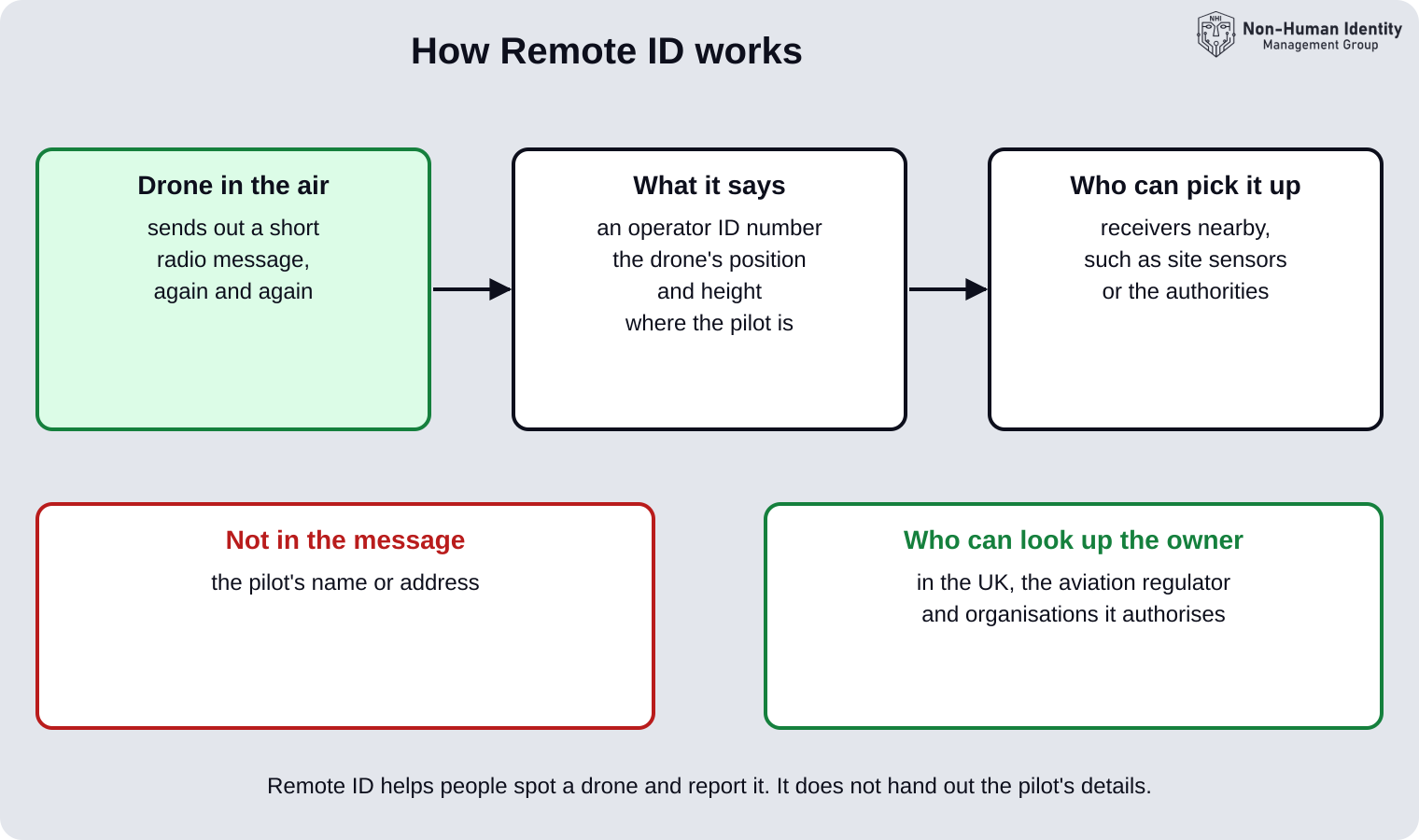
Who must use it depends on where you fly. In the US, the Federal Aviation Administration says drones that must be registered, or are registered, need Remote ID. Pilots can buy a drone with it built in or add a small broadcast unit. Or they can fly in special areas set aside for drones without it.[1] In the UK, new drones with the UK1, UK2 or UK3 class marks have needed it since 1 January 2026. Many other drones will need it from 1 January 2028. These include older drones, and small ones of 100 grams or more with a camera.[2]
What about drones that cause trouble? There is a big difference between two things. Detecting a drone means seeing, hearing or picking up its signals. Mitigating it means jamming, taking over or bringing it down. In the US, a joint government advisory says the law on these tools is "far from clear". It urges anyone thinking of using them to take legal advice. It notes that Congress gave mitigation powers to only a few federal departments.[3] Since July 2026, trained and certified state and local police can also act, under strict rules. Private firms may sell and fit these systems. They may not run the parts that need that legal power.[5]
This guide explains the topic in general terms and is not legal advice. Rules differ between countries and change over time, so check with your aviation regulator or police.
A worked example
Orla Haddad manages the depot of Slate Removals, a fictional moving firm in England. One afternoon a guard calls her. A drone has been hovering over the north yard for ten minutes.
A driver suggests throwing something at it. Orla says no. It could fall on someone, and stopping a drone is a job for the authorities.
Instead she follows the plan on the wall: spot, record, report. The guard fills in the sighting card with the time, height and direction. He takes a photo from inside the gatehouse. Orla moves two staff away from the loading bay, and covers a whiteboard listing customers' moving dates.
She calls the police on the non-emergency line and reads out the card. The drone leaves a few minutes later.
Two days later, the police call back. The pilot, Umar Marlow, is a local hobby flyer. He was testing a new camera and did not know the yard was private. Orla never learns his address, and she does not need to. The police had what they needed to find him.
Umar, for his part, checks his own drone. He turns on Remote ID, which he had left off. He also finds his app was sharing his flight history online, and switches that off. Orla adds one line to the depot plan: keep customer details out of sight from above.
Myths and mistakes
| What people think | What is true |
|---|---|
| I can jam or knock down a drone over my property. | Stopping a drone can be dangerous and may break the law. In the US, only certain authorities may do it.[3] |
| Remote ID shows the pilot's name and address. | In the UK it sends an operator ID and locations, not personal details. Only the regulator and organisations it authorises can see who the operator is.[2] |
| Every drone sends Remote ID. | Some older or home-built drones may not yet need it, and a rule-breaker may not send it. |
| A small drone has nothing worth protecting. | It can hold photos, flight history and your take-off spot. Check what the app shares.[4] |
| Buying a counter-drone system means we can stop drones. | Detection tools help you spot drones. Using tools that stop them is a separate question of law.[5] |
What can I do this week?
- If you fly, check that Remote ID is on and your registration is up to date.
- Open your drone app and review what it shares, such as flight logs and live streams.
- Turn on a strong password and a second check for your drone account.
- If you manage a site, write a one-page "spot, record, report" plan and put it at reception.
- Look at your site from above, such as on an online map, and move sensitive items out of sight.
Checklist
- Your drone is registered where the rules require it, and Remote ID is switched on.
- The drone app's data sharing and live streaming settings have been reviewed.
- Your drone account uses a strong password and multi-factor authentication.
- Photos and flight history are moved off the drone and its memory card after each trip.
- Software updates come only from the maker's official app or website.
- Sites have a written plan for drone sightings, with a named person to call the police.
- Staff know not to try to stop or bring down a drone themselves.
- Sensitive areas and papers are kept out of sight from above.
Common questions
Can someone hijack my drone?
It is possible. Weak spots in a drone's software, or an unprotected radio link, can let someone take data or even control. Keep the drone and app updated from the maker, protect your account, and set a safe "return home" spot. The US cyber agency gives similar advice.
What should I do if a drone is filming my house?
Stay calm and do not try to bring it down. Note the time, place and direction, and take a photo if you safely can. If you think it is unsafe or unlawful, report it to the police. They can use Remote ID and other details to find the pilot.
Does Remote ID tell me who is flying?
No, not directly. In the UK the message carries an operator ID, the drone's position and the pilot's location, but no personal details. Only the regulator and organisations it authorises can link that ID to a person. See Drone Remote ID.
Can my business buy a drone jammer?
Be very careful. In the US, a joint government advisory says the law is far from clear and urges legal advice first. Mitigation powers sit with certain federal departments and, since 2026, trained state and local police. Detection tools are a separate, often simpler, question.
Is drone security only about cyber attacks?
No. It covers data and accounts, the radio link and software, and also physical risks, like a drone over a crowd or filming a site. Most of the work is simple: good settings for your own drone, and a calm plan for other people's.
Where next?
Ready for the detail? Read the practitioner guide: Drone and Counter-UAS Security Guide. It goes further into fleet data and firmware security, how detection systems differ, and working with the authorities.
Also useful:
- Drone Remote ID
- Drone Incursion Response Playbook
- GNSS Spoofing and Jamming Guide
- Physical Security for Beginners
- IoT Security for Beginners
Related NHI Mgmt Group resources: Location Spoofing · Device and IoT Identity Guide · Non-Human Identities for Beginners
Key terms
- Drone security
- Protecting drones, their links and their data, and handling other people's drones safely.
- Remote ID
- A radio message a drone sends while flying, showing an ID number and where the drone and pilot are.
- Counter-drone
- Tools and steps for spotting, tracking and, by authorised bodies, stopping drones.
- GPS spoofing
- Sending fake satellite location signals so a device thinks it is somewhere else.
- GNSS jamming
- Radio noise that stops a device getting its satellite location signal.
- Firmware
- The built-in software that runs a device such as a drone or its controller.
- Multi-factor authentication
- A sign-in that needs a second check, such as a code on a phone, as well as a password.
Sources and further reading
- Remote Identification of Drones. Federal Aviation Administration. https://www.faa.gov/uas/getting_started/remote_id, accessed 28 Nov 2026.
- Remote ID (RID). UK Civil Aviation Authority. https://www.caa.co.uk/drones/open-category/moving-on-to-more-advanced-flying/remote-id-rid/, accessed 28 Nov 2026.
- Interagency Issues Advisory on Use of Technology to Detect and Mitigate Unmanned Aircraft Systems. US Department of Justice, 17 August 2020. https://www.justice.gov/opa/pr/interagency-issues-advisory-use-technology-detect-and-mitigate-unmanned-aircraft-systems, accessed 28 Nov 2026.
- UAS Cybersecurity. Cybersecurity and Infrastructure Security Agency. https://www.cisa.gov/uas-cybersecurity, accessed 28 Nov 2026.
- Counter-UAS Authority for State, Local, Tribal, and Territorial Law Enforcement and Correctional Agencies (interim final rule). US Department of Homeland Security and Department of Justice, Federal Register, 6 July 2026. https://www.govinfo.gov/content/pkg/FR-2026-07-06/html/2026-13609.htm, accessed 28 Nov 2026.