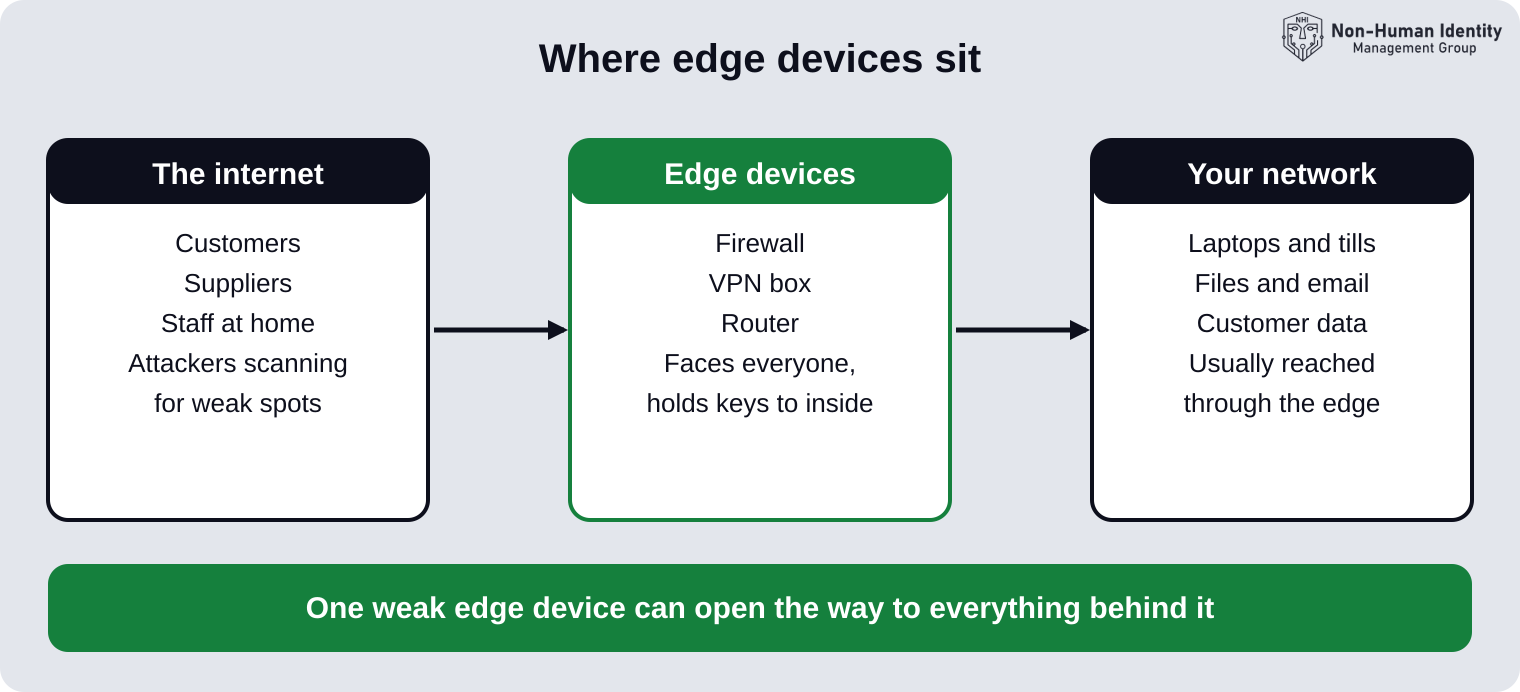
An edge device is a box, such as a firewall or router, that links your network to the internet.
This guide is for managers, small business owners and people new to IT work. You do not need to manage these boxes yourself to be affected: if your office has internet access or staff who work from home, you rely on edge devices every day.
In short
- Edge devices sit on the border between your network and the internet, so anyone online can reach them.
- National cyber agencies say attacking them has become a tactic of choice for many attackers.
- Keep their admin pages off the internet, change default passwords and install updates promptly.
- Replace any edge device that no longer gets security updates from its maker.
What you will learn
- Spot the edge devices in a typical office.
- Explain why attackers aim at them first.
- Check four simple things on each device.
- Ask your IT supplier when each device stops getting updates.
- Border box (edge device)
- a device that connects your own network to the internet or another outside network.
- Settings page (management interface)
- the screen where an administrator changes how a device works.
- Last update date (end of support)
- the date after which the maker stops fixing security problems.
What is an edge device?
Think of a shop. Its front door, delivery hatch and side gate all face the street. A burglar tries those first, because anyone can walk up to them.
Edge devices are the doors and gates of a computer network. Canada's national cyber agency describes them as network hardware or software that links an organisation's own network to outside networks.[1] Common examples are firewalls, which decide which traffic may pass, and routers, which pass traffic between networks. VPN gateways are another, letting staff connect safely from home. Load balancers, which share website traffic across servers, count too.[2]
These devices can be reached from the public internet.[2] That is their job. It also means anyone in the world can knock on them.
Where the comparison stops working: a shop door only lets people in. An edge device often also holds passwords and keys for the network behind it. Breaking the door can hand over the keys to the rooms inside as well.
Why does it matter?
Canada's cyber agency says attacking edge devices is now a tactic of choice for many attackers. That includes attackers backed by states.[1] Australia's cyber agency adds that they face the internet and are often hard to watch. They can also reach other systems, so they make an attractive way in.[3]
If you run a small business
What could happen: an old router or VPN box with a known flaw lets a stranger into your files and email.
Check this: ask your IT supplier for a list of your edge devices and their end-of-support dates.
If you manage a team or a budget
What could happen: a box that "still works" no longer gets security fixes, and nobody planned money to replace it.
Check this: put each device's replacement date in the budget plan.
If you are new to IT work
What could happen: a device's settings page is left open to the internet with its factory password.
Check this: confirm the settings page can only be reached from inside the network.
What does it look like?
Here is a made-up list of edge devices for a small firm, the kind of list an IT supplier could keep.
Example only. All values are made up.
Edge device list for EXAMPLE Ltd
Device         Model           Support ends   Admin page from internet?
Office router  FAKE-R100       2031           No
Firewall       EXAMPLE-FW20    2023           Yes                  (1)(2)
VPN box        FAKE-VPN5       2029           No
Login: admin / FAKE-default-0000                                   (3)
Last update installed: unknown                                     (4)
- Support ended years ago, so the maker no longer fixes security flaws in it.
- The settings page can be reached from anywhere on the internet.
- In a real file, this line would contain the password the device was shipped with, never changed.
- Nobody knows whether the latest updates are installed.
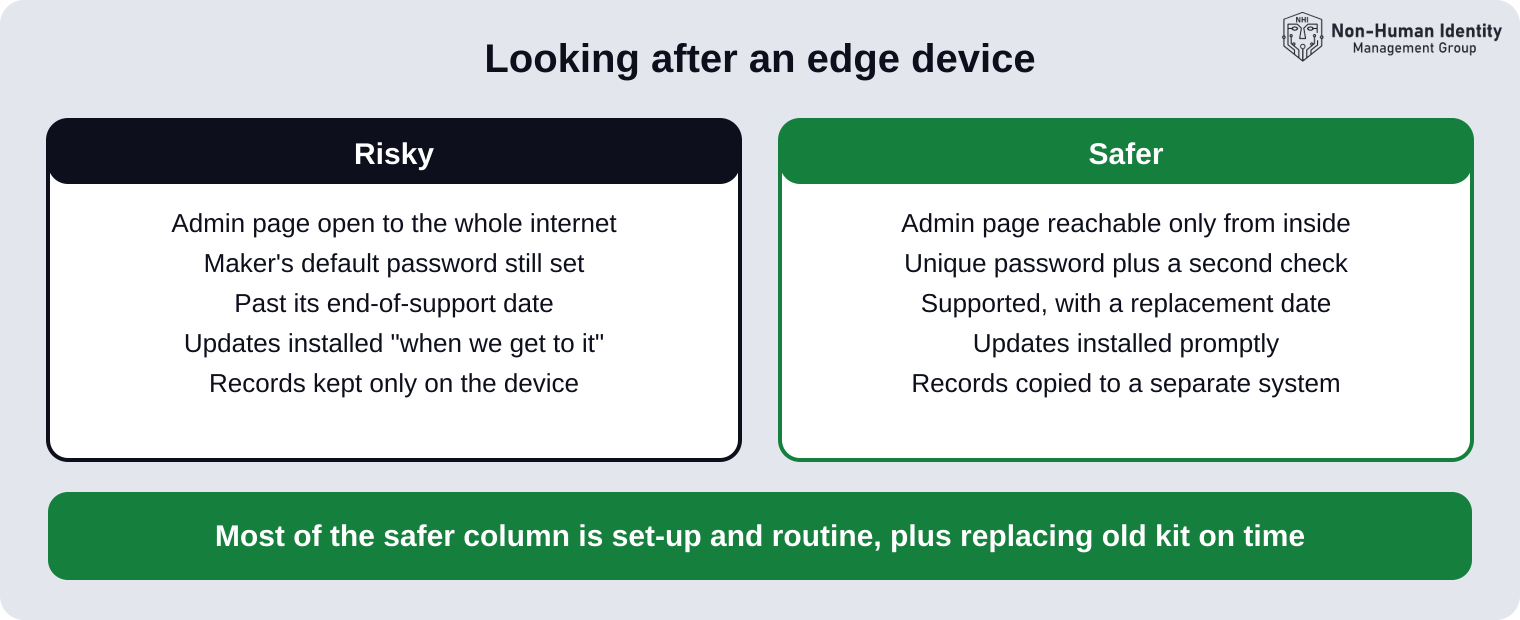
Why this is risky: the firewall has every warning sign at once. Agencies warn that unsupported boxes carry serious risk. Attackers can use flaws that will not be fixed.[2] Default passwords from makers are often widely known.[3]
The safer way: keep this list up to date and review it regularly.[2] Plan to replace the firewall, close its settings page to the internet and give it a unique password with a second login check.
How does it work?
Here is how an attack on an edge device often unfolds, and where each defence fits.
- Scanning. Attackers use automated tools to scan the internet for devices of a known make and version.
- A known weakness. They try a published flaw, a default password or a settings page left open to the internet.
- A foothold. If it works, they control a box that sits inside your border and may hold passwords for other systems.
- Moving inside. From there they may reach laptops, files and email on your network.
- The defences. Each step can be blocked. Agencies advise keeping settings pages off the internet and using a second login check for admins. They also advise installing updates promptly and sending device records elsewhere.[1]
Records matter here. Australia's cyber agency advises that edge devices send their records (logs) to a central system as they happen. The device should not be able to change or delete them there.[3] If the box itself is taken over, a copy kept elsewhere still shows what happened.
A worked example
Hana Yilmaz runs Meadow Nursery, a fictional garden centre with two sites and twenty staff. Bodhi Engel looks after its IT two days a week.
Hana reads a news story about attacks on VPN boxes and asks Bodhi a simple question. "Which of our boxes face the internet?"
Bodhi does not have a full answer, so he makes a list. He finds a router at each site, a firewall at the main site and a VPN box that the office staff use from home.
Next he checks each one against four points. Is it still supported? Is its settings page reachable from the internet? Has the factory password been changed? Are updates installed?
Three devices look fine. The firewall at the second site does not. Its maker stopped security updates two years ago, and its settings page is open to the internet.
Hana remembers the shop door. An old lock on a side gate is still a way in, even if the front door is strong. She approves money to replace the firewall this month.
Until the new one arrives, Bodhi closes the settings page to the internet and changes the password. He also turns on a second login check for the VPN box and sets its records to copy to a separate log store.
Bodhi now keeps the list in a shared file with each device's end-of-support date. He and Hana review it every quarter, so the next replacement is planned before it becomes urgent.
Myths and mistakes
| What people think | What is true |
|---|---|
| A firewall is a security device, so it is safe by itself. | Firewalls and VPN boxes are targets too. They need updates and careful set-up like any other system.[1] |
| If the box still works, it is fine to keep using it. | Once support ends the maker stops fixing flaws. Agencies advise replacing such devices.[3] |
| We are too small for anyone to bother. | Scanning tools look for weak devices across the whole internet, whoever owns them. |
| Opening the settings page to the internet saves the IT supplier a trip. | Settings pages are not designed to face the internet. Use a safer remote route instead.[3] |
| Wait to update until a problem is in the news. | Australia's agency says not to wait for problems to be advertised before updating edge devices.[3] |
What can I do this week?
- List every router, firewall and VPN box your organisation uses.
- Write the end-of-support date next to each one.
- Ask your IT supplier whether any settings page can be reached from the internet.
- Check that factory passwords have been changed on every device.
- Sign up for the makers' security update alerts.
Checklist
- There is an up-to-date list of every edge device and its end-of-support date.
- No device past its end-of-support date stays in use without a dated replacement plan.
- Settings pages cannot be reached from the internet.
- Admin logins use a unique password and a second login check.
- Security updates are installed promptly, with a named person responsible.
- Device records are copied to a separate system.
- Someone is told when an admin logs in or a setting changes.
Common questions
Is my home router an edge device?
Yes, in the same sense. It links your home network to the internet, so the same habits apply. Change the default password, keep it updated and replace it when updates stop. See Home Router Security for Beginners for home-specific steps.
How do I find out when a device stops getting updates?
Check the maker's website for an end-of-life or end-of-support notice for your model. Makers often publish these dates in advance. If you cannot find it, ask your IT supplier, and add the date to your device list once you have it.
Why do attackers like VPN boxes so much?
Because they face the internet by design and let people into the network. A VPN box often checks staff logins, so it may hold or reach passwords. Taking one over can give an attacker a way in that looks like a normal remote worker.
Can I just turn on automatic updates?
Often, yes, and agencies suggest it where possible. Weigh it against the small risk that an update briefly interrupts the device. Many organisations test updates on a spare device first, then install them promptly across the rest.
What should I do if I think an edge device has been hacked?
Contact your IT supplier or security contact straight away and keep the device's records. We suggest asking before you reset it, because a reset can wipe useful evidence. Passwords stored on or used by the device may need changing too.
Where next?
Ready for the detail? Read the practitioner guide: Edge Device Security Guide. It goes further into national guidance, locking down the settings page and stored credentials, logging minimums and replacement planning.
Also useful:
- Firewalls for Beginners
- VPNs for Beginners
- Patch Management for Beginners
- Edge Device End of Life Replacement Playbook
Related NHI Mgmt Group resources: Edge Device Risk Executive Briefing · Edge Device Exploitation by Threat Actors Guide · The CISA KEV Catalogue for Beginners
Key terms
- Edge device
- A device on the border of a network that connects it to the internet or another outside network.
- Firewall
- A filter that decides which network traffic may pass and which is blocked.
- VPN
- A protected connection that lets a person or office join a network from elsewhere.
- Management interface
- The settings page or connection an administrator uses to control a device.
- End of life
- The point when a maker stops supporting a product, including security updates.
- Patch
- An update from the maker that fixes a flaw.
- Attack surface
- All the places where an attacker could try to get in.
Sources and further reading
- Security considerations for edge devices (ITSM.80.101). Canadian Centre for Cyber Security, February 2025. https://cyber.gc.ca/en/guidance/security-considerations-edge-devices-itsm80101, accessed 28 Nov 2026.
- Reducing the Attack Surface for End-of-Support Edge Devices (joint fact sheet). CISA, FBI and UK NCSC, 5 February 2026. https://www.ic3.gov/CSA/2026/260205.pdf, accessed 28 Nov 2026.
- Mitigation strategies for edge devices: practitioner guidance. Australian Signals Directorate's Australian Cyber Security Centre. https://www.cyber.gov.au/business-government/protecting-devices-systems/hardening-systems-applications/network-hardening/securing-edge-devices/mitigation-strategies-for-edge-devices-practitioner-guidance, accessed 28 Nov 2026.