An electronic signature is any electronic way of showing you agree to a document.
This guide is for small business owners, office staff and anyone who has been asked to "sign here" by email. You do not need any technical background. If your business sends quotes, leases or staff contracts for signing online, this affects you.
In short
- Typing your name, ticking a box or clicking "sign" on a signing website can all be electronic signatures.
- In the UK, the US and the EU, the law generally accepts electronic signatures for everyday agreements, with some exceptions.
- Signing websites keep a record of who signed, when and from where. That record is what makes the signature useful later.
- Fake "please sign" emails are a common trick, so open signing requests from the signing website, not the email link.
What you will learn
- Explain what an electronic signature is in one sentence.
- Explain what a signing website records when you sign.
- Spot a fake signing request.
- Check which documents may need more than a click.
Status: correct as at 28 November 2026, based on the US ESIGN Act, the Law Commission of England and Wales report on electronic execution and the European Commission's eSignature pages. Laws change; check the official text.
This guide explains the topic in general terms and is not legal advice.
- Sign online (electronic signature)
- any electronic mark, click or typed name used to show you agree.
- Signing record (audit trail)
- a dated list of each step: sent, opened, signed and by whom.
- Signing website (e-signature platform)
- an online service that sends documents, collects signatures and keeps the record.
What is an electronic signature?
Think of signing for a parcel on a courier's handheld screen. Your squiggle is messy, but the device also notes the time, the place and the parcel number.
An electronic signature works the same way. It is any electronic way of showing you agree to a document. It could be your typed name at the end of an email, a tick in a box or a click on a "sign" button.
Most business signing now happens on an e-signature platform, a website that handles the whole process. The sender uploads a document. The website emails a link to each signer. Each signer opens it, checks it and signs. The website then locks the finished document and keeps an audit trail, which is a record of every step.
You may also hear about digital signatures. These use special maths (cryptography) to prove a file has not changed since it was signed. Many signing websites use them behind the scenes to seal the finished document.
Where the comparison stops working: a courier sees you in person. A signing website usually only knows that someone opened a link sent to your email. If someone else controls your inbox, they could sign as you.
Why does it matter?
Signing online is quick, so it is now used for leases, job offers, loans and supplier deals. That speed also attracts fraudsters, who copy the look of signing emails to steal passwords.
The value of an electronic signature lies in proof. If someone later says "I never signed that", the audit trail and the sealed document are what you rely on.
If you run a small business
What could happen: a supplier disputes a contract and you cannot show who signed or when.
Check this: download and keep the signed document and its audit trail for every deal.
If you get documents to sign
What could happen: a fake "please sign" email takes you to a page that steals your email password.
Check this: open the request from the signing website itself, not from the email link.
If you work in an office team
What could happen: a shared signing account means nobody can tell which person sent or signed a document.
Check this: give each person their own login, with two-step login turned on.
What does it look like?
Here is a made-up signing email next to the signs that it may be fake.
Example only. All values are made up.
From: Signing Service <[email protected]> (1)
Subject: URGENT - lease ready, sign within 2 hours (2)
Cobble Accountants has sent you a document.
[ REVIEW DOCUMENT ] (3)
Attached: Lease_FAKE.html (4)
Access code: 0000-EXAMPLE (5)
- The sender's address is not the signing service's usual address.
- Pressure to act fast is a common sign of a trick.
- In a real message, this button would contain a link. Hover over it to see where it goes before you click.
- One large signing service, Docusign, says it never sends signature requests as a file.[4]
- Docusign also gives a security code, so you can open the document on its own website instead.[4]
Why this is risky: a fake signing page may ask you to "log in to view" the document. Whatever you type goes to the fraudster.
The safer way: if you expect a document, go to the signing website by typing its address yourself, or use the access code there. If you do not expect it, check with the sender by phone or a message you start yourself.
How does it work?
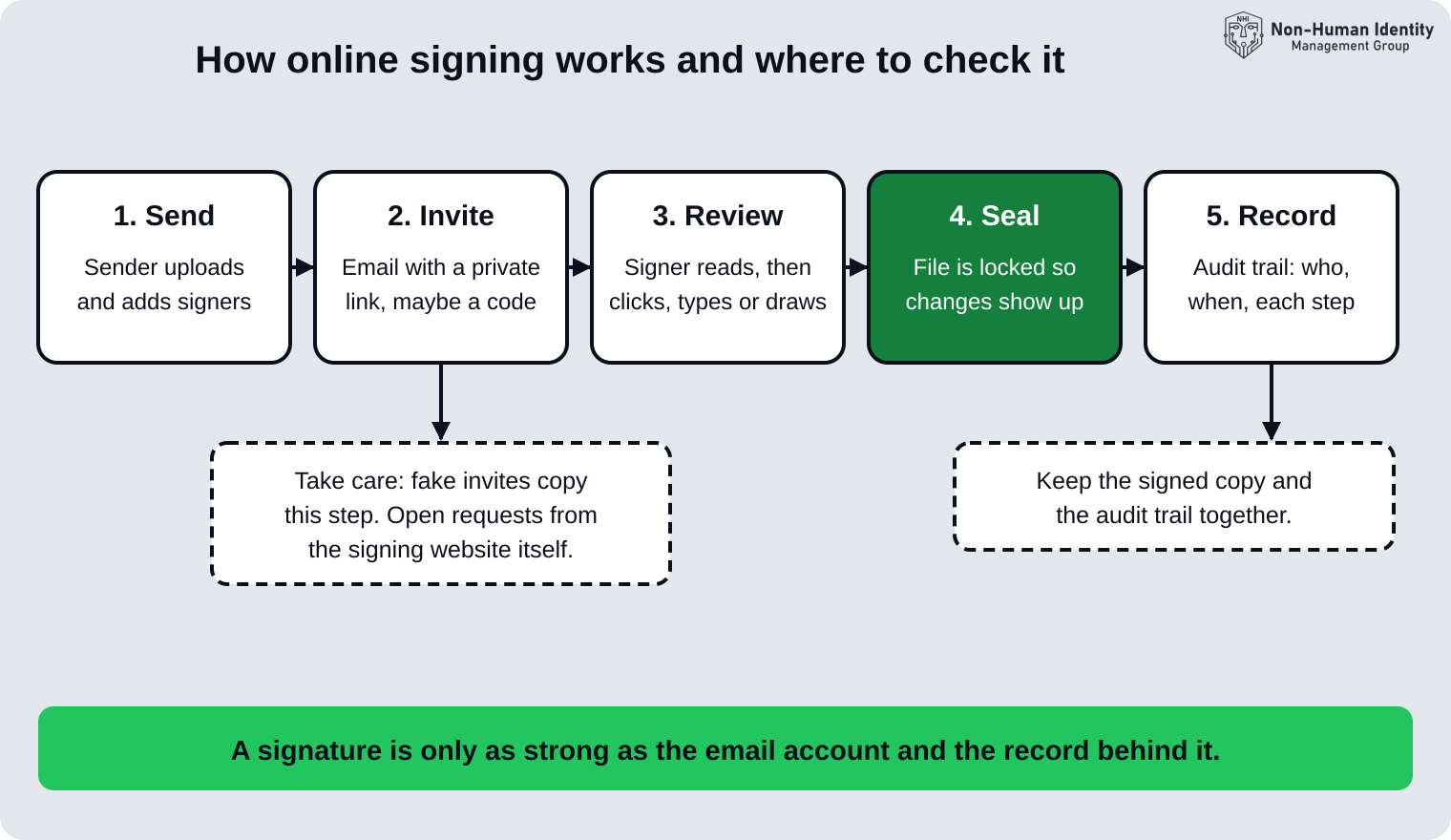
Here is what usually happens when a document is signed on a signing website.
- Send. The sender uploads the document, marks where each person signs and adds their email addresses.
- Invite. The website emails each signer a private link. Some senders add a second check, such as a code sent by text.
- Review and sign. The signer reads the document and clicks to agree, types their name or draws a signature.
- Seal. The website locks the finished file, often with a digital signature, so any later change can be spotted.
- Record. The website keeps the audit trail: each email address, time and step. Many services give a summary page with the signed copy.
The law in many places accepts this. In the US, a federal law says a signature or contract may not be denied legal effect just because it is electronic.[1] In England and Wales, the Law Commission concluded that an electronic signature can be used to sign a document. The signer must mean to sign it, and any other formal steps must be met.[2]
In the EU, the law describes three levels. A simple electronic signature can be as plain as a typed name. A higher level must be linked to the signer and show any later change. The highest level uses an approved certificate and device, and has the same legal effect as a handwritten signature across the EU.[3]
Some documents need more. For example, in England and Wales a deed must still be signed in front of a witness who is physically present. This applies even if both use electronic signatures.[2]
A worked example
Vida Zamora runs Bracken Brewery, a fictional small brewery. Her accountant, Nadia Rinaldi of Cobble Accountants (also made up), handles the brewery's paperwork.
On Monday, Vida gets an email. It says Cobble Accountants has sent her a lease to sign within two hours. There is a big "Review document" button and an attached file.
Vida remembers the courier's screen. The squiggle is not the point; the record behind it is. And this email feels rushed. She hovers over the button. The link points to a website name she does not recognise.
She does not click. Instead, she sends Nadia a new message from her own contacts list. "Did you send me a lease today?"
Nadia replies that she did not. She warns her other clients and reports the email to her own email provider.
The next week, Nadia does send a real document: the brewery's new supplier contract. Vida goes to the signing website by typing its address herself and logs in with two-step login. The contract is waiting there.
She reads it, signs it and downloads the finished copy with its audit trail. She saves both in the brewery's contracts folder.
Nadia also mentions that the brewery's property purchase next year is a deed. That will need a witness, so they agree to plan it with the solicitor.
Myths and mistakes
| What people think | What is true |
|---|---|
| An electronic signature is not legally binding. | In the US, a signature may not be denied legal effect just because it is electronic.[1] Some documents still need extra steps. |
| A scanned image of my signature is safer. | A pasted image is easy to copy. The record behind a signature matters more than how it looks. |
| Electronic and digital signatures are the same. | A digital signature uses cryptography to show a file has not changed. An electronic signature is the wider idea. |
| Every document can be signed with a click. | Some, such as deeds in England and Wales, need a witness or other formal steps.[2] |
| If the email looks right, it is real. | Fraudsters copy signing emails closely. Open requests from the signing website itself. |
What can I do this week?
- Turn on two-step login for your signing website account and your email.
- Find your last three signed documents and save each with its audit trail.
- Agree with your team how to check an unexpected signing request.
- Ask your adviser which of your documents need more than a click.
Checklist
- Each person has their own signing account, not a shared one.
- Two-step login is on for signing accounts and email.
- Signing requests are opened from the signing website, not from email links.
- Unexpected requests are checked with the sender through a channel you start yourself.
- Signed copies are stored with their audit trails.
- For important deals, senders add a second check for signers, such as a text code.
- Documents that need a witness or extra steps are flagged before sending.
Common questions
Is typing my name at the end of an email a signature?
It can be. In the EU, a name under an email might count as a simple electronic signature, and other countries take a similar view in many cases. The document and the law that applies decide whether it is enough. This is general information, not legal advice.[3]
How do I know a signing email is real?
Check rather than trust the look. Look at the sender's address, hover over links and be wary of pressure or attachments. Safest of all, go to the signing website yourself and open the document there, using any access code the email gives.[4]
What is an audit trail on a signed document?
It is the signing website's record of what happened. It usually lists who was sent the document, when it was opened and signed, and the email addresses used. Keep it with the signed copy, because it is your evidence if anyone disputes the signature later.
Can someone forge my electronic signature?
Yes, if they get into your email or signing account. The signing website usually trusts whoever opens the private link. That is why two-step login on your email and signing account matters, and why senders of important documents can add a second check.
Do I need a digital certificate to sign online?
Usually not, for everyday agreements. Most signing websites need only your email and a click. Some EU legal or cross-border documents may need the highest level of signature. That level uses an approved certificate. See Advanced vs Qualified Electronic Signature.
Where next?
Ready for the detail? Read the practitioner guide: E-Signature Platform Security. It goes further into what to require from a signing platform, how to test it and the red flags to watch for when you choose one.
Also useful:
- Electronic Signature Workflow Security Guide
- Digital Signature vs Electronic Signature
- Digital Signatures for Beginners
- Email Security for Beginners
Related NHI Mgmt Group resources: If your e-signature platform is compromised · Advanced vs Qualified Electronic Signature · eIDAS Qualified Trust Services Guide
Key terms
- Electronic signature
- An electronic way of showing agreement to a document. Its value depends on the proof of who signed and what they meant.
- Digital signature
- A cryptographic seal made with a private key, which lets anyone check who signed and that nothing changed.
- Advanced electronic signature
- An EU level of e-signature that is linked to the signer and shows any later change to the document.
- Qualified electronic signature
- The highest EU level, backed by an approved certificate, with the same legal effect as a handwritten signature in the EU.
- Audit trail
- A dated record of each step, showing who did what and when.
- ESIGN Act
- A US law that gives electronic signatures legal validity in many business deals.
- Phishing
- A message that pretends to come from someone trusted, to trick you into clicking, paying or giving away a password.
Sources and further reading
- 15 U.S. Code 7001, General rule of validity (Electronic Signatures in Global and National Commerce Act). Legal Information Institute, Cornell Law School. https://www.law.cornell.edu/uscode/text/15/7001, accessed 28 Nov 2026.
- Electronic execution of documents (report published 4 September 2019). Law Commission of England and Wales. https://www.lawcom.gov.uk/project/electronic-execution-of-documents/, accessed 28 Nov 2026.
- What is eSignature. European Commission, Digital Building Blocks. https://ec.europa.eu/digital-building-blocks/sites/display/DIGITAL/What+is+eSignature, accessed 28 Nov 2026.
- Safety center. Docusign. https://www.docusign.com/safety, accessed 28 Nov 2026.