A digital signature is a code made with a secret key that shows who signed something and that nothing changed.
This guide is for anyone who has seen "signed by" or "signature valid" on a document or app and wondered what it proves. You do not need a technical background. If your business sends invoices, contracts or software, signatures can help others trust what you send.
In short
- A digital signature shows which key signed a file and that the file has not changed since.
- It does not hide the contents. Signed data can still be read by anyone who gets it.
- Two keys do two jobs: a secret private key signs, and a shared public key checks.
- A signature is only as trustworthy as the private key, and you must know whose public key you hold.
What you will learn
- Explain what a digital signature proves and what it does not.
- Check who signed a document, not just whether it says "valid".
- Spot the difference between a typed name and a real digital signature.
- Ask who looks after your organisation's signing keys.
- Secret signing key (private key)
- the half of a key pair that makes signatures and must stay secret.
- Shared checking key (public key)
- the half anyone can have, used to check a signature.
- Digital ID card (certificate)
- a file from a trusted issuer that links a public key to a named person or firm.
What is a digital signature?
Think of a wax seal on a letter. The pattern shows who sent it, and a broken seal shows someone opened it. A digital signature does both jobs for files and messages.
It uses two linked keys, called a key pair. The signer keeps the private key secret and uses it to sign. Everyone else gets the public key and uses it to check.
When the check works, you learn two things. The file was signed with that private key, and it has not changed since. This also makes it harder for the signer to deny signing later.
A signature does not keep anything secret. Anyone who gets the file can still read it. If you need secrecy too, the file must also be encrypted.
Where the comparison stops working: a wax seal looks the same on every letter. A digital signature is worked out from the file's own contents. So it is different for every file and cannot be lifted onto another one.
Why does it matter?
Signatures sit behind things you use every day. The padlock in your browser, software updates and many secure logins depend on them. They help you trust a file that came from far away.
If you pay invoices
What could happen: a fraudster changes the bank details on a supplier's invoice, and you pay the wrong account.
Check this: if a signed document shows a warning, stop and call the sender on a number you already have.
If you install software at work
What could happen: a fake update carries harmful code, but has no valid signature from the real maker.
Check this: heed warnings about unsigned or unknown publishers, and ask IT before going ahead.
If you look after IT or builds
What could happen: a signing key left in a shared folder is copied, and someone signs harmful files in your name.
Check this: find where each signing key lives and who, or what software, can use it.
What does it look like?
Here is a made-up signature panel, like the one a PDF reader shows when a signed file has been changed.
Example only. All values are made up.
Signature panel: invoice-EXAMPLE-0000.pdf
Signed by:     Example Supplies Ltd             (1)
Issued by:     Example Trust CA (example.com)   (2)
Signed on:     03 Mar 2026 10:15
Status:        Document has been changed        (3)
               since it was signed
Certificate:   valid until 0000-00-00           (4)
- Who the certificate says signed it. In a real file, this line would contain the signer's verified name.
- The issuer that vouches for the signer's public key.
- The warning that matters. The file no longer matches what was signed.
- The certificate's end date. An expired or cancelled certificate is another warning.
Why this is risky: the invoice may look normal on screen. Only the signature panel shows it was changed after signing.
The safer way: read the panel, not just the page. Check the signer's name and status. If anything is wrong, contact the sender by a trusted route.
How does it work?
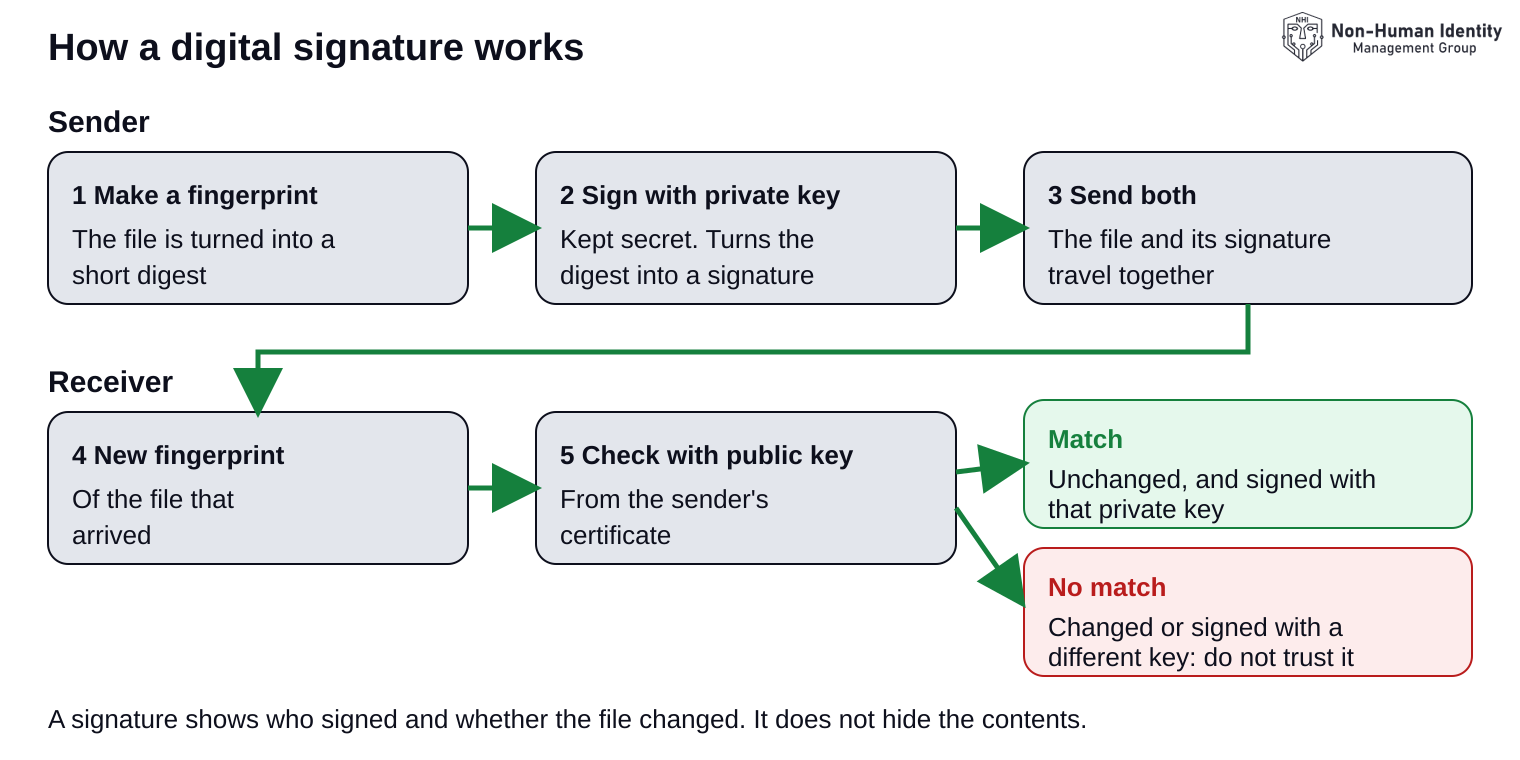
Your software does the maths for you. In plain words, signing and checking go like this:
- Make a key pair. The signer creates a private key and a public key. The public key is often placed in a certificate, a digital ID card from a trusted issuer.
- Make a fingerprint. For most methods, the file is first run through a hash function. This turns any file into a short value called a digest. Change one letter and the digest changes.[1]
- Sign. The signer's software uses the private key to turn the digest into the signature, and sends it with the file.
- Check the key's owner. The receiver needs to know the public key really belongs to the signer. The US signature standard names a certificate from a trusted issuer as one way to do this.[1]
- Verify. The receiver's software makes its own digest and uses the public key to check the signature. A match means the file is unchanged and was signed with that private key.[2]
The current US signature standard, published in 2023, approves three families of method, called RSA, ECDSA and EdDSA. An older method, DSA, may now only be used to check old signatures.[1]
Future quantum computers could weaken today's methods. In August 2024, the US standards body published a new signature method that it believes stays secure even against a large quantum computer.[3]
A worked example
Zane Ishikawa works as a freelance bookkeeper for a few small firms. One client, a made-up print shop, asks him to pay a paper supplier's invoice.
The supplier sends invoices as signed PDF files. That morning, two copies arrive. The first came in last week. The second arrived today with a note: "Our bank has changed. Please use the new details."
Zane opens both files. The first shows a valid signature from the supplier's certificate. The second looks the same on screen, but the signature panel says the document has changed since it was signed.
Zane does not pay. He calls the supplier on the number in his own records. The supplier confirms the bank details have not changed. Someone had got into an email account and edited a copy of the invoice.
Zane pays the original invoice and tells his client what happened. He also suggests the print shop asks all its suppliers for signed invoices. They agree a rule: any change to bank details is confirmed by phone first.
The signature did not stop the fraud attempt. It also would not have helped if the fraudster had stolen the supplier's private key. What it did give Zane was a clear, early warning, and that is its job.
Myths and mistakes
| What people think | What is true |
|---|---|
| A signature keeps the file secret. | It proves who signed and that nothing changed. Encrypt the file as well if it must stay private. |
| "Signature valid" means the file is safe. | A signature can be valid but made with an attacker's own key. Check the signer's name too. |
| A typed name or a scanned signature image is a digital signature. | In EU law a typed name under an email can count as a simple electronic signature. Only the higher levels add a firm link to the signer and show later changes.[4] |
| Signing keys can sit in a shared folder. | Whoever copies the private key can sign in your name. Keep it in a key vault or locked hardware. |
| Certificates last for ever. | They have end dates and can be cancelled if a key is lost. Track the dates. |
What can I do this week?
- Open a signed PDF and find its signature panel. Note who signed it and who issued the certificate.
- Agree a rule for changed bank details: always confirm by calling a number you already have.
- List where your organisation signs things, such as documents, software releases and emails.
- Ask where the private signing keys live and who, or what software, can use each one.
Checklist
- I can explain the difference between signing and encrypting.
- I check the signer's name, not only the "valid" message.
- I treat a "document changed" warning as a reason to stop and check.
- Every signing key has a named owner.
- Private keys are kept in a vault or locked hardware, not in files or code.
- Certificate end dates are tracked and renewed in time.
- We have a plan to cancel a certificate if its key is lost.
- We no longer create new signatures with retired methods.
Common questions
Is a digital signature the same as an electronic signature?
Not always. "Electronic signature" is a wide term that can include a typed name. A digital signature uses keys and maths, so it can show who signed and whether the file changed. In the EU, the higher levels of electronic signature add these protections.[4]
Does a digital signature encrypt my file?
No. A signature proves who signed a file and that it has not changed. It does not hide the contents, so anyone who gets the file can read it.[2] If the file must stay private, encrypt it as well as signing it.
What happens if someone steals a private key?
They can sign files that look as if they came from the real owner. The owner should ask the issuer to cancel the certificate, make a new key pair and tell the people who rely on it. Until then, signatures made with that key cannot be trusted.
Why do I need a certificate?
To know whose public key you hold. Anyone can make a key pair and claim a name. A certificate from a trusted issuer links the public key to a checked name, so a valid signature points to the right person or firm.[1]
Do machines use digital signatures too?
Yes, a great deal. Build servers sign software, websites sign parts of their connections and systems sign tokens to trust each other. The software doing the signing is a non-human identity, and its private key needs the same care as any other secret.
Where next?
Ready for the detail? Read the practitioner guide: Digital Signatures Guide. It goes further into signature methods and formats, how verification fails and how to protect signing keys in practice.
Also useful:
- Encryption for Beginners
- Encoding, Encryption and Hashing for Beginners
- Public Key Infrastructure for Beginners
- Code Signing for Beginners
- Machine Identities and Certificates for Beginners
Related NHI Mgmt Group resources: Code Signing Security Guide · PKI Basics Guide · Post-Quantum Cryptography Migration Guide
Key terms
- Digital Signature
- A code made with a private key that anyone can check with the matching public key.
- Private Key
- The secret half of a key pair, used to sign. If it is exposed, its signatures cannot be trusted.
- Public-Key Cryptography
- A system that uses linked key pairs, one kept secret and one shared.
- Hash Function
- A method that turns any data into a short fixed-length value, used to spot changes.
- Digital certificate
- A file, valid for a set time, that links a public key to a named identity.
- Public Key Infrastructure
- The issuers, rules and systems that create and manage certificates.
- Non-Repudiation
- Evidence that makes it hard for someone to deny an action, such as signing, later.
Sources and further reading
- FIPS 186-5, Digital Signature Standard (DSS). National Institute of Standards and Technology (NIST), 3 February 2023. https://nvlpubs.nist.gov/nistpubs/FIPS/NIST.FIPS.186-5.pdf, accessed 28 Nov 2026.
- Glossary: digital signature (from SP 800-63-4). NIST Computer Security Resource Center, National Institute of Standards and Technology. https://csrc.nist.gov/glossary/term/digital_signature, accessed 28 Nov 2026.
- FIPS 204, Module-Lattice-Based Digital Signature Standard. National Institute of Standards and Technology (NIST), 13 August 2024. https://csrc.nist.gov/pubs/fips/204/final, accessed 28 Nov 2026.
- What is eSignature. European Commission, Digital Building Blocks. https://ec.europa.eu/digital-building-blocks/sites/display/DIGITAL/What+is+eSignature, accessed 28 Nov 2026.