Web cache poisoning tricks a website's shared cache into storing a harmful copy of a page for other visitors.
This guide is for people learning web development, website owners and anyone new to web security. You do not need to write code to be affected: if your site uses a content delivery network or a caching plugin, its settings decide whether this attack is possible.
In short
- A shared cache keeps one copy of a page and hands it to many visitors, to make the site faster.
- If an attacker can change what the site builds, and the cache stores that version, every visitor may get the bad copy.
- It usually works because the site reads a part of the request that the cache ignores.
- Cache only pages that are truly the same for everyone, and turn off request inputs the site does not need.
What you will learn
- Explain how a shared cache can spread one bad page to many visitors.
- Spot the mismatch between what the site reads and what the cache checks.
- Check which of your pages are cached, and for how long.
- Ask your developer or hosting supplier the right questions.
- Saved copy (cache)
- a stored copy of a web page that is handed out again so the site does not rebuild it each time.
- Matching label (cache key)
- the parts of a request a cache looks at to decide whether it already has the right copy.
- Extra request details (headers)
- small labels a browser sends with each request, such as language or device type.
What is web cache poisoning?
Think of a busy café that makes popular sandwiches early and leaves them on the counter. Now imagine someone tricks the kitchen into making one tray with a bad filling. That tray goes on the counter, and every customer who orders that sandwich gets one.
Many websites work like the café. A shared cache sits between visitors and the site and stores one copy of a page to hand to many people.[2] A content delivery network (CDN), a group of computers in many places that keep copies close to visitors, is a common example.
To find the right copy, the cache looks at a few parts of each request, usually the web address. This set of parts is called the cache key. Parts it ignores are called unkeyed.[1]
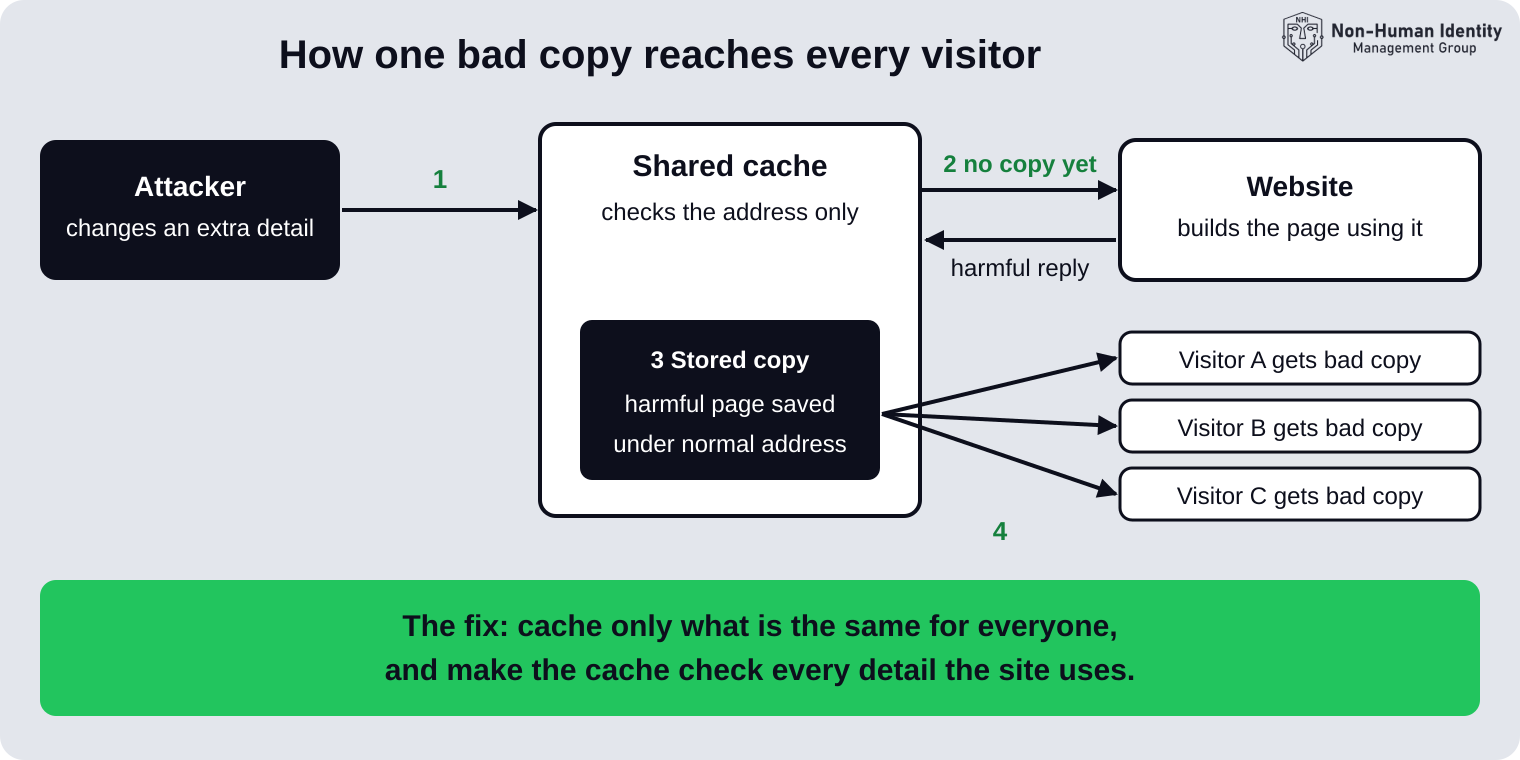
Web cache poisoning happens when the site uses an unkeyed part to build the page. An attacker changes that part, the site builds a harmful version, and the cache saves it under the normal address.[1]
Where the comparison stops working: café staff might notice an odd tray. A cache does not taste the food. It stores whatever the site sends, as long as its rules say the page can be saved.
Why does it matter?
One request from an attacker can affect many visitors who did nothing wrong. They type the right address and still get the bad copy.
How much harm it does depends on the page. Security researchers at PortSwigger note the impact can range from none to massive, depending on how popular the poisoned page is.[1] A poisoned home page could send visitors to a fake site or load harmful code.
If you are learning web development
What could happen: your code trusts a request detail that the cache ignores, and one visitor's version is shown to all.
Check this: list every request detail your pages use to build their content.
If you own a website
What could happen: visitors see a defaced page or are sent to a scam site, and they blame your brand.
Check this: ask your supplier which pages the CDN or caching plugin stores, and for how long.
If you are new to IT or security work
What could happen: you clear the cache to fix the page, and it is poisoned again an hour later.
Check this: after clearing, find out why the bad copy was stored, not only that it was.
What does it look like?
Here is a made-up scenario card, the kind of note a developer might write while investigating.
Example only. All values are made up.
Page:        www.example.com/  (home page)
Cache key:   address only                          (1)
Site reads:  address + an extra header              (2)
Header used: builds the link to the site's script file
Stored copy: script link points to attacker.example.invalid  (3)
Kept for:    1 hour, shared with every visitor      (4)
- The cache only checks the address, so all home page requests look the same to it.
- The site also reads a header the cache ignores. This is the gap.
- In a real file, this line would show the page loading code from a site the owner does not control.
- Until the copy expires or is cleared, every visitor gets it.
Why this is risky: the site and the cache disagree about what makes two requests "the same". Anyone who can change the ignored part can shape the copy that everyone gets.
The safer way: turn off headers the site does not need. If the page really must change with a header, tell the cache to treat it as part of the key. One way is a Vary header, a response label that tells caches to store separate copies for different values of a named request header.[3]
How does it work?
Security researchers describe the attack in two phases. First, the site is made to build a harmful reply. Then that reply is cached and served to others.[1] Here are the steps from the defender's point of view.
- A gap exists. The site uses a request detail, often a header, that the cache does not include in its key.[1]
- A harmful reply is built. An attacker sends a request with a changed value in that detail, and the site builds a page using it.
- The reply is stored. The cache saves the page under the normal address, because its rules say the page may be shared.
- Others receive it. Ordinary visitors ask for the normal address and get the stored copy until it expires.
- The fix. The team clears the bad copy, then closes the gap, so it cannot be stored again.
A close relative is web cache deception. There, the cache is tricked into storing one person's private page so someone else can read it. Some CDNs offer checks for this. One example refuses to cache a page when its address looks like a file type that does not match the content.[4] The Website Caching for Beginners guide covers that side.
A worked example
Rania Thorne is a junior developer at Rowan Accountants, a fictional firm with a small website and a CDN in front of it.
On Tuesday morning a client phones. The firm's home page asked her to "re-enter bank details" on a strange page. Rania opens the site and sees the normal page. A colleague in another office sees the bad one.
She thinks of the café counter. Some copies on the counter look fine and some do not, so the problem is in what was stored, not in the kitchen's usual recipe.
Rania clears the CDN's stored copy of the home page. The bad version disappears for everyone. Then she looks for the gap.
She finds that a theme plugin builds a link using an extra header to work out the site's own address. The CDN ignores that header when matching copies. So one request with a changed header could shape the copy everyone got.
She updates the plugin, which now uses the site's fixed address from its settings. She also turns off the header in the CDN rules, because the site does not need it. Last, she shortens how long the home page is cached.
Rania tells her manager, and they let affected clients know which page to ignore. Nobody's details were entered, as far as the client calls and the site records show.
Myths and mistakes
| What people think | What is true |
|---|---|
| Clearing the cache fixes it. | It removes the bad copy for now. Unless the gap is closed, it can be stored again. |
| Only big sites are at risk. | Any site behind a shared cache, including a CDN or caching plugin, can have the gap. |
| If my browser shows the right page, the site is fine. | Different cache locations may hold different copies. Check from more than one place. |
| Caching is the problem, so switch it off. | Turning caching off removes the risk, but costs speed.[1] Caching only pages that are the same for everyone is often a good middle path. |
| Headers are harmless background details. | Headers can be changed by whoever sends the request. Treat them as untrusted input. |
What can I do this week?
- Ask your developer or supplier which pages are cached, and for how long.
- Check that pages showing personal details are marked as not to be stored in shared caches.
- Ask whether the site uses any request headers to build page content.
- Find out how to clear the CDN's stored copies quickly, and who can do it.
- Keep themes and plugins up to date, since they often decide what headers are used.
Checklist
- We know which pages our CDN or caching plugin stores.
- Only pages that are the same for every visitor are shared-cached.
- Personal pages are marked so shared caches do not store them.
- Headers the site does not need are turned off or ignored.
- Any header that changes a page is part of the cache key.
- Someone can clear the cache quickly in an emergency.
- After an incident we fix the cause, not just the stored copy.
Common questions
Is web cache poisoning the same as DNS cache poisoning?
No. DNS cache poisoning plants a false address in the internet's address book, so people reach the wrong site. Web cache poisoning plants a bad copy of a page in a website's cache. Both abuse saved answers, but at different layers.
How is it different from web cache deception?
Poisoning puts a harmful page in front of many visitors. Deception gets a private page, such as an account page, stored where someone else can fetch it. Both come from a cache saving something it should not.
Can I tell if my site has been poisoned?
Often only by its effects. Visitors report odd content, or a page loads code from an unknown site. Comparing the page from different locations, and checking the cache's records of what it stored, can help confirm it.
Does HTTPS stop web cache poisoning?
No. HTTPS protects the connection between the visitor and the server or CDN. The cache sits at the end of that connection and can still store a harmful reply that the site itself built.
Which cache settings matter most?
Three settings matter most. Which pages may be shared, which request details form the key, and how long copies are kept. A setting called Cache-Control: private or no-store keeps personal pages out of shared caches.[2]
Where next?
Ready for the detail? Read the practitioner guide: Web Cache Poisoning and Cache Deception Guide. It goes further into how to detect poisoning, hardening CDN and cache settings, and lessons from real incidents.
Also useful:
- Website Caching for Beginners
- CDN Security Guide
- Security Headers for Beginners
- HTTP Request Smuggling Guide
Related NHI Mgmt Group resources: DNS Cache Poisoning and Spoofing · Website Defacement for Beginners · Web Application Firewalls for Beginners
Key terms
- A cache between visitors and a site, such as a CDN, that hands one stored copy to many people.
- Cache key
- The parts of a request a cache uses to decide whether two requests are the same.
- Unkeyed input
- A part of the request the site may use but the cache ignores when matching copies.
- Content delivery network (CDN)
- A group of computers in many places that keep copies of a site close to visitors.
- Cache deception
- An attack that makes a private page look cacheable, so a shared cache stores it and hands it to someone else.
- Cache invalidation
- Removing stored copies when the real content changes, so the cache stops serving old or bad versions.
Sources and further reading
- Web cache poisoning. Web Security Academy, PortSwigger. https://portswigger.net/web-security/web-cache-poisoning, accessed 28 Nov 2026.
- Cache-Control header. MDN Web Docs, Mozilla. https://developer.mozilla.org/en-US/docs/Web/HTTP/Reference/Headers/Cache-Control, accessed 28 Nov 2026.
- Vary header. MDN Web Docs, Mozilla. https://developer.mozilla.org/en-US/docs/Web/HTTP/Reference/Headers/Vary, accessed 28 Nov 2026.
- Cache Deception Armor. Cloudflare Cache documentation, Cloudflare. https://developers.cloudflare.com/cache/cache-security/cache-deception-armor/, accessed 28 Nov 2026.