Email security is the set of checks and habits that stop fake, dangerous or unwanted messages reaching people, and that protect real messages while they travel between mail servers.
Email is still the main way most organisations talk to customers, suppliers and each other, which is exactly why criminals use it. This guide is for newcomers, students, career changers and managers who are not security specialists. It explains, in plain English, the layers that sit between a sender and your inbox: checking who really sent a message, encrypting it on the way, filtering out the bad, and helping people report what slips through. It is broader than our pages on phishing and business email compromise, which focus on particular attacks.
By the end of this guide you will be able to:
- Explain what email security covers and why email is a favourite route for attackers.
- Describe the main layers an email passes through before it reaches an inbox.
- Understand what SPF, DKIM, DMARC, TLS and filtering each do, in simple terms.
- Identify practical first steps a small organisation can take this week.
Key takeaways
- Email was not built to check senders. Anyone can type any "From" address, so extra checks were added later to spot fakes.
- Good email security has layers. Sender checks, encryption between servers, filtering, user reporting and fast response each catch different problems.
- SPF, DKIM and DMARC protect your name. Together they make it harder for criminals to send email that pretends to come from your domain.
- Filters reduce risk, they do not remove it. Some bad messages will always get through, so people need a quick, blame-free way to report them.
- The account matters as much as the message. Strong sign-in, such as multi-factor authentication, limits the damage when someone does click.
What it is, in plain English
When you send an email, it does not go straight to the other person. Your mail service hands it to the recipient's mail service, often across several computers called mail servers. The rules they use to pass messages along are called SMTP (Simple Mail Transfer Protocol). SMTP is decades old and was designed for a world where people trusted each other, so on its own it does not check that the sender is who they say they are.
That gap is what email spoofing exploits: making a message look as if it came from a trusted sender when it did not. Spoofed and deceptive messages are the raw material for phishing, where a message tricks someone into giving away a password, opening malware or sending money. MITRE ATT&CK, a public catalogue of attacker techniques, lists phishing as technique T1566, with separate entries for malicious attachments (T1566.001) and malicious links (T1566.002).[7]
Email security is everything an organisation does to close those gaps. US standards body NIST groups the technical side into three areas: proving who sent a message (sender authentication), protecting it while it travels (transmission security) and protecting the content itself (content security).[3] On top of that sit filtering, people and response.
A helpful comparison is the post room in a large office. Staff check the return address against a list of known senders, make sure parcels arrived sealed, put anything suspicious aside for a closer look, and tell everyone what to do if a strange package lands on their desk. Where the analogy breaks down: a post room handles a few hundred items a day by hand, while email systems make these checks automatically on thousands or millions of messages, in seconds, and attackers can change their approach far faster than a parcel sender.
Why it matters to you
- If you run a small business: one convincing fake invoice or "change of bank details" email can cost more than a year's IT budget, and criminals can also send fake email in your name to your customers.
- If you are new to a security job: email is one of the first things you will be asked about, and terms such as DMARC, quarantine and phishing reports come up in daily work.
- If you are a manager: email fraud is a business risk, not only an IT one. Payment and approval processes need checks that do not rely on email alone.
The money involved is large. In its 2025 report, the FBI's Internet Crime Complaint Center (IC3) recorded 24,768 complaints about business email compromise (BEC), where criminals impersonate a trusted person or company to redirect payments, with reported losses of about $3.05 billion.[6] Those are only the cases reported to one agency in one country.
Your domain name, the part after the @ in your address, is also part of your reputation. The UK National Cyber Security Centre (NCSC) points out that securing email helps protect your business contacts and brand, and reduces the cost of downtime and email fraud.[1]
How it works, step by step
Different products use different names, but most organisations' mail goes through broadly the same stages.
- Check the sender. The receiving mail service checks three records that the sender's domain has published in the DNS (Domain Name System, the internet's address book). SPF (Sender Policy Framework) lists the servers allowed to send mail for that domain. DKIM (DomainKeys Identified Mail) adds a digital signature that shows the message came from the domain and was not changed on the way. DMARC (Domain-based Message Authentication, Reporting and Conformance) tells receivers what to do when those checks fail, and sends reports back to the domain owner.[1] The current DMARC standard is RFC 9989, published in May 2026, which replaced the older RFC 7489.[4]
- Protect the message in transit. Mail servers should pass messages to each other over an encrypted connection using TLS (Transport Layer Security), the same technology behind the padlock in your browser.[1] Often this is done with STARTTLS, which upgrades a normal connection to an encrypted one if both sides support it. MTA-STS lets a domain tell senders to refuse delivery unless TLS with a trusted certificate is available, so a message is not quietly sent unencrypted.[5]
- Filter the content. A filter, either built into the mail service or a separate secure email gateway, looks at the sending server's reputation, known spam, links and attachments. NCSC lists techniques such as IP address and domain checks, allow and deny lists, attachment type rules and malware detection.[2] Some services rewrite links so they can be checked again when clicked, or open attachments in a safe test area first.
- Deliver, mark or hold. Clean mail goes to the inbox. Doubtful mail may go to the junk folder, and risky mail may be blocked or placed in quarantine, a holding area where it waits for review. NCSC notes the trade-off: marking mail as junk still leaves it in front of users, while blocking can lose genuine messages, so rules need tuning over time.[2]
- People spot and report. No filter catches everything, so users need a simple button or route to report suspicious mail. NCSC advises a reporting process that is clear, simple and quick, with feedback and no blame.[2]
- Respond and learn. The security or IT team checks reports, removes the same bad message from every other mailbox, blocks the sender or link, and resets any account whose password may have been entered on a fake page.
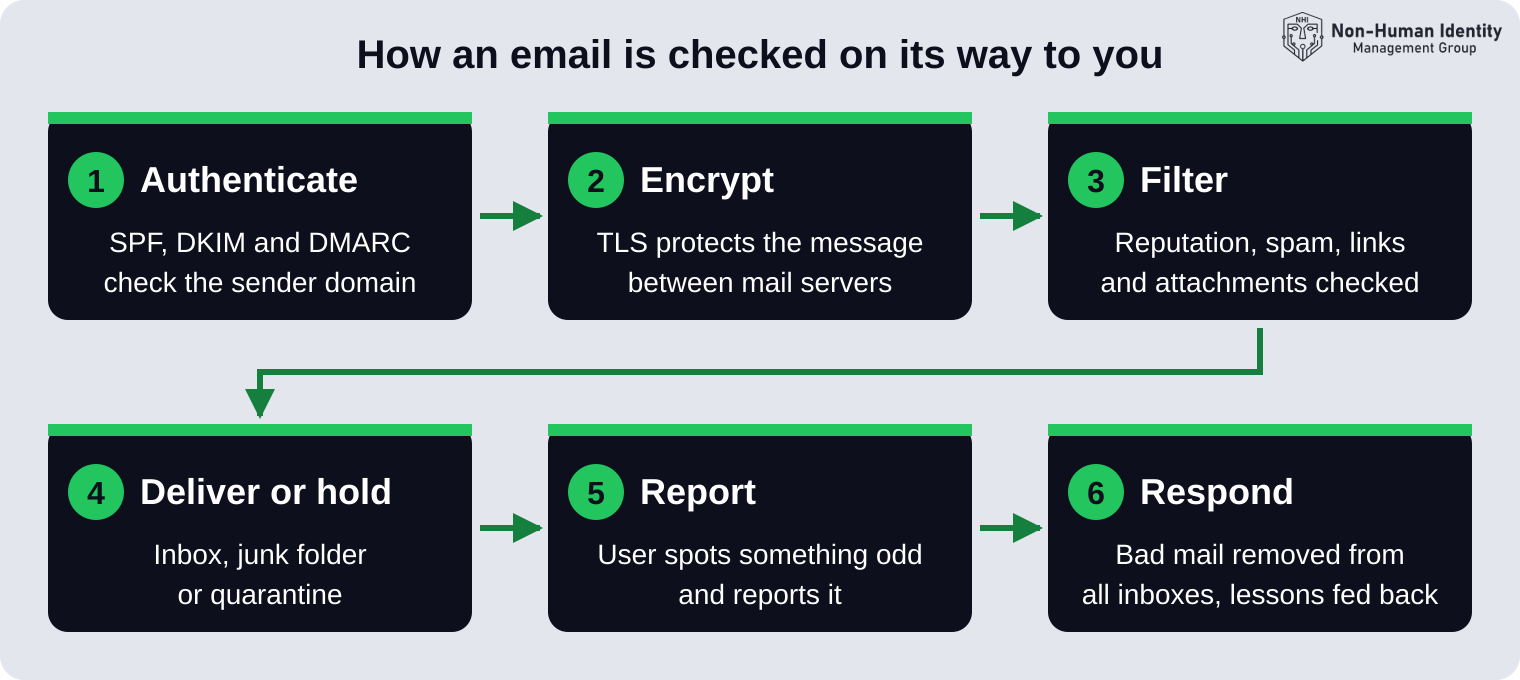
The table below sums up what each layer is for and what it cannot do on its own.
| Layer | What it helps with | What it does not do |
|---|---|---|
| SPF, DKIM, DMARC | Makes it harder to send fake mail from your exact domain, and gives you reports on who sends in your name. | Does not stop look-alike domains (for example one letter changed) or mail from a real but hacked account. |
| TLS, STARTTLS, MTA-STS | Protects messages from being read or changed while they travel between mail servers. | Does not check whether the content is honest or safe. |
| Filtering and gateways | Catches known spam, malware and dangerous links before people see them. | Misses some new or carefully targeted messages, and can occasionally hold genuine mail. |
| User reporting | Finds messages the filters missed, often within minutes. | Depends on people noticing; training alone is not enough.[2] |
| Response | Removes bad mail from all mailboxes and limits harm after a click. | Works best when logging and a plan are in place beforehand. |
Useful distinctions
- Protecting your domain is not the same as protecting your inbox. SPF, DKIM and DMARC on your own domain mainly protect other people from fake mail in your name. Your inbox is protected when your mail service checks other senders' records and honours their DMARC policies, which NCSC recommends.[2]
- Encryption between servers is not end-to-end encryption. TLS protects mail between servers, but the mail services at each end can still read it. Protecting the content itself needs message-level encryption such as S/MIME, which NIST covers under content security.[3]
- "Quarantine" has two meanings. It can be a DMARC policy setting a domain owner asks receivers to apply, or a holding area inside your own mail filter. The idea is similar: hold suspicious mail rather than deliver it.
A worked example
Harbour Bakeries is a fictional chain of six bakeries with 70 staff. Nadia, the office manager, also looks after IT with help from an outside support company.
One Monday, the finance assistant, Tom, receives an email that appears to come from the flour supplier, asking for future payments to go to a new bank account. The sender address looks right. Tom is unsure and clicks the "Report" button in his mail app, as he was shown in a short team briefing.
Nadia looks at the report with the support company. The message headers show it failed the supplier's DMARC check: it did not come from the supplier's real mail servers. The supplier's DMARC policy was only set to monitor, so the mail was delivered rather than blocked. Nadia asks the support company to search for the same message in other mailboxes; two more staff had received it and it is removed. Tom calls the supplier on the phone number in their signed contract, not the one in the email, and the supplier confirms their bank details have not changed.
Nadia then makes three changes. She turns on the mail service's stricter filtering and makes sure it honours other domains' DMARC policies. She asks the support company to set up SPF, DKIM and a monitoring-only DMARC record for the bakery's own domain, with a plan to move to a stricter policy once the reports show all genuine senders pass. And she writes a one-line rule for finance: any change of bank details is confirmed by phone using a known number before anything is paid.
None of this means Harbour Bakeries can no longer be tricked by email. A message from a genuinely hacked supplier account would pass the DMARC check. The phone check and the reporting habit are what give the team a chance to catch that kind of message too.
Myths and misunderstandings
| What people think | What is true |
|---|---|
| Our email provider handles all of this for us. | Providers include useful filtering, but you usually still need to publish SPF, DKIM and DMARC for your own domains, choose filtering settings and set up reporting. NCSC says to protect all your domains, including those on cloud email services.[1] |
| If the sender address looks right, the email is genuine. | The visible "From" line can be faked, and a real account can be hacked. Check unusual requests through a second channel, such as a phone call.[2] |
| Once DMARC is set up, we are done. | A DMARC record set only to monitor ("p=none") reports on failures but asks receivers to take no action. NCSC's plan moves from monitoring to marking spoof mail as spam and then rejecting it.[1] |
| Training people means filters matter less. | NCSC advises against relying on training alone, because no one can spot every phishing email. Filters and training work together.[2] |
| People who click a bad link should be disciplined. | Blame makes people hide mistakes. Quick, blame-free reporting gives the team time to act.[2] |
Key terms
- Phishing
- Using deceptive messages or websites to trick people into revealing credentials, running malware, approving access or sending money.
- Email spoofing
- Making a message appear to come from a trusted sender when it does not.
- Business email compromise (BEC)
- Impersonating a trusted person or domain to manipulate payments, change bank details or extract sensitive information, often without any malware.
- SPF
- A DNS record that lists which systems are permitted to send email on behalf of a domain.
- DKIM
- An email signing method that uses a public key published in DNS so receivers can check a message came from the domain and was not altered.
- DMARC
- A DNS-published policy that tells receiving mail systems how to handle messages that fail authentication and alignment checks, with reports back to the domain owner.
- STARTTLS
- A command that upgrades an existing mail connection to an encrypted TLS connection when both sides support it.
- MTA-STS
- A standard that lets a domain tell sending mail servers to use TLS with a trusted certificate when delivering to it.
- Secure email gateway
- A control layer that inspects email before it reaches users, and can inspect outbound mail, to filter malicious content and enforce policy.
- Quarantine
- Holding a message back from delivery until it can be reviewed or released under policy.
- URL rewriting
- Replacing links in messages with links that pass through a scanning service when clicked.
- Attachment sandboxing
- Opening a suspicious file in an isolated environment to see what it does before it reaches the user.
Common questions
What is the difference between spam and phishing?
Spam is unwanted bulk email, such as unsolicited adverts. Phishing is deliberately deceptive and aims to steal something, such as a password or money. Filters handle both, but phishing is the bigger security risk.
Do I need SPF, DKIM and DMARC if my domain never sends email?
Yes, it is sensible. Criminals can still try to send fake mail from an unused domain, and NCSC advises protecting all your domains.[1] Records can state that the domain sends no mail at all. Our Email Authentication for Beginners page explains how.
Is my email encrypted?
Usually it is encrypted between mail servers using TLS, if both services support it. That protects it on the way, but the services at each end can still read it. Content encryption, such as S/MIME, is a separate step.[3]
Why did a genuine email end up in junk or quarantine?
Filters work on likelihood, so some genuine messages look risky, for example if the sender's SPF or DKIM is wrong. Check quarantine regularly, release genuine mail through the agreed process and tell the sender to fix their records.
What should I do if I clicked a link in a phishing email?
Report it straight away using your organisation's process. If you typed a password, change it and tell IT so they can end active sessions. Reporting quickly is far more useful than staying quiet.[2]
Can an attacker use a real account instead of a fake one?
Yes. If a password is stolen, the attacker can send from the real mailbox and pass every sender check. That is why strong sign-in, such as multi-factor authentication, is part of email security.[2]
First steps
Three things you can do this week:
- Check your domain. Use a free online email security checker, such as the one NCSC mentions, to see whether your domains publish SPF, DKIM and DMARC records.[1] List every domain you own, including unused ones.
- Turn on the protections you already have. In your mail service's admin settings, look for anti-spam, anti-phishing and anti-malware policies, and make sure they apply to every user. We suggest also checking that the service honours other domains' DMARC policies.
- Give people a report button and a phone rule. Make sure everyone knows how to report a suspicious email, and agree that any request to change bank details or make an urgent payment is confirmed by phone using a known number.
Checklist
- We know every domain we own, including ones that never send email.
- Each domain publishes SPF and DMARC, and each sending domain signs mail with DKIM.
- We read our DMARC reports and have a plan to move from monitoring to a stricter policy.
- Our mail service filters spam, malware and dangerous links for every user.
- Our mail service honours other domains' DMARC policies.
- Mail is sent and received over TLS, and we have looked at MTA-STS.
- Staff have a simple, blame-free way to report suspicious email, and get feedback.
- Payment and bank detail changes are always confirmed through a second channel.
- All mailboxes, especially admin ones, use multi-factor authentication.
- Someone checks quarantine regularly and releases genuine mail through an approved, recorded process.
Simple measures that show progress: the share of your domains with a DMARC policy stricter than monitoring, the number of suspicious emails reported each month (more reports is usually a good sign), the time from first report to removal from all mailboxes, and the number of genuine messages wrongly held.
Check your understanding
1. Why can criminals fake the sender of an email so easily?
Answer: the basic rules for sending email (SMTP) were not designed to check who the sender is. SPF, DKIM and DMARC were added later to help receivers spot fakes.
2. What does DMARC add to SPF and DKIM?
Answer: it tells receiving mail services what to do with messages that fail the checks, such as reject them, and sends reports to the domain owner.
3. Does TLS stop phishing emails?
Answer: no. TLS protects messages while they travel between servers. It does not judge whether the content is honest or safe; that is the filter's job.
4. Why is user reporting still needed if you have good filters?
Answer: filters miss some new or carefully targeted messages. Reports let the team find and remove them from every mailbox quickly.
Suggested learning pathway
- For how SPF, DKIM and DMARC work, read Email Authentication for Beginners.
- For the most common email attack, read Phishing for Beginners.
- For payment fraud by email, read Business Email Compromise for Beginners.
- For the human side, read Security Awareness for Beginners.
- For the encryption behind TLS, read TLS and HTTPS for Beginners.
- For the full practitioner view, including gateways, routing and post-delivery removal, see the Email Security Guide.
- For record values and DMARC enforcement in depth, see the DMARC, SPF and DKIM Guide.
Standards and references
- Email security and anti-spoofing. National Cyber Security Centre (NCSC), version 2.0, 7 October 2019. https://www.ncsc.gov.uk/collection/email-security-and-anti-spoofing, accessed 27 Nov 2026.
- Phishing attacks: defending your organisation. National Cyber Security Centre (NCSC). https://www.ncsc.gov.uk/guidance/phishing, accessed 27 Nov 2026.
- SP 800-177 Rev. 1, Trustworthy Email. National Institute of Standards and Technology (NIST), February 2019. https://csrc.nist.gov/pubs/sp/800/177/r1/final.
- RFC 9989, Domain-based Message Authentication, Reporting, and Conformance (DMARC). IETF, RFC Editor, Proposed Standard, May 2026. https://www.rfc-editor.org/info/rfc9989.
- RFC 8461, SMTP MTA Strict Transport Security (MTA-STS). IETF, RFC Editor, Proposed Standard, September 2018. https://www.rfc-editor.org/info/rfc8461.
- Internet Crime Report 2025. Federal Bureau of Investigation, Internet Crime Complaint Center (IC3). https://www.ic3.gov/AnnualReport/Reports/2025_IC3Report.pdf, accessed 27 Nov 2026.
- T1566 Phishing. MITRE ATT&CK, Enterprise, version 20. https://attack.mitre.org/techniques/T1566/, accessed 27 Nov 2026.
Related NHI Mgmt Group resources: Email Quarantine and Release Governance Guide · Email Auto-Forwarding Controls Guide · Email Security Maturity Model