CyberChef is a free web tool that turns scrambled-looking data back into something people can read.
This guide is for students, new security analysts and curious IT staff who have met a strange string of letters in an email or a log. You do not need to write code: CyberChef works by dragging steps into a list.
In short
- CyberChef was made by GCHQ, the UK signals intelligence agency, and is free to use.
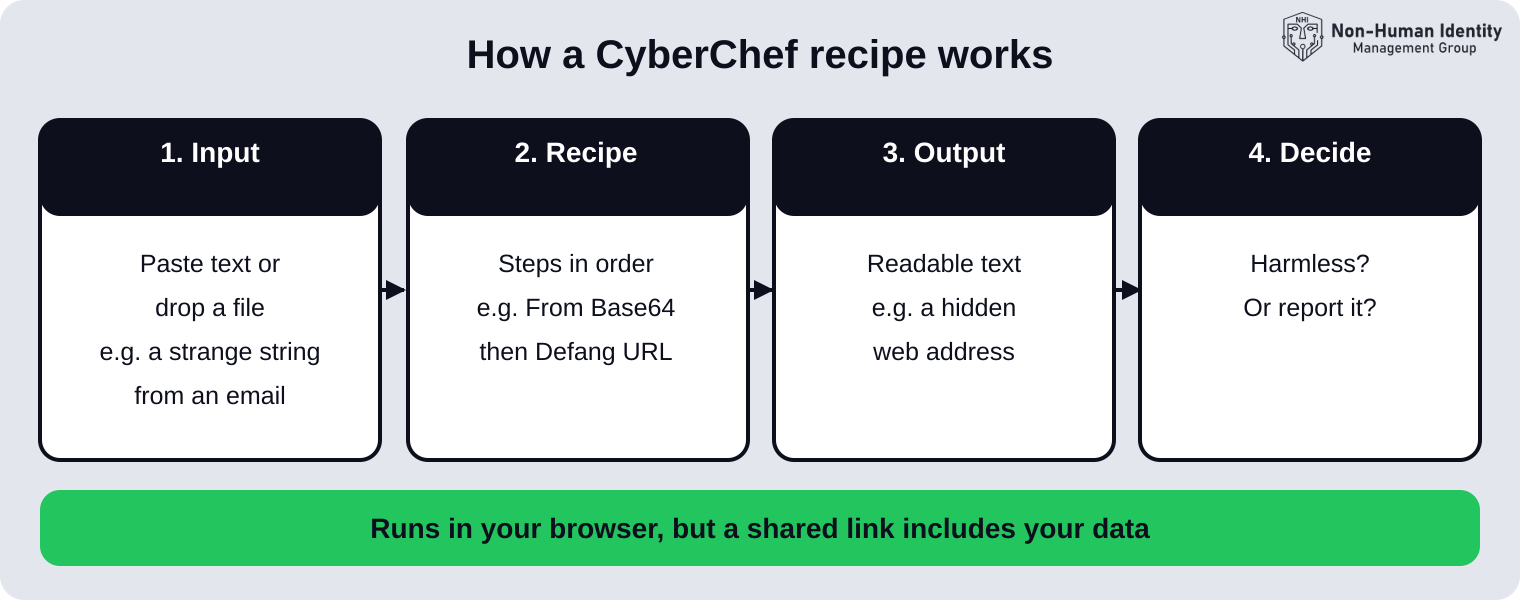
- You paste data in, add steps such as "From Base64", and read the result. Its makers call the list of steps a recipe.
- Its "Magic" feature tries to guess how data was encoded, which helps beginners.
- It runs in your browser, but a shared link can carry your data, so take care with anything sensitive.
What you will learn
- Explain what CyberChef does and why analysts use it.
- Spot data that is probably encoded, such as Base64.
- Check a suspicious link safely, without clicking it.
- Ask whether data is safe to paste before you use any online tool.
- Writing in a different alphabet (encoding)
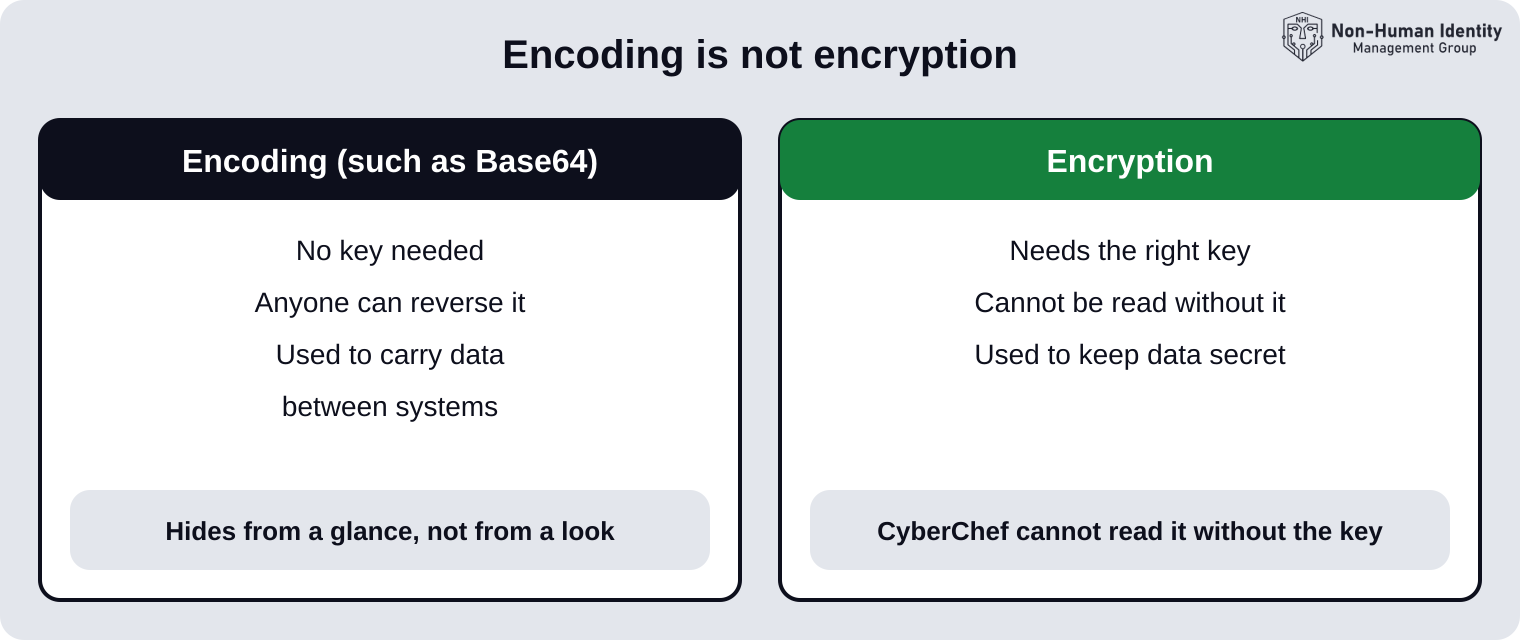
- changing data into another format so systems can carry it; anyone can reverse it.
- List of steps (recipe)
- the steps you line up in CyberChef to change your data, one after another.
- Making a link safe to share (defanging)
- changing a web address slightly, such as hxxp for http, so it cannot be clicked by mistake.
What is CyberChef?
Think of a kitchen. You put in raw ingredients, follow a recipe step by step, and a finished dish comes out. CyberChef uses this same picture: your data is the ingredient, the steps are the recipe, and the result is the dish.
CyberChef is a web tool made by GCHQ. Its makers describe it as a way to carry out "cyber" operations in a web browser.[1] These include encoding (writing data in a different alphabet), decoding, file unpacking and making fingerprints of files, called hashes.[1]
The screen has four parts. There is an input box, an output box and a list of operations. In the middle is the recipe area, where you drag the steps you want.[1] The makers say it was built so that technical and non-technical analysts can work with data without complex tools.[1]
Where the comparison stops working: a cook knows what dish they want before they start. In CyberChef you often do not know what the data is yet. You try a step, look at the result, and try again.
Why does it matter?
Attackers often wrap links, commands and data in encoding so they are harder to read at a glance. Being able to unwrap them quickly helps you decide whether something is harmless or needs reporting.
If you are new to a security team
What could happen: an alert contains a long string of letters, and you close it because you cannot read it.
Check this: you can decode Base64 and spot a hidden web address in a few minutes.
If you are a student
What could happen: you mix up encoding with encryption and give a wrong answer in an exam or interview.
Check this: you can say why Base64 hides nothing from someone who wants to read it.
If you handle IT support tickets
What could happen: a user forwards an odd email, and you click its link to "see what it is".
Check this: you decode and read links in a tool, and never open them on your work machine.
What does it look like?
Here is a made-up example of one small recipe. The input came from a suspicious email.
Example only. All values are made up.
INPUT
aHR0cDovL2xvZ2luLmV4YW1wbGUuaW52YWxpZC9yZXNldD91c2VyPUZBS0U=   (1)

RECIPE
1. From Base64                                                  (2)
2. Defang URL                                                   (3)

OUTPUT
hxxp://login[.]example[.]invalid/reset?user=FAKE                (4)
- Letters, numbers and an equals sign at the end. That ending is a common sign of Base64.
- The first step turns Base64 back into normal text.
- The second step changes the address so it cannot be clicked by mistake.
- In a real email, this line would show where the link really goes, such as a fake sign-in page.
Why this is risky: the email hid a sign-in link inside Base64. A quick glance shows only nonsense, so it may slip past people and some filters.
The safer way: decode it, defang it and report it. The standard behind Base64 says it can hide things from a casual look but gives no real secrecy.[2]
How does it work?
Most CyberChef work follows the same short loop.
- Put the data in. Paste text into the input box or drag a file onto it.[1]
- Try Magic first. The Magic feature tries several ways to find how the data was encoded. If it finds one, a small wand icon appears that you can click.[1]
- Add steps by hand. Search the operations list, such as "From Base64" or "From Hex", and drag steps into the recipe. The result updates as you go, which the makers call auto bake.[1]
- Peel the layers. Data is often wrapped more than once. Keep adding steps until the output reads clearly.
- Save and share with care. You can save a recipe in your browser. You can also copy a link that holds the recipe and the input.[1] That link carries the data too, so do not share it if the data is sensitive.
A worked example
Soren Pereira started as a junior analyst at a security firm two weeks ago. One of the firm's customers is Meadow Gym, a local fitness club.
A gym receptionist forwards an email that says "Your membership payment failed". It has a button, and the link behind it is a long block of letters ending in an equals sign.
Soren does not click it. He thinks of the kitchen: the letters are the raw ingredient, and he needs the right recipe. He pastes them into the firm's own copy of CyberChef and clicks the Magic wand. It suggests Base64.
The output is a web address for a fake sign-in page. He adds a defang step so the address cannot be clicked, and copies it into his ticket.
His mentor, Anil Sorensen, checks the work. "Good. Now tell the email team, so they can block that address," he says. "And never share a CyberChef link for this ticket. The link would hold the gym's email content."
The email team blocks the address. Soren also asks the gym whether anyone clicked the button. One person had, but says they did not type a password. The gym reminds staff to report odd emails, and Soren saves his two-step recipe for next time.
Myths and mistakes
| What people think | What is true |
|---|---|
| Base64 is a kind of encryption. | It is encoding. The standard behind it says it gives no real secrecy.[2] Anyone can reverse it. |
| CyberChef can crack any scrambled data. | It can undo encoding easily. Properly encrypted data needs the right key, and CyberChef does not have it. |
| CyberChef sends my data to a server. | Its makers say all processing happens in your browser, on your own computer.[1] A shared link, though, carries the data. |
| Any website calling itself CyberChef is fine to use. | Use the official site or a copy your team runs. An unknown copy could be changed to collect what you paste. |
| If Magic finds nothing, the data is harmless. | Magic tries common encodings. It may miss unusual ones, so ask a colleague. |
What can I do this week?
- Open the official CyberChef site and find the input, output, operations and recipe areas.
- Encode your own name with "To Base64", then decode it again with "From Base64".
- Try the Magic wand on a Base64 string you made yourself.
- Ask your team whether they run their own copy of CyberChef for work data.
- Practise defanging a harmless web address, such as example.com.
Checklist
- I can explain the difference between encoding and encryption.
- I can spot likely Base64 and decode it in CyberChef.
- I use the official CyberChef site or my team's own copy.
- I do not paste sensitive work data into tools my team has not approved.
- I never share a CyberChef link that holds sensitive data.
- I defang addresses before I paste them into tickets or chat.
- I save useful recipes so I can repeat my steps.
Common questions
Is CyberChef free and safe to use?
It is free, released under an open-source licence by GCHQ. Its makers say processing happens in your browser, not on their server. For work data, many teams prefer to run their own copy, which the makers say you can download and host on a closed network.
Do I need to know how to code?
No. You build a recipe by dragging steps into a list and changing a few options. Knowing what common encodings look like helps more than coding. Over time you learn which steps to try first for each kind of data.
How do I know if text is Base64?
Often, but not always, it is a long run of capital letters, small letters, numbers, plus signs and slashes. It may end with one or two equals signs. The easiest test is to try "From Base64" and see whether readable text comes out.
Can I use CyberChef on suspicious files?
Yes, with care. You can drop a file in to look at its contents or work out its fingerprint, called a hash. Opening the file in CyberChef does not run it. Still, follow your team's rules for handling suspicious files.
What is the difference between CyberChef and a malware sandbox?
CyberChef only changes and displays data. It does not run programs. A sandbox is a closed-off system that runs a suspicious file to watch what it does. Analysts often use CyberChef first to read hidden text, then a sandbox if they need to see behaviour.
Where next?
Ready for the detail? Read the practitioner guide: CyberChef for Analysts Guide. It goes further into defender use cases, safe deployment for teams and the alternatives analysts use.
Also useful:
- Encoding, Encryption and Hashing for Beginners
- Malware Analysis for Beginners
- Indicators of Compromise for Beginners
- Security Operations Centres for Beginners
Related NHI Mgmt Group resources: Encoding, Encryption and Hashing · SOC Analyst for Beginners · Command and Control for Beginners
Key terms
- CyberChef
- A free web tool from GCHQ for decoding, converting and analysing data in the browser.
- Encoding
- Changing data into another format so systems can carry it; anyone can reverse it.
- Encryption
- Scrambling data so only someone with the right key can read it.
- Hashing
- Making a short fingerprint of data, used to check or identify it.
- Deobfuscation
- Undoing the tricks used to make data or code hard to read.
- Defanging
- Changing a link slightly so it cannot be clicked by mistake.
Sources and further reading
- CyberChef: The Cyber Swiss Army Knife (README). GCHQ, GitHub. https://github.com/gchq/CyberChef, accessed 28 Nov 2026. Official site: https://gchq.github.io/CyberChef/.
- RFC 4648: The Base16, Base32, and Base64 Data Encodings. S. Josefsson, IETF, October 2006 (Proposed Standard). https://www.rfc-editor.org/rfc/rfc4648, accessed 28 Nov 2026.