A ClickFix attack is a fake web check that tricks you into pasting and running a harmful command yourself.
This guide is for anyone who uses a computer for work or at home and wants to spot this trick. You do not need any technical skill to be targeted: the attack only needs you to follow three keyboard steps.
In short
- A fake "I am not a robot" box or fake error message asks you to press some keys to "verify" or "fix" something.
- Clicking the box quietly copies a hidden command. Pasting it runs that command on your computer.
- The command usually downloads malware that steals saved passwords and logged-in sessions.
- A genuine human check asks you to click or pick pictures. If a web page asks you to paste anything into your computer, close it and tell IT.
What you will learn
- Spot a fake "prove you are human" page.
- Explain why pasting a command is the moment that matters.
- Check what to do if you already followed the steps.
- Ask your IT team about settings that make this trick harder.
- Human check (CAPTCHA)
- a small test on a website, like ticking a box or picking pictures, that tries to tell people from bots.
- Copy holder (clipboard)
- the hidden store on your computer that holds whatever you last copied, ready to paste.
- Command box (Run box or terminal)
- a window where typed or pasted text is run as an instruction to the computer.
What is a fake CAPTCHA or ClickFix attack?
Think of a fake ticket inspector at a station gate. To "check your ticket", he hands you a sealed parcel and asks you to carry it through the staff door. You get through, and so does his parcel.
A ClickFix attack works the same way. A web page shows a fake CAPTCHA, the "I am not a robot" box you see on many sites. Some versions show a fake error with a "Fix it" button instead.
When you click, the page secretly copies a command to your clipboard (the place that holds what you last copied). It then shows "verification steps". These tell you to open a command box, paste and press Enter.[1]
You never see the command, so it feels like a harmless check. In fact you have just told your computer to fetch and run harmful software, called malware.
This is a form of social engineering: it tricks the person, not the technology. Because you start the command yourself, some security tools see a normal user action.
Where the comparison stops working: a parcel can be opened and checked at the gate. A pasted command runs straight away, and the harm can start before you notice anything.
Why does it matter?
This trick has spread fast. One security company says it grew by over 500% in the first half of 2025. In its data, only phishing was a more common way in.[2]
If you work at a computer all day
What could happen: the malware steals your saved work passwords and logged-in sessions, and someone else signs in as you.
Check this: if a page asks you to press keys and paste, close it and report it.
If you run a small business
What could happen: one paste on one laptop gives criminals a way into your email, bank or customer data.
Check this: ask your IT supplier whether staff laptops can block the Run box for people who do not need it.
Next: Malware for Beginners
If you use a computer at home
What could happen: the malware takes passwords saved in your browser, including email and shopping accounts.
Check this: treat any "press these keys to continue" page as a scam, even on a site you know.
Next: Phishing for Beginners
What does it look like?
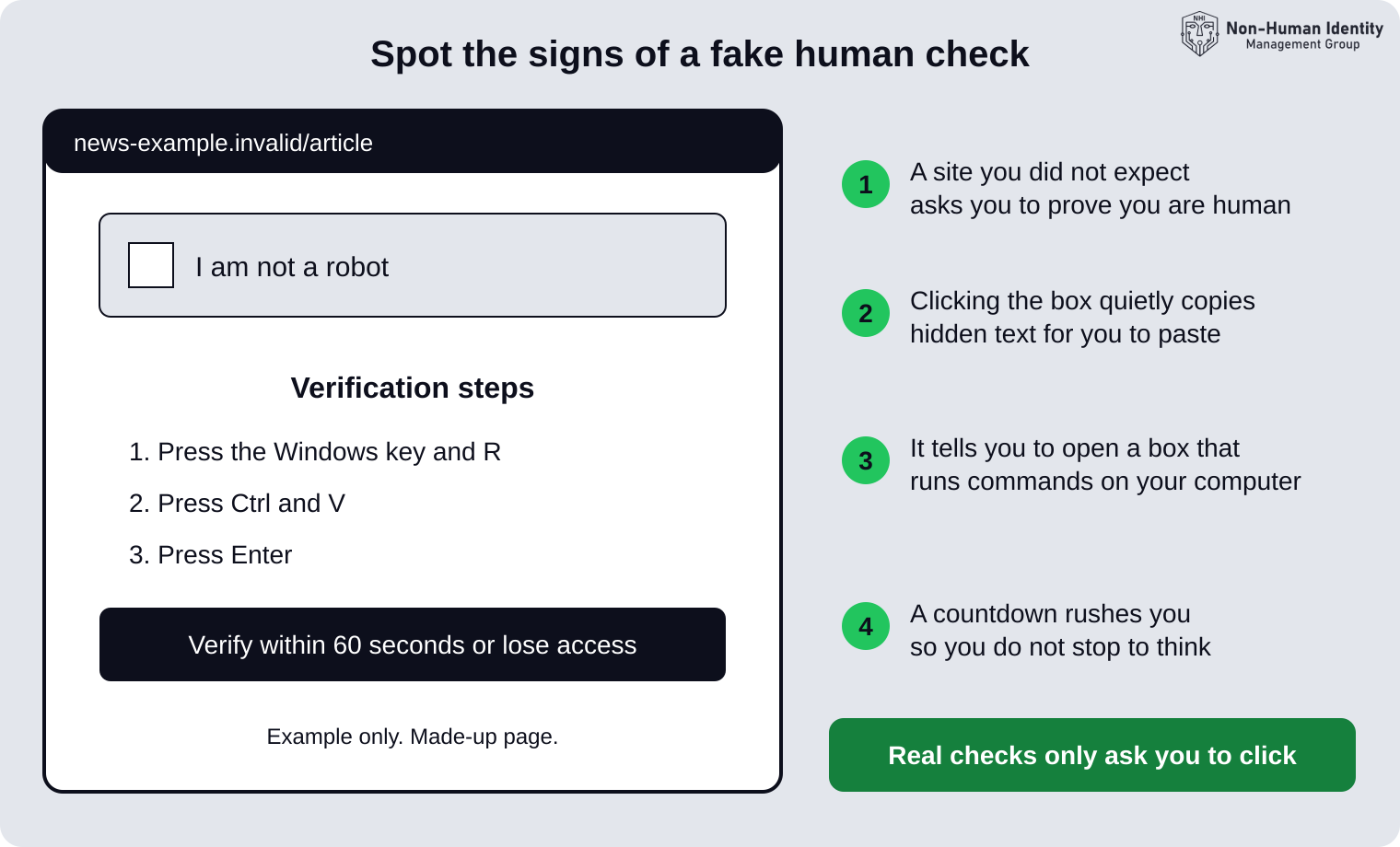
Here is a made-up fake check, written out as plain text. The real ones copy the look of well-known human checks.
Example only. All values are made up.
news-example.invalid/article                (1)
[ ] I am not a robot                        (2)
Verification steps:                         (3)
  1. Press Windows key + R
  2. Press Ctrl + V
  3. Press Enter
Ray ID: EXAMPLE-0000                        (4)
Complete within 60 seconds or lose access   (5)
- A page you reached from a link, advert or search result, not one you went looking for.
- A tick box that looks normal. Clicking it copies a hidden command.
- Keyboard steps that open a command box, paste the command and run it.
- A made-up code to make the page look official.
- A countdown to rush you.
Why this is risky: steps 1 to 3 run whatever the page copied. On a Mac, the same trick asks you to open Terminal and paste.[1]
The safer way: close the tab. A genuine human check asks you to click or pick pictures, not to paste anything into your computer.
How does it work?
This is a simple view so you can spot it. It is not a guide to doing it.
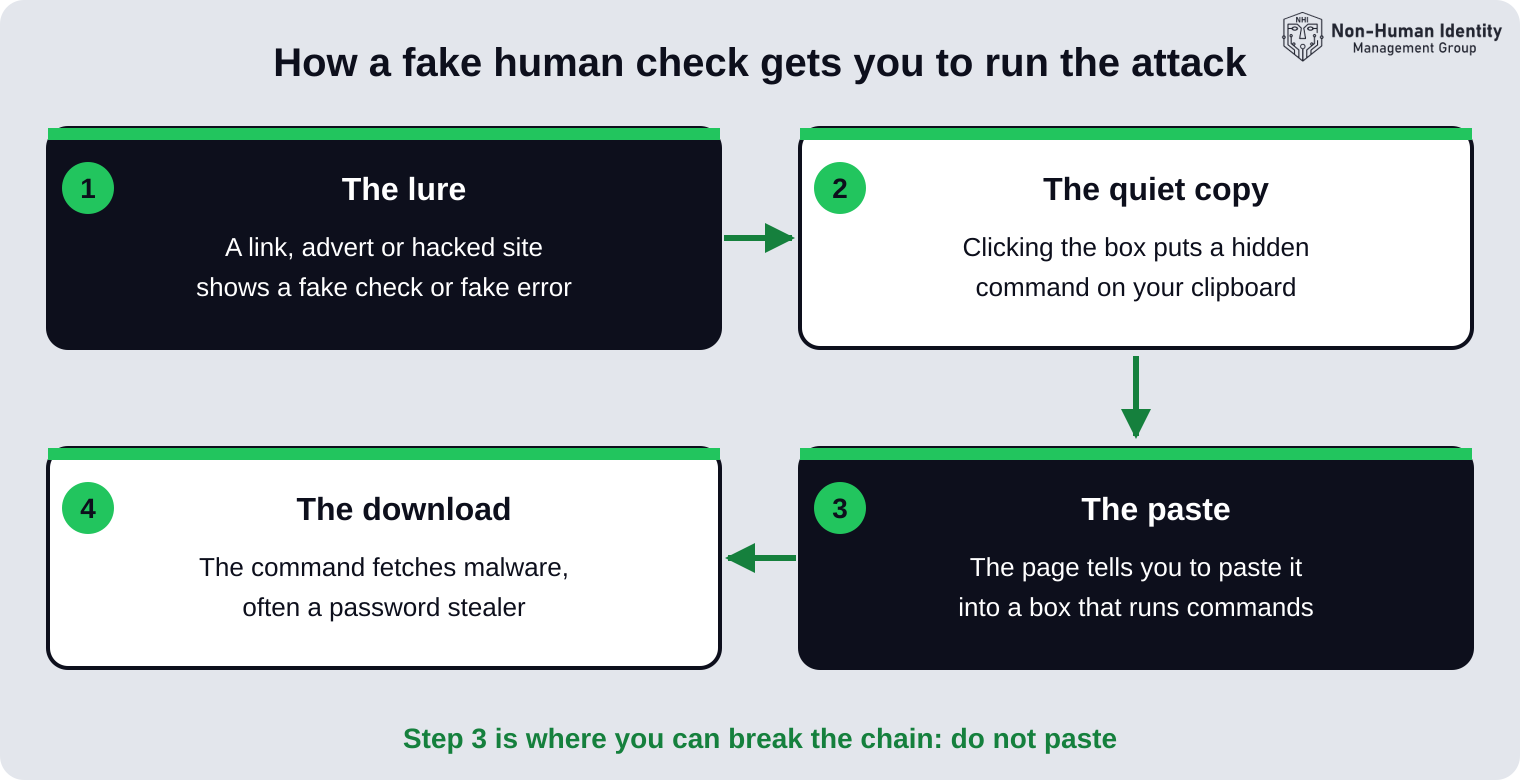
- You land on the page. Links in emails, adverts in search results and real websites that have been hacked can all show the fake check.[1]
- You click the box. The page quietly places a command on your clipboard, where you do not see it.
- You follow the steps. The keys open a command box, paste the hidden text and run it.[3][5]
- The command fetches malware. It is often an infostealer, which collects saved passwords and logged-in sessions. Some versions install tools that let criminals control the computer remotely.[1]
- Criminals use what they took. Stolen sessions can let them into accounts without your password. In some cases this has led to ransomware, which locks an organisation's files.[3]
Microsoft first saw this trick between March and June 2024. It now sees it used by many criminal groups.[1] US agencies have reported a ransomware group using fake CAPTCHA pages to get in.[3]
A worked example
This story is made up to show how it can happen.
Georgia Pappas runs the office at a small accountancy firm. On Monday morning she searches for a free invoice template. She clicks a result that looks like a design blog.
The page fades and a box appears: "I am not a robot". She ticks it. A new message pops up with "verification steps". Press the Windows key and R. Press Ctrl and V. Press Enter. A timer counts down from 60.
Georgia has ticked hundreds of these boxes. She has never had to press keys before. She remembers a short talk from her IT supplier: "A human check should not need your keyboard." She closes the tab instead.
She does not paste anything anywhere, even to look at it. She writes down the web address and the time, and sends a screenshot to her IT supplier.
The supplier checks her laptop. There is no sign the command ran. They block the site for the whole office. They also turn off the Run box on staff laptops that do not need it. Microsoft suggests this as one way to make the trick harder.[1]
A week later, a colleague gets the same kind of page on a different site. Because of Georgia's report, he already knows what it is. He closes it too.
What made the difference: Georgia noticed that the check wanted her keyboard, not just her mouse, and she stopped before step 3.
Myths and mistakes
| What people think | What is true |
|---|---|
| It is only a CAPTCHA, so it is safe. | A real CAPTCHA asks you to click or pick pictures. One that asks you to paste into your computer is a trick. |
| I did not download anything, so I am fine. | The pasted command does the downloading for you. Nothing shows up as a file you saved. |
| Only dodgy websites show these. | Criminals also inject fake checks into real websites that they have hacked.[1] |
| Macs are safe from this. | Versions aimed at Macs ask you to paste into Terminal and install password-stealing malware.[1] |
| If I pasted it but nothing happened, it did not work. | Malware often runs quietly. Tell IT straight away and change your passwords from a different device. |
What can I do this week?
- Tell your family or team the one rule: a website should not ask you to paste anything into your computer.
- Ask your IT team or supplier whether the Run box can be turned off for people who do not need it.
- Check that security updates and virus protection are turned on.
- Keep your IT help contact details where you can find them fast.
Checklist
- I know a genuine human check only asks me to click or pick pictures.
- I close any page that asks me to press the Windows key and R, open Terminal, or paste a command.
- I know a countdown on a check page is a pressure trick.
- I know who to tell at work if I see one of these pages.
- I know that if I did paste, I should report it at once and change passwords from another device.
- My computer gets security updates automatically.
Common questions
What should I do if I already pasted the command?
Report it straight away to your IT team, or get help from a trusted computer service at home. Disconnect the computer from the internet if they tell you to. Then change your important passwords from a different, clean device and sign out of other sessions.
Why does the page need me to paste the command?
Because it helps the attack slip past checks. Many security tools look closely at downloaded files and email attachments. When you paste and run a command yourself, the computer may treat it as a normal action by you, so it gets less attention.
Are all CAPTCHAs dangerous now?
No. Most CAPTCHAs are genuine tests that stop bots from abusing a website. They ask you to tick a box, pick pictures or type letters into the page. The warning sign is a request to use your keyboard to open something on your own computer.
Where do I report it in the UK?
At work, tell your IT or security team first. If you lost money or data at home, report it to Report Fraud in England, Wales or Northern Ireland, or to Police Scotland in Scotland.[4] Tell your bank if any payment details may be affected.
Where next?
Ready for the detail? Read the practitioner guide: ClickFix and Fake CAPTCHA Paste-and-Run Attacks Guide. It goes further into how security teams detect these pastes, which computer settings reduce the risk, and how the trick is used by different criminal and state-backed groups.
Also useful:
- Social Engineering for Beginners
- Malware for Beginners
- Infected Computer for Beginners
- Phishing for Beginners
Related NHI Mgmt Group resources: Infostealer Threat Guide · Social Engineering Guide · CAPTCHA and bot challenges
Key terms
- ClickFix
- A social engineering trick that persuades a user to paste and run a harmful command, usually copied to the clipboard by a fake web page.
- CAPTCHA
- A small test on a website that tries to tell people from automated bots.
- Tricking a person into revealing information or taking a risky action, rather than breaking the technology.
- Infostealer
- Malware that collects saved passwords, browser session cookies and other secrets, then sends them to criminals.
- Malware
- Software designed to harm a device or steal from it, for example by taking data or locking files.
- PowerShell
- A built-in Windows tool for running commands, which ClickFix pages often misuse to download malware.
Sources and further reading
- Think before you Click(Fix): Analyzing the ClickFix social engineering technique. Microsoft Threat Intelligence, Microsoft Security Blog, 21 August 2025. https://www.microsoft.com/en-us/security/blog/2025/08/21/think-before-you-clickfix-analyzing-the-clickfix-social-engineering-technique/, accessed 28 Nov 2026.
- ESET Threat Report H1 2025 (ClickFix up by over 500% compared with H2 2024; second most common attack vector after phishing in ESET telemetry). ESET, 26 June 2025. https://www.eset.com/blog/en/research/eset-threat-report-h1-2025/, accessed 28 Nov 2026.
- #StopRansomware: Interlock (AA25-203A). Cybersecurity and Infrastructure Security Agency (CISA), FBI and partners, 22 July 2025. https://www.cisa.gov/news-events/cybersecurity-advisories/aa25-203a, accessed 28 Nov 2026.
- Report Fraud service goes live. Report Fraud (City of London Police), 4 December 2025. https://www.reportfraud.police.uk/news/report-fraud-service-goes-live/, accessed 27 Nov 2026.
- User Execution: Malicious Copy and Paste (T1204.004). MITRE ATT&CK. https://attack.mitre.org/techniques/T1204/004/, accessed 28 Nov 2026.