A famous vulnerability is a software flaw so widespread and so badly abused that it made headlines.
This guide is for students, curious readers and anyone who has seen names like Heartbleed or Log4Shell in the news. You do not need to be technical to be affected: these flaws hit hospitals, shops and websites that ordinary people use every day.
In short
- A vulnerability is a weak spot in software that an attacker may be able to use.
- Heartbleed, EternalBlue and Log4Shell became famous because the software was everywhere and the flaw was easy to abuse.
- In each case a fix existed, but many systems stayed open because nobody updated them in time.
- The lessons are simple: know what software you run, install security updates quickly and replace software that no longer gets them.
What you will learn
- Explain what made three well-known flaws so serious.
- Spot the common pattern behind most famous vulnerabilities.
- Check whether your own devices and software still get security updates.
- Ask your IT helper or supplier the right questions when the next big flaw hits the news.
- Weak spot (vulnerability)
- a mistake in software that someone may be able to use to cause harm.
- Fix (patch)
- an update from the software maker that repairs a weak spot.
- Flaw number (CVE)
- a public ID number given to a known weak spot, so everyone talks about the same one.
What is a famous vulnerability?
Think of a safety recall on a popular car. The fault might be small, like a faulty brake part. But if millions of cars share that part, it becomes national news.
Software works the same way. Most apps are built from shared parts, so one mistake in a popular part can sit inside thousands of products at once. A weak spot like this is called a vulnerability. When attackers use it, they are said to exploit it.
Each known vulnerability gets a public ID number, called a CVE. It is made of the letters CVE, a year and a number. Many famous ones also get a catchy nickname. The nickname helps the news, but the ID number is what IT teams use to check their systems.
Where the comparison stops working: a car recall letter arrives in your post. Software owners often get no letter at all. Many only learn about a flaw from the news, and some never hear about it.
Why does it matter?
Famous flaws are not just history. Old, unfixed copies of the same software can stay online for years, and the lessons repeat with each new flaw.
The cost can be large. In May 2017 the WannaCry attack, which spread using the EternalBlue flaw, infected at least 81 of the 236 hospital trusts in England. NHS England estimated that over 19,000 appointments were cancelled.[4]
If you are a student
What could happen: you meet these names in every course and interview, and mix up what each flaw did.
Check this: learn the pattern behind each story, not just the nickname.
If you run a small business
What could happen: an old computer or website plug-in that nobody updates becomes the way in.
Check this: ask who installs security updates on your computers and website, and how fast.
If you are new to IT work
What could happen: a big flaw hits the news and you are asked "are we affected?" with no list to check.
Check this: find out where your team keeps its list of software and versions.
What does it look like?
Here is a made-up "story card" that sums up a famous flaw. You can use the same card to learn any new one.
Example only. All values are made up.
FLAW STORY CARD
Nickname:      "Example Bleed"             (1)
ID number:     CVE-YEAR-NUMBER (FAKE)      (2)
Shared part:   EXAMPLE-library v1.0 to 1.4 (3)
What it lets:  strangers read hidden data  (4)
Fix:           update to v1.5              (5)
Why famous:    used by many websites, fix slow to arrive on many of them
- The nickname the news uses, such as Heartbleed.
- The public ID. In a real file, this line would contain the CVE number IT teams search for.
- The shared software part and the versions that have the flaw.
- What an attacker may be able to do, in plain words.
- The version that repairs it. Older versions stay open until someone updates them.
Why this is risky: the flaw lives in a shared part, so the owner of a website or device may not know it is inside. They cannot fix what they do not know they have.
The safer way: keep a list of the software and shared parts you run, with their versions. When a new flaw hits the news, you can check the list in minutes rather than guess.
How does it work?
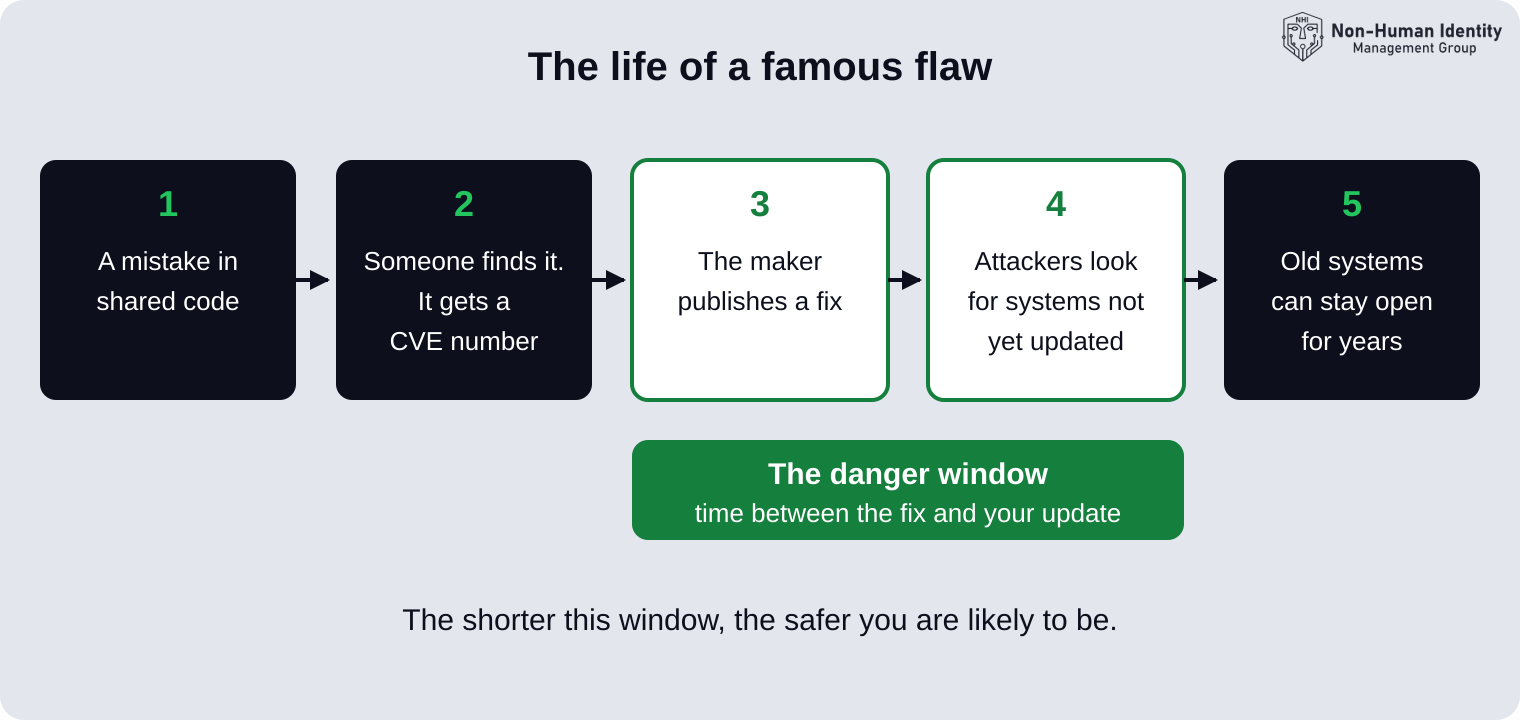
Most famous vulnerabilities follow the same five steps.
- A mistake is made. A programmer writes code with a small error, often in a part that many other products later reuse.
- Someone finds it. A researcher, the maker or an attacker spots the error. It gets a CVE number when it is reported.
- A fix is published. The maker releases an update, called a patch, and a warning.
- The race begins. Attackers look for systems that have not installed the patch yet. Owners rush to find out if they run the affected part.
- The long tail. Systems that are never updated, or that run software too old to get updates, can stay open for years.
Here are three of the best-known stories.
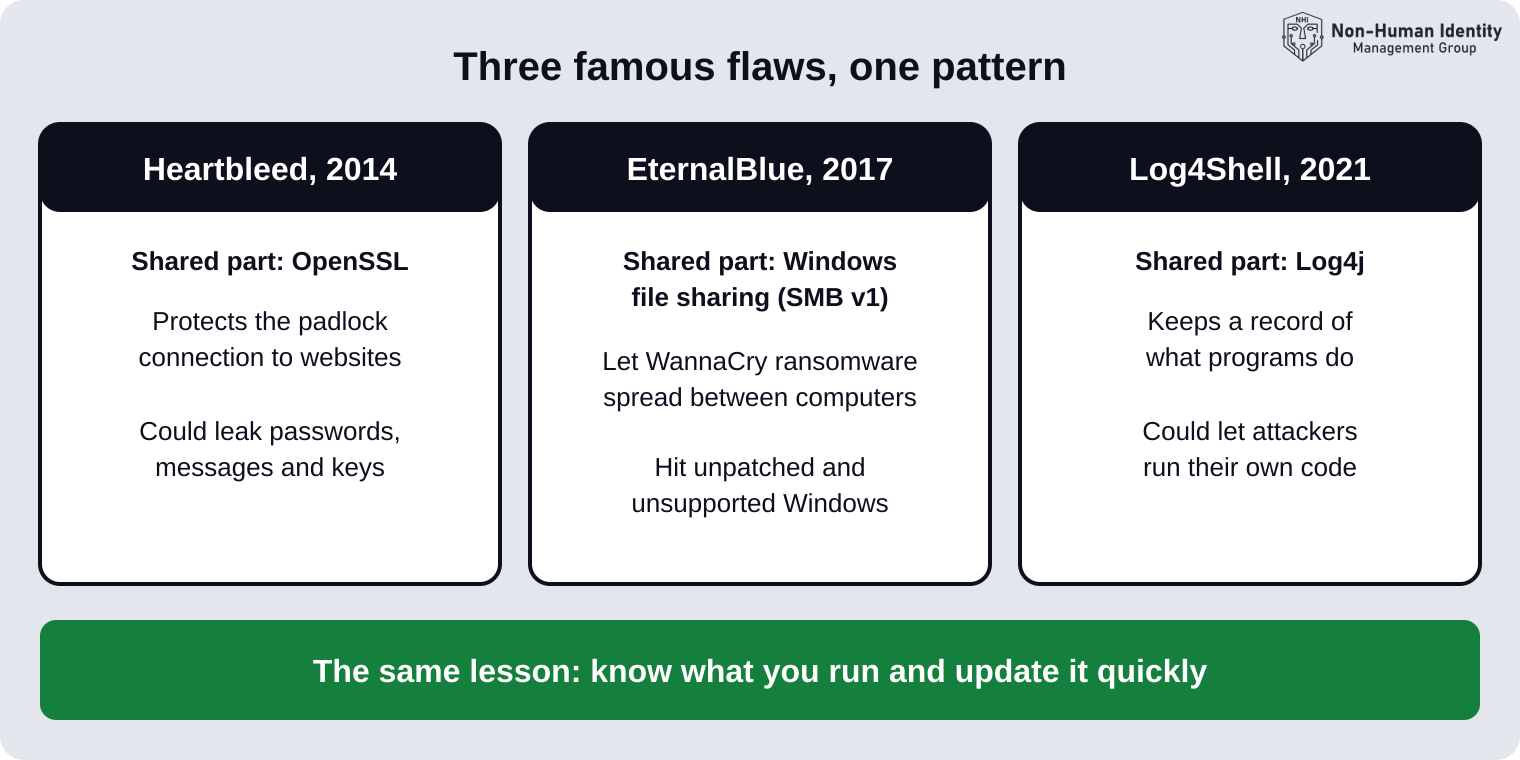
Heartbleed (2014). OpenSSL is a free toolkit that many websites use to protect the padlock connection in your browser. A flaw in some versions let anyone on the internet read pieces of the server's memory. That memory could hold passwords, private messages and the secret keys behind the padlock itself. It was made public on 7 April 2014. The fix was to update OpenSSL, then replace the website's keys and ask users to change passwords.[1]
EternalBlue and WannaCry (2017). Windows has a file-sharing feature called SMB. In March 2017 Microsoft published a critical fix for flaws in the old version of SMB. The worst of them could let an attacker run their own code on a computer, often without a password.[2] In May 2017 WannaCry ransomware used this flaw to spread. Ransomware is harmful software that locks files and demands payment. The UK's National Audit Office found that infected NHS organisations were running unpatched or unsupported Windows. It said basic IT security could have prevented the attack.[4]
Log4Shell (2021). Log4j is a free software part that many programs use to keep a record of what they do. A flaw let an attacker who could get certain text into those records make the program run code of the attacker's choosing. The maker rated it 10 out of 10, the highest score.[3] The UK's National Cyber Security Centre called it potentially the most severe computer vulnerability in years. Because Log4j sat inside so many products, it could be in devices people used without knowing.[5]
A worked example
Amara Whitlock runs a small, fictional bookkeeping firm with eight staff. Yusuf Gallardo, a freelance IT helper, looks after its computers and website.
One Monday Amara hears about a new flaw on the radio. The presenter calls it "the next Log4Shell". She messages Yusuf: "Are we affected?"
Amara remembers the car recall picture. A recall only matters if your car has the faulty part. So the first question is not "how bad is it?" but "do we have it?"
Yusuf opens the simple list he keeps of every computer, the website and the main apps, with their versions. He searches the maker's warning for the CVE number and the affected versions.
The office computers do not use the affected part. The website's booking plug-in does. The plug-in maker has already published a fixed version.
Yusuf installs the update that afternoon and checks the website still works. He then looks at the website's records for strange requests since the flaw was announced. He finds nothing unusual in the records available to him.
While he is there, Yusuf spots one old laptop that no longer gets security updates. Amara agrees to replace it, because no future fix will ever reach it.
The next day Amara asks Yusuf to turn on automatic updates wherever they are offered. The list made a scary headline into a two-hour job.
Myths and mistakes
| What people think | What is true |
|---|---|
| Famous flaws are old news and do not matter now. | Unpatched copies can stay online for years, and new flaws follow the same pattern. |
| Only big companies get hit. | WannaCry hit GP practices as well as large hospitals.[4] Attackers often scan for any unpatched system, whatever its size. |
| If I have never heard of the software, I do not use it. | Shared parts like Log4j sit inside other products, so you may run them without knowing.[5] |
| Installing the update is always the whole fix. | Sometimes you must do more. After Heartbleed, sites were told to replace their keys and users to change passwords.[1] |
| A catchy name means a flaw is the most dangerous. | Names help the news. Check the CVE details and whether attackers are using it. |
What can I do this week?
- Turn on automatic updates on your phone, laptop and router.
- Find any device or app that no longer gets security updates, and plan to replace it.
- Ask your IT helper or supplier how quickly they install urgent security fixes.
- Start a simple list of your devices, website and main apps, with their versions.
- Pick one famous flaw and fill in a story card for it.
Checklist
- Automatic updates are on wherever they are offered.
- Every device and app in use still gets security updates from its maker.
- We keep a list of our software and versions, and someone owns it.
- Someone checks the news and maker warnings for flaws in what we run.
- Urgent security fixes are installed quickly, with a named person responsible.
- Suppliers who run our website or systems have agreed how fast they patch.
- After a big flaw, we check whether extra steps are needed, such as changing passwords.
Common questions
Why do some vulnerabilities get names?
A name makes a flaw easier to talk about and remember. Researchers sometimes give one, often with a logo or website, as happened with Heartbleed. The name does not change the risk. IT teams still use the CVE number to look up details and check whether their systems are affected.
Is a famous vulnerability the same as a zero day?
Not always. A zero day is a flaw attackers use before the maker has a fix. Many famous flaws, like EternalBlue, did most of their damage after a fix existed, because systems were not updated. See Zero Day Vulnerabilities for Beginners.
How do I know if a flaw in the news affects me?
Check whether you run the affected software and version. For home users, keeping devices updated covers most cases. Businesses should compare the maker's warning with their software list. Ask your IT helper or supplier if you are unsure, and keep the CVE number handy.
Why didn't everyone just install the fix?
Updating takes time, testing and sometimes downtime. Some owners did not know they ran the affected part. Others ran software too old to get the fix at all. The NHS report on WannaCry found unpatched and unsupported Windows systems were the problem.
Where can I see which flaws attackers are using now?
The US cyber agency CISA keeps a public list of flaws known to be used in real attacks. Many teams use it to decide what to fix first. See The CISA KEV Catalogue for Beginners for a plain guide to it.
Where next?
Ready for the detail? Read the practitioner guide: Log4Shell (CVE-2021-44228) Guide. It goes further into how to find affected software, the versions and fixes, and how teams check for signs of attack.
Also useful:
- EternalBlue (MS17-010)
- Exploited Vulnerability Breaches
- Zero Day Vulnerabilities for Beginners
- Patch Management for Beginners
- Vulnerability Management for Beginners
Related NHI Mgmt Group resources: CVE and CVSS for Beginners · Vulnerability Management for Beginners · Famous Malware Outbreaks for Beginners
Key terms
- Vulnerability
- A weak spot in software or a system that someone may be able to use to cause harm.
- Exploit
- A way of using a vulnerability to make a system do something it should not.
- CVE
- A public ID number for a known vulnerability, so everyone refers to the same flaw.
- Patch
- An update from the software maker that fixes a flaw.
- Software library
- A ready-made, shared piece of code that many programs reuse.
- End-of-life software
- Software the maker no longer updates, so new flaws in it stay unfixed.
- Ransomware
- Harmful software that locks files or systems and demands payment.
Sources and further reading
- The Heartbleed Bug. Synopsys (Codenomicon). https://heartbleed.com/, accessed 28 Nov 2026.
- Microsoft Security Bulletin MS17-010: Security Update for Microsoft Windows SMB Server (4013389). Microsoft, 14 March 2017. https://learn.microsoft.com/en-us/security-updates/securitybulletins/2017/ms17-010, accessed 28 Nov 2026.
- Apache Log4j Security Vulnerabilities (CVE-2021-44228). Apache Logging Services, Apache Software Foundation. https://logging.apache.org/security.html, accessed 28 Nov 2026.
- Investigation: WannaCry cyber attack and the NHS. National Audit Office, October 2017. https://www.nao.org.uk/reports/investigation-wannacry-cyber-attack-and-the-nhs/, accessed 28 Nov 2026.
- Log4j vulnerability: what everyone needs to know. National Cyber Security Centre, 14 December 2021. https://www.ncsc.gov.uk/information/log4j-vulnerability-what-everyone-needs-to-know, accessed 28 Nov 2026.