A malware outbreak is when harmful software spreads quickly to very many computers at once.
This guide is for students, newcomers to security and anyone curious about the attacks they hear named in the news. It tells six famous stories in plain words. You do not need to work in IT: the lessons from these outbreaks are the same habits that protect a home laptop or a small office today.
In short
- Famous outbreaks include the Morris worm, ILOVEYOU, Conficker, Mirai, WannaCry and NotPetya.
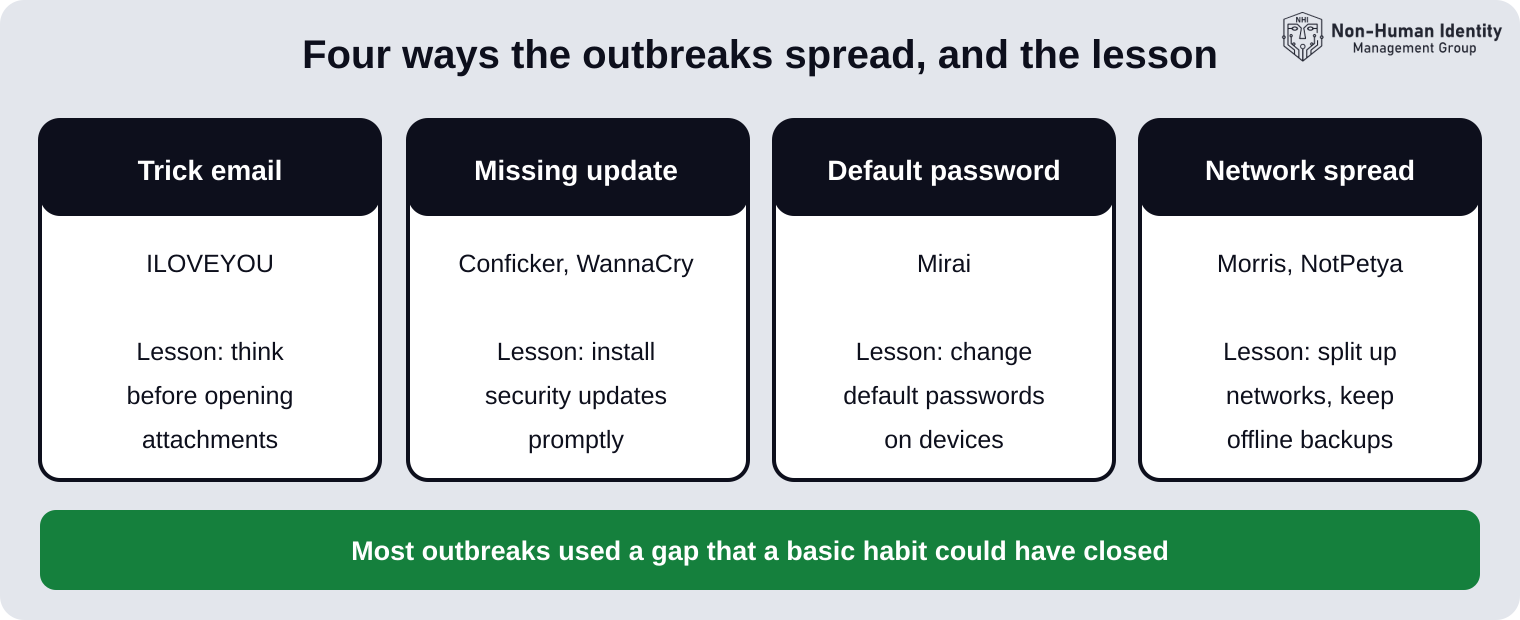
- Most spread through a few gaps: trick emails, missing updates, default passwords and flat networks.
- Each one taught a lesson that defenders still use, such as installing updates and changing default passwords.
- Knowing the stories helps you explain why basic security habits matter.
What you will learn
- Name six famous outbreaks and say roughly when they happened.
- Explain the main ways each one spread.
- Link each outbreak to a habit that lowers the risk of the same thing today.
- Check your home or office for the same gaps.
- Harmful software (malware)
- any program made to damage, spy on or take control of a device.
- Self-spreading program (worm)
- malware that copies itself from one computer to the next without anyone clicking anything.
- Fix from the maker (security update)
- a free update that closes a known weak spot in software.
What is a malware outbreak?
Think of the famous epidemics in medical history. Each one spread in its own way, and each taught doctors a new habit, like hand washing or clean water.
Malware outbreaks work the same way. Malware is harmful software. Usually it hits one victim at a time. In an outbreak, it spreads so fast that thousands of computers are hit within days.
Many outbreaks are caused by a worm, which is malware that copies itself from one computer to the next on its own. Others spread because people open a file they trust, or because devices still use the password they came with.
Where the comparison stops working: a disease spreads by chance. Malware is written by people, and some outbreaks were aimed at chosen targets before they spread much further.[6]
Why does it matter?
Outbreaks show how one gap can hurt real services. In May 2017, WannaCry affected at least 81 of the 236 NHS trusts in England. An estimated 19,000 or more appointments were cancelled.[5] The same gaps still exist in many homes and offices.
If you are studying cyber security
What could happen: you learn the names but miss the pattern behind them.
Check this: for each outbreak, write down how it got in and which habit would have helped.
Next: Malware for Beginners
If you run a small business
What could happen: one old, unpatched computer lets a worm reach every machine in the office.
Check this: ask whether every computer gets security updates, including the old one in the back room.
Next: Ransomware for Beginners
If you have smart devices at home
What could happen: a camera or router with its factory password is quietly taken over.
Check this: change the default password on every device that connects to the internet.
Next: Botnets for Beginners
What does it look like?
A good way to use these stories is as a quick self-check. Here is a made-up card for a small office.
Example only. All values are made up.
Outbreak lessons check: EXAMPLE-OFFICE-0000
[ ] Security updates installed this month      (1)
[ ] Default passwords changed on cameras/router (2)
[ ] Odd attachments checked, even from friends  (3)
[ ] A backup kept offline, tested this year     (4)
[ ] Old computers split off from the rest       (5)
- The lesson of Conficker and WannaCry: both used a Windows flaw that already had a fix.
- The lesson of Mirai: it took over devices that still used factory passwords.
- The lesson of ILOVEYOU: it arrived from people the reader knew.
- The lesson of WannaCry and NotPetya: when files are locked or wiped, an offline copy is what you restore from.
- The lesson of the Morris worm and NotPetya: malware that spreads by itself moves fast through a connected network.
Why this is risky: each empty box is a gap a past outbreak used.
The safer way: work through the card every month, and fix the empty boxes first.
How does it work?
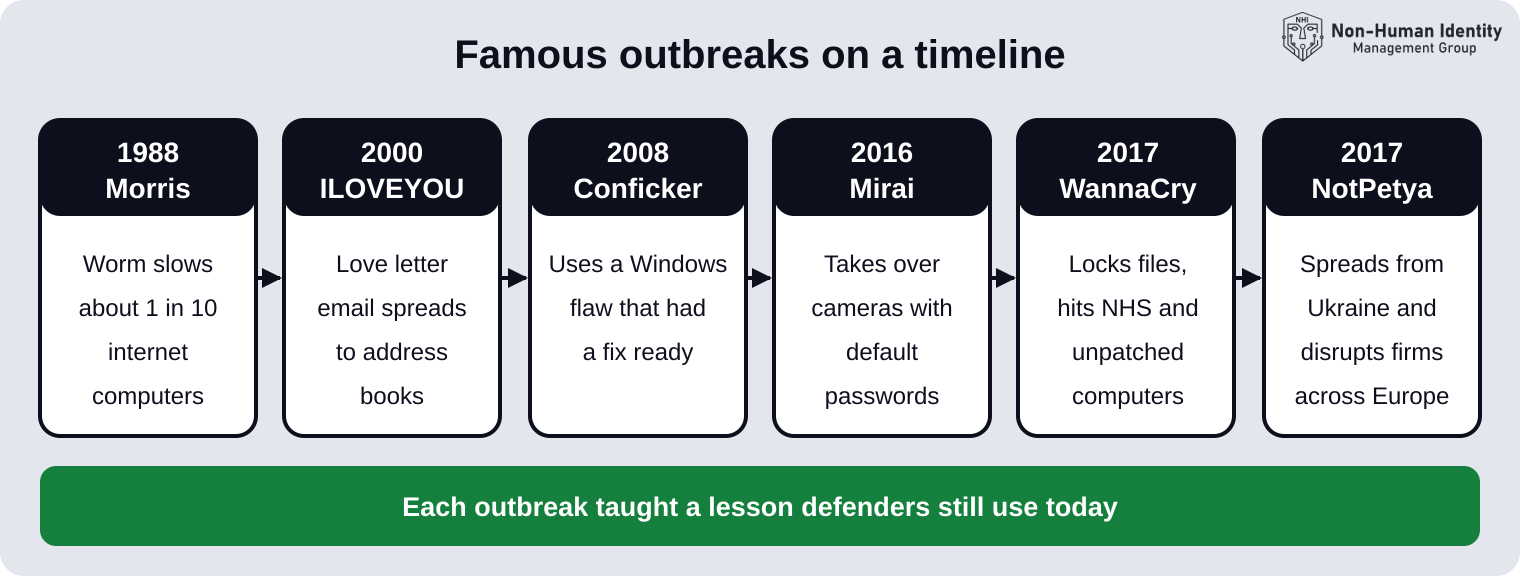
Here are the six stories in date order, told for defenders, not attackers.
- The Morris worm, 1988. It was released on 2 November 1988. It hit an estimated 6,000 of about 60,000 connected computers, around one in ten at the time. It spread and re-infected machines faster than its maker expected, and slowed many of them to a crawl.[1]
- ILOVEYOU, 2000. This "love letter" email arrived in May 2000. When opened, it mailed itself to everyone in the victim's address book, so it came from people the reader knew. It also wrote over certain files. Within days, over 500,000 systems were reported affected.[2]
- Conficker, 2008. This worm used a Windows flaw that Microsoft had fixed in October 2008.[3] It also spread through shared folders and USB drives. It switched off updates and blocked security websites.[4]
- Mirai, 2016. Mirai took over home routers, cameras and video recorders by trying a short list of common factory passwords. It then used them to flood websites with traffic. One attack in September 2016 went over 620 gigabits per second.[7]
- WannaCry, 2017. This ransomware, which locks files and demands payment, spread worldwide on 12 May 2017. The NHS bodies it hit were running unpatched or unsupported Windows. A researcher found a "kill switch" that stopped it locking more devices.[5]
- NotPetya, 2017. In June 2017, NotPetya hit Ukrainian banks, energy firms and government first. It then spread to businesses across Europe and Russia. The UK government says the Russian military was responsible, and that it cost hundreds of millions of pounds.[6]
Look across the six, and the same few gaps keep coming back.
A worked example
Petra Rosen manages a dental practice with eight staff. Gita Ueda is a cyber security student on a summer placement there. Petra asks her a simple question. "Could one of those famous attacks happen to us?"
Gita takes six outbreaks and turns each one into a question about the practice. She walks round with Petra and checks each one.
WannaCry and Conficker make her ask about updates. Most computers update by themselves. But the old computer that runs the X-ray machine has not had an update for two years. Petra calls the supplier, who agrees a plan to update it and move it onto its own part of the network.
Mirai makes her look at devices. The security camera recorder still uses the password printed in its manual. Petra changes it that afternoon.
ILOVEYOU makes her think about email. The receptionist says she opens anything that comes from a patient she knows. Gita explains that ILOVEYOU came from friends' accounts too. They agree to phone the sender when an attachment is unexpected.
WannaCry and NotPetya make her ask about backups. The practice backs up every night, but only to a drive on the same network. Petra adds a second copy that is kept offline.
By the end of the week, the practice has fixed four gaps. None needed new software, only time and a clear list.
Myths and mistakes
| What people think | What is true |
|---|---|
| Famous outbreaks used clever, unknown tricks. | Several used weak spots that already had a fix, or passwords nobody had changed.[3][7] |
| A message from a friend is safe. | ILOVEYOU sent itself from victims' own email, so it looked like it came from people they knew.[2] |
| Old outbreaks are just history. | The same gaps, such as missing updates and default passwords, are still used in attacks today. |
| Only computers get infected. | Mirai took over routers, cameras and video recorders.[7] |
| A backup on the same network is enough. | Malware that spreads across a network may reach that copy too. Keep one copy offline. |
What can I do this week?
- Check that automatic updates are on for your computers and phones.
- Change the default password on your router and any cameras.
- Make one backup copy that is not connected to your network.
- Pick one outbreak from this page and read its full story.
Checklist
- Security updates are installed on every computer, including old ones.
- Computers that cannot be updated are kept apart from the rest.
- No device still uses its factory password.
- Staff check unexpected attachments, even from people they know.
- At least one backup copy is kept offline.
- Restoring from backup has been tested this year.
- Someone knows who to call if a computer starts acting strangely.
Common questions
What was the first big malware outbreak?
The Morris worm of 1988 is often called the first major attack on the internet. It hit an estimated 6,000 computers, about one in ten of those connected at the time, and slowed many of them badly.
What is the difference between a virus and a worm?
A worm spreads by itself from one computer to the next. A virus usually needs a person to run an infected file or program. In everyday speech people use "virus" for both, and many outbreaks mixed the two ways of spreading.
Could an outbreak like WannaCry happen again?
Yes, it could. The weak spot WannaCry used was already fixed, but some computers had not installed the fix. While computers miss updates, a fast-spreading program can still cause similar harm, which is why regular updates matter.
Who was behind these outbreaks?
It varies. Some were written by individuals, and some by criminal groups. For NotPetya, the UK government publicly said the Russian military was responsible. Naming a culprit takes careful evidence, so trust official statements over rumours.
Why do students learn about old outbreaks?
Because the lessons still apply. Each outbreak shows a gap, such as missing updates or default passwords, and a habit that helps close it. The stories also make it easier to explain to others why those habits matter.
Where next?
Ready for the detail? Read the practitioner guide: ILOVEYOU Worm Explained. It goes further into how one famous outbreak spread, how organisations responded and the legal aftermath.
Also useful:
- Conficker
- Mirai and IoT Botnet Families Guide
- Computer Worms Guide
- Ransomware for Beginners
- Supply Chain Attacks for Beginners
Related NHI Mgmt Group resources: Famous Vulnerabilities for Beginners, The 3-2-1 Backup Rule for Beginners and Machine Identities and Certificates for Beginners.
Key terms
- Malware
- Software made on purpose to steal, damage or take control of devices and data.
- Computer worm
- Malware that copies itself across computers without a person needing to click anything.
- Ransomware
- Malware that locks files or systems and then pressures the victim to pay.
- Botnet
- A group of hacked devices that an attacker controls together.
- Security update
- A release from a software maker that closes known weak spots.
- Patch management
- Checking, testing and installing software updates so known weak spots are fixed.
Sources and further reading
- The 1988 Morris Worm: the internet's first cyberattack. Lawrence Livermore National Laboratory, Look Back. https://st.llnl.gov/news/look-back/1988-morris-worm-internets-first-cyberattack, accessed 28 Nov 2026.
- CERT Advisory CA-2000-04 Love Letter Worm. CERT Coordination Center, Carnegie Mellon University, May 2000. https://vuls.cert.org/confluence/x/hwDKBQ, accessed 28 Nov 2026.
- Microsoft Security Bulletin MS08-067: Vulnerability in Server Service Could Allow Remote Code Execution (958644). Microsoft, 23 October 2008. https://learn.microsoft.com/en-us/security-updates/securitybulletins/2008/ms08-067, accessed 28 Nov 2026.
- Virus alert about the Win32/Conficker worm. Microsoft Support. https://support.microsoft.com/en-us/servicing/os/windows-server/2018/04/virus-alert-about-the-win32-conficker-worm, accessed 28 Nov 2026.
- Investigation: WannaCry cyber attack and the NHS. National Audit Office (NAO), 27 October 2017. https://www.nao.org.uk/reports/investigation-wannacry-cyber-attack-and-the-nhs/, accessed 28 Nov 2026.
- Foreign Office Minister condemns Russia for NotPetya attacks. UK Government (GOV.UK), 15 February 2018. https://www.gov.uk/government/news/foreign-office-minister-condemns-russia-for-notpetya-attacks, accessed 28 Nov 2026.
- Alert TA16-288A: Heightened DDoS Threat Posed by Mirai and Other Botnets. Cybersecurity and Infrastructure Security Agency (CISA), October 2016 (archived). https://www.cisa.gov/ncas/alerts/TA16-288A, accessed 28 Nov 2026.