Free automatic certificates let a website get and renew its HTTPS padlock by software, with no fee.
This guide is for people who run a small website or pay someone to look after one. You do not need to be technical to be affected: if renewal quietly fails, visitors see a warning instead of your site.
In short
- Services such as Let's Encrypt give out website certificates for free, using a shared method called ACME.
- Software on your server proves you control the web address, then fetches and renews the certificate.
- Let's Encrypt certificates last 90 days, so renewal has to be automatic.
- Renewal can fail quietly. Watch your expiry dates with a monitoring service.
What you will learn
- Explain how a free certificate is issued and renewed.
- Spot the common changes that break automatic renewal.
- Check who gets told if a renewal fails.
- Ask your web host or developer the right questions.
- Website ID card (TLS certificate)
- a digital file that proves a website's name, so browsers show the padlock.
- Robot renewal method (ACME)
- a shared set of rules that lets software request and renew certificates by itself.
- Proof of control (domain validation)
- a check that the person asking really controls the web address.
What are free automatic TLS certificates?
Think of a residents' parking permit that renews itself. Each time, the council checks you still live at the address, then posts a fresh permit before the old one runs out.
A website certificate works in a similar way. It is a digital ID card for a web address. Browsers check it before they show the padlock and set up a private connection, called HTTPS.
Certificates come from a certificate authority, an organisation browsers trust to issue them. Some charge a fee. Let's Encrypt is a non-profit authority that charges no fee.[3][5]
The automatic part comes from ACME. It is an open standard that lets an authority and a website's software check the web address and issue a certificate with no person involved.[1] The software that does this on your server is called an ACME client.
Where the comparison stops working: a council posts you a reminder when a permit runs out. Let's Encrypt stopped sending expiry reminder emails in June 2025.[5] If renewal fails, you may not hear about it unless you have set up your own alert.
Why does it matter?
When a certificate expires, browsers warn visitors and many will leave. Lifetimes are also getting shorter. The industry group that sets the rules agreed a change. The longest allowed life falls from 398 days to 47 days, in stages from March 2026 to March 2029.[7] More renewals means more chances for one to fail.
If you run a small business website
What could happen: a renewal fails after a settings change, and customers see a warning page.
Check this: ask your host whether renewal is automatic and who gets told if it fails.
If you are new to IT work
What could happen: you move a site to a new server, and the renewal job stays behind on the old one.
Check this: after any move, confirm the renewal runs on the new server.
If you look after several sites
What could happen: one forgotten site, set up years ago, expires on a busy weekend.
Check this: keep one list of every web address, with its expiry date and an owner.
What does it look like?
Here is a made-up renewal record, the kind of note an ACME client keeps for one web address.
Example only. All values are made up.
Web address:     shop.example.com
Issued by:       EXAMPLE Free CA
Valid from:      01 Jan 0000
Valid until:     01 Apr 0000 (90 days)          (1)
Next renewal:    around day 60                  (2)
Proof method:    file on web server (port 80)   (3)
Last renewal:    FAILED - check timed out       (4)
Alert sent to:   (nobody)                       (5)
- The certificate's end date. In a real file, this line would contain the actual date.
- Let's Encrypt suggests renewing 90-day certificates every 60 days. That leaves time to fix a problem.[3]
- How the software proves it controls the web address.
- The renewal did not work. The old certificate still works until its end date.
- Nobody was told, so the failure stays hidden.
Why this is risky: the site looks fine today. In about a month, visitors will see a warning. Nobody knows yet.
The safer way: send renewal failures to a shared inbox, and add an outside monitor that warns you before any certificate expires.
How does it work?
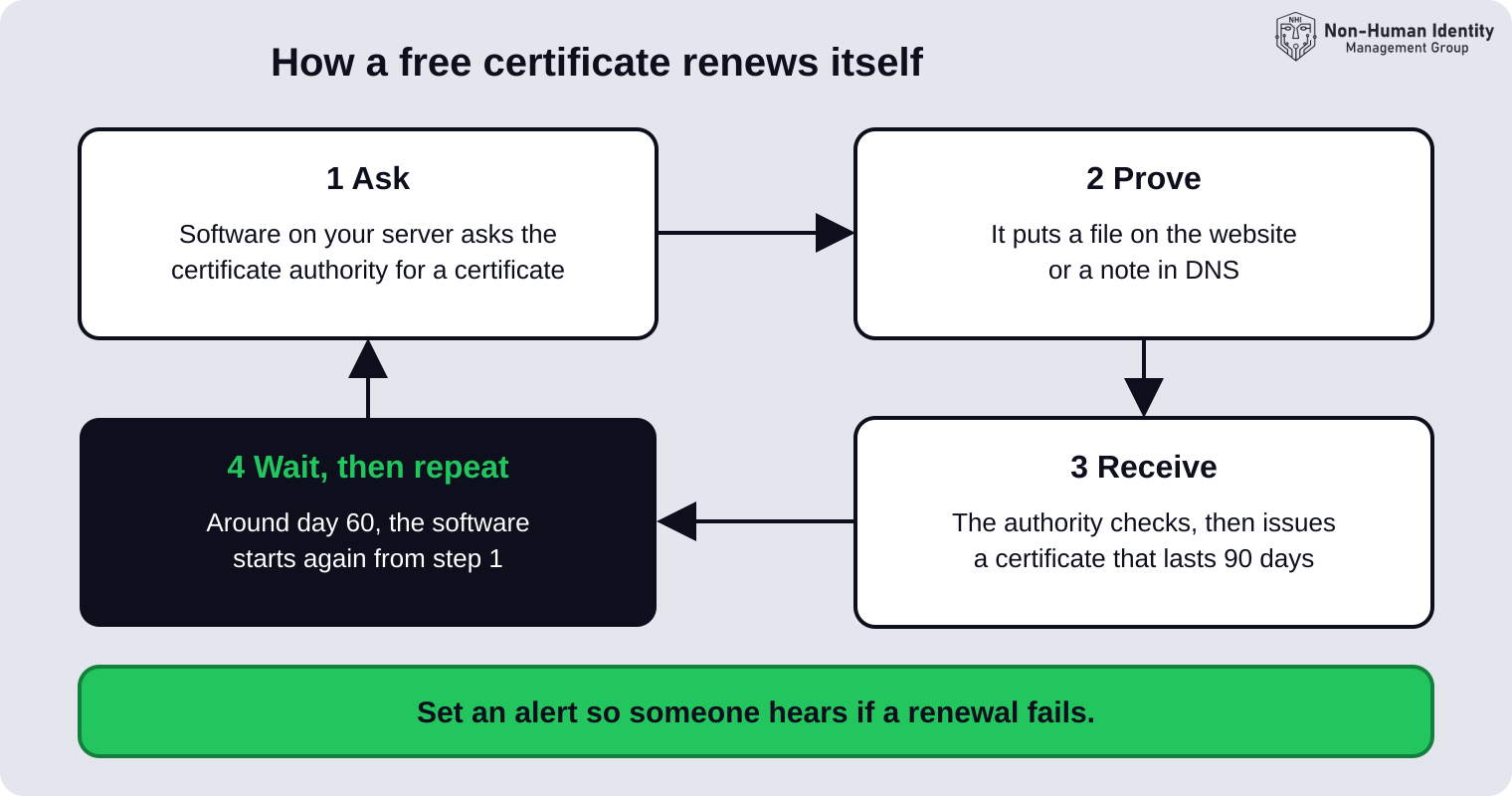
Here is what happens, in plain steps, the first time and at each renewal.[2]
- Set up the software. Your host turns on free certificates, or someone installs an ACME client, such as Certbot from the Electronic Frontier Foundation.[8]
- Ask. The software creates an account with the authority and asks for a certificate for your web address.
- Prove control. The authority sets a small task. The software either puts a file on the website or adds a note to the address's DNS records (the internet's address book). The authority then checks it from several places.[2]
- Receive. If the check passes, the authority issues the certificate, and the software installs it. The authority also records it in public logs.[2]
- Repeat. Before the end date, the software does the whole thing again. Renewal repeats the check each time.[2]
There are two common ways to prove control. The file method is the easiest to set up. But the web server must be reachable on port 80, a standard web entry point. It cannot be used for a wildcard certificate, which covers every name under an address, such as anything.example.com.[4]
The DNS method works for wildcards and for servers the public cannot reach. It needs a DNS provider that software can update. Let's Encrypt warns that keeping full DNS access keys on a web server makes a break-in on that server much more serious.[4] Those keys are a non-human identity, a password used by software, so treat them with the same care as any other secret.
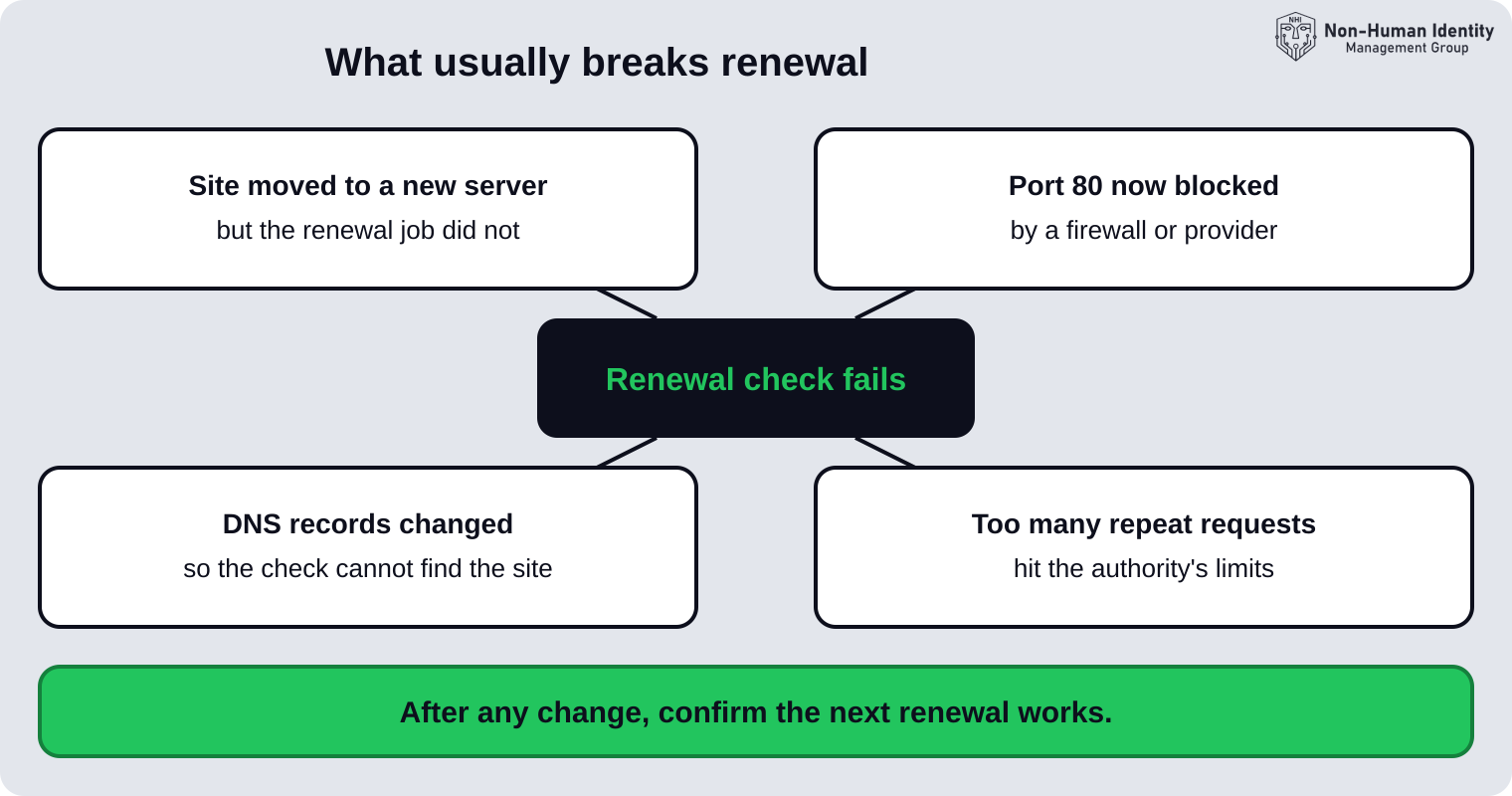
Authorities also set limits on how many certificates you can ask for. Let's Encrypt allows up to 50 certificates for one main web address each week, and only 5 for the exact same set of names. A setup that asks afresh every time it restarts can use these up. It suggests a separate test service for experiments.[6]
A worked example
Soren Lindahl runs Juniper Laundry, a fictional laundry with an online booking page. A freelancer, Vida Corrigan, set up the site and its free certificate two years ago.
In spring, Soren moves the site to a cheaper server. Everything looks fine. Bookings keep coming in.
Six weeks later, a customer emails a screenshot. Her browser says the connection is not private. Soren calls Vida.
Vida checks the certificate. It expired the day before. The renewal software was still set up on the old server, which had been switched off. The new server had a copy of the certificate, but nothing to renew it.
Soren remembers the parking permit. The council had been sending the new permit to his old address.
Vida installs an ACME client on the new server and gets a fresh certificate within the hour. She runs a test renewal to make sure the check passes. Then she sets the renewal tool to email a shared inbox if it fails.
Because Let's Encrypt no longer sends reminder emails, Vida also signs Soren up for a free outside monitoring service.[5] It warns them both if the certificate gets close to expiry.
Last, Soren adds "check certificate renewal" to his list of steps for any future move.
Myths and mistakes
| What people think | What is true |
|---|---|
| Free certificates give weaker protection. | They give the same encrypted connection. Let's Encrypt checks the web address only, not the business behind it.[3] |
| Automatic means I never need to look at it. | Renewal can fail after a server move or settings change. Set an alert and check it. |
| Let's Encrypt will email me before it expires. | It stopped expiry emails in June 2025. Use your own monitoring.[5] |
| Copying the certificate to a new server is enough. | The renewal job must move too, or the copy will simply run out. |
| Asking again and again will fix a failed renewal. | Repeat failures can hit request limits. Find the cause first.[6] |
What can I do this week?
- Click the padlock on each of your sites and note the issuer and end date.
- Ask your host or developer whether renewal is automatic, and who is told if it fails.
- Sign up for an outside certificate monitor that emails a shared inbox.
- Add "check renewal" to your steps for moving a site or changing DNS.
Checklist
- Every web address is on one list, with its end date and a named owner.
- Certificates renew automatically, well before they expire.
- Renewal failures alert a shared inbox, not one person.
- An outside monitor warns before any certificate expires.
- Renewal is retested after any server move or DNS change.
- DNS access keys used for renewal are limited, stored safely and have an owner.
Common questions
Is Let's Encrypt really free?
Yes. Let's Encrypt does not charge for its certificates. Some hosting companies that set it up for you may add a small fee for their own work. Paid certificates from other authorities can include extra checks on the business or added support.[3]
How long do Let's Encrypt certificates last?
Ninety days by default. Let's Encrypt suggests renewing every 60 days, so there is time to fix a problem. It also offers optional six-day certificates for sites that want even shorter lives, renewed every few days.[3]
Do I need a wildcard certificate?
Usually not. Most small sites need a certificate for one or two names. A wildcard covers every name under an address, but it needs the DNS method of proof. That means storing DNS access keys where the renewal software can use them.[4]
What is Certbot?
Certbot is a free tool from the Electronic Frontier Foundation. It gets Let's Encrypt certificates for a web server and can keep renewing them. Many hosting companies use their own built-in tools instead, so you may never see Certbot.[8]
What should I do if my certificate has expired?
Get a new one first, so visitors stop seeing warnings. Then find out why renewal failed: a server move, a blocked port or a DNS change are common causes. Fix it, test a renewal, and set an alert for next time.
Where next?
Ready for the detail? Read the practitioner guide: ACME and Automated Certificate Management Guide. It goes further into ACME clients, proof methods at scale and running renewal across many servers.
Also useful:
- Certificate Expiry Outages and 47-Day TLS Certificates Guide
- TLS and HTTPS for Beginners
- Machine Identities and Certificates for Beginners
Related NHI Mgmt Group resources: Certificate Renewal Runbook Template · Certificate Transparency Guide · CAA Records
Key terms
- TLS certificate
- A digital file that proves a website or service is who it says it is.
- A trusted organisation that checks requests and issues certificates.
- ACME
- A shared method that lets software request and renew certificates automatically.
- Domain validation
- A check that the requester controls the web address, without checking the business behind it.
- Certificate renewal
- Getting a fresh certificate before the old one expires, so nothing stops working.
- Certificate expiry
- The date after which a certificate is no longer trusted.
- Wildcard certificate
- A certificate that covers every name one level under an address.
Sources and further reading
- RFC 8555, Automatic Certificate Management Environment (ACME). Internet Engineering Task Force (IETF), March 2019. https://www.rfc-editor.org/rfc/rfc8555.
- How It Works. Let's Encrypt. https://letsencrypt.org/how-it-works/, accessed 28 Nov 2026.
- FAQ. Let's Encrypt. https://letsencrypt.org/docs/faq/, accessed 28 Nov 2026.
- Challenge Types. Let's Encrypt. https://letsencrypt.org/docs/challenge-types/, accessed 28 Nov 2026.
- Ending Support for Expiration Notification Emails. Let's Encrypt, 22 January 2025. https://letsencrypt.org/2025/01/22/ending-expiration-emails/, accessed 28 Nov 2026.
- Rate Limits. Let's Encrypt. https://letsencrypt.org/docs/rate-limits/, accessed 28 Nov 2026.
- Ballot SC-081v3: Introduce Schedule of Reducing Validity and Data Reuse Periods. CA/Browser Forum, April 2025. https://cabforum.org/2025/04/11/ballot-sc081v3-introduce-schedule-of-reducing-validity-and-data-reuse-periods/, accessed 28 Nov 2026.
- Certbot. Electronic Frontier Foundation. https://certbot.eff.org/, accessed 28 Nov 2026.