DNS is the internet's lookup system that turns names like example.com into the number addresses computers use.
This guide is for students, people new to IT work and anyone who looks after a website. You do not need to be technical to be affected: if your business has a website or email, a few DNS settings decide whether people can reach you.
In short
- Computers find each other by number addresses. DNS looks up the number behind a name.
- The answer comes from a chain of servers: your local lookup service, the top of the tree, the ending (such as .com), and finally the server that holds the domain's own records.
- Each domain has a short list of records. Different types point to websites, mail servers or other names.
- Answers are remembered for a set time, so a change can take a while to reach everyone.
What you will learn
- Explain what DNS does in one sentence.
- Follow the steps of a lookup from your laptop to the answer.
- Read a simple list of DNS records and say what each line does.
- Check a name yourself with a free built-in tool.
- Internet lookup system (DNS)
- the system that turns names into the number addresses computers use.
- Lookup helper (resolver)
- the server your device asks, which finds the answer for you.
- Address entry (DNS record)
- one line that says where a name, or part of a name, should point.
What is DNS?
Think of the contacts list on your phone. You tap a name, and the phone dials the number saved behind it. You never need to remember the number.
DNS, short for the Domain Name System, does the same job for the internet. People remember names like example.com. Computers need an IP address, a number that tells the network where to send data. DNS stores which number goes with which name, and hands it out when asked.
A name like example.com is called a domain name. The person or firm that registers it decides what its records say.
Where the comparison stops working: your contacts list sits on one phone. DNS is spread across many servers run by many different organisations. No single server knows every answer, so a lookup can pass through several of them.[1]
Why does it matter?
Nearly everything online starts with a DNS lookup. If a record is wrong, people may reach the wrong place, or nothing at all. If someone else can change your records, they can send your visitors and your email wherever they like.
If you run a small business website
What could happen: you move to a new web host, and some customers still see the old site for a day or more.
Check this: find out who can log in to change your domain's records, and keep that login protected.
If you are new to IT support
What could happen: a user says "the internet is down", but only one site fails, because of a DNS problem.
Check this: look up the name with a lookup tool before you restart anything.
If you are studying for a security course
What could happen: you meet attacks like fake answers or hijacked records and cannot tell which step they target.
Check this: learn the normal lookup steps first. Each attack bends one of them.
What does it look like?
A domain's records usually appear as a short table in the account where the domain is managed. Here is a made-up set for a printing firm.
Example only. All values are made up.
Name                    Type   TTL    Value
hazelprint.example      A      3600   192.0.2.10                   (1)
hazelprint.example      AAAA   3600   2001:db8::10                 (2)
www.hazelprint.example  CNAME  3600   hazelprint.example           (3)
hazelprint.example      MX     3600   10 mail.provider.example     (4)
hazelprint.example      TXT    3600   "EXAMPLE-site-check-0000"    (5)
hazelprint.example      NS     86400  ns1.dnshost.example          (6)
- An A record: the name points to an older-style number address. In a real file, this line would contain the web server's address.
- An AAAA record: the same idea for the newer, longer kind of address.[3]
- A CNAME record: "www" is a nickname that points to another name.[1]
- An MX record: where email for this domain should be delivered.
- A TXT record: free text, often used to prove to an online service that you own the domain. The standard simply calls it descriptive text.[2]
- An NS record: which servers hold the official records for this domain.
The TTL column, short for time to live, is a number of seconds. It tells other servers how long they may remember the answer.[1] Here 3600 means one hour.
Why this is risky: a record can point somewhere you no longer control, for example a web service you stopped paying for. And anyone with the login to this table can redirect your website and email.
The safer way: keep a list of what each record is for, and remove records for services you have retired. Protect the account login with a second check, such as a code from an app.
How does it work?
Domain names are read from right to left, like a family tree. The very top is called the root. Below it sit endings such as .com, .org and .uk. Below those sit the domains people register.[1]
Here is what happens when you type www.hazelprint.example into a browser.
- Your device asks. Your browser needs the address, so your laptop sends the question to a resolver. This lookup helper is usually run by your internet provider, your employer or a public service.[1]
- The resolver checks its memory. If it looked up this name recently, and the TTL has not run out, it answers straight away.[1]
- It asks the top of the tree. If not, it asks a root server. The root does not know the answer, but it knows who looks after the ending. The root is served by 13 named server groups, run by 12 organisations, with hundreds of machines behind them.[4]
- It asks the ending's servers. These say which servers hold the records for hazelprint.example. Those are the domain's NS records.[2]
- It asks the domain's own servers. These are called authoritative servers, because they hold the official records for the domain. They send back the address the resolver asked for.
- The answer comes back. The resolver passes the address to your laptop and remembers it for the TTL. Your browser then connects to that address.
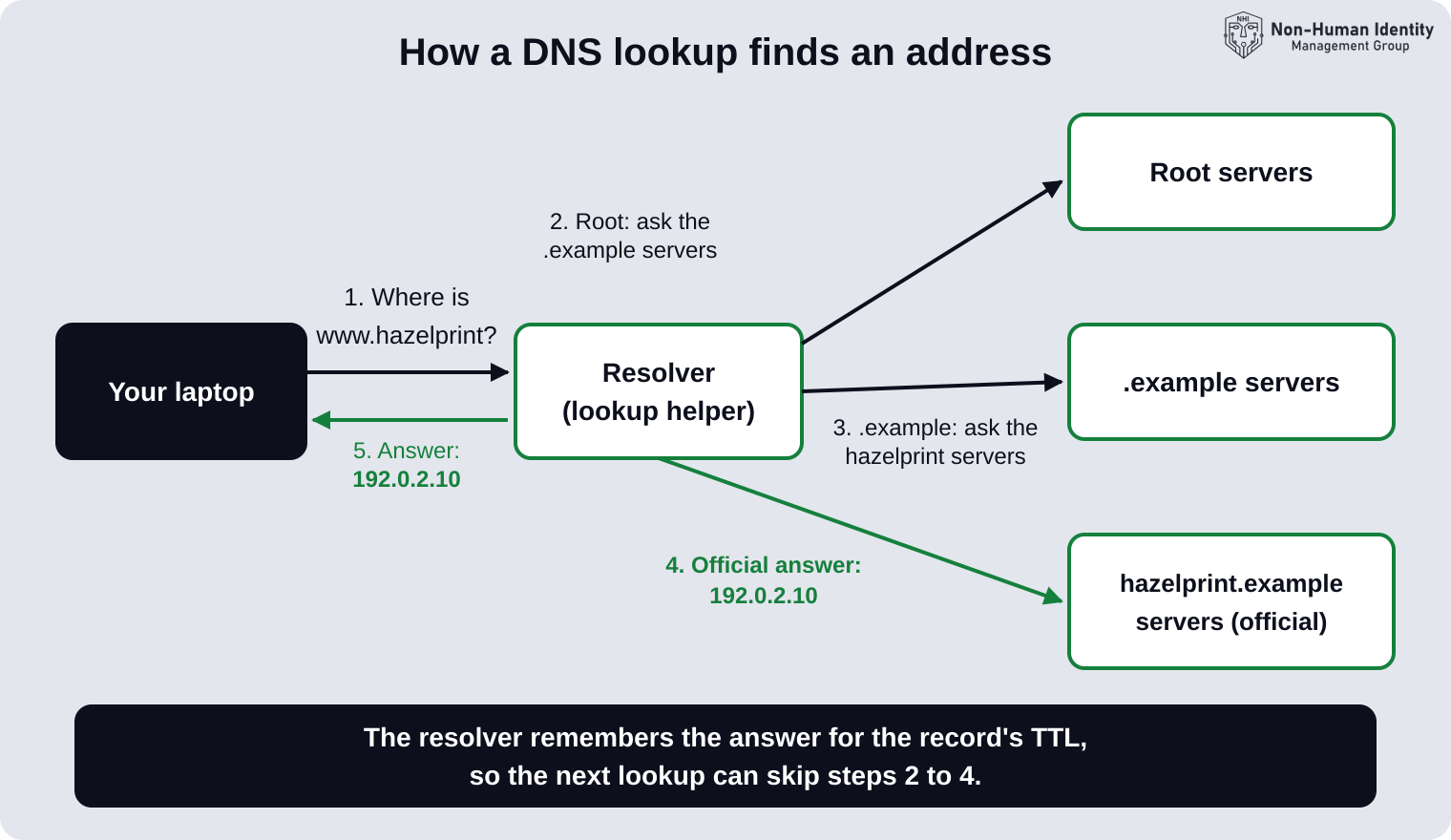
Most lookups are much shorter than this. Resolvers remember the root and the endings for a long time, so many answers come straight from memory.
You can try a lookup yourself. On Windows, the built-in nslookup tool asks a DNS server for a name. You can add a record type, such as MX, to see a domain's mail servers.[5] On Mac and Linux, a similar tool called dig is often available.[6] Both only read public records. They do not change anything.
A worked example
Dario Brandt runs Hazel Printers, a small print shop. The shop is moving its website to a new host on Friday. Dario has never touched DNS before, so he asks his friend Jana Haddad, who works in IT support, to help.
On Wednesday, Jana logs in to the account where the shop's domain is managed. She shows Dario the record table. There is an A record for the website and an MX record for email. She explains that only the A record needs to change, because email is staying where it is.
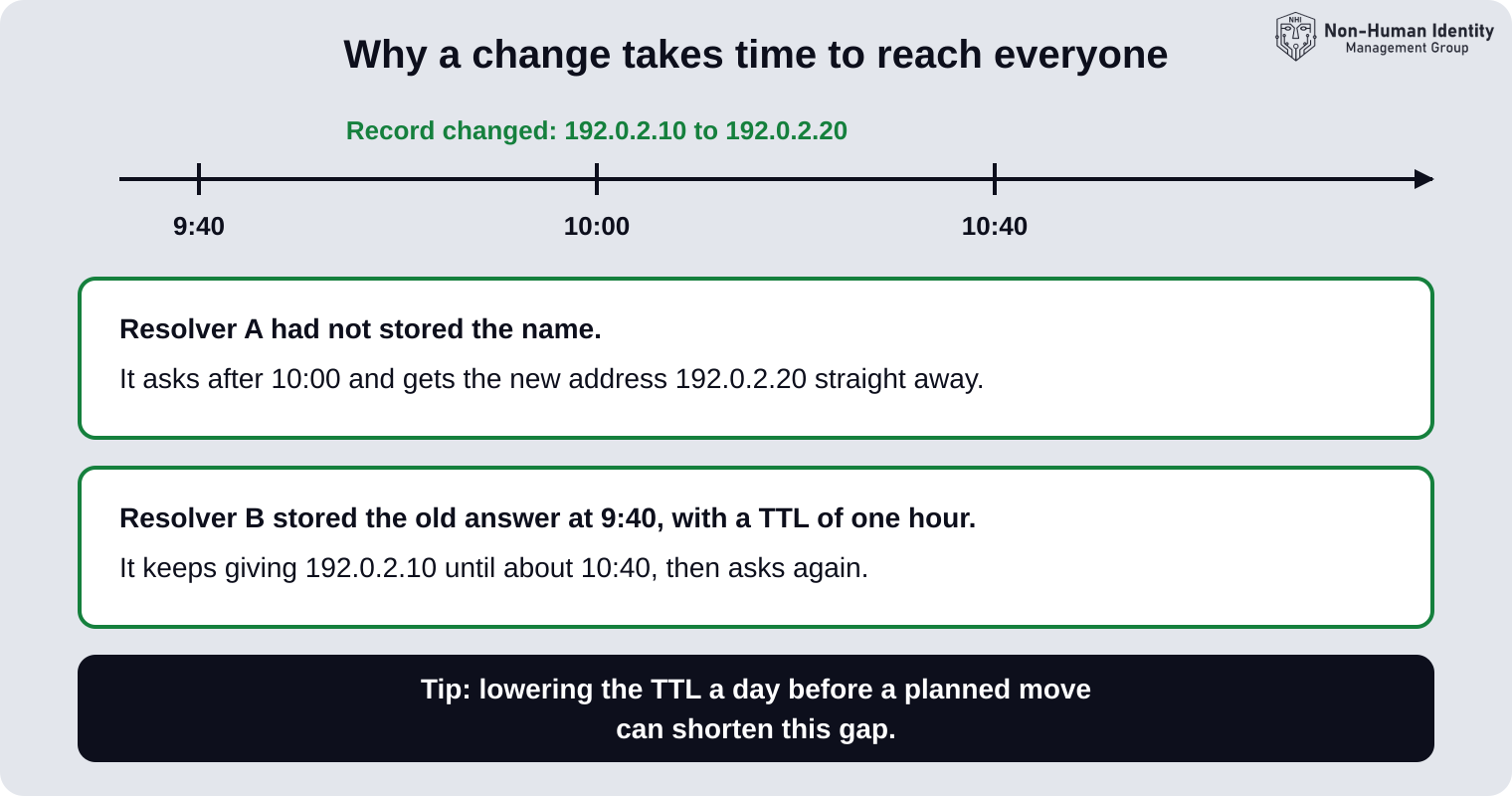
She notices the TTL on the A record is 86400 seconds, which is a full day. So she lowers it to 300 seconds, or five minutes. That way, once old remembered answers run out, servers will check again more often.
She also spots a CNAME for "shop", pointing to an online store the business stopped using last year. Dario agrees it can go. Jana deletes it, because someone who claimed that old store name might have been able to show pages under the shop's address.
On Friday the new host gives them the new address. Jana changes the A record. Then she runs nslookup on her laptop to check what a public resolver now returns. The new address appears. Dario's phone, on mobile data, still shows the old site for a few minutes, then switches.
A week later, once the move has settled, Jana puts the TTL back up to an hour. She also turns on a second sign-in check for the domain account. Dario writes down who has access, and keeps the note with his other business records.
Myths and mistakes
| What people think | What is true |
|---|---|
| DNS changes take 48 hours to "propagate". | The delay depends mostly on the TTL and on which resolvers had stored the old answer. A short TTL set in advance usually means a short wait. |
| If a website does not load, the internet is down. | Often only one name fails to look up. Check whether other sites work, then look up the name. |
| DNS records are private. | Most records are public on purpose, so anyone can look them up. Do not put secrets in a TXT record. |
| Old records are harmless. | A record pointing at a retired service may let someone else take over that name. Remove it when the service goes. |
| Whoever built the website controls the DNS. | The domain account may be held by a former supplier or employee. Find out who holds it. |
What can I do this week?
- Run
nslookupon a website you use, and find its address. - Look up the MX records for your own work or school domain.
- Find out where your organisation's domain is managed and who can log in.
- Ask whether that login has a second sign-in check turned on.
- Make a list of your records and what each one is for.
Checklist
- I can explain what DNS does in one sentence.
- I know the difference between a resolver and an authoritative server.
- I can say what A, CNAME and MX records do.
- I know what TTL means and why changes are not seen by everyone at once.
- We know who can change our domain's records.
- The domain account uses a second sign-in check.
- We remove records when we stop using a service.
Common questions
Who runs DNS?
Lots of organisations, each for its own part. Root servers are run by 12 organisations. Each domain ending has an operator. Each domain owner, or the company they pay, runs the servers holding their records. Your internet provider or employer usually runs the resolver you use.
Why does my change show for me but not for a customer?
Because their resolver may still remember the old answer. It keeps an answer for the TTL set in the record, then asks again. Waiting for that time to pass usually fixes it. Lowering the TTL before a planned change shortens the wait.
Is DNS the same as a domain name?
No. A domain name is the name itself, like example.com. DNS is the system that stores and looks up the records behind that name. You buy the name from a registrar, then set its records with whoever hosts your DNS.
Can I change which resolver my device uses?
Usually, yes. Home routers and devices let you pick a DNS server, and some public services offer extra filtering or privacy. At work, leave this to IT, because work systems often rely on the office DNS servers to find internal services.
Is looking up a domain's records allowed?
Yes. Public DNS records are designed to be looked up by anyone, and tools like nslookup only read them. Changing records is different: only people with the domain account login can do that, and it should be done with care.
Where next?
Ready for the detail? Read the practitioner guide: DNS Protocol Fundamentals for Defenders Guide. It goes further into the layout of a DNS message, how lookups travel over the network and how defenders turn DNS records into detection.
Also useful:
- DNS Security for Beginners
- Mail Delivery and Bounces for Beginners
- DNS Record Types Security Guide (A, MX, TXT, CNAME, CAA)
- DNS Investigation with dig and nslookup Guide
Related NHI Mgmt Group resources: DNS Security Checklist · Domain and DNS Management Policy Template · DNS Security Guide
Key terms
- Domain Name System
- The naming system that turns domain names into the addresses computers use.
- Domain name
- A name people can read, like example.com, that points to something online through DNS.
- DNS resolver
- The server that takes your lookup and finds the answer for you.
- A server that holds the official records for a domain and answers lookups for them.
- A record
- A record that points a name to an older-style (IPv4) address.
- CNAME record
- A record that makes one name a nickname for another name.
- MX record
- A record that says which servers take in email for a domain.
- TTL
- Time to live: how long a resolver may keep an answer before checking for a newer one.
Sources and further reading
- RFC 1034: Domain Names, Concepts and Facilities. P. Mockapetris, IETF, November 1987. https://www.rfc-editor.org/rfc/rfc1034, accessed 28 Nov 2026.
- RFC 1035: Domain Names, Implementation and Specification. P. Mockapetris, IETF, November 1987. https://www.rfc-editor.org/rfc/rfc1035, accessed 28 Nov 2026.
- RFC 3596: DNS Extensions to Support IP Version 6. IETF, October 2003. https://www.rfc-editor.org/rfc/rfc3596, accessed 28 Nov 2026.
- Root Servers. Internet Assigned Numbers Authority (IANA). https://www.iana.org/domains/root/servers, accessed 28 Nov 2026.
- nslookup. Microsoft Learn, Microsoft. https://learn.microsoft.com/en-us/windows-server/administration/windows-commands/nslookup, accessed 28 Nov 2026.
- Manual pages: dig. BIND 9 Administrator Reference Manual, Internet Systems Consortium (ISC). https://bind9.readthedocs.io/en/latest/manpages.html, accessed 28 Nov 2026.