IEC 62443 is a set of international standards for protecting the computers that run factories, utilities and other industrial sites.
This guide is for anyone who keeps hearing "62443" and wants to know what it means. You do not need an engineering background. If your business depends on a production line, pumps or building controls, these ideas can help you protect them.
In short
- IEC 62443 helps industrial sites protect the computers that control physical equipment, such as motors, valves and ovens.
- It splits a site into zones of equipment with similar needs, and controls the links between them, called conduits.
- Security levels from 1 to 4 set how strong protection should be, based on the kind of attacker a zone must resist.
- Security is shared: the site owner, the firms that install and support the system, and product makers each have duties.
What you will learn
- Explain what IEC 62443 is and who uses it.
- Spot zones and conduits on a simple site plan.
- Check how remote support reaches your industrial equipment.
- Ask suppliers clear questions about their part in keeping the site secure.
Status: correct as at 28 November 2026, based on the International Society of Automation (ISA) overview of the series and the IEC Webstore. Standards are revised part by part; check the current edition of each part.
This guide explains the topic in general terms and is not legal advice.
- Factory computers (operational technology, or OT)
- the hardware and software that run physical equipment, such as a packing line or a water pump.
- Area of equipment (zone)
- a group of machines and computers that share the same security needs.
- Controlled link (conduit)
- the path data takes between two zones, which is checked and limited.
What is IEC 62443?
Think of a hospital. The wards, the operating theatres and the pharmacy each have their own entry rules, and the doors between them are controlled. IEC 62443 works the same way for an industrial site.
Factories, power plants and water works use computers to run their machines. This kind of tech is called operational technology, or OT. A small box that runs one machine is often a programmable logic controller, or PLC.
IEC 62443 is a series of standards and reports. It sets out good security habits for these systems. Two global bodies write it together, and both put out the same text.[1]
It is meant for many sectors. Its makers name building controls, power, medical devices, transport and chemical plants.[1]
Where the comparison stops working: in a hospital, people walk between rooms. On a factory network, it is mostly data and commands that move between areas. They often move on their own, and very fast.
Why does it matter?
When an office computer fails, you may lose files. When an industrial computer fails or is misused, a line can stop, or equipment can behave unsafely.
Many controllers were built to run for decades, long before anyone expected them to be connected. A shared plan helps owners and suppliers decide what to protect first.
If you run a factory or utility
What could happen: a supplier's remote support link reaches your controllers directly, and nobody checks who uses it.
Check this: list every way into your production network, including support tools and laptops.
If you are new to security work
What could happen: you join an OT project and the talk of zones, conduits and levels makes no sense.
Check this: ask for the site's zone diagram and walk through it with an engineer.
If you buy equipment or services
What could happen: you buy a controller or an integration project with no clear security duties in the contract.
Check this: ask suppliers which parts of IEC 62443 their product or service follows.
What does it look like?
Here is a made-up scenario card, the kind of first sketch a small site might draw.
Example only. All values are made up.
Site: EXAMPLE Treats packing line
Zone A  Office: email, orders, laptops
Zone B  Supervisory: operator screens, data store   (1)
Zone C  Control: 3 controllers, 1 oven, 2 motors     (2)
Conduit A-B: one firewall, only reports pass         (3)
Conduit B-C: one switch, operator commands only
Supplier support: direct internet link to Zone C     (4)
Login on operator screens: admin / FAKE-0000         (5)
- Screens where staff watch and steer the line, plus a server that stores readings.
- The equipment that moves, heats or mixes. A mistake here has physical effects.
- A conduit is a controlled link. Only the traffic that is needed should pass.
- This link skips every other zone. In a real file, this line would show who approved it.
- A shared, default-style login that many people know.
Why this is risky: lines 4 and 5 give anyone who finds the support link an easy way to reach the controllers.
The safer way: route support through one controlled gateway with a second sign-in step, and give each person their own login.
How does it work?
The series has four groups of documents. One covers general terms, one covers security programmes for site owners and service firms, one covers whole systems and one covers individual products.[2] A site usually follows a risk-based path like this, simplified for beginners.[2]
- Define the system. List the equipment, networks and connections that make up the system you want to protect.
- Do a first risk check. Ask what could go wrong and how bad it would be, such as a stopped line or an unsafe temperature.
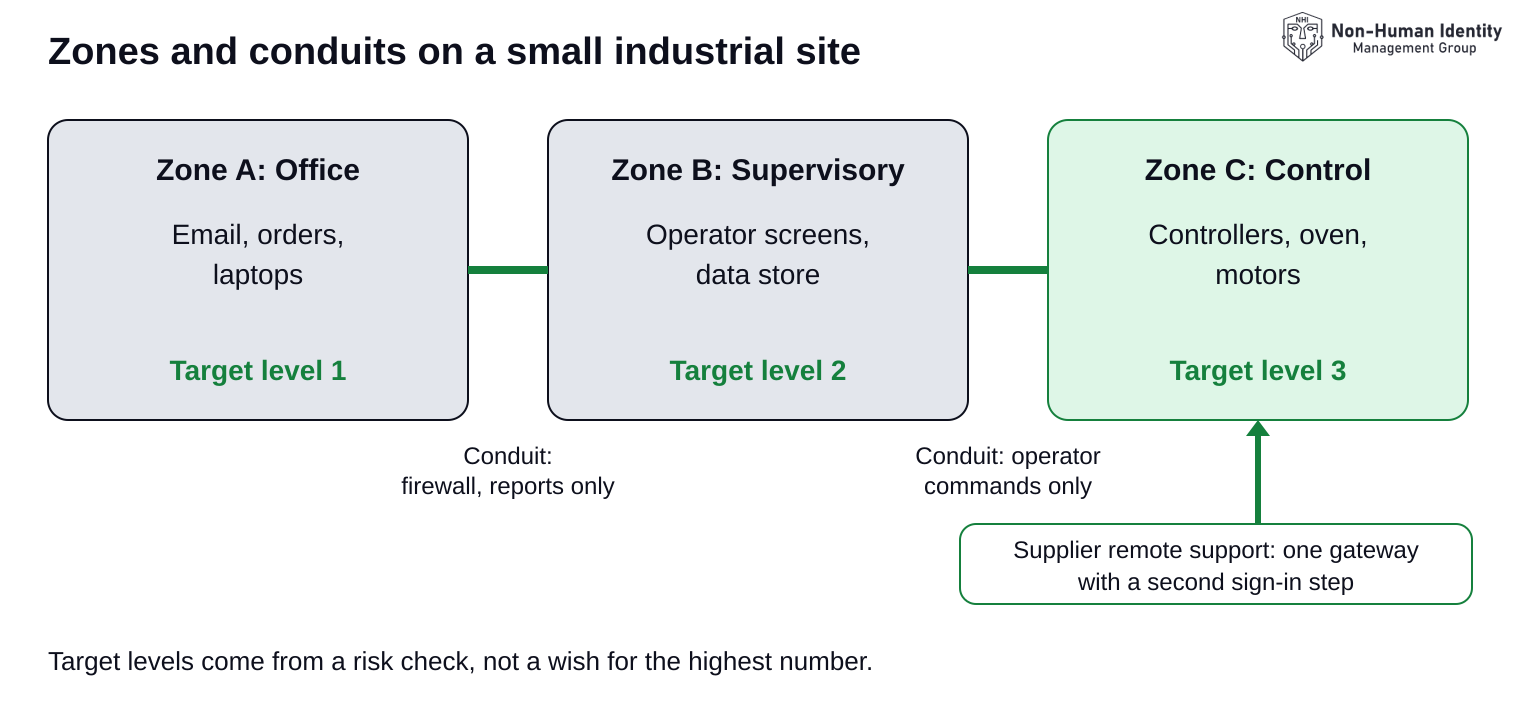
- Draw zones and conduits. A zone groups equipment by risk or function. A conduit groups the links between zones that share the same security needs.[2]
- Set a target level. Give each zone and conduit a target security level, from 1 to 4, based on the risk.
- Agree and build. The site owner approves the plan and the risk that remains. Then suppliers and installers deliver to the agreed targets.
The security levels describe the attacker each zone should withstand.[2]
- Level 1: casual or accidental mistakes, such as someone changing a setting by error.
- Level 2: deliberate attacks with simple means, few resources and general skills.
- Level 3: deliberate attacks with advanced means, moderate resources and industrial skills.
- Level 4: deliberate attacks with advanced means, large resources, industrial skills and strong motivation.
The standard also names four roles.[2] The asset owner runs the system and is accountable for it. The integration service provider designs, installs and hands it over. The maintenance service provider supports it afterwards. The product supplier makes the hardware and software. ISA calls this shared responsibility a founding idea of the series.[1]
Older equipment is expected. The 2024 edition of the part for site owners says old systems may meet only some requirements. Extra safeguards can make up for missing features.[3]
A worked example
Dev Kamau is the engineering lead at Pebble Pet Care, a made-up firm that bakes and packs pet treats on one automated line. A large retail customer asks how the firm protects that line from cyber attacks.
Dev has no security team, so he starts with the 62443 path. With the line's installer, he lists every controller, operator screen, engineering laptop and network switch. He also lists every link to the office network and the internet.
They draw three zones: office, supervisory and control. That is when they spot a problem. The installer's remote support tool connects straight into the control zone, and everyone shares one login.
A first risk check shows that a stopped line would cost a day of orders. A wrong oven temperature could also be a safety issue. So Dev sets a higher target level for the control zone than for the office.
They make three changes. Remote support now passes through one gateway with a second sign-in step. Each engineer gets their own login. The default passwords on the operator screens are changed.
Six months later, Dev shows the customer a zone diagram, a short list of requirements and records of who connected remotely and when. Pebble Pet Care is not certified, and the work does not make the line safe from every attack. It does give the firm fewer hidden routes in and a clear plan for what to improve next.
The risk is real. In late 2023, the US cyber agency CISA reported attackers reaching an internet-facing controller at a US water facility, which switched to manual operation.[4]
Myths and mistakes
| What people think | What is true |
|---|---|
| IEC 62443 is only for product makers. | It has parts for site owners, service firms and product makers. Owners and installers use the programme and system parts most.[1] |
| It is one single document. | It is a series of standards and reports, published and revised at different times. |
| Every zone should be at level 4. | Targets come from a risk check. The highest level everywhere adds cost without matching the real risk. |
| Our site is cut off from the internet, so this does not apply. | Many "isolated" sites still have support laptops, USB drives or remote links. Drawing zones often finds forgotten links. |
| Buying a certified product makes the whole site secure. | A certified product helps, but the site still has to be designed, installed and run securely. |
What can I do this week?
- Make a list of the boxes, screens and laptops on one line. Note who looks after each one.
- Find every way in. Think of office links, supplier support tools, USB sticks and visiting laptops. Remove any you do not need.
- Sketch your zones on one page and mark the links between them. Then talk it through with your installer.
- Change default passwords on screens and controllers, where the kit allows it.
Checklist
- I can explain the difference between a zone and a conduit.
- We know who the asset owner is for each industrial system.
- We have an up-to-date list of OT equipment and its software versions.
- We have a diagram that shows our zones and the conduits between them.
- No controller or operator screen is reachable straight from the internet.
- Remote access goes through one controlled route with a second sign-in step, and it is logged.
- Default passwords have been changed, and shared logins are being replaced with personal ones.
- We have asked our main suppliers which parts of IEC 62443 they follow.
Common questions
Is ISA/IEC 62443 the same as IEC 62443?
Yes, the content is the same. ISA says its editions and the IEC editions of each document are identical, though the names and numbering style differ slightly.[1] You will see both names used in contracts, job adverts and product sheets, and they refer to the same series.
Do I have to follow IEC 62443?
Usually not by law. It is a voluntary standard. However, customers, contracts or sector rules may ask for it, so it can become expected in practice. Check what your customers, insurers and sector regulators ask for before deciding how far to go.
Where should a beginner start?
Start with a free overview, such as the quick start guide from the ISA Global Cybersecurity Alliance.[2] It explains zones, levels and roles in a few pages. After that, site owners usually look at the programme and risk parts, and product makers at the product parts.
What is the difference between a security level and a maturity level?
A security level describes how strong the technical protection is for a zone. A maturity level describes how well a firm carries out its security processes. The 2024 edition of the part for site owners added a way to rate this.[3] A site can have strong locks but weak habits, so the two are rated separately.
Where do logins and accounts fit in?
Near the top. The first two of the seven basic requirement groups cover identifying and checking users, and controlling what they may do.[2] These apply to people, devices and software accounts, such as the account a data server uses to read from controllers.
Where next?
Ready for the detail? Read the practitioner guide: IEC 62443 Guide. It goes further into each part of the series, how security levels are set and checked, and how owners and suppliers share the work.
Also useful:
- Industrial Control Systems and SCADA for Beginners
- Network Segmentation for Beginners
- IEC 62443-3-2 OT Risk Assessment Guide
- OT Network Segmentation, Purdue Model and IEC 62443 Zones and Conduits Guide
Related NHI Mgmt Group resources: IEC 62443-3-3 and 4-2 Security Levels Guide · OT Network Security Monitoring Guide · OT Remote Access Guide · NHIs in OT
Key terms
- Operational Technology
- The hardware and software that monitor or control physical equipment, such as factory lines and water pumps.
- Industrial automation and control system
- The term IEC 62443 uses for an industrial system, including its people, equipment, software and rules.
- Zones and conduits
- Groups of equipment with similar security needs, and the controlled links between them.
- PLC
- A small rugged computer that controls one machine or process step.
- Asset owner
- The organisation that runs an industrial system and is accountable for its security.
- Risk assessment
- Working out what could go wrong, how likely it is and how bad it would be, so you know what to fix first.
Sources and further reading
- ISA/IEC 62443 Series of Standards. International Society of Automation (ISA). https://www.isa.org/standards-and-publications/isa-standards/isa-iec-62443-series-of-standards, accessed 28 Nov 2026.
- Quick Start Guide: An Overview of ISA/IEC 62443 Standards. ISA Global Cybersecurity Alliance, June 2020. https://gca.isa.org/hubfs/ISAGCA%20Quick%20Start%20Guide%20FINAL.pdf, accessed 28 Nov 2026.
- IEC 62443-2-1:2024, Security for industrial automation and control systems, Part 2-1: Security program requirements for IACS asset owners (edition 2.0, 7 August 2024). IEC Webstore, International Electrotechnical Commission. https://webstore.iec.ch/en/publication/62883, accessed 28 Nov 2026.
- Exploitation of Unitronics PLCs used in Water and Wastewater Systems. Cybersecurity and Infrastructure Security Agency (CISA), last updated 19 December 2023. https://www.cisa.gov/news-events/alerts/2023/11/28/exploitation-unitronics-plcs-used-water-and-wastewater-systems, accessed 28 Nov 2026.